Can You Really Tell The Difference Between 4k And 1080p
The difference between 4K and 1080p is real, but whether you can see it depends on several factors like screen size, viewing distance, and content quality. 4K offers four times the pixels of 1080p, giving you sharper images and more detail. However, not everyone notices the upgrade, and your setup plays a huge role in what you actually perceive.
Have you ever stood in front of two TVs side by side and wondered if the extra sharp one was really that much better? That is the question at the heart of the debate around the difference between 4K and 1080p. Resolution talk fills every tech review and product page, but the real-world experience can be surprisingly different from what the numbers suggest.
The short answer is yes, you can often tell the difference. But the longer answer is that it depends on a lot of things. Your screen size, how far you sit, the type of content you watch, and even your own eyesight all play a role. This guide breaks down everything you need to know about 4K vs 1080p so you can make a smart decision without getting lost in the tech jargon.
Whether you are shopping for a new TV, setting up a home office monitor, or just curious about display quality, understanding resolution helps you get the most out of your setup. Let us dive into what makes these two resolutions different and how to decide which one actually matters for you.
Key Takeaways
- 4K resolution packs four times more pixels than 1080p, resulting in noticeably sharper images on larger screens.
- Viewing distance matters a lot — the further you sit, the harder it is to spot the difference.
- Screen size is a key factor in whether the upgrade from 1080p to 4K is worth it for you.
- Content quality affects everything, since upscaled 1080p content won’t look as sharp as native 4K.
- Gaming and content creation benefit the most from the extra detail and clarity of 4K.
- Your eyes and perception vary, so what looks obvious to one person may not register for another.
- Bandwidth and storage requirements increase with 4K, which is worth considering before upgrading.
📑 Table of Contents
What Is 4K Resolution?
4K resolution refers to a display that has roughly 4,000 pixels across the horizontal axis. It is also called ultra HD or UHD in most consumer products. The standard 4K resolution for TVs and monitors is 3840 by 2160 pixels. That gives you a total of about 8.3 million pixels on screen at any given time.
This is a big jump from older resolutions. When manufacturers started pushing 4K TVs into the mainstream around 2013, it felt like a leap into the future. The extra pixels mean more detail clarity and smoother edges on text and objects. If you have ever zoomed in on a photo and seen it get blurry, 4K is like having that photo stay sharp even when you zoom in.
How Many Pixels Make Up 4K?
Let us break this down simply. A 4K display has 3840 pixels running horizontally and 2160 pixels running vertically. Multiply those two numbers together and you get 8,294,400 pixels. That is over eight million tiny dots of light working together to create the image you see.
Compare that to a standard high definition 1080p screen, which has only about 2 million pixels. The pixel count difference is massive. Four times as many pixels means four times the detail, at least in theory. In practice, whether your eyes can use all those extra pixels depends on several factors we will explore shortly.
Many modern HDTV models now come standard in 4K. Even budget options from brands like Samsung, LG, and TCL offer 4K panels. If you are in the market for a new display, it is worth understanding what you are actually paying for when you choose the 4K option over a lower resolution.
What Is 1080p Full HD?
1080p, also known as Full HD, has been the standard resolution for televisions and monitors for many years. It stands for 1920 pixels wide by 1080 pixels tall. That gives you a total of about 2.07 million pixels on screen. For a long time, this was considered the sweet spot for home entertainment.
Most cable TV channels, YouTube videos, and older movies are still shot in 1080p or lower. If you have ever watched a movie on a laptop or a smaller TV and thought it looked perfectly fine, that is likely a 1080p image. The display quality of 1080p is perfectly acceptable for many everyday uses.
Understanding 1080p Pixel Count
The number 1080 refers to the vertical pixel count. The “p” stands for progressive scan, which means every line of the image is drawn in sequence rather than alternating lines. This results in a smoother, more complete picture compared to older interlaced formats.
With about 2 million pixels, 1080p delivers a clean and clear image. On smaller screens like a 24-inch monitor or a tablet, 1080p looks great. The pixel density is high enough that individual pixels are hard to spot with the naked eye. But on larger screens, those pixels start to become more visible, and the image can look less sharp.
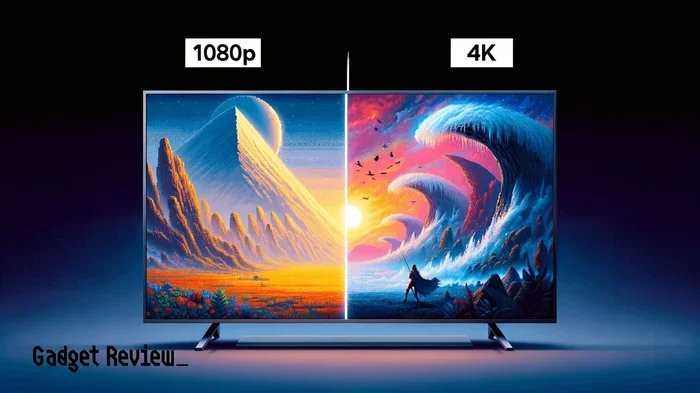
This is where the difference between 4K and 1080p starts to become more apparent. When you stretch 1080p content across a 55-inch or 65-inch screen, the pixels spread out and the image can lose some of its crispness. 4K keeps those pixels packed tightly together, preserving sharpness even on bigger displays.
Can You Really Tell The Difference?
This is the million-dollar question. The honest answer is: it depends. Many people can spot the difference between 4K and 1080p when they see them side by side. But when watching alone from a normal distance, the gap can shrink quite a bit.
Studies have shown that most people can notice the extra sharpness of 4K on screens 50 inches or larger when sitting about 8 feet away. On smaller screens or from further away, the difference becomes much harder to detect. Your viewing distance is one of the biggest factors in whether the upgrade is worth it.
Factors That Affect Your Perception
Several things determine how clearly you can see the gap between 4K and 1080p. Let us look at the most important ones.
Screen Size: Larger screens make the resolution difference more obvious. A 4K image on a 75-inch TV looks dramatically sharper than 1080p on the same size screen. On a 32-inch monitor, the difference is much harder to spot.
Viewing Distance: The further you sit from the screen, the less detail your eyes can pick up. If you sit 10 feet from a 50-inch TV, you might not notice much difference between 4K and 1080p. Move closer, and the 4K advantage becomes clearer.
Content Quality: Native 4K content looks amazing. But if you are watching a 1080p video on a 4K screen, the TV has to upscale the image to fill the extra pixels. Upscaling works well, but it is not magic. The image will look good, but not as sharp as true 4K content would.
Your Eyesight: Some people have keener vision than others. Age also plays a role. Younger eyes tend to pick up fine detail more easily. If you wear glasses or have vision issues, the difference might be less noticeable to you.
Quick Tips for Testing the Difference Yourself
Want to see if you can spot the gap? Try these simple steps at home.
- Find a 4K and a 1080p video of the same scene on YouTube.
- Play them side by side on a screen that is at least 40 inches.
- Sit at your normal viewing distance and look for fine details like hair, text, or textures.
- Take a break and then come back to test again fresh.
- Ask a friend to join you and see if they notice the same differences.
These quick tests give you a personal answer rather than relying on what reviewers say. Everyone’s eyes are different, and your experience may surprise you.
4K vs 1080p: A Detailed Comparison
Let us put the two resolutions head to head. This comparison table covers the key specs and practical differences you should know about.
- Resolution: 4K has 3840 x 2160 pixels (8.3 million total). 1080p has 1920 x 1080 pixels (2.07 million total).
- Pixel Density: 4K packs pixels much more tightly, especially on larger screens, resulting in a sharper image.
- Content Availability: 1080p content is still everywhere. 4K content is growing fast but is not yet as widely available.
- Bandwidth Needs: Streaming 4K requires much more internet speed and data than 1080p. A stable connection of at least 25 Mbps is recommended for 4K streaming.
- Storage Requirements: 4K video files are significantly larger than 1080p files, which matters for storage and editing.
- Hardware Requirements: Playing 4K content demands more powerful hardware. If you are editing video, having the right setup matters a lot. For example, you might ask yourself Can I Edit 4K Video On My Laptop before diving into 4K workflows.
- Cost: 4K displays have come down in price significantly, but they still cost more than comparable 1080p screens.
The difference between 4K and 1080p goes beyond just pixel count. It affects your entire viewing experience, from the sharpness of text to the smoothness of fast-moving scenes. If you are connecting external devices, you might also need the right cables. For instance, understanding whether you Can I Convert Hdmi To Displayport can help ensure your setup supports the resolution you want.
When Does 4K Matter Most?
Not every situation calls for 4K. Knowing when the extra resolution actually makes a difference helps you spend your money wisely. Let us look at the scenarios where 4K shines the brightest.
Gaming and 4K Performance
Gamers tend to notice the difference between 4K and 1080p more than most other users. The extra detail makes game worlds feel more immersive. Textures on surfaces, distant objects, and fine environmental details all benefit from the higher resolution.
However, 4K gaming demands serious hardware. Your graphics card needs to be powerful enough to push 8.3 million pixels at smooth frame rates. If you are building or upgrading a gaming PC, make sure your components can handle the workload. You might also want to check whether you Can I Extend Hdmi To Two Monitors if you plan to use multiple displays for a more immersive setup.
Console gamers on platforms like the PS5 and Xbox Series X also benefit from 4K gaming, but the experience depends on your TV’s capabilities and the game’s optimization. Not every game runs in true 4K, even on next-gen consoles.
Streaming and Content Creation
If you watch a lot of streaming content, 4K is becoming more accessible. Netflix, Disney+, Amazon Prime, and YouTube all offer 4K content. But you need a fast and stable internet connection to enjoy it without buffering.
For content creators, the difference between 4K and 1080p is even more significant. If you shoot video, edit footage, or produce digital content, 4K gives you much more flexibility in post-production. You can crop, zoom, and stabilize your footage without losing quality. If you are working with different connection types, knowing whether you Can I Convert From Usb C To Hdmi can help you set up your editing workspace properly.
Content creators also benefit from the extra screen real estate that 4K provides. More pixels mean more workspace for timelines, toolbars, and preview windows. This productivity boost is one of the reasons many professionals prefer 4K monitors for their work.
Everyday Viewing: Is 4K Worth It for Casual Use?
If you mostly watch regular TV, browse the web, or use your computer for office work, 1080p might still be perfectly fine. On a 24-inch or 27-inch monitor, 1080p looks clean and sharp. The difference between 4K and 1080p is much less noticeable at these smaller screen sizes.
That said, prices for 4K monitors have dropped so much that there is little reason not to go 4K if you are buying new. Even if you do not need the extra resolution today, having it gives you flexibility for the future. Content is moving toward 4K, and having a 4K display means you are ready for whatever comes next.
Common Mistakes People Make When Choosing Resolution
There are a few traps that many people fall into when deciding between 4K and 1080p. Avoiding these mistakes can save you money and frustration.
- Assuming bigger always means better: A large 1080p TV can look worse than a smaller 4K TV. Size and resolution work together, not separately.
- Ignoring content availability: Buying a 4K TV does not mean everything you watch will be in 4K. Much of your content may still be 1080p or lower.
- Overlooking bandwidth limits: Streaming 4K content uses a lot of data. If you have a data cap or slow internet, 1080p might be the more practical choice.
- Forgetting about upscaling quality: Not all 4K TVs upscale 1080p content equally. Premium models do a much better job of filling in the missing detail.
- Skipping the test before buying: Always compare resolutions in person if possible. Online reviews and spec sheets do not replace seeing the image with your own eyes.
These mistakes are easy to avoid with a little research. Understanding what you actually need from your display helps you make a confident choice without overspending.
Expert Insights on Resolution Perception
Display scientists and vision researchers have studied how humans perceive resolution differences for years. The general consensus is that the difference between 4K and 1080p is most visible on screens larger than 50 inches and at viewing distances closer than 10 feet. Beyond that, the human eye struggles to distinguish the extra detail.
Dr. Raymond Soneira, a display researcher, has noted that the human retina can resolve incredible detail, but only under ideal conditions. In a bright room with perfect vision, most people can see the difference on a large screen. In a dimly lit room or at greater distances, the gap narrows considerably.
Another important factor is color accuracy and contrast ratio. These aspects of display quality often matter more to the overall picture than raw resolution alone. A well-calibrated 1080p display with excellent contrast can sometimes look better than a poorly calibrated 4K screen. This is why resolution is only one piece of the puzzle when evaluating display quality.
Experts also point out that HDR (High Dynamic Range) technology often has a bigger visual impact than the jump from 1080p to 4K. HDR brings brighter highlights, deeper blacks, and a wider range of colors. A 4K HDR display offers a dramatically better experience than a 4K display without HDR.
Final Verdict
So, can you really tell the difference between 4K and 1080p? The answer is yes, most of the time, especially on larger screens and at closer viewing distances. The difference between 4K and 1080p is real and measurable. Four times the pixels means four times the detail, and your eyes can pick up on that sharpness when conditions are right.
But the difference is not always dramatic. On smaller screens, from farther away, or when watching lower-quality content, the gap can be subtle. If you are buying a new display today, 4K is the smart choice. Prices have dropped to the point where 4K is the standard, not the premium option. Going 1080p in 2024 and beyond usually only makes sense for smaller screens or budget setups.
Think about how you use your screen. If you game, create content, or watch a lot of streaming video, 4K is the way to go. If you just need a basic display for office work or casual browsing, 1080p still gets the job done well. The best resolution is the one that fits your needs, your budget, and your setup.
Take the time to test different resolutions in person if you can. Trust your own eyes over any spec sheet or review. The difference between 4K and 1080p is real, but what matters most is whether it makes a difference in your daily experience. Make your choice based on what you actually see, not just what the numbers say.
Frequently Asked Questions
Can I tell the difference between 4K and 1080p on a small screen?
It is very difficult to notice the difference on screens smaller than 32 inches. The pixel density on smaller screens is already high enough that 1080p looks sharp. The extra pixels in 4K become more valuable as screen size increases.
Does 4K look better than 1080p on a 55-inch TV?
Yes, on a 55-inch TV the difference is usually noticeable. The image sharpness and detail clarity of 4K are much more apparent at this screen size, especially if you sit at a normal viewing distance of 6 to 8 feet.
Can I watch 4K content on a 1080p screen?
You can, but the screen will downscale the image to fit its resolution. You will not get the full benefit of 4K detail. The content will look good, but it will not be as sharp as it would on a true 4K display.
Is 1080p still good enough for gaming in 2024?
Absolutely. 1080p gaming is still very popular and performs well on a wide range of hardware. If you prioritize frame rates over visual detail, 1080p can give you a smoother gaming experience than 4K on the same machine.
Does the difference between 4K and 1080p matter for streaming?
It depends on your internet speed and screen size. If you have a fast connection and a large TV, 4K streaming looks noticeably better. On a small screen or with a slow connection, 1080p streaming is still a great experience.
Will upgrading from 1080p to 4K improve my work productivity?
Yes, especially for creative work like photo and video editing. The extra screen detail helps with precision, and the additional workspace makes multitasking easier. Even for general office work, 4K text looks noticeably sharper and more comfortable to read for long periods.
=== CONCLUSION ===
The difference between 4K and 1080p is more than just a number on a spec sheet. It represents a real improvement in image sharpness, detail, and overall visual quality. But whether that improvement matters to you depends on your screen size, viewing distance, and how you use your display.
For most people buying a new TV or monitor today, 4K is the clear winner. It is becoming the standard, prices continue to drop, and the content library keeps growing. If you are still on 1080p, upgrading to 4K can make a noticeable difference in your daily viewing experience.
Take a moment to evaluate your own setup. Consider your screen size, how far you sit, and what you watch most often. Armed with this knowledge, you can confidently choose the resolution that delivers the best experience for you. The difference between 4K and 1080p is real, and now you have the tools to decide if it matters for your life.