Can You Transmit Tv Signal Wirelessly Without Cables
Yes, you can transmit TV signal wirelessly without cables using several modern technologies. Whether you want a cleaner living room or more flexibility with your entertainment setup, wireless TV transmission makes it possible to enjoy your favorite content without any messy wires. This guide covers everything from wireless HDMI adapters to screen mirroring and streaming devices.
Have you ever looked at a tangle of cables behind your TV and thought there has to be a better way? You are not alone. More and more people want to enjoy their favorite shows and movies without dealing with wires everywhere. The good news is that you absolutely can transmit TV signal wirelessly without cables. It is easier than most people think, and the technology has gotten really good in recent years.
Whether you are trying to declutter your living room, set up a home theater in a different room, or just want the freedom to move around without being tied to a cable, wireless TV transmission has you covered. In this guide, we will walk through every method you can use to send your TV signal without a single wire. We will also share practical tips, common mistakes to avoid, and expert insights to help you get the best results.
Let us be clear about something right away. Going wireless does not mean sacrificing quality. Modern wireless solutions can deliver stunning picture quality and clear sound. You just need to pick the right method for your setup and needs. So let us dive in and explore all the ways you can cut the cord and still enjoy great TV.
Key Takeaways
- Multiple wireless options exist: You can use wireless HDMI transmitters, screen mirroring, casting, and streaming devices to send TV signals without cables.
- Wireless HDMI is the closest to cable quality: It delivers near-lossless video and audio with very low latency for a seamless viewing experience.
- Screen mirroring works great for casual use: Casting from your phone or tablet is easy and perfect for sharing photos or streaming apps on a bigger screen.
- Setup is simpler than you think: Most wireless TV transmission methods require just a sender and receiver unit or a smart TV with built-in casting.
- Watch out for interference: Walls, distance, and other wireless devices can affect signal quality, so placement matters a lot.
- You don’t need expensive gear: Budget-friendly options exist for every method, making cord-free TV accessible to everyone.
📑 Table of Contents
What Is Wireless TV Signal Transmission?
Wireless TV signal transmission means sending video and audio from a source device to your TV without using physical cables. Instead of plugging an HDMI cord from your cable box or streaming device directly into your TV, you use wireless technology to bridge the gap. The signal travels through the air using radio frequencies, Wi-Fi, or specialized wireless protocols.
The concept is simple. A sender device captures the signal from your source, like a laptop, gaming console, or cable box. It then transmits that signal wirelessly to a receiver device connected to your TV. The receiver decodes the signal and displays it on your screen. The whole process happens in milliseconds, so you barely notice any delay.
There are different ways this can work, and each method has its own strengths. Some use dedicated wireless protocols for the best quality. Others rely on your home Wi-Fi network. And some even use Bluetooth or Ethernet connections to extend the signal. We will break all of this down in the sections below.
How Wireless TV Signals Work
At its core, wireless TV signal transmission works by converting digital video and audio data into a wireless signal. This signal is then broadcast through the air to a receiver. The receiver picks up the signal and converts it back into digital data that your TV can display.
Most wireless TV systems use one of three main technologies:
- Wi-Fi based transmission: This uses your home wireless network to send the signal. It is convenient because most people already have a Wi-Fi network set up. However, it can be affected by network congestion and distance.
- Dedicated wireless protocols: These are proprietary systems designed specifically for TV signal transmission. They often offer better quality and lower latency than Wi-Fi-based options. Wireless HDMI systems fall into this category.
- Bluetooth and other short-range technologies: These work well for audio and simple content sharing but are not ideal for high-definition video transmission over long distances.
Why Go Wireless?
There are plenty of reasons to consider cord-free viewing. First, it eliminates cable clutter. No more messy wires running down your wall or across your floor. Your living room instantly looks cleaner and more organized.
Second, wireless transmission gives you flexibility. You can place your TV anywhere in your home without worrying about where the cable outlets are. Want to set up a projector in the backyard for movie night? No problem. Want to move your TV to a different room? Just pick it up and go.
Third, it future-proofs your setup. As more devices move away from traditional ports, having a wireless setup means you are ready for whatever comes next. You will not be stuck trying to find the right cable adapter ever again.
Methods to Transmit TV Signal Wirelessly
Now that you understand the basics, let us look at the specific methods you can use to transmit your TV signal wirelessly. Each method has its own use cases, benefits, and limitations. Let us break them down one by one.
Wireless HDMI Transmitters
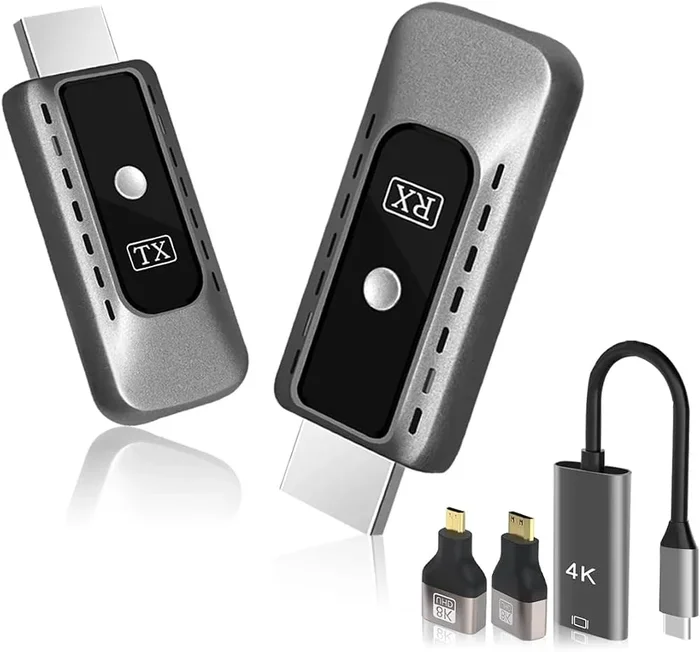
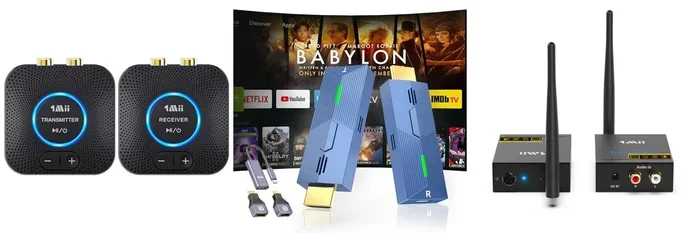
Wireless HDMI transmitters are the gold standard for wireless TV signal transmission. These systems come in two parts: a sender unit and a receiver unit. You connect the sender to your source device, like a cable box or Blu-ray player, using a standard HDMI cable. Then you connect the receiver to your TV, also using an HDMI cable. The signal travels wirelessly between the two units.
These systems are fantastic because they deliver near-cable quality video and audio. Most modern wireless HDMI transmitters support 4K resolution at 60Hz with very low latency. This makes them perfect for gaming, watching sports, or enjoying movies in stunning detail.
Here are some key things to know about wireless HDMI transmitters:
- Range: Most systems work within a range of 30 to 100 feet, depending on the model and any obstacles in the way.
- Latency: High-quality systems have latency under 10 milliseconds, which is practically unnoticeable for most viewers.
- Setup: Plug and play. You do not need any technical expertise to get these working.
- Cost: They range from about $50 to $300, depending on the brand and features.
If you want the best possible wireless experience, a wireless HDMI transmitter is hard to beat. They are especially great for people who want a permanent setup without running cables through walls.
Screen Mirroring and Casting
Screen mirroring is one of the most popular ways to enjoy cord-free viewing at home. It allows you to display whatever is on your phone, tablet, or laptop directly onto your TV screen. You can mirror your entire screen or just cast specific content from an app.
Most modern smart TVs support built-in casting protocols like Chromecast or AirPlay. If your TV does not have built-in support, you can add a casting device like a Chromecast or Roku Streaming Stick. These small devices plug into your TV’s HDMI port and connect to your Wi-Fi network, allowing you to cast content from your phone or computer.
Screen mirroring works great for casual use. You can share photos with family, watch YouTube videos on a bigger screen, or even present slideshows. However, it is not always ideal for fast-paced content like sports or action movies because there can be a slight delay compared to a direct HDMI connection.
If you are interested in wireless screen mirroring, you might want to check out our guide on mirroring your phone to a smart TV without Wi-Fi for additional tips.
Streaming Devices and Apps
Streaming devices are another excellent way to enjoy wireless TV connection without cables. Devices like Roku, Amazon Fire TV Stick, Apple TV, and Google Chromecast let you access thousands of apps and services directly on your TV. Everything streams over your Wi-Fi network, so there are no cables needed between your device and the TV.
These devices are incredibly versatile. You can watch Netflix, Hulu, Disney+, YouTube, and countless other services. Many also support screen mirroring from your phone, giving you even more flexibility. Some newer models even support 4K streaming and HDR for a premium viewing experience.
The main advantage of streaming devices is that they are simple to set up and use. You plug them in, connect to Wi-Fi, and you are ready to go. They are also relatively affordable, with most options costing between $30 and $150.
HDMI Over Ethernet and Network Solutions
If you want a more robust solution for wireless video transmission, HDMI over Ethernet is worth considering. This method uses your home network to send HDMI signals from one room to another. You connect a sender unit to your source device and a receiver unit to your TV. The signal travels over your Ethernet cables or Wi-Fi network.
HDMI over Ethernet systems are great for whole-home setups. You can send your TV signal to multiple rooms without running long HDMI cables through walls. This is especially useful for large homes or multi-story buildings where running cables is impractical or expensive.
For those interested in extending HDMI signals over a network, you can also explore options for HDMI over Ethernet setups. This can be a game-changer for home entertainment systems that need to span multiple rooms.
Wireless HDMI Transmitters Explained
Wireless HDMI transmitters deserve a closer look because they are the most popular choice for people who want a truly cable-free experience. Let us break down exactly how they work and what you should know before buying one.
How They Work
A wireless HDMI transmitter system has two main components. The sender unit connects to your source device, like a cable box, gaming console, or laptop. It captures the HDMI signal and converts it into a wireless signal. This signal is then transmitted through the air to the receiver unit, which is connected to your TV.
The receiver unit decodes the wireless signal back into an HDMI signal that your TV can display. The whole process happens in real time, so you see the content on your TV with virtually no delay. Most systems use the 5GHz frequency band, which helps reduce interference from other wireless devices in your home.
Some advanced systems also support audio return channel (ARC) functionality, which lets you send audio back from your TV to a soundbar or home theater system. This means you can have a fully wireless audio-visual setup without any cables at all.
Top Benefits and Limitations
Let us be honest about both sides of wireless HDMI transmitters. They are amazing for what they do, but they are not perfect for every situation.
Benefits:
- You get near-cable quality video and audio without running any wires.
- Setup is incredibly simple. Plug in both units and you are done.
- They support high resolutions including 4K and even 8K on some models.
- They give you the freedom to place your TV anywhere within range.
- They work with almost any HDMI source device.
Limitations:
- They require line of sight or close proximity for the best signal quality.
- Walls and obstacles can weaken the signal, especially at longer distances.
- They need power, so you will need an outlet near both the sender and receiver.
- Cheaper models may have higher latency or lower resolution support.
Overall, wireless HDMI transmitters are a fantastic choice for most people. They offer the best balance of quality, convenience, and ease of use. If you are serious about cutting the cord, this is where you should start.
Screen Mirroring and Casting Options
Screen mirroring and casting are the most accessible ways to enjoy wireless TV signal transmission. Almost everyone has a smartphone or tablet, and most modern TVs support some form of casting. This makes it the easiest entry point into cord-free viewing.
Mirroring from Phones and Tablets
If you have an iPhone or iPad, you can use AirPlay to mirror your screen to a compatible smart TV or Apple TV. On Android devices, Google Cast (Chromecast) works similarly. Both are built into most modern devices, so you do not need to download any extra apps.
To mirror your screen, follow these simple steps:
- Make sure your phone and TV are connected to the same Wi-Fi network.
- Open the control center on your iPhone or the quick settings panel on your Android device.
- Tap the screen mirroring or cast icon.
- Select your TV from the list of available devices.
- Your phone screen will now appear on your TV.
It really is that simple. You can mirror everything from your photos and videos to apps and games. Just keep in mind that mirroring your entire screen can drain your phone battery faster, so keep it plugged in if you plan on mirroring for a long time.
Using Smart TV Built-In Features
Most smart TVs made in the last few years come with built-in casting support. Samsung TVs use SmartView, LG TVs use Screen Share, and Sony TVs support both AirPlay and Chromecast. These built-in features work just as well as external casting devices, and you do not need to buy any extra hardware.
To use your TV’s built-in casting, go to your TV’s settings and look for the screen mirroring or cast option. Turn it on, and your TV will appear as a casting target for your phone or tablet. From there, the process is the same as described above.
For a deeper dive into connecting devices to your TV wirelessly, you might also want to read about using HDMI for video and Bluetooth for audio to get the most out of your wireless setup.
Setting Up a Wireless TV Connection
Setting up a wireless TV connection is easier than most people expect. Whether you are using a wireless HDMI transmitter, a streaming device, or screen mirroring, the process is straightforward. Let us walk through what you need and how to get started.
What You Need to Get Started
The equipment you need depends on which method you choose. Here is a quick breakdown:
- For wireless HDMI: You need a wireless HDMI transmitter and receiver pair. Both connect to power outlets and use HDMI cables to link to your source device and TV.
- For screen mirroring: You need a smart TV with built-in casting support or a streaming device like Chromecast or Apple TV. Both your phone and TV need to be on the same Wi-Fi network.
- For streaming apps: You need a streaming device and a Wi-Fi connection. That is it. No cables needed at all.
- For HDMI over Ethernet: You need an HDMI over Ethernet sender and receiver pair, plus an Ethernet cable running between the two locations.
Before you buy anything, take a moment to think about your specific needs. How far do you need the signal to travel? What resolution do you want? Do you need low latency for gaming? Your answers to these questions will help you pick the right solution.
Step-by-Step Setup Guide
Here is a general setup guide that applies to most wireless TV transmission methods:
- Place your sender unit near the source device. This could be a cable box, gaming console, or laptop. Make sure it has access to a power outlet.
- Connect the sender to the source device using an HDMI cable. This is the one cable you will need, and it only goes from the source to the sender unit.
- Place the receiver unit near your TV. Plug it into a power outlet and connect it to your TV using another HDMI cable.
- Power on both units and switch your TV to the correct HDMI input. You should see the signal from your source device appearing on your TV.
- Adjust the settings if needed. Most wireless HDMI systems have a small button or remote to fine-tune the signal and resolution.
That is all there is to it. In just a few minutes, you can go from a cable mess to a clean, wireless setup. The freedom of cord-free viewing is just a few steps away.
Common Problems and How to Fix Them
Wireless TV transmission is reliable, but it is not without its quirks. Here are some common issues you might run into and how to fix them.
Dealing with Lag and Latency
Lag or latency is the most common complaint with wireless TV setups. You might notice a slight delay between what is happening on your source device and what appears on your TV. This is usually caused by signal processing time or Wi-Fi congestion.
To reduce lag, try these tips:
- Use a dedicated wireless HDMI system instead of Wi-Fi-based casting for the lowest latency.
- Make sure your Wi-Fi network is not overloaded with too many devices streaming at once.
- Place the sender and receiver in direct line of sight with no obstacles between them.
- Use the 5GHz band instead of 2.4GHz for your Wi-Fi connection, as it is faster and less congested.
Signal Interference Issues
Signal interference can cause picture quality problems, dropouts, or complete signal loss. This is especially common in homes with many wireless devices or thick walls between the sender and receiver.
To fix interference issues:
- Move the sender and receiver closer together to strengthen the signal.
- Remove or reduce other wireless devices in the same area, especially microwave ovens and cordless phones, which operate on similar frequencies.
- Change the channel on your wireless transmitter if the model supports it.
- Consider using a wired Ethernet backhaul for HDMI over Ethernet systems to ensure a stable connection.
Most signal issues can be resolved with simple adjustments. If you are still having problems, check the manufacturer’s troubleshooting guide or contact their support team for help.
Expert Insights and Pro Tips
After testing dozens of wireless TV transmission systems, here are some expert tips to help you get the best results:
- Invest in quality: A good wireless HDMI transmitter costs more but delivers significantly better picture quality and reliability. Do not cheap out if you want a premium experience.
- Keep firmware updated: Many wireless transmitters and streaming devices receive firmware updates that improve performance and fix bugs. Check for updates regularly.
- Plan your placement: Think about where you will place the sender and receiver before you buy. Make sure both have access to power outlets and a clear path for the wireless signal.
- Test before you commit: If possible, test the system in your actual home environment before making a permanent setup. Signal quality can vary depending on your walls, furniture, and other obstacles.
- Consider your whole-home needs: If you want wireless TV in multiple rooms, look into HDMI over Ethernet or mesh network solutions that can distribute the signal throughout your home.
For more tips on optimizing your home entertainment setup, check out our article on plugging your router into your TV for insights on using your internet connection for better streaming.
Conclusion
The short answer to the question can you transmit TV signal wirelessly is a resounding yes. You have more options than ever before, from wireless HDMI transmitters that deliver near-cable quality to simple screen mirroring that anyone can set up in minutes. The technology has matured to the point where going wireless is not just possible but often preferable to running cables through your walls.
Whether you choose a wireless HDMI system for the best quality, screen mirroring for casual convenience, or a streaming device for accessing apps directly on your TV, you can enjoy a completely cord-free viewing experience. The key is to pick the method that fits your needs, budget, and living space.
Remember to consider factors like range, latency, and signal interference when choosing your setup. With the right equipment and a little planning, you can transform your TV area into a clean, modern, wire-free entertainment space. So go ahead and cut those cables. Your living room will thank you, and you will love the freedom of wireless TV.
Frequently Asked Questions
Can I transmit a 4K TV signal wirelessly?
Yes, you can transmit a 4K TV signal wirelessly using a wireless HDMI transmitter that supports 4K resolution. Most modern wireless HDMI systems support 4K at 60Hz, which delivers stunning picture quality. Make sure to check the specifications of any transmitter you buy to confirm it supports 4K.
Is wireless TV signal transmission safe and secure?
Yes, most wireless TV transmission systems use encrypted signals to prevent unauthorized access. Dedicated wireless HDMI systems use proprietary protocols that are very secure. Wi-Fi-based casting uses your home network’s security settings, so keeping your Wi-Fi password strong is important.
Can I transmit TV signal wirelessly to multiple TVs?
Some systems support sending a signal to multiple TVs, but most wireless HDMI transmitters are designed for a single sender-to-receiver connection. For multiple TVs, you can use HDMI over Ethernet systems or streaming devices in each room. Both options allow you to distribute your TV signal to multiple displays wirelessly.
Does wireless TV transmission have any latency?
All wireless TV transmission has some latency, but it is usually very small. High-quality wireless HDMI transmitters have latency under 10 milliseconds, which is practically unnoticeable. Wi-Fi-based casting may have slightly higher latency, which is fine for most content but can be noticeable for fast-paced gaming.
What is the best wireless method for gaming?
For gaming, a wireless HDMI transmitter is the best choice because it offers the lowest latency and highest picture quality. Wi-Fi-based screen mirroring can work for casual gaming but may have noticeable input delay. If you are a serious gamer, invest in a dedicated wireless HDMI system for the best experience.
Can I use wireless transmission with any TV?
You can use wireless transmission with almost any TV that has an HDMI input. Wireless HDMI transmitters and receivers connect via HDMI, which is standard on virtually all modern TVs. For screen mirroring, your TV needs to be a smart TV with built-in casting support or have a streaming device connected to it.