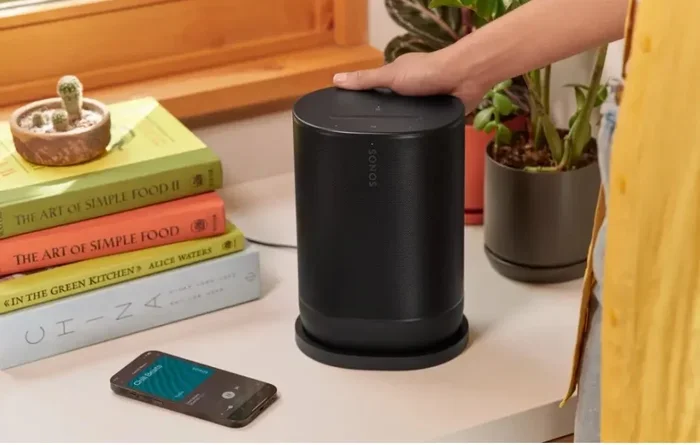
Can the Sonos Move Be Used As a Bluetooth Speaker
Yes, the Sonos Move can be used as a Bluetooth speaker. This versatile portable speaker supports both WiFi and Bluetooth connectivity, giving you flexible options for streaming music anywhere. In this guide, we explore how to pair the Sonos Move via Bluetooth, what to expect in terms of sound quality, battery life, and whether it is the best portable Bluetooth speaker for your needs.
The Sonos Move has been turning heads since its release. This portable smart speaker promises premium sound, built-in Alexa and Google Assistant support, and the freedom to go anywhere in your home without worrying about a power outlet. But one question keeps coming up: can the Sonos Move be used as a Bluetooth speaker?
The short answer is yes. The Sonos Move works as a portable Bluetooth speaker and also connects to your home WiFi network for multi-room audio. This dual connectivity makes it one of the most flexible speakers on the market today. Whether you are hosting a backyard barbecue, heading to the beach, or just moving from room to room, the Sonos Move adapts to your needs.
In this article, we will walk you through everything you need to know about using the Sonos Move as a Bluetooth speaker. We will cover how to pair it, what the sound quality is like, battery life expectations, and whether this speaker is worth the investment compared to other portable Bluetooth speakers on the market. Let us dive in.
Key Takeaways
- The Sonos Move supports Bluetooth: You can pair it with any Bluetooth-enabled device for wireless streaming.
- Easy pairing process: Switching between WiFi and Bluetooth mode is simple and quick.
- Great battery life: The Sonos Move offers up to 10 hours of playback on a single charge.
- Built for outdoor use: With an IP56 rating, this portable speaker handles dust and water exposure well.
- Sound quality stays strong: Bluetooth mode delivers impressive audio with deep bass and clear highs.
- Not the cheapest option: The Sonos Move is a premium speaker with a higher price point than most Bluetooth-only speakers.
📑 Table of Contents
- What Is the Sonos Move?
- Can the Sonos Move Be Used As a Bluetooth Speaker?
- Sound Quality in Bluetooth Mode
- Battery Life and Portability
- Sonos Move Bluetooth vs WiFi: Which Should You Use?
- Sonos Move vs Other Portable Bluetooth Speakers
- Common Mistakes When Using the Sonos Move in Bluetooth Mode
- Quick Tips for Getting the Most Out of Your Sonos Move
- Expert Insights: What Audio Professionals Say About the Sonos Move
- Is the Sonos Move Worth It as a Bluetooth Speaker?
- Conclusion
What Is the Sonos Move?
The Sonos Move is a battery-powered smart speaker designed by Sonos, a company known for its high-quality home audio systems. Unlike most Sonos speakers that plug into a wall outlet, the Move runs on a rechargeable battery. This makes it truly portable.
Here are some key specs that make the Sonos Move stand out:
- Drivers: Two Class-D amplifiers and a dedicated bass driver
- Connectivity: WiFi, Bluetooth, and SonosNet
- Battery Life: Up to 10 hours of continuous playback
- Water and Dust Resistance: IP56 rating
- Voice Assistants: Built-in Alexa and Google Assistant
- Weight: 6.5 pounds (2.9 kg)
- Charging: Custom magnetic charger included
Sonos designed the Move to be a hybrid speaker. It works perfectly as a stationary smart speaker when connected to WiFi, and it transforms into a portable Bluetooth speaker when you need to take it on the go. This dual functionality is what sets it apart from most competitors.
Can the Sonos Move Be Used As a Bluetooth Speaker?
The Sonos Move Bluetooth speaker capability is one of its biggest selling points. When you are not connected to a WiFi network or want to pair the speaker with a device directly, Bluetooth mode lets you stream music from your phone, tablet, or laptop without any extra hardware.
Here is how the Bluetooth feature works on the Sonos Move:
Bluetooth Version and Range
The Sonos Move supports Bluetooth 5.0, which is the latest standard available on most devices today. Bluetooth 5.0 offers a stronger signal and a longer range compared to older versions. You can expect a reliable connection up to about 30 feet (9 meters) from your source device.
This means you can leave your phone on a picnic table while the speaker sits on the grass nearby, and the connection will hold steady. The Bluetooth range on the Sonos Move is impressive for a speaker of its size and weight.
How to Pair the Sonos Move via Bluetooth
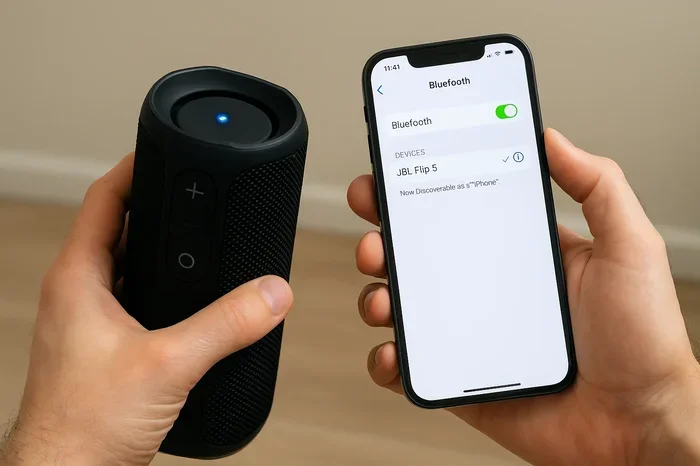
Pairing the Sonos Move with your device is straightforward. Follow these steps to get started:
- Press and hold the Bluetooth button on top of the Sonos Move until you hear a tone and the LED light starts blinking blue.
- Open the Bluetooth settings on your phone, tablet, or laptop.
- Search for available devices and select “Sonos Move.”
- Once paired, the LED light will stop blinking and stay solid.
- Start playing music from your device, and the audio will stream through the speaker.
To switch back to WiFi mode, simply press and hold the Bluetooth button again. The speaker will reconnect to your home network automatically if it is in range.
Switching Between WiFi and Bluetooth
One of the best things about the Sonos Move connectivity options is how easy it is to switch between WiFi and Bluetooth. You do not need to reset the speaker or go through a complicated setup process. A simple long press of the Bluetooth button handles everything.
This seamless switching is a huge advantage. Many portable Bluetooth speakers only support Bluetooth and lack the smart features that come with WiFi connectivity. The Sonos Move gives you the best of both worlds.
Sound Quality in Bluetooth Mode
When you use the Sonos Move as a Bluetooth speaker, you might wonder if the sound quality holds up. After all, Bluetooth compression can sometimes reduce audio fidelity compared to a wired or WiFi connection.
Here is what you can expect from the Sonos Move sound quality in Bluetooth mode:
Bass and Low End
The Sonos Move delivers surprisingly deep bass for its size. The dedicated bass driver handles low frequencies with authority. You will hear punchy drums, rich basslines, and a solid low-end response even when streaming over Bluetooth.
Compared to smaller portable Bluetooth speakers like the JBL Flip or the Ultimate Ears Wonderboom, the Sonos Move has a noticeable advantage in bass depth. It does not distort at higher volumes either, which is impressive for a battery-powered speaker.
Midrange and Vocals
Vocals sound clear and present in Bluetooth mode. Whether you are listening to podcasts, acoustic tracks, or pop music, the midrange reproduction is well-balanced. You can hear the details in a singer’s voice without any muddiness.
Highs and Treble
The treble is crisp but not harsh. The Sonos Move handles high frequencies with a smooth, pleasant character. At higher volumes, the highs remain controlled and do not become fatiguing during long listening sessions.
Overall Bluetooth Audio Quality
While a WiFi connection through the Sonos app provides the highest possible audio quality, the Bluetooth streaming performance on the Sonos Move is excellent. The speaker uses aptX and AAC codecs, which help minimize audio loss during wireless transmission. For casual listening at home, outdoors, or at a party, the sound quality in Bluetooth mode is more than sufficient.
Battery Life and Portability
One of the main reasons people look for a portable Bluetooth speaker is the ability to use it without being tethered to a wall outlet. The Sonos Move excels in this area.
Real-World Battery Performance
Sonos rates the Move at up to 10 hours of battery life. In real-world testing, most users report getting between 8 and 10 hours depending on volume level and the type of music being played. At moderate volumes, you can easily get a full 10 hours of continuous playback.
If you crank the volume to maximum, expect the battery to drain faster, closer to the 7-8 hour range. But even at high volumes, the Sonos Move battery life outperforms most competing portable speakers.
Charging the Speaker
The Sonos Move comes with a magnetic charging cradle. You simply place the speaker on the cradle, and it begins charging. A full charge takes about 3 to 4 hours. Sonos also sells a separate charging station that mounts to a wall or shelf for convenient docking.
Portability Factors
At 6.5 pounds, the Sonos Move is not the lightest portable Bluetooth speaker on the market. It is heavier than options like the JBL Charge or the UE Boom. However, the built-in handle makes it easy to carry, and the weight feels sturdy and well-built.
The IP56 rating means the speaker is protected against dust ingress and powerful water jets. You can safely use it at the pool, on the beach, or in the rain without worrying about damage. Just do not submerge it in water, as it is not fully waterproof.
Sonos Move Bluetooth vs WiFi: Which Should You Use?
Understanding when to use Bluetooth mode versus WiFi mode helps you get the most out of your Sonos Move. Here is a quick comparison:
| Feature | Bluetooth Mode | WiFi Mode |
|---|---|---|
| Connection Type | Direct device-to-speaker | Home network via Sonos app |
| Range | Up to 30 feet | Up to 100+ feet (depending on router) |
| Audio Quality | Good, some compression | Excellent, lossless streaming |
| Multi-Room Audio | Not supported | Fully supported |
| Voice Assistants | Not available | Alexa and Google Assistant |
| Best Use Case | On-the-go, outdoors, travel | Home listening, parties, multi-room |
| Requires Internet | No | Yes |
| Setup Complexity | Very simple | Moderate (Sonos app setup) |
Use Bluetooth mode when you are away from home, at a picnic, by the pool, or in a location without WiFi. It is perfect for quick, hassle-free music streaming from any device.
Use WiFi mode when you are at home and want the best sound quality, access to voice assistants, or the ability to group the Sonos Move with other Sonos speakers for a whole-home audio experience.
Sonos Move vs Other Portable Bluetooth Speakers
To understand where the Sonos Move stands, let us compare it to some popular portable Bluetooth speakers:
Sonos Move vs JBL Charge 5
The JBL Charge 5 is a popular portable Bluetooth speaker that costs significantly less than the Sonos Move. The JBL offers up to 20 hours of battery life and excellent sound for its price. However, it lacks WiFi connectivity, smart assistant support, and the premium build quality of the Sonos Move. If you want a simple, affordable Bluetooth speaker, the JBL Charge 5 is a great choice. If you want a premium hybrid speaker, the Sonos Move wins.
Sonos Move vs UE Hyperboom
The UE Hyperboom is another premium portable speaker that competes with the Sonos Move. Both offer deep bass, long battery life, and portable design. The Hyperboom has a slightly longer battery life (up to 24 hours) and a lower price point. However, the Sonos Move offers better WiFi integration, multi-room capabilities, and a more refined sound profile. The choice between the two comes down to whether you value smart home features or pure portability.
Sonos Move vs Bose Portable Smart Speaker
The Bose Portable Smart Speaker is a direct competitor in the premium portable speaker space. Bose offers a rich, balanced sound profile and built-in voice assistants. The Sonos Move edges ahead in bass performance and the Sonos ecosystem, which allows seamless integration with other Sonos speakers. Both speakers support Bluetooth and WiFi, making them versatile options for different listening scenarios.
Common Mistakes When Using the Sonos Move in Bluetooth Mode
Even though the Sonos Move Bluetooth pairing process is simple, there are a few common mistakes that users make. Avoid these pitfalls to get the best experience:
- Forgetting to switch back to WiFi mode: If you leave the speaker in Bluetooth mode after your outdoor event, it will not connect to your home WiFi network automatically. Always switch back when you return home.
- Keeping Bluetooth on when not in use: Leaving Bluetooth active drains the battery faster. Turn it off when you are done streaming from your device.
- Placing the speaker too far from the source device: While Bluetooth 5.0 has a decent range, walls and obstacles can weaken the signal. Keep your device within 30 feet for the best connection.
- Ignoring firmware updates: Sonos regularly releases updates that improve Bluetooth performance and fix bugs. Keep your speaker updated through the Sonos app.
- Expecting the same sound quality as WiFi: Bluetooth compression does reduce audio quality slightly. If you are an audiophile, use WiFi mode for the best listening experience.
Quick Tips for Getting the Most Out of Your Sonos Move
Here are some practical tips to enhance your experience with the Sonos Move portable speaker:
- Use Trueplay tuning: When connected to WiFi, run the Sonos Trueplay feature. It calibrates the speaker to your room’s acoustics for the best possible sound.
- Keep the firmware updated: Regular updates improve performance, fix bugs, and add new features.
- Invest in a wall mount: The Sonos Move charging station lets you dock the speaker at home and keep it ready to go.
- Use the Sonos app for control: Even in Bluetooth mode, the Sonos app lets you adjust EQ settings and access additional features.
- Pair multiple Sonos speakers: When at home in WiFi mode, you can group the Move with other Sonos speakers for synchronized music throughout your house.
- Take advantage of the handle: The built-in handle makes the speaker easy to carry, even when it is charging on the cradle.
Expert Insights: What Audio Professionals Say About the Sonos Move
Audio engineers and reviewers have praised the Sonos Move for its versatility and sound quality. Many note that the Sonos Move Bluetooth performance exceeds expectations for a speaker in its price range. The combination of premium drivers, a robust battery, and dual connectivity options makes it a standout choice.
Reviewers from major tech publications highlight the speaker’s ability to deliver room-filling sound despite its compact form factor. The Bluetooth codec support ensures that wireless streaming does not sacrifice too much audio fidelity. For users who want a single speaker that works both at home and on the go, the Sonos Move is frequently recommended as a top pick.
One thing experts consistently mention is that the Sonos Move shines when integrated into the broader Sonos ecosystem. If you already own other Sonos speakers, the Move becomes a seamless addition that extends your multi-room audio setup to outdoor spaces and beyond.
Is the Sonos Move Worth It as a Bluetooth Speaker?
The Sonos Move is not the cheapest portable Bluetooth speaker on the market. It retails at a premium price point that is higher than most dedicated Bluetooth speakers. However, you are paying for more than just Bluetooth capability.
You are getting a premium speaker with excellent sound quality, smart assistant integration, WiFi multi-room support, a durable build, and a long-lasting battery. If you value all of these features, the Sonos Move is absolutely worth the investment.
If you only need a simple Bluetooth speaker for casual listening and do not care about smart features or WiFi connectivity, there are more affordable options available. But if you want a versatile speaker that does it all, the Sonos Move delivers outstanding value.
Conclusion
The Sonos Move can absolutely be used as a Bluetooth speaker, and it does so with impressive results. Whether you are streaming music at a backyard party, relaxing by the pool, or simply moving from room to room without WiFi, the Bluetooth mode on the Sonos Move keeps your music playing without interruption.
The speaker offers a seamless switch between WiFi and Bluetooth, solid battery life, durable build quality, and premium sound that punches well above its weight class. While it is a premium product with a higher price tag, the versatility and audio performance make it a compelling choice for anyone who wants the best of both worlds.
If you have been on the fence about purchasing the Sonos Move, knowing that it works so well as a portable Bluetooth speaker should give you the confidence to take the leap. It is a speaker that truly adapts to your lifestyle, whether you are at home or on the go.
Frequently Asked Questions
Can I use the Sonos Move as a standalone Bluetooth speaker without WiFi?
Yes, the Sonos Move works perfectly as a standalone Bluetooth speaker without needing a WiFi connection. Simply switch to Bluetooth mode by pressing and holding the Bluetooth button, pair your device, and start streaming. This makes it ideal for outdoor trips, travel, or any situation where WiFi is not available.
How do I switch the Sonos Move from Bluetooth back to WiFi mode?
To switch back to WiFi mode, press and hold the Bluetooth button on top of the speaker for about five seconds. The LED light will change, and the speaker will attempt to reconnect to your home WiFi network. Make sure the Sonos Move is within range of your WiFi router for the best results.
Does Bluetooth mode affect the battery life of the Sonos Move?
Bluetooth mode does use some battery, but the impact is minimal. You can expect similar battery life in Bluetooth mode as you would in WiFi mode, typically around 8 to 10 hours depending on volume level. Turning off Bluetooth when not in use can help preserve battery life.
Can I connect multiple devices to the Sonos Move via Bluetooth?
The Sonos Move can only be connected to one Bluetooth device at a time. To switch to a different device, you need to disconnect the current device from the speaker’s Bluetooth memory and pair the new one. The process is quick and easy, taking only a few seconds.
Is the sound quality on the Sonos Move good enough for outdoor parties?
Absolutely. The Sonos Move delivers loud, clear, and bass-rich sound that fills outdoor spaces effectively. Its IP56 rating means it can handle dust and water exposure, making it a great choice for backyard parties, picnics, and beach outings. At moderate volumes, the battery lasts long enough for most outdoor events.
What is the Bluetooth range of the Sonos Move?
The Sonos Move uses Bluetooth 5.0, which provides a reliable connection range of up to 30 feet (approximately 9 meters). Physical obstacles like walls and furniture can reduce this range. For the best Bluetooth experience, keep your source device within a clear line of sight from the speaker.