Can You Lock Door Remotely Heres What You Need to Know
Yes, you can lock your door remotely using smart lock technology and a mobile app. Remote door locking lets you secure your home from anywhere in the world. You just need a smart lock system, a stable Wi-Fi connection, and a compatible device. This guide covers everything you need to know about locking your door remotely, from how it works to the best options available.
Have you ever left your house and wondered if you locked the door? You are not alone. Millions of people face this worry every single day. The good news is that you can lock your door remotely with today’s smart home technology. This is no longer science fiction. It is a real, affordable solution that works right now.
Smart locks have changed the way we think about home security. You can control your door lock system from your phone, tablet, or even your smartwatch. Whether you are at work, on vacation, or just sitting on the couch, remote access gives you peace of mind. Let us dive into everything you need to know about locking your door remotely.
Key Takeaways
- Remote locking is real: Smart locks let you lock and unlock doors from your phone, no matter where you are.
- Multiple technologies power it: Wi-Fi, Bluetooth, and Z-Wave are the main ways smart locks connect to your network.
- Security matters: Always use strong passwords and two-factor authentication to keep your door lock system safe.
- Not all locks are equal: Some work with Alexa or Google Home, while others need a dedicated hub.
- Installation is usually simple: Most smart locks replace your existing deadbolt in minutes.
- Watch for connectivity issues: A weak Wi-Fi signal can cause delays in remote locking.
📑 Table of Contents
- What Is Remote Door Locking?
- How Does Remote Door Locking Work?
- Types of Smart Locks You Can Control Remotely
- Benefits of Locking Your Door Remotely
- Things to Consider Before Buying a Remote Lock
- Common Problems and How to Fix Them
- Setting Up Remote Door Locking at Home
- Final Thoughts on Remote Door Locking
What Is Remote Door Locking?
Remote door locking means you can lock or unlock a door using a device that is not physically near the door. This is usually done through a mobile app on your smartphone. The app talks to your smart lock over the internet or a wireless connection.
Think of it this way. You have a regular lock on your door. You need a physical key to open it. A smart lock replaces or works alongside that traditional lock. It connects to your home network and lets you control it from far away. You can even set it to auto-lock after a certain time.
Many smart home devices now include remote locking as a core feature. Brands like August, Yale, Schlage, and Kwikset all make locks you can control from your phone. Some of these also work with voice assistants like Alexa or Google Home.
How Does It Differ From a Regular Lock?
A regular lock only works when you are standing right in front of it. You need the key. A remote door lock works through the internet or a wireless signal. This means you can lock up from miles away. You can also give temporary access to guests without handing over a physical key.
The difference is huge for busy households. Parents can lock the back door while kids are coming home from school. Homeowners can let in dog walkers or cleaners while they are at work. The remote access feature makes life much more convenient.
How Does Remote Door Locking Work?
Understanding how locking your door remotely actually works helps you pick the right product. The process is simpler than most people think. Here is a quick breakdown of how it all connects.
First, you install a smart lock on your door. This replaces your existing deadbolt or works on top of it. The lock connects to your home network using one of these methods:
- Wi-Fi: The lock connects directly to your home Wi-Fi network. This is the most common method.
- Bluetooth: The lock connects to your phone directly when you are nearby. Some locks use Bluetooth for close-range control.
- Z-Wave or Zigbee: These are low-power wireless signals. They need a hub to connect to your Wi-Fi network.
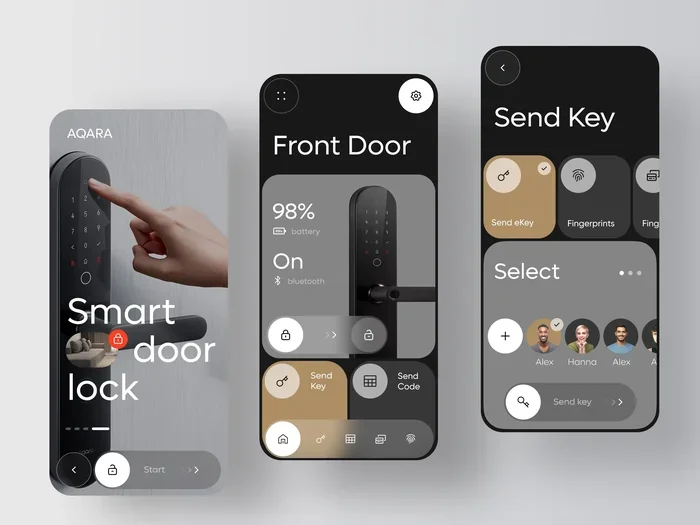
Once the lock is connected, you download the manufacturer’s app on your phone. Through the app, you can send commands to lock or unlock the door. The app sends a signal over the internet to your lock. The lock then engages or disengages the deadbolt.
Many locks also support voice control. You can say “Hey Google, lock the front door” and it happens. Some locks even let you create guest codes. These are temporary codes you can share with visitors.
The Role of Your Home Network
Your Wi-Fi network plays a big role in remote locking. If your internet goes down, you may not be able to lock your door from far away. However, most smart locks still work locally. You can usually still use Bluetooth or a physical key to lock the door from nearby.
This is where home network security becomes important. If someone gains access to your Wi-Fi, they might be able to control your smart lock. That is why you should always use a strong password on your Wi-Fi. You can learn more about Wi-Fi security and how to protect your network in our article on blocking Wi-Fi in a room, which covers how to manage access to your wireless network.
It is also worth noting that smart locks use encryption to protect your data. This means the signals between your phone and your lock are scrambled. Only your authorized device can read them. This keeps your door lock system safe from most types of hacking.
Types of Smart Locks You Can Control Remotely
Not all smart locks are the same. Different types offer different features and levels of remote access. Here are the most common types you will find on the market today.
Wi-Fi Enabled Smart Locks
These locks connect directly to your home Wi-Fi network. You do not need a separate hub. You just plug in the lock, connect it to your Wi-Fi, and you are done. Brands like August and Wyze make popular Wi-Fi locks.
The biggest advantage is simplicity. You do not need extra equipment. The lock works right out of the box. The downside is that Wi-Fi locks use more power than other types. They also depend heavily on your internet connection.
Bluetooth Smart Locks
Bluetooth locks connect directly to your phone when you are within range. They are great for keyless entry when you are close to home. Some Bluetooth locks can still be controlled remotely if you add a bridge device.
These locks use less battery power. They are also very fast to connect. The main limitation is range. Bluetooth usually works within about 30 feet. So you cannot control the lock from far away without extra hardware.
Smart Locks With a Hub
Some locks work with a separate hub. The hub connects to your Wi-Fi and talks to the lock using Z-Wave or Zigbee. This setup is very stable. It also lets you add other home automation devices to your system.
Brands like Yale and Schlage offer locks that work with hubs. These systems are great if you already have a smart home setup. The hub acts as a bridge between your lock and the internet.
Biometric Smart Locks
Biometric locks use your fingerprint to unlock the door. Some of these also support remote control through an app. They are very secure because your fingerprint is unique. The downside is that they tend to cost more than standard smart locks.
Comparison Table
| Lock Type | Remote Access | Hub Needed | Battery Life | Price Range |
|---|---|---|---|---|
| Wi-Fi Enabled | Yes | No | 6-12 months | $100-$250 |
| Bluetooth | Limited | Sometimes | 6-18 months | $80-$200 |
| Hub-Based (Z-Wave/Zigbee) | Yes | Yes | 6-12 months | $150-$300 |
| Biometric | Yes (some models) | Sometimes | 3-6 months | $200-$400 |
Benefits of Locking Your Door Remotely
There are many real-world reasons to use a remote door lock. Let us look at the biggest benefits that make this technology worth considering.
Peace of Mind
This is the number one reason people buy smart locks. You can check your door from anywhere. Did you lock up before heading to work? Just open the app and lock it. Did you forget to lock the back door? No problem. You can do it from your desk at work.
This feature is especially helpful for frequent travelers. If you are on vacation and wondering about your home security, a quick check on your phone tells you everything you need to know. You can even auto-lock all doors at a set time every night.
Keyless Convenience
No more fumbling for keys. With a smart lock, you can unlock your door with your phone or even your voice. You can also create temporary codes for guests. Dog walkers, babysitters, and house cleaners can all get access without you being there.
Guest codes are time-limited in most cases. You can set a code to work only on Tuesday between 2 PM and 4 PM. Once that window passes, the code stops working. This is much safer than giving out a physical key that could be copied.
Integration With Other Smart Devices
Many smart locks work with other home automation devices. You can set up routines where locking the door turns off the lights and arms the security system. Some locks even work with security cameras. When someone unlocks the door, your camera starts recording.
This level of integration makes your home smarter and safer. You can create a complete security ecosystem that works together seamlessly.
Emergency Access
If someone is locked out, you can let them in remotely. If a family member forgets their keys, you can unlock the door for them from your office. Some locks even let emergency services in with the right permissions.
Things to Consider Before Buying a Remote Lock
Before you buy a smart lock for remote control, there are a few important things to think about. Not every lock is right for every home.
Compatibility With Your Door
Not all smart locks fit every door. Check the lock’s specifications before buying. Most smart locks work with standard doors that have a deadbolt. But some doors have unusual measurements or smart locks that need specific hardware.
Measure your door before shopping. Look at the backset (the distance from the edge of the door to the center of the lock hole). Most doors are either 2-3/8 inches or 2-3/4 inches. Make sure the lock you choose matches your door.
Power Source and Battery Life
Smart locks run on batteries. Most last between 6 and 12 months depending on usage. Some locks use rechargeable batteries, while others use standard AA or AAA batteries. Keep spare batteries on hand so you are never locked out.
A few locks also offer a backup power option. You can use a 9-volt battery on the outside of the lock to power it temporarily. This is a handy feature if you forget to change the batteries on time.
Security Features
Look for locks that offer two-factor authentication. This means you need two forms of verification before the lock opens. Some locks also send alerts to your phone every time someone locks or unlocks the door.
Encryption is another key feature. Make sure your chosen lock uses AES encryption or better. This protects your data and prevents unauthorized access to your door lock system.
Price and Value
Smart locks range from about $80 to $400. The price depends on features and brand. Wi-Fi locks tend to be cheaper because they do not need a hub. Hub-based locks cost more but offer more stability and features.
Think of a smart lock as an investment in your home’s security. A good lock can last for years and add real value to your daily routine.
Common Problems and How to Fix Them
Remote door locking is not perfect. Sometimes things go wrong. Here are the most common issues and how to solve them.
Lock Not Responding to App Commands
This is the most common problem. Usually, it happens because the lock has lost its Wi-Fi connection. Try moving closer to your router to see if that helps. You can also check if your internet is working normally. Sometimes a simple router restart fixes everything.
If the lock still does not respond, check the batteries. Low batteries often cause connectivity issues. Replace them and try again. Most smart locks will send a low-battery alert to your phone before this happens.
Delayed Locking or Unlocking
Delays happen when your Wi-Fi signal is weak. The lock takes longer to receive the command from the app. If you notice delays, consider moving your router closer to your front door or adding a Wi-Fi extender.
Another cause can be too many devices on your network. Smart home devices use bandwidth. If your network is crowded, the lock may respond slowly. You can learn more about managing your network and device connections in our guide on browsing the internet on a tablet, which covers how connected devices share network resources.
Security Concerns With Smart Locks
Some people worry about hacking. It is a valid concern. Smart locks can be hacked if your network is not secure. The best way to protect yourself is to use a strong, unique password for your Wi-Fi. Enable two-factor authentication on your lock app if available.
You should also keep your lock’s firmware updated. Manufacturers release updates that fix security flaws. Check for updates regularly in the app. You can also read more about how your Wi-Fi network can be accessed by others in our article on Wi-Fi sniffing detection, which explains how wireless signals can be monitored and how to protect your network.
Physical Key Backup
Even with a smart lock, always keep a physical key as a backup. If the batteries die completely and you do not have a backup power source, you will need a key to get in. Most smart locks include a traditional keyhole for this exact reason.
Also, make sure someone in your household knows how to use the lock manually. In an emergency, everyone should be able to lock and unlock the door without relying on the app.
Setting Up Remote Door Locking at Home
Setting up a remote door lock is easier than most people expect. Here is a simple step-by-step guide to get you started.
- Choose your smart lock: Pick a lock that fits your door and your needs. Consider Wi-Fi, Bluetooth, or hub-based options.
- Install the lock: Most smart locks replace your existing deadbolt. Use the included hardware and follow the instructions. The process usually takes 10 to 20 minutes.
- Download the app: Get the manufacturer’s app on your phone. Create an account and follow the setup prompts.
- Connect to Wi-Fi: If your lock supports Wi-Fi, connect it to your home network through the app.
- Test the lock: Try locking and unlocking from different distances. Make sure the remote feature works before you rely on it.
- Set up auto-lock: Enable auto-lock so the door locks itself after a set time. This adds an extra layer of security.
- Create guest codes: Set up temporary codes for anyone who needs regular access to your home.
Once your smart lock is set up, you will wonder how you ever lived without it. The convenience and security are hard to beat. Remote door locking is one of the best upgrades you can make to your home.
Final Thoughts on Remote Door Locking
Locking your door remotely is a game changer for modern living. It gives you control, convenience, and security all in one package. Whether you are a busy professional, a parent, or a frequent traveler, a smart lock makes your life easier.
The technology is mature, affordable, and widely available. You do not need to be a tech expert to set it up. Most locks work right out of the box with just a few simple steps. The key is to choose a lock that fits your door, your budget, and your smart home setup.
Take the time to research your options. Read reviews, compare features, and pick a lock that gives you the remote access you need. With the right door lock system, you will never wonder if you locked your door again.
Start small if you want. Try one smart lock on your front door. See how it fits into your routine. Once you experience the convenience, you will likely want to add more to other doors in your home. Remote door locking is the future of home security, and it is here today.
Frequently Asked Questions
Can I lock my door remotely without Wi-Fi?
Most smart locks need Wi-Fi for true remote access from far away. However, some Bluetooth locks let you control the door when you are nearby. If you lose Wi-Fi, you can usually still use a physical key or the lock’s manual controls to secure your door.
Is remote door locking safe from hackers?
Good smart locks use strong encryption to protect your data. To stay safe, use a unique password for your Wi-Fi, enable two-factor authentication on the lock app, and keep your firmware updated. These steps make it very hard for anyone to hack your door lock system.
How much does a smart lock cost?
Prices range from about $80 to $400. Basic Wi-Fi locks are at the lower end. Hub-based locks with more features cost more. The price is worth it for the security and convenience you get from remote door locking.
Can I give temporary access to someone remotely?
Yes. Most smart locks let you create guest codes through the app. You can set these codes to work only during specific times. This is perfect for dog walkers, cleaners, or guests who need short-term access to your home.
Do smart locks work with Alexa or Google Home?
Many smart locks do work with voice assistants. Check the product description before buying to confirm compatibility. Voice control adds another layer of convenience to your home automation setup.
What happens if the batteries die on my smart lock?
Most smart locks send low-battery alerts to your phone before they die. If the batteries do die, you can usually use a physical key to get in. Some locks also accept a 9-volt backup battery on the outside for emergency power.