Does Hue Sync Box Work With Netflix and Your Sound System
The Hue Sync Box does work with Netflix, but with some important limitations you need to know about. This device creates stunning ambient lighting effects that match what you see on screen, turning any room into a personal cinema. Whether you stream Netflix on a TV or projector, the Hue Sync Box can sync its colors to the content in real time. However, it requires specific hardware and a compatible setup to function properly. Let us walk you through everything you need to know about using this smart lighting device with Netflix.
If you love watching Netflix and want to take your viewing experience to the next level, you have probably heard about the Hue Sync Box. This little device from Philips promises to fill your room with dynamic lighting that matches what is happening on your screen. It sounds amazing, right? But the big question is: does it actually work with Netflix? The short answer is yes, but there are some important details you need to understand before you buy one.
Many people set up their entertainment system with smart lighting and wonder if the Hue Sync Box is the right fit. Maybe you already have a few Philips Hue bulbs and want to expand into ambient lighting for movie nights. Or perhaps you are building a full audio visual setup from scratch and want the lighting to feel as immersive as the sound. Whatever your situation, this guide covers everything you need to know about using the Hue Sync Box with Netflix.
We will walk through how the device works, what you need to set it up, where it falls short, and how to get the best results. By the end, you will know exactly whether this gadget is worth adding to your media room or living room entertainment area.
Key Takeaways
- Yes, the Hue Sync Box works with Netflix: It syncs ambient lighting to match Netflix content on your TV or projector screen.
- You need specific hardware: A Philips Hue Bridge, compatible HDMI cables, and a supported display are all required for the setup.
- Dolby Vision is not supported: The Hue Sync Box has limitations with certain Netflix streaming formats, which can affect the lighting sync experience.
- Setup is straightforward: The process involves connecting the box between your streaming device and your TV, then pairing it with the Hue app.
- It enhances your entertainment area: The color sync effects create a more immersive viewing experience for movies and shows on Netflix.
- Sound system integration is separate: The Hue Sync Box handles lighting only, but it pairs well with smart speakers and soundbars for a full setup.
📑 Table of Contents
- What Is the Hue Sync Box and How Does It Work?
- Does Hue Sync Box Work With Netflix? The Full Answer
- Setting Up the Hue Sync Box for Netflix Streaming
- Hue Sync Box vs. Other Lighting Solutions for Netflix
- Common Issues and Troubleshooting Tips
- Expert Tips for the Best Netflix Lighting Experience
- Final Verdict: Is the Hue Sync Box Worth It for Netflix?
What Is the Hue Sync Box and How Does It Work?
The Hue Sync Box is a small device made by Philips that analyzes the colors on your TV or projector screen and mirrors them with lighting in your room. Think of it as a bridge between what you see on Netflix and the lights around you. The box sits between your streaming device and your display, reading the video signal in real time. It then sends color commands to your Philips Hue lights, creating a live color sync effect that follows the action on screen.
Here is how it works in simple terms. You connect your streaming stick, game console, or Blu-ray player to the Hue Sync Box using an HDMI cable. Then you connect the Hue Sync Box to your TV with another HDMI cable. The box reads the video content and matches the lighting colors to what is on screen. If there is a bright blue sky in a Netflix show, your lights shift to blue. If there is a dark, tense scene, your lights dim and take on darker tones.
The Technology Behind Screen Sync
The Hue Sync Box uses a process called screen sync to analyze the video signal. It looks at the dominant colors, brightness levels, and movement on screen. It then translates that data into lighting commands for your Philips Hue lights. The whole process happens in milliseconds, so the lighting changes feel smooth and natural.
One important thing to know is that the Hue Sync Box works with the Philips Hue Bridge. This is the central hub that connects all your Philips Hue devices to your home Wi-Fi network. Without the Bridge, the Hue Sync Box cannot communicate with your lights. Make sure you have the Bridge set up and your lights are connected before you try to use the Sync Box.
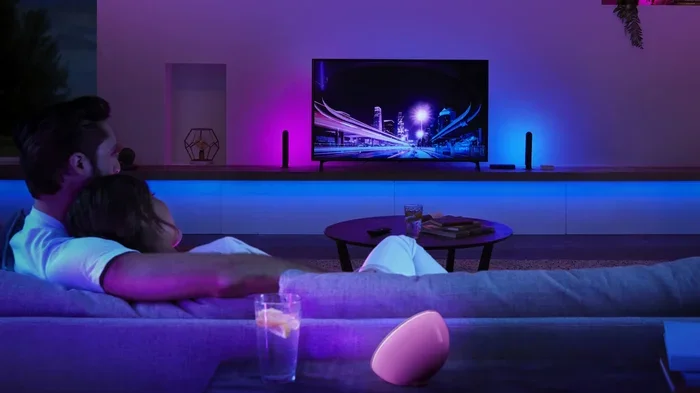
The device also supports different lighting zones. You can set up multiple groups of lights in your room and have them all respond to Netflix content at the same time. This is great for larger rooms where you want lighting effects spread across the space. Some users place light bars behind their TV, while others scatter Philips Hue bulbs around the room for a more dramatic immersive viewing experience.
Does Hue Sync Box Work With Netflix? The Full Answer
Yes, the Hue Sync Box works with Netflix. You can use it to sync your Philips Hue lights to any Netflix content playing on your TV or projector. Whether you are watching a documentary, a thriller, or a bright animated movie, the lighting will adjust to match what is on screen.
However, there is a catch. The Hue Sync Box does not support Dolby Vision content. Netflix offers a lot of content in Dolby Vision, which is a high dynamic range format that provides brighter colors and better contrast. When you watch Dolby Vision content on Netflix, the Hue Sync Box cannot read the video signal properly. This means the lighting sync will not work during those titles.
How Netflix Content Gets Processed
When you stream Netflix, the video signal goes from your device (like a Roku, Apple TV, or Fire Stick) through the Hue Sync Box and then to your TV. The Hue Sync Box reads the signal and analyzes the colors. It then sends commands to your Philips Hue lights to match those colors.
For standard Netflix content that is not in Dolby Vision, this process works well. You get smooth, real-time lighting effects that follow the movie or show. But when you try to watch a Dolby Vision title, the Hue Sync Box either cannot read the signal or falls back to a basic mode that does not sync properly.
Supported Netflix Content Types
Here is a quick look at what works and what does not when using the Hue Sync Box with Netflix:
- Standard Dynamic Range (SDR) Netflix content: This works perfectly. The lighting sync is smooth and responsive.
- Content in HDR10 (non-Dolby Vision): This also works, though the lighting effects may not be as precise as with SDR content.
- Dolby Vision content: This does not work. The Hue Sync Box cannot process the Dolby Vision signal, so the sync feature will not activate.
- 4K Netflix streams: These work as long as they are not in Dolby Vision. The resolution does not affect the lighting sync.
This is an important limitation to keep in mind. Netflix has a growing library of Dolby Vision content, and many popular shows and movies are available in this format. If you watch a lot of Dolby Vision titles, you may find that the Hue Sync Box does not work for a significant portion of your Netflix library.
Setting Up the Hue Sync Box for Netflix Streaming
Setting up the Hue Sync Box for Netflix is not complicated, but it does require the right hardware and a few steps. Here is what you need and how to get it done.
Hardware Requirements
Before you start, make sure you have everything you need. You will need the following items:
- A Philips Hue Sync Box
- A Philips Hue Bridge (version 2 or newer)
- At least two Philips Hue lights (bulbs, light bars, or light strips)
- An HDMI cable to connect your streaming device to the Hue Sync Box
- Another HDMI cable to connect the Hue Sync Box to your TV
- A Netflix-compatible streaming device (Roku, Apple TV, Fire Stick, etc.)
- A TV or projector with HDMI inputs
Without the Philips Hue Bridge, the Sync Box will not work. The Bridge is what connects the Sync Box to your lights and allows them to communicate. Make sure your Bridge is updated to the latest firmware before you begin setup.
Step-by-Step Setup Process
Follow these steps to get your Hue Sync Box working with Netflix:
- Connect your streaming device to the Hue Sync Box. Use an HDMI cable to plug your Roku, Apple TV, or Fire Stick into the input port on the Hue Sync Box.
- Connect the Hue Sync Box to your TV. Use another HDMI cable to connect the output port on the Hue Sync Box to an available HDMI input on your TV.
- Power on the Hue Sync Box. Plug the power cable into the Sync Box and connect it to a wall outlet or power strip.
- Open the Philips Hue app on your phone. Make sure your phone is connected to the same Wi-Fi network as your Hue Bridge.
- Go to the Hue Sync app. The Hue Sync Box uses its own app, which you can download for free. Open it and follow the on-screen instructions to pair the box with your Bridge.
- Select your TV as the source. In the Hue Sync app, choose the option that matches your setup (TV, Projector, or PC Monitor).
- Choose your lighting zone. Select the Philips Hue lights you want to use for the sync effect. You can pick individual lights or groups.
- Start Netflix and play a show. Open the Netflix app on your streaming device, pick a movie, and watch the lighting come alive.
Once everything is set up, you can adjust the lighting intensity, transition speed, and color brightness in the Hue Sync app. These settings let you fine-tune the experience to match your preferences and the size of your entertainment area.
Hue Sync Box vs. Other Lighting Solutions for Netflix
If you are exploring smart lighting options for your Netflix setup, you might be wondering how the Hue Sync Box compares to other solutions. Let us look at a few alternatives and see how they stack up.
Hue Sync Box vs. Philips Hue Light Strips
Philips Hue light strips are a popular choice for TV backlight setups. They stick behind your TV and create a soft glow that can match on-screen colors. However, light strips do not have built-in screen sync technology. You would need a separate device like the Hue Play light bar or the Hue Sync Box to get real-time color matching.
The Hue Sync Box is more powerful because it can control multiple lights at once and analyze the full screen. Light strips are simpler and cheaper, but they offer fewer features.
Hue Sync Box vs. Govee and Other Budget Brands
Budget brands like Govee offer similar screen sync features at a lower price. These devices often work well for basic lighting effects and are easy to set up. However, they may not offer the same quality of color accuracy or integration with a full Philips Hue ecosystem.
If you are already invested in the Philips Hue system, the Hue Sync Box is the best choice. It works seamlessly with your existing Hue lights and offers more control through the Hue app.
Comparison Table
| Feature | Hue Sync Box | Philips Hue Light Strips | Budget Screen Sync Devices |
|---|---|---|---|
| Screen sync capability | Yes | No (needs a sync device) | Yes |
| Dolby Vision support | No | No | No |
| Number of lights supported | Up to 10 | Unlimited (with Bridge) | Varies |
| Price range | $$$ | $-$$ | $ |
| Integration with Hue ecosystem | Full | Full | Limited |
| Netflix compatibility | Yes (non-Dolby Vision) | No sync without extra device | Yes |
Common Issues and Troubleshooting Tips
Even with a proper setup, you might run into some issues when using the Hue Sync Box with Netflix. Here are the most common problems and how to fix them.
Audio and Video Sync Problems
Some users notice a slight delay between the lighting changes and what is happening on screen. This is usually caused by the processing time it takes for the Hue Sync Box to analyze the video signal. In most cases, the delay is so small that you will not notice it. But if it bothers you, try reducing the lighting intensity or switching to a faster transition mode in the Hue Sync app.
If the delay is very noticeable, check your HDMI cables. Using high-quality, certified HDMI cables can reduce lag and improve the overall performance of your setup. Also, make sure your TV is set to the right input mode. Some TVs have a game mode or a low-latency mode that can help speed up the signal processing.
Compatibility Limitations
The biggest compatibility issue with the Hue Sync Box is Dolby Vision. As mentioned earlier, the box does not support this format, which means your lighting effects will not work during Dolby Vision content on Netflix.
Another limitation is that the Hue Sync Box only works with HDMI inputs. If you are using a streaming device that connects wirelessly or through a different port, you may need an adapter or a different setup. Also, the box does not work with all TVs equally. Some TVs process the HDMI signal in a way that interferes with the Sync Box’s ability to read the video data.
If you experience issues, try these troubleshooting steps:
- Restart your Hue Sync Box and Philips Hue Bridge.
- Update the Hue Sync app to the latest version.
- Check that all HDMI cables are firmly connected.
- Try a different HDMI port on your TV.
- Disable any TV features that might interfere, like HDR optimization or motion smoothing.
- Reset the Hue Sync Box and set it up again from scratch.
Expert Tips for the Best Netflix Lighting Experience
Getting the most out of your Hue Sync Box with Netflix comes down to a few smart choices. Here are some expert tips to help you create the best possible setup.
First, place your lights strategically. Light bars behind your TV work great for a subtle glow, but you can also place Philips Hue bulbs around the room for a more immersive effect. The key is to create layers of light that surround you, not just one source behind the screen.
Second, experiment with the Hue Sync app settings. The app lets you adjust the brightness, color saturation, and transition speed. Start with the default settings and then tweak them to find what feels best for your room. A dimmer setting works well for dark rooms, while a brighter setting is better for rooms with lots of natural light.
Third, consider pairing the Hue Sync Box with a good sound system. While the Sync Box handles lighting, a quality soundbar or speaker setup can make your Netflix sessions feel truly cinematic. The combination of ambient lighting and great sound creates an entertainment experience that rivals a real theater.
Fourth, keep your Philips Hue firmware and the Hue Sync app updated. Philips regularly releases updates that improve performance and add new features. An up-to-date setup will give you the smoothest and most reliable color sync experience.
Finally, be mindful of the Dolby Vision limitation. If you find that many of your favorite Netflix shows are in Dolby Vision, you may want to check if those titles are also available in standard HDR or SDR format. This way, you can still enjoy the full lighting effects that the Hue Sync Box provides.
Final Verdict: Is the Hue Sync Box Worth It for Netflix?
So, does the Hue Sync Box work with Netflix? Yes, it does, with some clear limitations. For standard Netflix content, the lighting sync is impressive and adds a new dimension to your viewing experience. The colors respond smoothly, the setup is manageable, and the integration with the Philips Hue ecosystem is seamless.
However, the lack of Dolby Vision support is a significant drawback. If you watch a lot of Netflix content in Dolby Vision, you will miss out on the sync feature for many of your favorite shows and movies. This is something to consider before you spend your money.
Overall, the Hue Sync Box is a great addition to any smart lighting setup for people who watch Netflix on a regular basis. It works best in a dedicated media room or a living room where you can control the lighting environment. If you already own Philips Hue lights or are willing to invest in them, the Sync Box is a worthwhile purchase that elevates your Netflix nights.
Just remember to check your Netflix content formats, set up your hardware correctly, and tweak the app settings to get the best results. With the right setup, the Hue Sync Box can turn your ordinary TV watching into a vibrant, immersive experience that brings your favorite shows to life in a whole new way.
Frequently Asked Questions
Can I use the Hue Sync Box with Netflix on a projector?
Yes, you can. The Hue Sync Box works with both TVs and projectors. Just make sure your projector has an HDMI input and that the streaming device connects to the Hue Sync Box before the projector. The lighting sync will work the same way as it does with a TV setup.
Why does the Hue Sync Box not work with Dolby Vision on Netflix?
The Hue Sync Box does not have the hardware capability to process Dolby Vision signals. Dolby Vision uses a dynamic metadata format that the box cannot read. This means when you watch Dolby Vision content, the lighting sync feature will not activate. You will need to watch Netflix content in standard HDR or SDR format for the sync to work.
How many Philips Hue lights can the Hue Sync Box control?
The Hue Sync Box can control up to 10 Philips Hue lights at once. You can mix and match bulbs, light bars, and light strips. The app lets you group your lights into zones, so you can create a customized lighting setup that fills your room with color sync effects while you watch Netflix.
Do I need a Philips Hue Bridge to use the Sync Box with Netflix?
Yes, the Philips Hue Bridge is required. The Bridge acts as the central hub that connects the Hue Sync Box to your lights and your home Wi-Fi network. Without it, the Sync Box cannot communicate with your Philips Hue devices or process the Netflix video signal for lighting sync.
Can I use the Hue Sync Box with other streaming services besides Netflix?
Absolutely. The Hue Sync Box works with any content that comes through the HDMI input. This includes Disney+, Amazon Prime Video, YouTube, and even gaming consoles. As long as the content is not in Dolby Vision, the color sync feature will work with any streaming service or video source connected through the box.
Is the Hue Sync Box difficult to set up?
No, the setup is straightforward and takes about 15 to 20 minutes. You connect your streaming device to the box, the box to your TV, and then follow the on-screen instructions in the Hue Sync app. The app walks you through pairing your lights and adjusting the settings. Most users find the process easy and enjoy getting started quickly.
=== CONCLUSION ===
The Hue Sync Box is a fun and effective way to bring your Netflix watching experience to life with dynamic ambient lighting. It works with standard Netflix content and creates real-time color sync effects that make movies and shows feel more immersive. While the lack of Dolby Vision support is a real limitation, the device still delivers a compelling experience for the majority of Netflix content you will watch.
If you are building or upgrading your entertainment system, the Hue Sync Box is a solid choice. It pairs well with existing Philips Hue lights and integrates smoothly into any smart lighting setup. Just remember to check your content formats, follow the setup steps carefully, and experiment with the app settings to get the best results.
Now that you know the answer to the question, it is time to decide if the Hue Sync Box is right for your home. Whether you are a casual Netflix viewer or a dedicated movie lover, this little device can add a surprising amount of atmosphere and fun to your screen time. Give it a try, and let your lights do the talking the next time you hit play on Netflix.