Difference Between Microsoft Access and Excel Explained
Microsoft Access is a database tool built for storing and managing large, structured data, while Microsoft Excel is a spreadsheet program ideal for calculations, analysis, and small datasets. Understanding their core differences helps you pick the right tool for your workflow.
Many people wonder about the difference between Microsoft Access and Excel. At first glance, both tools look similar. They both handle data. They both let you sort, filter, and search. But underneath the surface, they are very different creatures. One is a relational database built for managing large, structured information. The other is a spreadsheet program built for quick calculations and analysis. Knowing which one to use can save you hours of frustration.
This guide breaks down everything you need to know. We will explore what each tool does best. We will compare them side by side. And we will help you decide which one fits your needs. Whether you are a small business owner, a student, or an office worker, this article has you covered. Let us dive in and clear up the confusion once and for all.
Key Takeaways
- Access is a relational database: It handles structured data, complex relationships, and multi-user environments with ease.
- Excel is a spreadsheet powerhouse: It excels at calculations, data visualization, and quick analysis of smaller datasets.
- Data storage capacity differs greatly: Access manages millions of records, while Excel caps at about 1 million rows.
- Use Access for data integrity: It enforces rules and relationships that keep your data clean and consistent.
- Use Excel for flexibility: It is perfect for ad-hoc analysis, charts, and fast calculations.
- Both support VBA: But Access offers more built-in tools for forms, queries, and reports without coding.
- Choose based on your needs: Match the tool to your data size, complexity, and team collaboration requirements.
📑 Table of Contents
What Is Microsoft Access?
Microsoft Access is a database management system from the Microsoft Office family. It lets you store, organize, and retrieve large amounts of structured data. Unlike a simple spreadsheet, Access uses tables, relationships, and queries to manage information in a powerful way.
How Access Handles Data
Access stores data in tables that are linked together. These links are called relationships. For example, you might have a table for customers and another table for orders. Each order connects to a specific customer. This structure keeps your data clean and avoids duplication.
Here are some core features of Access:
- Tables: Store your raw data in organized rows and columns.
- Queries: Let you pull specific data using simple or advanced criteria.
- Forms: Provide easy data entry screens for users.
- Reports: Generate formatted printouts and summaries automatically.
- Relationships: Link tables together to maintain data integrity.
Who Uses Microsoft Access?
Access is popular among small to medium businesses. It is great for managing inventory, tracking customer information, or running a membership database. Because it supports multi-user access, teams can work in the same database at the same time. This makes it a strong choice for collaborative environments.
Access also handles large datasets with ease. You can store millions of records without slowing down. This is a huge advantage over spreadsheet tools when your data grows beyond a few thousand rows.
What Is Microsoft Excel?
Microsoft Excel is one of the most widely used spreadsheet programs in the world. It is designed for calculations, data analysis, and visualization. If you have ever created a budget, a chart, or a simple list, you have likely used Excel.
How Excel Handles Data
Excel stores data in a grid of cells organized by rows and columns. Each cell can hold a number, text, or a formula. Formulas are what make Excel so powerful. You can add, average, count, and look up data with built-in functions. Pivot tables let you summarize large amounts of data in seconds.
Here are some standout features of Excel:
- Formulas and Functions: Perform thousands of calculations instantly.
- Charts and Graphs: Turn raw numbers into visual stories.
- Conditional Formatting: Highlight cells based on rules you set.
- Data Validation: Control what users enter into cells.
- Macros and VBA: Automate repetitive tasks with code.
Who Uses Microsoft Excel?
Excel is used by almost every profession. Accountants use it for financial models. Marketers use it for campaign tracking. Teachers use it for grading. Even scientists use it for data analysis. Its flexibility makes it the go-to tool for quick, on-the-fly work. You do not need a database background to use Excel effectively.
However, Excel has a limit. A single worksheet holds about 1,048,576 rows. For most everyday tasks, this is plenty. But when your data grows beyond that, or when you need strict data integrity, Excel starts to show its limits.
Key Differences Between Access and Excel
The difference between Microsoft Access and Excel comes down to how they are built and what they are designed to do. Let us look at the main areas where they differ.
Data Structure
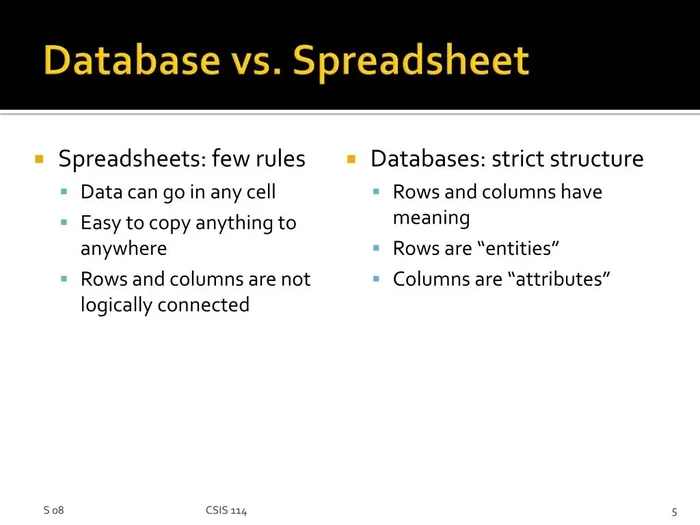
Access uses a relational database structure. Data is split into connected tables. Each table has a specific purpose. This design reduces redundancy and keeps data consistent. Excel uses a flat grid structure. All your data lives on one sheet (or a few sheets). There are no built-in relationships between different parts of your workbook.
Data Storage Capacity
This is one of the biggest differences. Access can handle millions of records across multiple tables. Excel caps out at roughly 1 million rows per sheet. For small projects, Excel is fine. For enterprise-level data, Access wins hands down.
Data Integrity and Validation
Access enforces strict rules. You can set field-level rules that prevent bad data from entering your database. You can also enforce referential integrity, which ensures that linked records stay consistent. Excel offers data validation, but it is not as robust. Users can still accidentally enter wrong data in cells.
Multi-User Support
Access is built for multiple users. Several people can enter data, run queries, and generate reports at the same time. Excel can be shared, but it often causes conflicts. When multiple people try to edit the same file, things can get messy fast.
Reporting and Forms
Access has built-in tools for creating professional forms and reports. You do not need to know how to code. Excel has charting tools, but creating structured forms and printed reports takes more manual effort.
Learning Curve
Excel is easier to pick up. Most people have used it before. Access requires a basic understanding of database concepts like tables, queries, and relationships. The learning curve is steeper, but the payoff is a much more powerful system.
Comparison Table
| Feature | Microsoft Access | Microsoft Excel |
|---|---|---|
| Primary Purpose | Database management | Spreadsheet and calculations |
| Data Structure | Relational (linked tables) | Flat grid (cells and sheets) |
| Max Data Size | Millions of records | ~1 million rows per sheet |
| Multi-User Support | Strong, built-in | Limited, prone to conflicts |
| Data Validation | Strict, enforced rules | Basic cell-level rules |
| Forms | Built-in drag-and-drop forms | No native form builder |
| Reports | Professional, automated reports | Basic charting and printing |
| Learning Curve | Moderate to steep | Gentle |
| Best For | Large, structured datasets | Quick analysis and small data |
When to Use Microsoft Access
Knowing when to reach for Access makes a big difference. Here are clear signs that Access is the right choice for your project.
You Are Managing Large, Structured Data
If your project involves thousands or millions of records, Access is the better tool. Its relational database design keeps everything organized. You can link customer data, order data, and product data without duplication.
Multiple People Need to Work Together
Access supports multi-user access out of the box. Your team can enter data simultaneously without overwriting each other’s work. This is a huge advantage for shared databases.
You Need Strict Data Rules
If data accuracy is critical, Access enforces rules that prevent mistakes. You can set required fields, restrict input types, and maintain data integrity across all connected tables.
You Want Built-In Forms and Reports
Access lets you create user-friendly data entry forms without writing code. You can also generate professional reports with just a few clicks. This saves a ton of time compared to building everything manually in Excel.
Quick Tips for Access Users
- Start with a clear plan for your table structure before you build anything.
- Use the Query Wizard to pull data without writing SQL code.
- Back up your database regularly to avoid data loss.
- Use forms for data entry to keep your tables clean and error-free.
When to Use Microsoft Excel
Excel shines in situations where flexibility and speed matter most. Here is when you should choose Excel over Access.
You Need Quick Calculations and Analysis
Excel is unmatched for fast math and analysis. Whether you are building a budget, forecasting sales, or analyzing survey results, Excel handles it with ease. Its library of built-in functions covers almost any calculation you can think of.
Your Dataset Is Small to Medium-Sized
For datasets under a million rows, Excel works perfectly. It is fast, flexible, and easy to share. You do not need to set up tables and relationships to get started.
You Want to Create Charts and Visualizations
Excel has some of the best charting tools available. You can create bar charts, line graphs, scatter plots, and more in seconds. Visualizing data in Excel is intuitive and visually appealing.
You Are Working Alone or in a Small Team
If only one or two people need to work with the file, Excel is a great choice. The sharing and collaboration features have improved, but Access still handles multi-user scenarios better.
Quick Tips for Excel Users
- Use pivot tables to summarize data quickly and easily.
- Name your ranges to make formulas easier to read and manage.
- Use conditional formatting to spot trends and outliers at a glance.
- Save your work as a template if you reuse the same structure often.
Common Mistakes People Make
Many users make avoidable mistakes when choosing between Access and Excel. Here are the most common ones to watch out for.
Using Excel for Large Databases
This is the number one mistake. People try to manage thousands of records in Excel. It becomes slow, error-prone, and hard to maintain. If your data has clear relationships and grows over time, Access is the better fit.
Using Access for Simple Calculations
On the flip side, some people build complex Access databases for tasks that a simple spreadsheet could handle. If you just need to track monthly expenses or create a quick budget, Excel is the smarter choice. Do not overcomplicate things.
Ignoring Data Validation
In Excel, people often skip data validation. This leads to typos, duplicates, and inconsistent entries. In Access, validation rules are built into the structure. Always enforce rules that keep your data clean.
Not Backing Up Files
Both tools are vulnerable to data loss if you do not back up your files. Access databases can corrupt if not handled properly. Excel files can be overwritten by mistake. Always keep backups, and consider cloud storage for extra safety.
Expert Insights: How Professionals Decide
Industry professionals use a simple framework to decide between Access and Excel. They ask three key questions:
- How much data do we have? Small data means Excel. Large data means Access.
- Do we need strict data relationships? If yes, go with Access. If no, Excel works fine.
- How many people will use the file? Multiple users at once? Access is better. Solo or small team? Excel is fine.
Many professionals also use both tools together. They keep the master data in Access and export summaries to Excel for analysis and presentation. This gives them the best of both worlds.
Expert Tip: You do not always have to choose just one. Many businesses use Access as their backend database and Excel as their frontend reporting tool. This combination is powerful and widely used in the industry.
Which One Should You Choose?
The answer depends on your specific situation. Here is a simple guide to help you decide.
Choose Microsoft Access if:
- You are managing large amounts of structured data.
- Multiple people need to access and edit the data at the same time.
- Data accuracy and relationships are critical.
- You need built-in forms and professional reports.
- Your data will keep growing over time.
Choose Microsoft Excel if:
- You need to perform quick calculations and analysis.
- Your dataset is small to medium-sized.
- You want to create charts and visualizations.
- You are working mostly on your own.
- You need something easy to set up and share.
Both tools are part of the Microsoft Office family, and both are incredibly useful. The key is matching the right tool to the right job. Once you understand the difference between Microsoft Access and Excel, making the right choice becomes much easier.
Conclusion
The difference between Microsoft Access and Excel comes down to purpose and scale. Access is a relational database designed for managing large, structured data with multiple users. Excel is a spreadsheet program designed for quick calculations, analysis, and visualization of smaller datasets.
Neither tool is better than the other. They are simply built for different jobs. When you use the right tool for the right task, your work becomes faster, cleaner, and more efficient. Take the time to assess your data needs before you start building. Your future self will thank you.
Now that you understand both tools, you can make a confident decision. Whether you build a database in Access or create a spreadsheet in Excel, you are equipped with the knowledge to get the job done right.
Frequently Asked Questions
Can I use both Microsoft Access and Excel together?
Yes, absolutely. Many professionals link Excel to Access databases. You can pull data from Access into Excel for analysis, or export Excel data into Access for storage. Using both tools together gives you the best of each world.
Is Microsoft Access hard to learn?
Access has a steeper learning curve than Excel because it involves database concepts like tables, queries, and relationships. However, Microsoft provides templates and wizards that make it much easier to get started. With a little practice, most people become comfortable within a few weeks.
Can Excel handle as much data as Access?
No. Excel is limited to about 1,048,576 rows per sheet. Access can handle millions of records across multiple tables. If your data exceeds Excel’s limits or requires complex relationships, Access is the better choice.
Which tool is better for data analysis?
It depends on the type of analysis. Excel is better for quick, flexible analysis with formulas, pivot tables, and charts. Access is better for analyzing large, structured datasets using powerful queries and built-in reporting tools.
Do I need programming skills to use Access?
No. Access includes visual tools for building forms, queries, and reports without any coding. However, learning basic VBA can help you automate tasks and build more advanced solutions over time.
Is Microsoft Access still relevant in 2024?
Yes. While Access is an older tool, it remains widely used for small to medium business database needs. It is especially valuable for organizations that need a simple, affordable database solution without switching to cloud-based alternatives.