Differences Between Rj45 And Rj48 Connectors Explained
The RJ45 and RJ48 connectors may look similar, but they serve very different purposes in networking and telecommunications. Understanding the differences between RJ45 and RJ48 helps you choose the right connector for your setup, avoid costly mistakes, and ensure reliable signal transmission. This guide breaks down every key difference in plain language so you can make confident decisions about your network cabling and telecom equipment.
Key Takeaways
- Different Purposes: RJ45 is used mainly for Ethernet networking, while RJ48 is designed for T1 and ISDN telecom lines.
- Pinout Variations: The wiring arrangements differ significantly between RJ45 and RJ48 connectors, affecting signal performance.
- Physical Similarities: Both connectors share the same 8P8C modular shape, which often causes confusion.
- Shielding Matters: RJ48 connectors typically offer better shielding for high-noise telecom environments.
- Using the Wrong Connector: Mixing up RJ45 and RJ48 can lead to signal loss, intermittent connections, or equipment damage.
- Application Dictates Choice: Your specific networking or telecom need determines which connector is the right fit.
📑 Table of Contents
- What Are RJ45 and RJ48 Connectors?
- RJ45 vs RJ48: Key Differences at a Glance
- Understanding the RJ45 Connector
- Understanding the RJ48 Connector
- Pinout Comparison: RJ45 vs RJ48
- When to Use RJ45 Connectors
- When to Use RJ48 Connectors
- Common Mistakes and How to Avoid Them
- Expert Insights on Choosing the Right Connector
- Key Takeaways
- Conclusion
What Are RJ45 and RJ48 Connectors?
If you have ever looked behind a computer or inside a networking rack, you have probably seen an RJ45 connector. It is the small, rectangular plug that connects your Ethernet cable to a computer, router, or switch. These connectors are everywhere in modern offices, homes, and data centers.
Now, RJ48 connectors look almost identical at first glance. They are the same size and shape. But underneath that familiar shell, they serve a completely different role. RJ48 connectors are built for telecommunications, specifically for T1 lines, ISDN connections, and other carrier-grade services.
The term “RJ” stands for Registered Jack. It is a standardized interface for connecting telecommunications or data equipment. The numbers that follow — like 45 and 48 — indicate different specifications, wiring standards, and use cases. Even though they share the same 8-position, 8-contact (8P8C) modular design, their internal wiring and intended applications set them apart.
Many people confuse these two connectors because they fit into the same kind of ports and look the same to the untrained eye. This confusion can cause real problems. Plugging an RJ45 cable into an RJ48 port — or vice versa — can lead to signal integrity issues, dropped connections, or even damaged equipment. That is why understanding the differences matters.
In this article, we will walk through every major difference between RJ45 and RJ48 connectors. We will cover pinouts, wiring standards, shielding, typical use cases, and common mistakes. By the end, you will know exactly which connector to reach for in any situation.
RJ45 vs RJ48: Key Differences at a Glance
Before diving into the technical details, let us lay out the main differences in a clear, side-by-side comparison. This overview gives you a quick mental map of what sets these two connectors apart.
Physical Design and Appearance
Both RJ45 and RJ48 connectors use the same 8P8C modular housing. They have eight pins arranged in a single row. The plastic casing looks virtually the same. You cannot tell them apart just by holding them. However, RJ48 connectors are often built with sturdier materials and better shielding to handle the demands of telecom environments.
Wiring and Pinout
This is where things get interesting. The RJ45 pinout follows the T568A or T568B wiring standard. These standards define which wire goes to which pin. RJ48 uses a completely different pin arrangement. The wires are mapped differently to support the electrical requirements of telecom signals like T1 and ISDN.
Signal Type and Application
RJ45 connectors carry Ethernet data signals for local area networks (LANs). They handle internet traffic, file transfers, and general data communication. RJ48 connectors carry telecom carrier signals. These include T1 lines, ISDN BRI, and other wide-area network (WAN) connections used by phone companies and large enterprises.
Shielding and Noise Protection
RJ48 connectors typically come with better shielding than standard RJ45 plugs. Telecom lines often run through environments with heavy electromagnetic interference (EMI). The shielding in RJ48 connectors helps maintain signal quality over long distances. RJ45 connectors are more commonly used in shorter-range setups where interference is less of a concern.
Understanding the RJ45 Connector
The RJ45 connector is the workhorse of modern networking. You will find it in almost every device that connects to a wired network. Let us take a closer look at what makes it tick.
How RJ45 Wiring Works
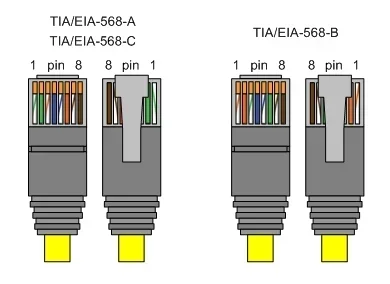
RJ45 connectors follow two main wiring standards: T568A and T568B. Both standards use eight wires, but the order in which they are arranged differs slightly. The T568B standard is more common in North America, while T568A is often preferred in government and international installations.
Here is a simplified look at the T568B pinout:
- Pin 1: White/Orange stripe
- Pin 2: Orange
- Pin 3: White/Green stripe
- Pin 4: Blue
- Pin 5: White/Blue stripe
- Pin 6: Green
- Pin 7: White/Brown stripe
- Pin 8: Brown
These wires are paired and twisted to reduce crosstalk and maintain data signal integrity. The twisted pair design is essential for Ethernet communication at speeds up to 10 Gbps over short distances.
Common Uses for RJ45
RJ45 connectors are used in a wide variety of networking applications. Here are the most common scenarios where you will encounter them:
- Home and office Ethernet networks: Connecting computers, printers, and smart devices to a router or switch.
- Data center cabling: Linking servers, patch panels, and network switches together.
- PoE (Power over Ethernet) setups: Delivering both data and power to devices like IP cameras and wireless access points.
- Patch cables: Short, pre-made cables used to connect devices in a rack or on a desk.
- Fiber media converters: Bridging fiber optic connections to copper Ethernet networks.
The versatility of the RJ45 connector is one of the main reasons it has become the universal standard for wired networking. Almost every networking device made today includes an RJ45 port.
RJ45 Cable Types and Categories
Not all RJ45 cables are the same. The cable category determines the maximum speed and bandwidth. Here is a quick breakdown:
- Cat5e: Supports speeds up to 1 Gbps at 100 MHz. Still widely used in older installations.
- Cat6: Supports speeds up to 10 Gbps at 250 MHz. A solid choice for most modern networks.
- Cat6a: Supports 10 Gbps at 500 MHz with better shielding against interference.
- Cat7: Fully shielded, supports 10 Gbps at 600 MHz. Common in enterprise environments.
- Cat8: The latest standard, supporting 25-40 Gbps at 2000 MHz. Designed for data centers.
When choosing an RJ45 cable, always match the cable category to your network equipment’s capabilities. Using a Cat5e cable with a Gigabit switch will limit your speed to 1 Gbps, no matter what.
Understanding the RJ48 Connector
The RJ48 connector is less common in everyday life, but it plays a critical role in telecommunications infrastructure. If you work with T1 lines, ISDN, or carrier services, you will encounter RJ48 connectors regularly.
How RJ48 Wiring Differs
The RJ48 connector uses a different pinout than RJ45. The most common RJ48 wiring standard is RJ48C. Here is how the pins are arranged:
- Pin 1: White/Orange stripe
- Pin 2: Orange
- Pin 3: White/Green stripe
- Pin 4: Blue
- Pin 5: White/Blue stripe
- Pin 6: Green
- Pin 7: White/Brown stripe
- Pin 8: Brown
Wait — that looks the same as T568B! This is exactly why so many people get confused. The wire colors can be identical, but the purpose of each pin changes. In RJ48, pins 1, 2, 4, and 5 carry the actual data and timing signals for T1 lines. Pins 3, 6, 7, and 8 are used for loopback testing and grounding. This is a fundamentally different arrangement than how RJ45 uses its pins for Ethernet data transmission.
T1 Lines and ISDN Connections
RJ48 connectors are primarily used with T1 lines. A T1 line is a dedicated telecommunications link that provides 1.544 Mbps of data transfer. It is commonly used by businesses for reliable, high-speed internet access and point-to-point connections.
ISDN (Integrated Services Digital Network) also relies on RJ48 connectors. ISDN allows voice and data to travel over the same line, which was a big deal in the 1990s and early 2000s. While ISDN is less common today, it is still used in some legacy systems and specific industries.
RJ48 connectors are also used in DTE (Data Terminal Equipment) and DCE (Data Circuit-terminating Equipment) setups. These are the devices that establish, maintain, and terminate communication sessions in telecom networks.
Shielding and Build Quality
One of the most noticeable differences between RJ45 and RJ48 is the build quality. RJ48 connectors are typically shielded with metal casings or additional grounding tabs. This shielding protects the signal from electromagnetic interference, which is especially important in telecom environments where multiple lines run close together.
The connectors are also built to withstand more physical stress. Telecom equipment is often installed in rugged environments — wiring closets, outdoor cabinets, and central offices. RJ48 connectors are designed to handle these conditions reliably over long periods.
Pinout Comparison: RJ45 vs RJ48
Understanding the pinout differences is essential for anyone who works with network cabling or telecom wiring. Let us break it down clearly.
RJ45 T568B Pinout
In a standard RJ45 T568B cable, the pin assignments are designed for Ethernet data transmission. Pins 1 and 2 are the transmit pair, and pins 3 and 6 are the receive pair. Pins 4, 5, 7, and 8 are reserved or used for PoE in some configurations.
RJ48C Pinout
In an RJ48C connector, the data signals are carried on pins 1, 2, 4, and 5. The remaining pins serve different functions, including loopback testing. This means that even if you use the same wire colors, the signal routing is completely different.
Why Pinout Matters
If you wire an RJ48 cable using the T568B standard (thinking it is an RJ45), your T1 line will not work correctly. The data signals will not reach the right pins, and the loopback pins will be carrying data instead of test signals. This is a common mistake that causes frustrating troubleshooting sessions.
Always double-check the wiring standard before crimping any connector. Label your cables clearly, especially in environments where both RJ45 and RJ48 cables are present. A simple label can save hours of downtime.
When to Use RJ45 Connectors
Knowing when to use RJ45 connectors is straightforward for most people. If your project involves Ethernet networking, the answer is almost always RJ45.
Typical RJ45 Use Cases
- Home networks: Connecting desktops, gaming consoles, smart TVs, and NAS devices to your router.
- Office LANs: Running structured cabling to desks, conference rooms, and server racks.
- Network switches and routers: Using patch cables to interconnect network hardware.
- Security cameras: Connecting IP cameras to a PoE switch for power and data over a single cable.
- Wi-Fi access points: Providing a wired backhaul connection for wireless access points.
If you are setting up any kind of standard Ethernet network, RJ45 is the connector you need. It is universally supported, easy to install, and available in every length and category you can imagine.
Quick Tips for RJ45 Installation
- Always use a certified cable tester after crimping a new RJ45 connector.
- Keep cable runs under 100 meters (328 feet) for optimal performance.
- Use shielded cables in environments with high EMI, such as near electrical panels.
- Match your cable category to your network speed requirements.
- Leave some slack in cable runs for future maintenance and rerouting.
When to Use RJ48 Connectors
RJ48 connectors are specialized tools. You reach for them when you are working with telecom services, not standard Ethernet networks.
Typical RJ48 Use Cases
- T1 line connections: Connecting a CSU/DSU (Channel Service Unit/Data Service Unit) to a T1 line.
- ISDN installations: Setting up ISDN BRI connections for voice and data services.
- Carrier equipment: Connecting telecom provider equipment at the demarcation point.
- Legacy WAN links: Maintaining older wide-area network connections that use T1 or E1 infrastructure.
- Loopback testing: Using the loopback pins on RJ48 to test signal integrity on telecom lines.
If you are a network technician or telecom installer, you will deal with RJ48 connectors regularly. Even if you are a home user, you might encounter an RJ48 connection if your internet service provider uses a T1 line for your connection.
Quick Tips for RJ48 Installation
- Always verify the wiring standard with your telecom provider before installing.
- Use shielded RJ48 cables to minimize interference in carrier environments.
- Label all RJ48 cables clearly to avoid confusion with RJ45 cables.
- Test loopback connections before putting the line into service.
- Keep spare RJ48 connectors on hand, as they are less commonly stocked than RJ45.
Common Mistakes and How to Avoid Them
Even experienced technicians sometimes run into trouble with RJ45 and RJ48 connectors. Here are the most common mistakes and how to prevent them.
Mistake 1: Assuming They Are Interchangeable
The biggest mistake is treating RJ45 and RJ48 as the same connector. They are not. While they share the same physical shape, the wiring and signal purposes are different. Always verify which connector type your equipment requires before making a cable.
Mistake 2: Using the Wrong Wiring Standard
Wiring an RJ48 cable with T568B standards will not work for telecom applications. The pin assignments are different, and the signals will not route correctly. Always follow the correct wiring standard for the connector type you are using.
Mistake 3: Ignoring Shielding Requirements
Using an unshielded RJ45 cable in a high-interference telecom environment can cause signal degradation. Similarly, using a non-shielded RJ48 cable in a noisy industrial setting can lead to dropped connections and data errors. Always match the cable shielding to the environment.
Mistake 4: Mixing Up Cable Labels
In a rack with dozens of cables, it is easy to grab the wrong one. If both RJ45 and RJ48 cables are present, label them clearly. Use color-coded cable ties or printed labels to distinguish telecom cables from Ethernet cables.
Mistake 5: Overlooking Loopback Testing
RJ48 connectors include dedicated loopback pins for testing. Skipping this step can mean missing a fault in the line before it causes an outage. Always perform a loopback test when installing or troubleshooting RJ48 connections.
Expert Insights on Choosing the Right Connector
Choosing between RJ45 and RJ48 comes down to one simple question: What type of signal are you carrying?
If the answer is Ethernet data — whether it is a home network, a business LAN, or a data center — go with RJ45. It is the universal standard, and every networking device supports it.
If the answer is telecom carrier signals — T1, ISDN, or other WAN services — you need RJ48. These connectors are purpose-built for those applications and provide the shielding and pinout configuration that telecom equipment requires.
One more thing to keep in mind: some modern equipment supports both connector types through adapters. If you are in a pinch, an RJ45-to-RJ48 adapter can bridge the gap temporarily. However, adapters should never be a long-term solution. They add a potential point of failure and can degrade signal quality if they are not high quality.
When in doubt, consult your equipment manual or reach out to your telecom provider. They can confirm exactly which connector type and wiring standard you need for your specific setup.
Key Takeaways
- Different Purposes: RJ45 handles Ethernet networking, while RJ48 is built for telecom and T1 line connections.
- Same Shape, Different Wiring: Both connectors use the 8P8C modular design, but their pinouts serve entirely different signal paths.
- Shielding Matters: RJ48 connectors typically include better shielding for noisy telecom environments.
- Using the Wrong Connector Causes Problems: Mixing them up leads to signal loss, failed connections, and potential equipment issues.
- Application Dictates Choice: Always match the connector to your specific networking or telecom application.
- Test Before Deploying: Use cable testers and loopback tests to verify your connections work correctly.
Conclusion
The differences between RJ45 and RJ48 connectors may seem subtle, but they have a big impact on how your network or telecom system performs. RJ45 connectors are the go-to choice for Ethernet networking, while RJ48 connectors serve the specialized world of T1 lines, ISDN, and carrier services.
By understanding the pinout differences, wiring standards, shielding options, and typical use cases, you can avoid costly mistakes and ensure reliable connections every time. The next time you face a networking or telecom project, you will know exactly which connector to choose and why.
Take the time to get it right. Label your cables, test your connections, and always match your connector to your application. A little knowledge goes a long way in keeping your network cabling and telecom infrastructure running smoothly.
Frequently Asked Questions
Can I use an RJ45 cable in an RJ48 port?
Technically, the physical shape allows it, but it will not work correctly. The pinouts are different, so the signals will not route to the right pins. Always use the correct connector type for your specific application to avoid connectivity issues and potential equipment damage.
Are RJ45 and RJ48 connectors the same size?
Yes, they are the same size. Both use the 8P8C modular design, which means eight positions and eight contacts. This is why they are so easy to confuse. The difference lies in the internal wiring and the intended signal type, not in the physical dimensions.
What is the main difference between T568B wiring and RJ48C wiring?
T568B wiring is designed for Ethernet data transmission over RJ45 connectors, with pins 1, 2, 3, and 6 handling the primary data pairs. RJ48C wiring is designed for telecom signals over RJ48 connectors, with pins 1, 2, 4, and 5 carrying the data and timing signals for T1 lines, and the remaining pins used for loopback testing and grounding.
Do I need special tools to install RJ48 connectors?
You can use the same crimping tools for RJ48 as you do for RJ45. However, it is important to use the correct wiring guide or template for RJ48 to ensure the pins are arranged properly. A quality cable tester is also essential to verify the connection before putting it into service.
Is RJ48 still used in modern networks?
Yes, RJ48 connectors are still used in telecom environments where T1 lines and ISDN connections are active. While these technologies are being phased out in some areas, many businesses and carriers still rely on them. RJ48 remains an important connector type for anyone working with legacy telecom infrastructure or dedicated carrier lines.
What happens if I accidentally mix up RJ45 and RJ48 cables in a rack?
Mixing up the cables can cause a range of problems, from no connectivity at all to intermittent signal loss and data corruption. In telecom setups, it can also disrupt carrier services and trigger service outages. Always label your cables clearly and double-check before connecting anything to a port.