How Do I Charge My Insignia Bluetooth Speaker Guide
Charging your Insignia Bluetooth speaker is simple once you know the right steps and tools. This guide covers everything from choosing the correct cable to troubleshooting common charging problems. You will learn how to keep your speaker powered up and ready to go anytime.
Charging your Insignia Bluetooth speaker might seem like a simple task. But there is more to it than just plugging in a cable. Whether you own the Insignia NS-SP1 or another popular model, knowing the right way to charge it can make a big difference. The battery life, charging speed, and overall performance all depend on how you handle the charging process. In this guide, we will walk you through every step. You will learn what tools you need, how long charging takes, and how to fix common problems. Let us get started so your speaker stays powered and ready to play.
Many people buy a Bluetooth speaker and assume charging is the same for every device. That is not true. Different models use different cables and power requirements. Some Insignia speakers charge quickly, while others take a bit longer. Understanding your specific model makes all the difference. This guide breaks it all down in plain language. No confusing jargon, no guesswork. Just clear steps you can follow right away.
Key Takeaways
- Use the right cable: Most Insignia speakers use a micro USB or USB-C cable for charging.
- Check the LED light: The charging indicator tells you if your speaker is powered on or charging.
- Avoid overcharging: Unplug your speaker once it reaches full charge to protect battery health.
- Power banks work great: You can charge your Insignia speaker on the go using a portable power bank.
- Troubleshoot smart: Try a different cable or power source if your speaker refuses to charge.
📑 Table of Contents
- Understanding Your Insignia Bluetooth Speaker
- What You Need to Charge Your Insignia Speaker
- Step-by-Step Charging Instructions
- How Long Does It Take to Charge Your Insignia Speaker?
- Troubleshooting Common Charging Issues
- Tips to Extend Your Insignia Speaker Battery Life
- Common Mistakes People Make When Charging Bluetooth Speakers
- When to Consider a Replacement Battery
- Can You Use Your Insignia Speaker While Charging?
- Final Thoughts
Understanding Your Insignia Bluetooth Speaker
Before you plug anything in, it helps to know what you are working with. Insignia offers several Bluetooth speaker models, and each one has unique charging needs. Let us look at the basics so you feel confident before you start.
What Models of Insignia Speakers Are There?
Insignia carries a range of wireless speakers under its brand. Some models are small and portable, perfect for picnics and trips. Others are larger and deliver richer sound for bigger spaces. The Insignia NS-SP1 is one of the most popular choices. It offers solid sound and a compact design. Other models in the lineup include the Insignia NS-P50 and various portable Bluetooth options sold through Best Buy. Each model may have slightly different charging requirements, so always check your user manual first.
Battery Capacity and What It Means
Battery capacity is measured in milliampere-hours, or mAh. A higher mAh number means more power and longer playtime. Most Insignia portable speakers have a battery between 2,000 mAh and 5,000 mAh. This gives you several hours of continuous music playback. The battery also affects how long the charging process takes. A larger battery needs more time to fill up. Knowing your speaker’s capacity helps you plan your charging schedule better.
What You Need to Charge Your Insignia Speaker
Getting the right tools ready makes the whole process smooth. You do not need anything fancy, but using the correct items matters. Here is what you will need before you begin.
The Right Charging Cable
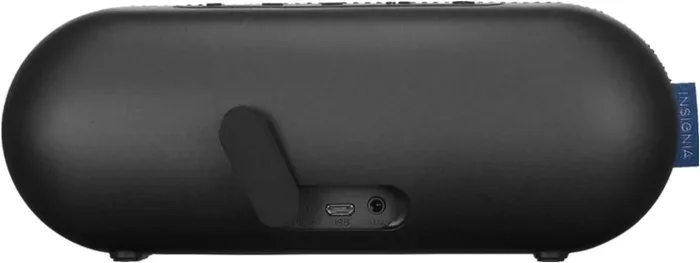
Most Insignia Bluetooth speakers use a micro USB cable or a USB-C cable. The cable type depends on your specific model. Check the charging port on the bottom or back of your speaker. If it is a small rectangular port, you likely need a micro USB cable. If it is a smaller oval port, you need a USB-C cable. Using the wrong cable can damage the port or fail to charge the speaker at all. Always use the cable that came with your speaker or one that matches the port type.
Power Sources for Charging
You have several options for powering up your Insignia speaker. A USB wall adapter is the most common choice. You can also use a computer, a car charger, or a portable power bank. Each source has its own advantages. A wall adapter usually provides the fastest charge. A computer works well when you are already at your desk. A power bank is perfect for outdoor trips where you do not have access to an outlet. If you want to charge your device on the go, a good power bank is a reliable companion. You can learn more about using power banks for charging devices like can I power my laptop with a power bank to understand portable power better.
Step-by-Step Charging Instructions
Now that you have your cable and power source ready, let us walk through the actual charging process. Follow these steps carefully for the best results.
Charging with a USB Wall Adapter
This is the most common and fastest way to charge your Insignia speaker. Start by plugging the USB cable into the wall adapter. Then connect the other end of the cable to your speaker. Plug the adapter into a wall outlet. The LED light on your speaker should turn on. It might flash red or show a pulsing light to indicate charging. Once the battery is full, the light usually turns solid or goes off. This method works well for daily charging at home.
Charging with a Power Bank
A power bank is a great option when you are away from wall outlets. Connect your USB cable to the power bank and then to your speaker. Make sure the power bank has enough charge to share. Most Insignia speakers draw power at a standard rate, so any decent power bank will work. This is especially handy during camping trips, beach days, or long road trips. For more on portable charging solutions, you might also check out whether you can charge my battery through a USB port for additional insights.
Charging via Computer or Laptop
You can also charge your Insignia speaker using a computer’s USB port. This is slower than a wall adapter, but it works in a pinch. Simply plug the USB cable into your computer and connect it to the speaker. Your computer will send power to the speaker. Keep in mind that the charging speed depends on your computer’s USB port. Older USB 2.0 ports charge more slowly than newer USB 3.0 ports. If you are curious about other USB charging scenarios, you can explore topics like can I charge my laptop with a USB-C car charger for related charging tips.
How Long Does It Take to Charge Your Insignia Speaker?
Charging time varies based on the model and the power source you use. Let us break it down so you know what to expect.
Charging Times by Model
Most Insignia Bluetooth speakers take between two and four hours to fully charge. Smaller models with smaller batteries usually charge faster. Larger models with bigger batteries take a bit longer. If your speaker came with a wall adapter, use it for the fastest charge. Using a computer or a low-power USB source will take more time. Always refer to your user manual for the exact charging time listed for your specific model.
Battery Life Expectations
Once fully charged, an Insignia Bluetooth speaker typically lasts between eight and twelve hours. The actual battery life depends on the volume level and the type of music you play. Higher volume drains the battery faster. Playing bass-heavy music also uses more power than lighter tracks. To get the most out of each charge, try to keep the volume at a moderate level. This simple habit can extend your listening sessions significantly.
Troubleshooting Common Charging Issues
Sometimes things do not go as planned. Your speaker might not charge, or the light might behave strangely. Do not worry. Most charging problems have simple fixes. Let us go through the most common issues.
Speaker Not Charging at All
If your Insignia speaker does not charge, start by checking the cable. A damaged or worn-out cable is the most common culprit. Try a different USB cable to see if that solves the problem. Next, check the power source. Plug the adapter into a different wall outlet. If you are using a computer, try a different USB port. Sometimes the USB port itself does not provide enough power. Clean the charging port on your speaker gently with a dry brush. Dust or lint can build up and block the connection. If none of these steps work, the battery inside the speaker may need replacement.
LED Indicator Light Problems
The LED light on your speaker gives you important clues about the charging status. A flashing red light usually means the speaker is charging. A solid green or blue light often means the battery is full. If the light does not turn on at all, the cable or power source might be faulty. If the light flashes but never turns solid, the battery might not be holding a charge. In that case, you may need to contact Insignia support or consider a battery replacement. Never ignore a blinking light pattern. It is your speaker trying to tell you something important.
Tips to Extend Your Insignia Speaker Battery Life
Taking good care of your speaker battery goes a long way. A few simple habits can keep your battery healthy for years. Here are some expert tips to follow.
Best Charging Practices
Do not wait until your speaker dies completely before charging it. Lithium-ion batteries, which most Bluetooth speakers use, prefer partial charges. Try to charge your speaker when the battery drops to around 20 percent. Avoid leaving your speaker plugged in overnight. While most modern devices have overcharge protection, it is still better to unplug once fully charged. Store your speaker in a cool, dry place when not in use. Heat and moisture are the enemies of battery health.
Storage Tips for Long Periods
If you plan to store your Insignia speaker for a while, charge it to about 50 percent first. Then turn it off and keep it in a cool drawer or closet. Check the battery level every few months and recharge if it drops below 20 percent. This keeps the battery from draining completely, which can cause permanent damage. A well-stored speaker will last much longer and perform better when you need it again.
Common Mistakes People Make When Charging Bluetooth Speakers
Everyone makes mistakes sometimes. Here are a few things you should avoid to keep your Insignia speaker in top shape.
- Using the wrong cable: Not all USB cables are created equal. Some carry more power than others. Always use the cable that matches your speaker.
- Charging in extreme heat: Leaving your speaker in a hot car while charging can damage the battery. Keep it in a cool spot.
- Ignoring the manual: Your user manual has specific instructions for your model. Skipping it can lead to missed tips and warnings.
- Using a damaged charger: A frayed or broken charger can harm your speaker or even create a safety risk. Replace it right away.
- Charging too fast with cheap adapters: Low-quality wall adapters may not deliver consistent power. Stick with trusted brands.
By avoiding these mistakes, you protect your investment and enjoy your music for years. A little care goes a long way when it comes to your wireless speaker and its battery.
When to Consider a Replacement Battery
Over time, every rechargeable battery loses its capacity. If your Insignia speaker used to last ten hours but now only lasts two, the battery may be wearing out. Before buying a new speaker, check if a replacement battery is available. Some Insignia models allow you to swap out the battery yourself. Others require professional service. Contact Insignia customer support to ask about battery replacement options for your specific model. Sometimes a new battery costs much less than a whole new speaker.
Can You Use Your Insignia Speaker While Charging?
Yes, most Insignia Bluetooth speakers let you use them while they charge. However, there is a catch. Playing music at high volume while charging generates extra heat. Heat can slow down the charging process and may affect battery health over time. If you need to use your speaker while it charges, keep the volume moderate. This helps the battery charge faster and stay healthier. If you want to explore other creative uses for your Bluetooth speaker, check out whether you can use a Bluetooth speaker to amplify my voice for some handy tips.
Final Thoughts
Charging your Insignia Bluetooth speaker does not have to be complicated. With the right cable, the correct power source, and a few good habits, you can keep your speaker powered up and ready to go. Remember to use the cable that matches your model, avoid overcharging, and store your speaker properly when not in use. If you run into issues, the troubleshooting steps above should help you fix most problems quickly. Taking care of your speaker battery pays off with longer playtime and better sound quality over the long run. Follow these tips and your Insignia speaker will serve you well for many adventures to come.
Keep this guide handy for whenever you need a quick refresher. Share it with friends who also own Insignia speakers. And most importantly, enjoy your music wherever you go. A fully charged speaker means no interruptions and endless fun.
Frequently Asked Questions
How long does it take to fully charge an Insignia Bluetooth speaker?
Most Insignia Bluetooth speakers take between two and four hours to fully charge. The exact time depends on your model and the power source you use. A wall adapter charges faster than a computer or power bank.
Can I charge my Insignia speaker with any USB cable?
You should use the cable that came with your speaker or one that matches the port type. Most Insignia models use either a micro USB or USB-C cable. Using the wrong cable may not charge the speaker properly.
Why is my Insignia Bluetooth speaker not turning on after charging?
This could be caused by a faulty cable, a dead battery, or a software issue. Try using a different cable and power source first. If the problem persists, contact Insignia customer support for further help.
Is it safe to use my Insignia speaker while it is charging?
Yes, it is generally safe. However, using it at high volume while charging can generate extra heat. To protect your battery, keep the volume at a moderate level during charging.
How can I make my Insignia speaker battery last longer?
Charge your speaker when the battery drops to around 20 percent. Avoid overcharging and store the speaker in a cool, dry place. Keeping the volume moderate also helps preserve battery health over time.
Can I replace the battery in my Insignia Bluetooth speaker?
Some Insignia models allow battery replacement, while others do not. Check with Insignia customer support for your specific model. A replacement battery is often cheaper than buying a new speaker.
=== CONCLUSION ===
Charging your Insignia Bluetooth speaker the right way keeps it performing at its best. From choosing the correct cable to following proper charging habits, every step matters. Use the tips in this guide to get the most out of your speaker’s battery. Troubleshoot problems quickly, avoid common mistakes, and store your device properly. With a little care and attention, your Insignia speaker will deliver great sound for many years. Now you know exactly how to keep it powered up and ready for every occasion.