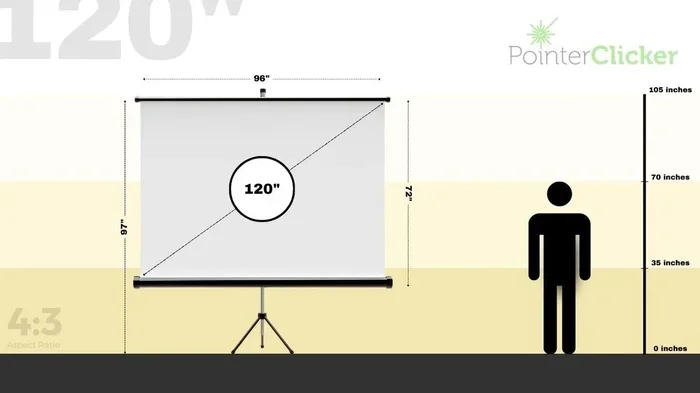
How Do I Calculate My Projection Screen Size Easily
Calculating your projection screen size is easier than you think. You just need to know your projector’s throw ratio, the distance from the screen, and the aspect ratio you want. This guide walks you through every step with simple formulas, practical examples, and expert tips so you can get the perfect screen dimensions every time.
You just bought a projector. Or maybe you already have one sitting in a closet. Either way, the big question is: how do I calculate my projection screen size? It sounds like a math problem you left behind in school. But here is the good news. It is way simpler than you think.
Knowing your screen size before you buy or set up a projector makes a huge difference. You avoid buying a screen that is too small. Or worse, one that does not even fit on your wall. A proper projection screen size turns a mediocre movie night into a cinema-like experience right in your living room.
In this guide, we break down everything you need to know. From throw ratios to aspect ratios, we explain each concept in plain English. No engineering degree required. By the end, you will know exactly how to calculate your screen size like a pro.
Key Takeaways
- Throw ratio is the key: It determines how big your image will be based on how far the projector sits from the screen.
- Aspect ratio matters: Choose between 16:9, 4:3, or 2.35:1 depending on what you watch most.
- Use the simple formula: Screen width equals throw distance divided by throw ratio for quick calculations.
- Viewing distance affects comfort: Sit too close or too far, and your experience suffers regardless of screen size.
- Online calculators help: Tools like flashlight projector hacks and dedicated screen size calculators save you time and guesswork.
- Room layout is critical: Measure your space first before buying any screen or projector.
- Black sheets work in a pinch: If you need a quick DIY screen, check if a black sheet can work as a projector screen for temporary setups.
📑 Table of Contents
- Why Calculating Your Projection Screen Size Matters
- Understanding the Throw Ratio
- The Aspect Ratio: Width vs Height
- The Simple Formula for Calculating Screen Size
- Quick Tips for Perfect Screen Sizing
- Common Mistakes People Make When Sizing a Projection Screen
- Expert Insights: Getting the Most Out of Your Setup
- Bringing It All Together
Why Calculating Your Projection Screen Size Matters
Some people just buy whatever screen looks cool at the store. Then they wonder why the image looks tiny or stretched. Calculating your screen size upfront saves you time, money, and frustration.
Think about it. A projector is only half the equation. The screen size determines how immersive your viewing experience feels. Too small, and you feel disconnected. Too large, and the image loses sharpness. Getting the right projection screen size hits the sweet spot for comfort and clarity.
Here are a few reasons why this calculation matters so much:
- Budget control: You buy the right screen the first time. No returns. No guesswork.
- Room fit: You make sure the screen fits your wall or space perfectly.
- Image quality: A properly sized screen keeps the picture sharp and bright.
- Viewing comfort: Everyone in the room sees the image clearly without straining.
- Projector compatibility: You match the screen to what your projector can actually deliver.
When you calculate projection screen size correctly, everything else falls into place. The setup feels natural. The picture looks stunning. And your friends will never stop asking how you did it.
Understanding the Throw Ratio
The throw ratio is the single most important number in your entire setup. It tells you how far the projector needs to be from the screen to produce a specific image size. Every projector has a different throw ratio, and finding yours is the first step.
What Is Throw Ratio?
A throw ratio looks like this: 1.5:1 or 2.0:1. The first number is the screen width. The second number is the distance from the projector to the screen. So a 1.5:1 ratio means the projector needs to be 1.5 feet away for every 1 foot of screen width.
Let us look at a simple example:
- Throw ratio: 1.5:1
- Desired screen width: 100 inches
- Required distance: 100 x 1.5 = 150 inches (12.5 feet)
That is it. This one number drives everything. If you know your throw ratio, you can calculate almost anything else.
Short Throw vs Long Throw Projectors
Not all projectors are the same. Short throw projectors sit close to the screen and produce large images. Long throw projectors need more distance. Here is a quick comparison:
| Type | Throw Ratio Range | Best For | Distance for 100″ Screen |
|---|---|---|---|
| Short Throw | 0.4:1 to 1.0:1 | Small rooms | 4 to 10 feet |
| Standard Throw | 1.0:1 to 2.0:1 | Medium rooms | 10 to 20 feet |
| Long Throw | 2.0:1 to 3.0:1 | Large rooms | 20 to 30 feet |
If you are setting up in a small apartment, a short throw projector is your best friend. You get a big picture without needing a ton of space. For larger rooms, standard or long throw models work great.
The Aspect Ratio: Width vs Height
Aspect ratio describes the shape of your image. It is the relationship between width and height. Most modern projectors use 16:9, which is the same shape as a widescreen TV. But other ratios exist too.
Common Aspect Ratios
Here are the most common aspect ratios you will encounter:
- 16:9 (Widescreen): The standard for movies, YouTube, and most streaming content. This is what most people want.
- 4:3 (Standard): Older format. Good for presentations and older TV shows.
- 2.35:1 (Cinematic): Ultra-wide. This gives you that true cinema feel. Great for movie nights.
- 16:10: Slightly taller than 16:9. Common in some business projectors.
Your aspect ratio directly affects your projection screen size. A 16:9 screen at 100 inches wide looks very different from a 2.35:1 screen at 100 inches wide. The height changes, and so does the overall feel of the image.
How to Choose the Right Aspect Ratio
Think about what you watch most. If you stream movies and TV shows, go with 16:9. If you are a serious home theater fan, consider 2.35:1. For presentations or gaming, 16:9 or 16:10 works best.
You can also use a screen size calculator online to quickly see how different ratios affect your image. Many projector manufacturers offer free tools on their websites. Just enter your throw distance and projector model, and the calculator does the rest.
The Simple Formula for Calculating Screen Size
Now for the part you have been waiting for. The actual math. Do not worry. It is just a few simple steps.
Step 1: Measure Your Throw Distance
Throw distance is the space between your projector lens and the screen wall. Measure this in feet or inches. Make sure you measure from the lens, not the back of the projector.
For example, if your projector sits 12 feet from the wall, your throw distance is 12 feet. Write this number down. You will use it in the next step.
Step 2: Find Your Projector’s Throw Ratio
Check your projector manual or the manufacturer’s website. Look for the throw ratio specification. It is usually listed as something like 1.5:1 or 1.2-1.5:1.
If the ratio is a range, use the middle number for your calculations. So a range of 1.2-1.5:1 would use 1.35 as your estimate.
Step 3: Calculate Screen Width
Here is the main formula:
Screen Width = Throw Distance ÷ Throw Ratio
Using our example:
- Throw distance: 12 feet
- Throw ratio: 1.5
- Screen width: 12 ÷ 1.5 = 8 feet (96 inches)
That gives you an 8-foot-wide screen. This is a solid size for most living rooms.
Step 4: Calculate Screen Height
Once you have the width, calculating the height is easy. Just multiply the width by the aspect ratio fraction.
For a 16:9 screen:
- Screen height = Screen width x (9 ÷ 16)
- Screen height = 96 inches x 0.5625
- Screen height = 54 inches
So your 8-foot-wide 16:9 screen is 54 inches tall. Simple as that.
Step 5: Calculate the Diagonal Size
Most screens are sold by their diagonal measurement. To find it, use the Pythagorean theorem. Or better yet, just use an online calculator.
For our example:
- Diagonal = Square root of (width² + height²)
- Diagonal = Square root of (96² + 54²)
- Diagonal = Square root of (9216 + 2916)
- Diagonal = Square root of 12132
- Diagonal ≈ 110 inches
So you would need roughly a 110-inch screen for this setup. That is a massive and impressive image.
Quick Tips for Perfect Screen Sizing
Even with the formulas, there are a few practical tips that make a real difference. These are the things most guides skip, but they matter.
Measure Your Room First
Before you do any math, measure your room. Know how far the projector wall is. Know where you will place the projector. Also consider where people will sit. Your viewing distance affects how big the screen should be.
A good rule of thumb is to sit about 1.5 to 2 times the screen diagonal distance away. So for a 110-inch screen, you would sit between 165 and 220 inches (13 to 18 feet) from the screen.
Account for Projector Offset
Some projectors need to be mounted above or below the screen center. This is called lens offset. It can affect your effective throw distance. Check your projector specs for the offset percentage and factor it into your calculations.
Consider Screen Gain
Screen gain measures how reflective the screen material is. A higher gain makes the image brighter but can narrow the viewing angle. A lower gain gives you wider viewing angles but a dimmer image. For most home setups, a gain between 1.0 and 1.3 works great.
Use Online Tools to Double-Check
You do not have to do all the math by hand. Many websites offer free projector screen size calculators. Just enter your throw distance and throw ratio, and the tool gives you the exact screen dimensions. It is a great way to verify your manual calculations.
Think About What You Will Watch
If you mostly watch movies, go wider. If you watch a lot of sports or play video games, a taller or wider 16:9 setup works better. Your content type should guide your aspect ratio choice and overall screen dimensions.
Common Mistakes People Make When Sizing a Projection Screen
Even with the best intentions, people make mistakes when calculating screen size. Here are the most common ones and how to avoid them.
Forgetting to Measure the Actual Throw Distance
Many people estimate the distance instead of measuring it. Even a small error can throw off your entire calculation. Use a tape measure. Get the exact number.
Ignoring the Projector’s Native Resolution
A bigger screen does not always mean a better picture. If you stretch a 720p image across a 150-inch screen, it will look pixelated. Make sure your screen resolution matches your projector’s native resolution for the best results.
Choosing a Screen That Is Too Large for the Room
Bigger is not always better. If your screen takes up an entire wall and the image feels overwhelming, the experience suffers. Choose a size that fits your room and viewing distance comfortably.
Not Accounting for Keystone Correction
Keystone correction adjusts the image shape when the projector is not perfectly aligned. But it reduces image quality. Try to mount the projector so it projects straight onto the screen. This avoids keystone issues and keeps your image brightness at its best.
Skipping the Test Setup
If possible, do a temporary test before mounting anything. Use a white wall or a plain sheet as a quick screen and project from your planned position. This gives you a real feel for the size and helps you fine-tune before committing to a permanent setup.
Expert Insights: Getting the Most Out of Your Setup
We asked a few home theater enthusiasts and AV professionals for their top tips on calculating and setting up projection screen size. Here is what they had to say.
“Always calculate your screen size before buying the projector, not after.” This is advice from a professional AV installer. It ensures the projector and screen work together perfectly from day one.
“The throw ratio chart in your projector manual is your best friend.” Many people overlook this section. But it contains all the data you need to get the perfect image size for your specific room.
“Do not forget about ambient light.” A room with lots of natural light may need a smaller screen or a projector with higher brightness. The screen size and projector brightness should work together to create the best possible image.
“If you are unsure, go slightly smaller.” A slightly small screen looks great. A slightly large screen can feel cramped and distort the image. When in doubt, size down a little.
“Use the 4K test pattern trick.” Before finalizing your screen size, project a 4K test pattern and sit in your main viewing position. If you can see individual pixels, the screen is too large for that viewing distance.
These insights come from real-world experience. They can save you from costly mistakes and help you build a setup that looks and feels professional.
Bringing It All Together
Calculating your projection screen size does not have to be complicated. You just need three things: your throw distance, your projector’s throw ratio, and your preferred aspect ratio. With those three numbers, you can calculate width, height, and diagonal size in minutes.
Start by measuring your room. Find your projector’s specs. Plug the numbers into the formulas we shared. Or use an online calculator to speed things up. Either way, you will know exactly what size screen you need.
The goal is simple. Create a setup that looks amazing and feels comfortable. A properly sized screen makes every movie, game, or presentation feel like an event. You will wonder how you ever watched anything on a small TV.
Take your time with the calculations. Measure twice. Calculate once. And when everything lines up, you will have a home theater setup that rivals the cinema. That is the power of getting your projection screen size right.
Now grab your tape measure, pull up your projector specs, and start calculating. Your perfect screen is one formula away.
Frequently Asked Questions
What is the easiest way to calculate projection screen size?
The easiest way is to use the formula: Screen Width = Throw Distance ÷ Throw Ratio. Then multiply the width by your aspect ratio fraction to get the height. You can also use free online projector screen size calculators for instant results without any manual math.
What throw ratio do I need for a 100-inch screen?
It depends on how far your projector sits from the screen. For a throw ratio of 1.5:1, you need 150 inches (12.5 feet) of distance. Check your projector manual for the exact throw ratio, then multiply it by 100 to find your required distance.
Does screen size affect image quality?
Yes, it does. A screen that is too large for your projector’s resolution will look pixelated. A screen that is too small may not use the projector’s full capability. Matching the screen size to your projector’s native resolution and brightness ensures the best image quality.
Can I use a white wall instead of a projector screen?
You can, but the results vary. A white wall works in a pinch, but projector screens are designed with specific gain and texture to improve brightness and color accuracy. For the best picture quality, a dedicated screen is always the better choice.
How far should I sit from a projection screen?
A good rule of thumb is to sit 1.5 to 2 times the screen diagonal distance away. For a 110-inch screen, that means sitting 13 to 18 feet back. This range provides a comfortable viewing experience without eye strain.
What aspect ratio is best for home theater?
16:9 is the most popular choice for home theater because it matches most streaming content and modern movies. If you want a true cinematic experience, 2.35:1 is excellent. Choose based on what type of content you watch most often.
=== CONCLUSION ===
Calculating your projection screen size is the foundation of every great home theater setup. With the throw ratio, aspect ratio, and a few simple measurements, you can determine the perfect screen dimensions for any room. The process is straightforward, the formulas are easy to use, and the results are worth it.
Do not guess. Do not settle for a screen that does not fit. Take the time to calculate, measure, and plan. Your future self will thank you every time you press play on a movie night. Start your calculation today and build the projection setup you have always wanted.