How Can I Increase My Wifi Speed Without Paying More
Want to increase my wifi speed without paying more? You can boost your wireless network with simple free tricks. This guide covers router placement, settings tweaks, and equipment upgrades that cost nothing. Learn how to get faster internet today.
If you want to increase my wifi speed without paying more, you are in the right place. Slow wifi frustrates everyone. You pay for a fast internet plan, but your wireless connection drags. The good news is that you can boost your speed without spending a dime. Many people do not realize that simple adjustments can make a huge difference. You do not need to call your internet provider or sign a new contract. A few free changes inside your home can unlock better performance today.
Whether you stream movies, play games, or work from home, fast wifi matters. This guide walks you through proven steps that cost nothing. You will learn how to tweak router settings, place your equipment better, and reduce interference. I will also show you when a small hardware upgrade can make a big impact. All of these tips focus on network optimization and smarter use of your existing connection. Let us get started.
Key Takeaways
- Router Placement Matters: Central location and elevation can dramatically improve signal strength and reduce dead zones.
- Update Firmware Regularly: Keeping your router’s software current fixes bugs and enhances overall performance.
- Switch to Less Crowded Channels: Avoid interference from neighbors by using the 5GHz band or changing channels.
- Use Ethernet for Critical Devices: Wired connections always outperform Wi-Fi for speed and stability.
- Limit Background Apps and Devices: Disconnect unused devices and pause heavy downloads to free bandwidth.
- Consider a Mesh System if Needed: A mesh network can extend coverage without paying for a faster plan.
📑 Table of Contents
- Why Does My Wifi Feel Slow?
- How Can I Increase My Wifi Speed Without Paying More? Start With Free Router Settings
- Perfect Placement for Maximum Coverage
- Reduce Interference from Neighbors and Devices
- When to Upgrade Hardware Without Paying More
- Quick Wins for Immediate Speed Gains
- Common Mistakes That Slow Down Your Wifi
- Expert Insights: What Networking Pros Recommend
- Conclusion
Why Does My Wifi Feel Slow?
Many people assume their internet plan is to blame. But often, the problem lies within your home network. Before you spend a dollar, understand what is slowing you down.
The Difference Between Speed and Latency
Speed measures how much data you can download. Latency measures the delay before data starts moving. A fast plan can still feel sluggish if latency is high. Increase my wifi speed without paying more often starts with reducing latency through simple tweaks. A quick internet speed test can reveal whether your issue is speed or latency. Run the test from a device close to your router. Then run it from a far room. Compare the numbers to see where the problem sits.
What Affects Your Wireless Connection
Several factors impact your wireless network performance. Distance from the router matters. Walls, floors, and furniture block signals. Other electronic devices cause interference. Even the number of connected devices splits your bandwidth. Running an internet speed test helps you see the real numbers. Keep reading to learn how to fix each factor.
How Can I Increase My Wifi Speed Without Paying More? Start With Free Router Settings
Your router has hidden settings that can unlock faster speeds. You do not need to buy new equipment. A few changes in the admin panel can make a big difference. These free router settings adjustments take only minutes.
Switch to the 5GHz Band
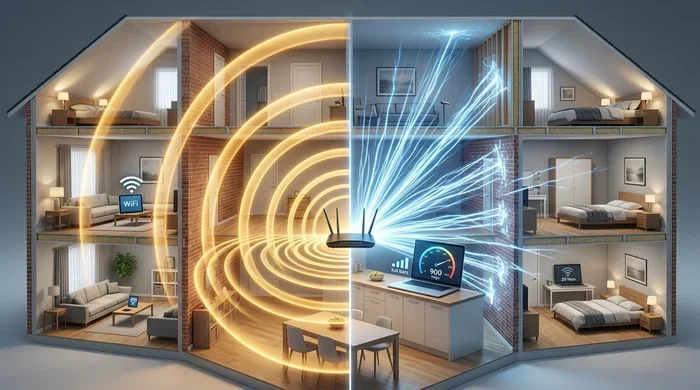
Most routers broadcast two bands: 2.4GHz and 5GHz. The 2.4GHz band travels farther but is slower and crowded. The 5GHz band offers wifi speed boosts but covers a shorter range. If you are close to your router, switch to 5GHz. This alone can reduce channel congestion and improve performance.
| Feature | 2.4GHz Band | 5GHz Band |
|---|---|---|
| Speed | Slower, up to 600 Mbps | Faster, up to 1300 Mbps or more |
| Range | Longer range, better wall penetration | Shorter range, needs closer proximity |
| Interference | High, many devices share it | Lower, fewer devices use it |
| Best For | Smart home devices, distant rooms | Streaming, gaming, video calls |
Change Your DNS Settings
DNS translates website names into addresses. Your ISP’s default DNS might be slow. Switching to a public DNS like Google (8.8.8.8) or Cloudflare (1.1.1.1) can speed up browsing. This is a free network optimization trick that works instantly. You can change DNS in your router settings or on each device. It is one of the easiest ways to improve latency.
Enable Quality of Service (QoS)
QoS lets you prioritize traffic. You can tell your router to give more bandwidth to video calls or gaming. This prevents a single heavy download from slowing everything else. Check your router’s manual for QoS settings. It is one of the most effective router settings for improving latency and keeping your wifi speed steady.
Perfect Placement for Maximum Coverage
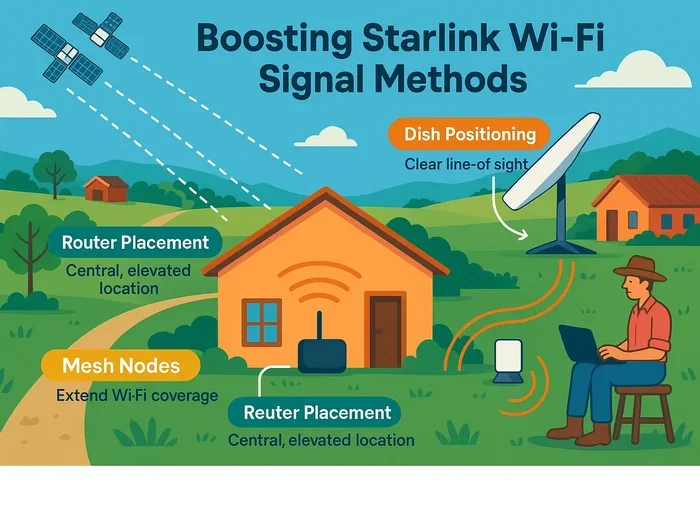
Where you put your router changes everything. A poorly placed router creates dead zones. Good placement costs nothing and can boost signal strength significantly.
Elevate Your Router and Keep It Central
Do not hide your router in a closet. Place it on a high shelf or mount it on a wall. Central location helps the signal reach all rooms. Walls and metal objects block wireless signals. Keep the router away from microwaves, baby monitors, and cordless phones. These devices create interference that slows down your connection.
Avoid Common Placement Mistakes
Many people place routers near windows or behind TVs. These spots cause interference. The best spot is an open area on the main floor. If your home is large, you might create a dead zone. In that case, consider a simple wifi extender or a wifi extender that uses an ethernet cable for a wired backhaul. This is a low-cost way to extend coverage without paying for a faster plan.
Reduce Interference from Neighbors and Devices
Your neighbors’ wifi networks can slow you down. Devices in your home also cause interference. Learning to manage this can free up bandwidth and improve your wireless network speed.
Find the Least Crowded Channel
Wifi routers use channels. If your neighbors are on the same channel, you get congestion. Use a free app like Wi-Fi Analyzer to scan for the least crowded channel. Switch your router to that channel. This simple network optimization step often yields immediate wifi speed gains. You can also set your router to “Auto” channel selection, but manual picking usually works better in crowded buildings.
Limit Connected Devices and Background Apps
Every device connected to your network uses bandwidth. Smart TVs, phones, tablets, and IoT gadgets all compete. Disconnect devices you are not using. On your computers, close background apps that sync or update. This frees up bandwidth for the devices that matter most. A quick look at your router’s connected device list can reveal hidden bandwidth hogs.
When to Upgrade Hardware Without Paying More
Sometimes free tweaks are not enough. You can still upgrade hardware without paying your ISP more. Buying your own equipment often gives you better control and faster wireless network performance. You can even Buy Your Own Router Instead of Renting
Many ISPs charge a monthly fee to rent their router. You can Add a Mesh System for Full Home Coverage
If your home has multiple floors or thick walls, a single router may not reach everywhere. A Use Ethernet for Devices That Need Maximum Speed
Nothing beats a wired connection for wifi speed and stability. You can run an ethernet cable to your smart TV, gaming console, or desktop. If running a cable is difficult, consider powerline adapters. They send internet through your home’s electrical wiring. For a permanent solution, you might Quick Wins for Immediate Speed Gains
Some fixes take less than five minutes. Try these first when your wifi feels slow. Routers accumulate memory leaks and cache issues over time. A simple reboot clears them out. Unplug the router for 30 seconds, then plug it back in. Do this once a week. You will notice smoother browsing and lower latency. Set a calendar reminder to make it a habit. Router manufacturers release firmware updates to fix bugs and improve performance. Log into your router’s admin page and check for updates. Keeping your firmware current is a free network optimization step that many people forget. New firmware often improves channel selection and bandwidth management. Always measure your internet speed test results. This tells you if a change actually helped. Use a reliable speed test site. Test from the same spot each time. Compare the numbers to see your progress. Tracking results keeps you motivated and helps you pinpoint what works. Avoid these habits that silently kill your wireless network speed. Professional network installers follow a few simple rules. You can adopt them too. First, always place the router in the open. Second, use the 5GHz band for speed-critical tasks. Third, keep firmware updated. Fourth, segment your network if your router supports it. A guest network can isolate heavy users and protect your main devices. These steps cost nothing but can transform your wireless network experience. Many pros also recommend restarting your router every few weeks to clear memory. These habits keep your wifi speed running at its best. To increase my wifi speed without paying more, you need to take control of your network. Start with free router settings, optimize placement, reduce interference, and upgrade hardware smartly. These steps cost little or nothing. You will enjoy faster, more reliable internet every day. Try one tip today and feel the difference. Use a free speed test website like Speedtest.net or Fast.com. Connect a device directly to your router with ethernet for the most accurate result. Then test over wifi from different rooms. Write down the numbers and compare them after making changes. Yes, especially in apartment buildings. Neighbors’ networks can overlap your channel and cause congestion. Use a free app to find the least crowded channel and switch your router to it. This simple change often reduces lag and improves wifi speed. Mesh systems are excellent for large homes. They eliminate dead zones by spreading signal across multiple nodes. You can
Reboot Your Router Regularly
Update Firmware
Run a Speed Test Before and After Changes
Common Mistakes That Slow Down Your Wifi
Expert Insights: What Networking Pros Recommend
Conclusion
Frequently Asked Questions
How can I test my current wifi speed?
Does changing the wifi channel really help?
Is a mesh wifi system worth buying?
Similar Posts
Can I Use Wi Fi Direct For Screen Mirroring On Any Device
Learn if you can use WiFi Direct for screen mirroring on any device. Get practical tips, setup guides, and comparisons with other methods today!
Does Wi Fi Interfere With Sleep and Your Overall Health
Discover if Wi Fi interferes with sleep and your overall health. Learn how wireless signals affect rest, melatonin, and what you can do tonight for better sl…
Can I Get A Hotspot Instead Of Wi Fi For Your Home
Wondering if you can get a hotspot instead of Wi-Fi for your home? This guide covers everything you need to know about replacing your home internet with a mo…
Can Universities See What You Do On Their Wi Fi Network
Can universities see what you do on their Wi-Fi? Learn what campus networks track, how they monitor activity, and simple tips to protect your privacy online.
Does ATT Install Internet On Weekends And How Fast
Find out if AT&T installs internet on weekends and how fast the setup process really is. Get tips, FAQs, and expert advice here.
How Can I Get Wi Fi All Over My Property Once And For All
Learn how to get Wi-Fi all over your property with proven solutions like mesh systems, extenders, and outdoor access points. Find the best plan for your home…