How Are Mini Cameras Powered and What You Need to Know
How Are Mini Cameras Powered depends on battery type, charging method, and usage patterns. This guide breaks down every power option, from disposable batteries to solar panels, so you can choose the right setup. You’ll also learn tips to extend battery life and avoid common mistakes.
When you think about how are mini cameras powered, the answer might surprise you. These tiny devices rely on a surprisingly diverse range of energy sources, from tiny coin cells to wall outlets hidden behind picture frames. Understanding power options is the first step to getting reliable surveillance or capturing those candid moments you want to keep.
Whether you are setting up a hidden camera for home security or just curious about spy tech, the power supply determines everything. It affects how long the camera records, where you can place it, and even whether it can stay hidden. In this guide, we will walk through every power method in simple terms, share practical tips, and highlight the mistakes most people make. By the end, you will know exactly which power source fits your needs.
Key Takeaways
- Battery Types Matter: Lithium polymer and alkaline batteries offer different run times and rechargeability.
- USB and Wireless Charging Are Common: Most modern mini cameras use micro-USB, USB-C, or magnetic docks for easy power.
- Solar Power Is a Game-Changer: Small solar panels can keep hidden cameras running indefinitely outdoors.
- Motion Activation Saves Power: Using event-based recording dramatically extends battery life.
- Hidden Power Sources Exist: Cameras can be wired to existing outlets or disguised as everyday objects with built-in batteries.
- Wi-Fi Cameras Draw More Power: Continuous streaming requires more energy than local storage models.
📑 Table of Contents
- Understanding Mini Camera Power Sources
- How Battery-Powered Mini Cameras Work
- Charging and Powering Your Mini Camera
- Power-Saving Features and Smart Usage
- Hidden Cameras and Power Supply
- Wi-Fi Cameras and Power Needs
- Comparison Table: Mini Camera Power Options
- Common Mistakes When Powering Mini Cameras
- Expert Insights on Mini Camera Power
- How to Choose the Right Power Source for Your Mini Camera
- Conclusion
Understanding Mini Camera Power Sources
Mini cameras come in all shapes, and so do their power supplies. The three main categories are battery-powered mini cameras, rechargeable models, and wired cameras. Each has trade-offs in convenience, runtime, and stealth. Let us break them down.
Battery-Powered Mini Cameras
The simplest option uses disposable batteries, usually AA or AAA cells. These cameras are incredibly easy to set up. You just drop in the batteries, and they are ready to go. The downside is that you must replace them regularly, which can be a hassle if the camera is tucked away in a hard-to-reach spot.
For short-term use, like a weekend trip or a one-time event, disposable batteries work fine. But for long-term monitoring, you will be changing batteries often. Some models use coin cell batteries (CR2032) that last a few weeks. These are great for tiny body-worn cameras or pens that you might carry daily.
Rechargeable Battery Options
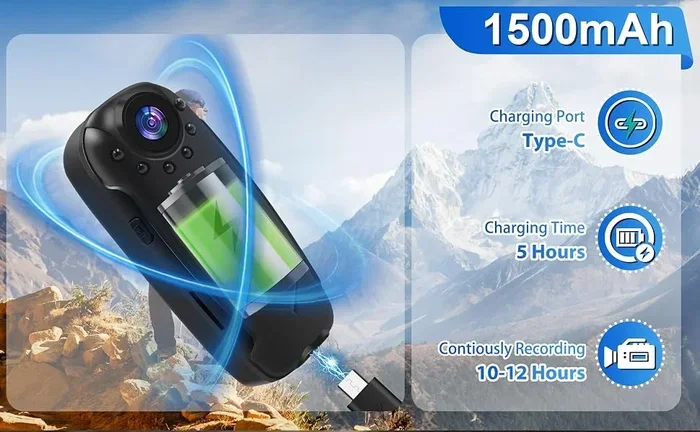
Most modern mini cameras use built-in lithium polymer batteries. These are the same kind of cells found in smartphones and smartwatches. They are lightweight, hold a good charge, and can be recharged hundreds of times. A typical rechargeable mini camera will run for 2 to 6 hours on a single charge, depending on features.
If you want longer runtime, look for models with large capacity lithium polymer cells (500 mAh or more). Some cameras even accept external power banks through a USB cable. This lets you keep the camera running for days without removing it. The trade-off is that you must remember to charge the camera regularly.
Wired Power and Hardwired Options
For permanent setups, a wired mini camera is unbeatable. These cameras plug directly into a wall outlet or a USB port. They never run out of juice, which makes them perfect for 24/7 surveillance. You can hide the cable behind a baseboard or inside a decorative item.
Wired cameras are often used in offices, retail stores, and homes where you do not want to worry about battery swaps. The only limitation is placement—you need to be near an electrical outlet. If you are considering a hidden wired camera, you might also wonder about privacy and disclosure rules. You can read more about placing cameras at home in our guide on Can I Put Cameras In My House Without My Spouse Knowing.
How Battery-Powered Mini Cameras Work
Inside a battery-powered mini camera, the power management system is surprisingly clever. It controls when the sensor wakes up, when it records, and when it sleeps. Understanding this helps you get the most from your batteries.
Lithium Polymer Batteries in Detail
Lithium polymer (LiPo) batteries are the gold standard for mini cameras. They are thin, flexible, and can be shaped to fit tiny spaces. A typical LiPo cell has a voltage of 3.7 volts and capacities ranging from 200 mAh to 2000 mAh. The higher the mAh rating, the longer the camera will run.
These batteries are rechargeable and do not suffer from the memory effect that older nickel-cadmium batteries had. However, they do degrade over time. A LiPo battery might last 300 to 500 charge cycles before its capacity drops noticeably. Storing the camera in a cool, dry place helps extend battery life.
Factors That Drain Battery Fast
Several things cause mini camera batteries to drain quickly. Continuous video recording is the biggest power hog. Motion-activated recording uses far less energy because the camera sleeps until it detects movement. Wi-Fi streaming also consumes a lot of power, since the radio transmitter works hard to send data to your phone or cloud server.
Night vision features, especially those using infrared LEDs, also draw significant current. If you need all-night recording, consider a model with a low-power night mode or one that uses a separate infrared illuminator. High-resolution settings (1080p or 4K) also use more battery than 720p or 480p.
Charging and Powering Your Mini Camera
Keeping your mini camera charged is easier than you think. Most modern devices use standard USB connections, but there are a few nuances worth knowing.
USB Charging Methods
The most common charging method is micro-USB or USB-C. You simply plug the camera into a wall adapter, computer, or power bank. Charging times vary from 30 minutes to 2 hours, depending on battery size. Some cameras have a charging LED that turns red while charging and green when full.
For cameras with non-removable batteries, you must charge them in place. This means you cannot swap in a fresh battery during a long event. If you need uninterrupted recording, consider a model that supports pass-through charging, which lets you plug in an external battery while the camera records.
Wireless Charging and Magnetic Docks
A few premium mini cameras now support wireless charging via Qi pads. You just place the camera on a charging dock, and it starts drawing power. This is convenient for cameras mounted in fixed locations, like a smoke detector or a clock.
Magnetic charging docks are also popular. The camera snaps onto a small magnetic base connected to a USB cable. This reduces wear on the charging port, which is a common failure point in tiny devices. If you are using a Wi-Fi enabled camera, you might wonder about network privacy. We have a separate article on Can People See Your Text Messages If You Are On Their Wifi that covers related concerns.
Solar Power for Outdoor Mini Cameras
One of the most exciting developments is solar-powered mini cameras. These devices have a small photovoltaic panel attached or mounted nearby. During the day, the panel charges the internal battery. At night, the camera runs on stored power. This setup can keep a camera running indefinitely, as long as it gets some sunlight.
Solar mini cameras are perfect for backyards, driveways, and garden sheds. They eliminate the need to remove the camera for charging. However, they do require a sunny spot. In cloudy climates or shaded areas, you may need a larger panel or a backup battery pack.
Power-Saving Features and Smart Usage
Getting the most out of your mini camera’s battery is all about smart settings. Most cameras include features designed to stretch runtime.
Motion-Activated Recording
Motion-activated power saving is the single best way to extend battery life. Instead of recording 24/7, the camera sleeps and wakes only when it detects movement. This can turn a 4-hour battery into a 30-day standby time. You will still capture the important moments, but you will not waste power on empty hallways.
You can usually adjust the motion sensitivity. Setting it too high causes false triggers; setting it too low means you might miss events. A medium sensitivity works well for most indoor spaces. For outdoor use, consider a camera with person detection, which uses AI to distinguish people from animals or passing cars.
Low-Power Modes and Scheduling
Many mini cameras offer a low-power mode that reduces resolution, frame rate, or disables Wi-Fi when idle. Some cameras also allow you to set a recording schedule. For example, you can tell the camera to only record between 10 PM and 6 AM. During the day, it stays asleep and conserves energy.
Another trick is to use local storage instead of cloud streaming. Storing video on an SD card uses less power than constantly uploading to the internet. If you do not need remote access, turning off Wi-Fi can double or triple your battery life.
Hidden Cameras and Power Supply
When you need a camera to stay out of sight, the power source must also be hidden. This is where creativity comes in. Mini cameras are often disguised as everyday objects that contain built-in batteries.
Disguised Cameras with Built-In Power
Products like clock cameras, smoke detector cameras, and USB charger cameras have batteries hidden inside a familiar object. The clock camera draws power from its own rechargeable cell, while the USB charger camera can even charge your phone while recording. These dual-purpose devices are brilliant for covert setups.
You can also buy mini cameras with integrated power banks. These look like normal power banks but have a hidden lens and recording function. They can charge your phone and record video simultaneously. The battery capacity is usually large enough for several hours of recording.
Wiring Hidden Cameras to Existing Outlets
If you are placing a camera in a fixed location, you can run a wire behind walls or baseboards. Some cameras come with flat power cables that are nearly invisible against a wall. You can hide the connector behind a picture frame or a bookshelf.
This approach is ideal for nanny cams or pet monitoring. It ensures the camera never runs out of power. Just remember that if you are hiding a camera in a shared home, you should be aware of the legal and ethical implications. Our article on Can I Put Cameras In My House Without My Spouse Knowing covers these important considerations.
Wi-Fi Cameras and Power Needs
Wi-Fi enabled mini cameras are incredibly popular, but they come with a power cost. Streaming video over a wireless network uses significantly more energy than recording to a local SD card. Understanding this trade-off helps you choose the right model.
Continuous Streaming vs. Event Recording
A camera that streams 24/7 to the cloud will drain its battery in a matter of hours. In contrast, a camera that only uploads short clips when motion is detected can last weeks on a single charge. If battery life is important, look for cameras that support event-based uploading and local storage.
Some advanced cameras use dual power modes. They record locally to an SD card most of the time and only use Wi-Fi for brief status checks or when an event occurs. This hybrid approach balances convenience with battery longevity.
Powering Wi-Fi Cameras Outdoors
Outdoor Wi-Fi cameras often need a permanent power source because solar panels alone may not provide enough consistent energy. You can use a weatherproof outdoor outlet or run a long USB cable from a nearby indoor outlet. Some models are designed for hardwired installation and include a small battery backup for power outages.
If you are concerned about network snooping, remember that your Wi-Fi router handles all data from these cameras. While the camera itself is encrypted, the broader network security matters. The same principles that protect your text messages on a shared Wi-Fi network apply here. You can find more on this topic in our guide about Can People See Your Text Messages If You Are On Their Wifi.
Comparison Table: Mini Camera Power Options
Not sure which power source is right for you? Here is a quick comparison of the most common options.
| Power Type | Runtime | Stealth | Best For |
|---|---|---|---|
| Disposable Alkaline | 4–20 hours | High (no charging dock) | Short-term, easy setup |
| Rechargeable LiPo | 2–6 hours | Medium (needs USB dock) | Portable, everyday use |
| Wired (USB/AC) | Unlimited | Low (cable visible) | 24/7 home or office |
| Solar Panel | Indefinite (with sun) | High (panel can be hidden) | Outdoor, long-term |
| Power Bank Integration | 10–40 hours | Medium | Extended portable use |
Common Mistakes When Powering Mini Cameras
Even experienced users make avoidable power mistakes. Here are the top ones to steer clear of.
- Forgetting to charge before use: A new rechargeable camera often arrives with a low battery. Always charge it fully before your first deployment.
- Using the wrong charger: Fast chargers can overheat tiny camera batteries. Stick to the manufacturer’s recommended charger or a standard 5V/1A USB adapter.
- Ignoring temperature extremes: Lithium batteries perform poorly in cold weather. If you are using a camera outdoors in winter, keep it insulated or bring it inside periodically.
- Leaving Wi-Fi on constantly: This is the fastest way to kill a battery. Turn off live streaming unless you need it.
- Overlooking solar panel angle: A solar panel pointed away from the sun will not charge effectively. Adjust the angle seasonally for best results.
Expert Insights on Mini Camera Power
We asked a few security professionals about their favorite power setups for mini cameras. Here is what they had to say.
Tip 1: Carry a spare USB cable. “I always keep a short USB cable and a wall adapter in my bag,” says a home security consultant. “If I need to charge a camera on the go, I can plug it into any outlet.”
Tip 2: Use a power bank with passthrough. “For fieldwork, I pair the camera with a 10,000 mAh power bank,” he adds. “The camera records while the power bank charges it, giving me unlimited runtime.”
Tip 3: Label your hidden cameras. “If you have multiple cameras, label the charging ports,” another expert suggests. “It saves a lot of confusion when you are swapping cables behind the TV.”
Tip 4: Rotate batteries. “For disposable battery cameras, I keep a set of charged spares in a small case,” one pro notes. “When the camera dies, I swap the whole battery pack in seconds.”
How to Choose the Right Power Source for Your Mini Camera
Choosing a power source comes down to three questions: How long do you need to record? Where will the camera be placed? How hidden does it need to be?
If you want a discreet indoor camera for a few hours, a rechargeable LiPo model with a magnetic dock is perfect. For outdoor year-round surveillance, a solar-powered camera with a backup battery is the way to go. For permanent, always-on monitoring, a wired camera plugged into an outlet is the most reliable.
Think about your typical use case. Are you monitoring a nursery, a pet, or a vacation home? Each scenario has different power demands. A nursery camera might run on a rechargeable battery with motion activation. A vacation home camera might need a wired connection or a large solar setup. Matching the power source to the use case ensures you never miss a moment.
Conclusion
How Are Mini Cameras Powered is a question with many answers, and the right choice depends on your specific needs. Whether you prefer the simplicity of disposable batteries, the convenience of USB recharging, the freedom of solar power, or the reliability of a wired connection, there is a power solution that fits. Understanding these options helps you avoid frustration, extend recording times, and keep your camera hidden where it belongs.
Remember to use motion-activated recording, manage your Wi-Fi settings, and store your camera properly. With the right power setup, your mini camera will be ready whenever you need it. Now you have the knowledge to make an informed decision and get the most out of your tiny surveillance device.
Frequently Asked Questions
How long does a mini camera battery last on a single charge?
Most rechargeable mini cameras run for 2 to 6 hours of continuous recording. With motion-activated recording and low-power modes, the same camera can last 2 to 4 weeks in standby. Battery life depends on resolution, Wi-Fi usage, and night vision settings.
Can I use a power bank to charge my mini camera?
Yes, most mini cameras with a USB charging port can be powered by a standard power bank. This is a great way to extend recording time in the field. Just make sure the power bank has enough capacity and a compatible cable.
Do solar-powered mini cameras work at night?
Solar mini cameras store energy in an internal battery during the day. At night, they run on that stored power. In cloudy conditions or during long nights, the camera may use more stored energy, so a larger battery or a backup power source is helpful.
Is it safe to leave a rechargeable mini camera plugged in all the time?
Generally, yes. Most modern cameras have overcharge protection. However, leaving a camera plugged in continuously can slightly reduce battery lifespan over time. It is best to use a smart plug or timer to cycle the power if you are going away for weeks.
What is the best power source for a hidden mini camera?
The best hidden power source is a built-in rechargeable battery with a discreet magnetic dock, or a wired connection hidden behind a wall or furniture. Solar power works well for outdoor hidden cameras where no one will notice a small panel.
Can I swap batteries in a mini camera while it is recording?
Only if the camera has a removable battery pack. Most tiny cameras with non-removable LiPo batteries must be paused or stopped before charging or swapping. Look for models with hot-swap battery trays if you need uninterrupted recording.