Does Wi Fi Calling Automatically Switch To Cellular
Wi-Fi calling does not always automatically switch to cellular. Whether your mobile phone transitions from a wireless connection back to the cellular network depends on your carrier, device settings, and signal strength. This guide breaks down exactly how Wi-Fi calling handoff works, what causes the switch, and how you can troubleshoot problems.
Have you ever been on a Wi-Fi call and suddenly wondered what happens when your wireless signal drops? Does your mobile phone seamlessly jump to the cellular network? Or does the call just die? This is a question a lot of people ask, especially if you rely on Wi-Fi calling to stay connected in areas with weak cell signal.
The short answer is: it depends. Your wireless connection, your carrier, and your device all play a role in whether Wi-Fi calling automatically switches to cellular. Let us dive deep into how this works, what you can expect, and how to make sure your calls never drop unexpectedly.
Wi-Fi calling has become a lifesaver for many people. Whether you are at home, in a big office building, or traveling abroad, it lets you make calls over your internet connection instead of relying solely on a cellular network. But the magic of seamless handoff is not always as smooth as we hope. Understanding how the switch works can save you from awkward dropped conversations and missed calls.
Key Takeaways
- Wi-Fi calling handoff is not universal: Different carriers and devices handle the switch differently.
- Signal loss triggers the transition: When your wireless connection weakens, your phone may fall back to cellular.
- Carrier settings matter a lot: Some providers support seamless network coverage handoff, while others do not.
- You can control the behavior: Adjusting settings on your mobile phone gives you more say in how calls switch.
- Common issues are fixable: Simple troubleshooting steps can resolve most Wi-Fi calling switch problems.
- Battery life plays a role: Poor signal can drain your battery faster during VoIP calls.
📑 Table of Contents
- What Is Wi-Fi Calling and How Does It Work?
- Does Wi-Fi Calling Automatically Switch to Cellular?
- What Triggers the Switch from Wi-Fi to Cellular?
- How to Check If Your Phone Supports Automatic Switching
- Common Problems with Wi-Fi Calling Handoff
- Tips to Improve Wi-Fi Calling and Cellular Handoff
- Expert Insights on Wi-Fi Calling and Cellular Switching
- Key Takeaways
- Conclusion
What Is Wi-Fi Calling and How Does It Work?
Wi-Fi calling is a feature that lets you place and receive phone calls using a wireless connection instead of the traditional cellular network. Your mobile phone sends your voice data over the internet, much like a VoIP call, rather than through cell towers. This is incredibly useful when your cell signal is weak but you have a strong internet connection.
How Wi-Fi Calling Connects Your Calls
When you enable Wi-Fi calling on your device, your mobile phone routes your calls through your home or office wireless network. The call data travels over the internet to your wireless carrier servers, which then connect you to the person you are calling. To the other person, it looks like a normal phone call.
Most modern mobile phones support this feature. iPhones, Samsung Galaxy devices, Google Pixels, and many other smartphones all have built-in Wi-Fi calling capabilities. You usually just need to turn it on in your settings or contact your wireless carrier to activate it.
Why People Use Wi-Fi Calling
There are several reasons why Wi-Fi calling has become so popular:
- Better call quality: When your cell signal is weak, calls over Wi-Fi often sound clearer and more stable.
- Coverage in dead zones: Basements, elevators, and rural areas often have poor cellular network coverage but good Wi-Fi.
- International calls: Wi-Fi calling can save you from expensive roaming charges when you travel abroad.
- Battery savings: Your phone does not have to work as hard to find a cell tower when it can use Wi-Fi instead.
If you want to learn more about setting up Wi-Fi calling with specific carriers, check out our guide on Wi-Fi Calling with Boost Mobile for detailed steps.
Does Wi-Fi Calling Automatically Switch to Cellular?
This is the big question, and the answer is more nuanced than you might think. Wi-Fi calling does not always automatically switch to the cellular network when your wireless connection drops. The behavior depends on several factors, including your device type, your wireless carrier, and your network settings.
How the Handoff Process Works
When you are on a Wi-Fi call, your mobile phone constantly monitors the quality of your internet connection. If the signal weakens significantly, your device may attempt to switch the call to the cellular network. This process is called handoff or seamless transition.
However, not all devices and carriers support this handoff equally. Some wireless carriers have built systems that allow smooth switching between Wi-Fi and cellular. Others require you to manually reconnect or may simply drop the call if the Wi-Fi signal is lost.
Carrier-Specific Behavior
Different carriers handle Wi-Fi calling handoff in different ways. Here is a quick look at how some major providers approach it:
- AT&T: Supports Wi-Fi calling with basic handoff on most devices. The switch to cellular happens when Wi-Fi drops, but it is not always instant.
- Verizon: Offers Wi-Fi calling with improved handoff features on newer devices. Their network coverage integration is generally smoother.
- T-Mobile: Has invested heavily in Wi-Fi calling technology and offers relatively seamless transitions between wireless connection and cellular network.
- Boost Mobile: Wi-Fi calling works well for making calls, but the automatic switch to cellular may not be as refined. You can read more about Boost Mobile Wi-Fi calling here.
The key takeaway is that your wireless carrier plays a huge role in determining how smoothly your calls transition between Wi-Fi and cellular.
What Triggers the Switch from Wi-Fi to Cellular?
Understanding what causes the switch can help you troubleshoot problems and set expectations. Several factors determine when your mobile phone moves a call from Wi-Fi to the cellular network.
Signal Strength Drops
The most common trigger is a significant drop in Wi-Fi signal strength. If your wireless connection weakens below a certain threshold, your device may try to hand off the call to the cellular network. This usually happens when you move too far from your router or when walls and obstacles block the signal.
Wi-Fi Network Disconnection
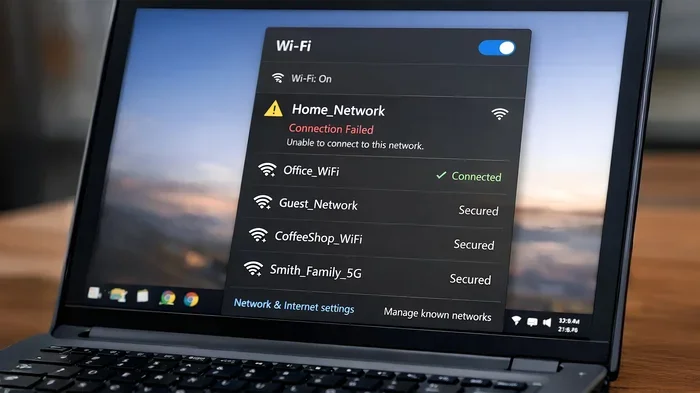
If your Wi-Fi network disconnects entirely, your phone will need another way to complete the call. If your cellular network is available, the device will attempt to switch over. However, if your cell signal is also weak, the call may drop entirely.
Network Congestion
Sometimes the Wi-Fi network itself becomes congested, especially in crowded areas like airports or stadiums. In these cases, your device may try to switch to cellular to maintain call quality. This is one reason why having a strong cellular network backup is important.
Device and Software Settings
Your device settings can also influence the switch behavior. Some phones have a Wi-Fi assistant or similar feature that automatically manages the transition between wireless connection and cellular data. Others require you to manually adjust settings to enable automatic handoff.
How to Check If Your Phone Supports Automatic Switching
Not all mobile phones support automatic Wi-Fi to cellular switching. Here is how you can check if your device has this capability.
On iPhone
Go to Settings, then Phone, and tap on Wi-Fi Calling. Look for an option related to seamless handoff or automatic switching. Newer iPhones generally support this feature, especially when paired with a carrier that offers Wi-Fi calling handoff.
On Android Devices
Open Settings, go to Connections, then Wi-Fi Calling. Android devices vary widely in their support for automatic switching. Samsung, Google Pixel, and OnePlus devices tend to have better handoff support than older or budget models.
Check with Your Carrier
The best way to know for sure is to contact your wireless carrier and ask about their Wi-Fi calling handoff capabilities. They can tell you exactly what to expect and help you set up the right network settings.
If your current setup does not support automatic switching, you might also consider whether a Wi-Fi stick or adapter could improve your connection. Our article on Wi-Fi sticks for PCs without built-in Wi-Fi covers some useful options.
Common Problems with Wi-Fi Calling Handoff
Even when your device and carrier support automatic switching, things can still go wrong. Here are the most common issues people face with Wi-Fi calling handoff and how to fix them.
Calls Drop When Wi-Fi Disconnects
This is the most frustrating problem. Your wireless connection drops, and instead of switching to cellular, the call simply ends. This often happens because the cellular signal is too weak to take over, or because your carrier does not support full handoff.
Quick fix: Make sure your cellular signal is strong before relying on Wi-Fi calling. You can also try toggling airplane mode on and off to force your phone to reconnect to the cellular network.
Delayed or Failed Switch
Sometimes the switch from Wi-Fi to cellular takes too long or fails entirely. This can happen if your mobile phone is busy managing other network tasks or if the wireless connection is unstable.
Quick fix: Restart your phone and router. This clears up many temporary network connectivity issues. Also, make sure your device software is up to date, as firmware updates often improve handoff performance.
Poor Call Quality During Transition
Even when the switch works, the call quality might suffer during the transition. You might hear static, experience delays, or notice a brief silence while the handoff happens.
Quick fix: Stay close to your router when on Wi-Fi calls to maintain a strong wireless connection. If you need to move around, consider using a mesh Wi-Fi system to extend your coverage throughout your home.
Tips to Improve Wi-Fi Calling and Cellular Handoff
Want to make sure your Wi-Fi calls transition smoothly to cellular when needed? Here are some practical tips to improve your experience.
Optimize Your Wi-Fi Network
A strong, stable wireless connection is the foundation of good Wi-Fi calling. Place your router in a central location, away from walls and electronic interference. Use the 5GHz band for better speed and stability if your devices support it.
Keep Your Cellular Signal Strong
Even though you are using Wi-Fi calling, your cellular network still needs to be ready as a backup. Make sure your phone has a decent cell signal at all times. If your home has weak cell coverage, consider a cell signal booster.
Update Your Device and Carrier Settings
Software updates often include improvements to Wi-Fi calling and handoff features. Keep your mobile phone updated to the latest version. Also, check for carrier settings updates, as these can improve network connectivity and switching behavior.
Disable Wi-Fi Calling When Not Needed
Sometimes turning off Wi-Fi calling when you do not need it can prevent unnecessary switching attempts. If you are in an area with excellent cell signal, you might not need Wi-Fi calling at all. This also helps preserve your battery life.
Use a Dedicated Wi-Fi Network for Calls
If possible, set up a separate wireless network for your calls. This reduces interference from other devices and ensures your internet connection stays focused on voice data. Many modern routers support guest networks that work perfectly for this purpose.
Expert Insights on Wi-Fi Calling and Cellular Switching
Industry experts agree that Wi-Fi calling handoff has improved dramatically over the past few years. Carriers are investing more in seamless transition technology, and device manufacturers are building better support into their mobile phones. However, the experience still varies widely depending on your specific setup.
One thing experts emphasize is the importance of a strong wireless connection at home or work. If your Wi-Fi signal is weak, no amount of carrier-level handoff technology will save your call. Investing in a good router or mesh network can make a huge difference.
Another expert tip is to always test your Wi-Fi calling setup before you actually need it. Make a test call and walk around your home to see where the signal drops and whether the switch to cellular happens smoothly. This way, you will know what to expect before an important call.
For those who travel frequently, Wi-Fi calling is especially valuable for avoiding roaming charges. But remember that the automatic switch to cellular may not work the same way internationally. Always check with your wireless carrier about their roaming and Wi-Fi calling policies when traveling abroad.
One thing many people overlook is the role of network congestion in call quality. Even if your Wi-Fi signal is strong, if too many devices are sharing the same network, your call quality can suffer. Consider limiting the number of devices on your network during important calls, or use a QoS (Quality of Service) setting on your router to prioritize voice traffic.
Key Takeaways
- Wi-Fi calling does not always automatically switch to cellular: The handoff depends on your carrier, device, and network settings.
- Signal strength is the biggest factor: A weak wireless connection triggers the switch, but a weak cellular signal can prevent it from completing.
- Carrier support varies: Some wireless carriers offer seamless handoff, while others provide only basic Wi-Fi calling without automatic switching.
- Device compatibility matters: Newer mobile phones generally have better handoff support than older models.
- You can take control: Adjusting your settings, optimizing your network, and keeping your device updated can all improve the switching experience.
- Test before you need to: Always test your Wi-Fi calling and handoff setup before an important call to avoid surprises.
Conclusion
Wi-Fi calling is a powerful tool that keeps you connected when your cellular network is weak. But whether it automatically switches to cellular when your wireless connection drops is not a simple yes or no answer. The handoff process depends on your wireless carrier, your device, and the strength of both your Wi-Fi and cellular signals.
By understanding how the switch works and following the tips in this guide, you can set yourself up for the best possible experience. Make sure your network coverage is strong, keep your device updated, and test your setup regularly. With the right preparation, Wi-Fi calling can give you reliable, high-quality calls almost anywhere.
The future of Wi-Fi calling handoff looks promising. As carriers continue to improve their seamless transition technology and device manufacturers add better support, we can expect fewer dropped calls and smoother switching between wireless connection and cellular network. For now, knowing how the system works puts you ahead of the curve.
Remember, if you are ever unsure about your carrier’s Wi-Fi calling capabilities, reach out to their support team. They can walk you through the specific settings and features available on your plan. Staying connected should never be a guessing game, and with the right knowledge, it does not have to be.
Frequently Asked Questions
Why does my Wi-Fi calling not switch to cellular automatically?
This usually happens because your carrier does not support full handoff, or your cellular signal is too weak to take over. Check your device settings and contact your wireless carrier to confirm whether your plan supports automatic switching between Wi-Fi and cellular.
Will I lose my call if Wi-Fi disconnects during a conversation?
Not necessarily. If your device and carrier support handoff, the call will switch to the cellular network. But if your cell signal is also weak, the call may drop. Always make sure you have a backup cellular connection available.
Does Wi-Fi calling use my mobile data?
No, Wi-Fi calling uses your wireless internet connection, not your mobile data. However, if your phone switches from Wi-Fi to cellular, it may use mobile data to complete the call over the internet through your carrier’s VoIP network.
Can I turn off automatic switching between Wi-Fi and cellular?
Yes, most mobile phones allow you to disable automatic handoff in your settings. You can also toggle Wi-Fi calling on and off as needed. This gives you more control over which network your calls use.
Does Wi-Fi calling work internationally?
Wi-Fi calling can work internationally, but automatic switching to cellular may not function the same way abroad. Check with your wireless carrier about their international Wi-Fi calling policies and any roaming fees that may apply.
What is the difference between Wi-Fi calling and a regular cellular call?
A regular cellular call routes through cell towers, while Wi-Fi calling sends your voice data over the internet. Wi-Fi calling often provides better quality in areas with weak cell signal but strong wireless connection. The main difference is the path your call takes to reach the other person.