Does 5g Get Better Reception Indoors At Home Or Work
Does 5G Get Better Reception Indoors? The short answer is that it depends on several factors like building materials, signal type, and your location. 5G indoor reception can be surprisingly strong in some cases but weak in others. This guide breaks down everything you need to know about how 5G performs inside homes and offices. You will learn what affects your signal and how to improve it.
You have probably wondered whether does 5G get better reception indoors. It is a fair question. After all, 5G promises lightning-fast speeds and low latency. But does that promise hold up once you step inside your home or office? The truth is more nuanced than you might think.
Indoor reception for any cellular signal has always been a challenge. 5G is no different. The type of 5G you have, the construction of your building, and even the weather outside all play a role. In this article, we will walk through everything you need to know about 5G indoor coverage. We will look at how signals behave inside homes and workplaces. We will also share practical tips to help you get the best possible reception.
Whether you are working from home, streaming movies, or just browsing the web, strong indoor cellular reception matters. Slow speeds and dropped calls are frustrating. Let us dive into the details and find out what really affects your 5G signal strength indoors.
Key Takeaways
- 5G indoor reception varies based on the frequency band, building materials, and distance from cell towers.
- mmWave 5G struggles indoors while sub-6 GHz 5G penetrates buildings much more effectively.
- Home network setup plays a big role in how well you receive 5G signals inside your house.
- Workplace connectivity can be improved with signal boosters, proper router placement, and Wi-Fi calling.
- Building materials like concrete and metal are the biggest enemies of indoor 5G signal strength.
- Simple tips like moving near windows or using a signal booster can make a big difference.
📑 Table of Contents
What Is 5G and Why Does Indoor Reception Matter?
5G is the fifth generation of wireless technology. It offers faster mobile data speeds, lower latency, and the ability to connect more devices at once. But not all 5G is created equal. There are different 5G frequency bands, and each one behaves differently when it hits a wall.
Indoor reception is important because most of our daily activities happen inside buildings. We work, relax, and communicate indoors. If your 5G network coverage drops off once you walk through the door, that is a real problem. Cellular reception indoors affects everything from video calls to online gaming.
Understanding how 5G works is the first step. 5G uses radio waves to transmit data. These waves travel from cell towers to your device. But walls, floors, and even furniture can weaken those waves. The result is that your indoor coverage may not match what you see outside. This is why many people ask whether does 5G get better reception indoors compared to older networks.
How 5G Signals Penetrate Buildings
The way 5G signals enter your home or office depends on the frequency band being used. 5G frequency bands fall into two main categories. Each one has very different signal penetration abilities.
mmWave vs Sub-6 GHz: What Is the Difference?
mmWave 5G operates on high-frequency bands, usually above 24 GHz. It delivers incredibly fast download speeds and very low latency. But it has a big weakness. mmWave signals do not travel far and struggle to pass through solid objects. A single thick wall can block a mmWave signal almost completely.
Sub-6 GHz 5G operates on lower frequency bands, usually below 6 GHz. These signals travel farther and penetrate buildings much better. Sub-6 GHz 5G is the type most people experience in daily life. It provides decent indoor coverage even in buildings with thick walls.
Here is a simple comparison:
- mmWave 5G: Very fast speeds, very short range, poor building penetration. Best for open outdoor spaces and dense urban areas.
- Sub-6 GHz 5G: Good speeds, longer range, better building penetration. The go-to choice for reliable indoor cellular reception.
- Mid-band 5G: A balance between mmWave and low-band. Offers a sweet spot of speed and coverage for most indoor environments.
Building Materials That Affect Signal Strength
Not all walls are the same. The materials used in your building have a huge impact on signal strength. Some materials block radio waves more than others. Here is what you need to know.
- Concrete and brick: These are the worst offenders. They absorb and reflect 5G signals heavily. A concrete wall can reduce your signal by half or more.
- Glass and windows: Modern energy-efficient glass can reflect signals. But glass is still better than concrete for signal penetration.
- Wood and drywall: These materials allow signals to pass through fairly easily. Wooden-frame homes usually have better indoor coverage than brick buildings.
- Metal and steel: Metal is a signal killer. Metal roofing, steel beams, and even foil-backed insulation can block 5G almost entirely.
- Water and moisture: Indoor plants, aquariums, and even wet walls can weaken signals. Water absorbs radio waves effectively.
If you live in a building with lots of concrete or metal, do not be surprised if your 5G signal strength indoors is weaker than outside. This is one of the main reasons people ask, does 5G get better reception indoors, and the answer is often no compared to outdoor coverage.
Does 5G Get Better Reception Indoors At Home?
The answer to this question depends on several factors. 5G reception at home can be excellent or terrible. It all comes down to your specific situation. Let us break down what affects indoor reception at home and what you can do about it.
Factors That Affect Home Reception
Several things determine how well you receive 5G inside your home. Understanding these can help you troubleshoot slow speeds or weak signals.
- Distance from the nearest cell tower: The farther you are from a tower, the weaker your signal. This is true for all cellular networks, but it matters even more for mmWave 5G.
- Home construction: As we discussed, building materials matter a lot. A wooden house will have better indoor coverage than a brick apartment.
- Your device: Not all phones and devices are equally 5G compatible. Older devices may not support the latest 5G bands. Check if your phone supports the right frequencies for your carrier.
- Network congestion: If too many people are on the same cell tower, speeds drop. This is especially common in dense neighborhoods or apartment buildings.
- Router placement and home layout: Where you place your device matters. Being in the center of your home or near a window can improve reception.
Tips to Improve 5G at Home
Want better 5G signal strength at home? Try these practical tips.
- Move near a window: Windows are the weakest barrier for radio waves. Standing or sitting near a window can boost your signal significantly.
- Use Wi-Fi calling: If your home network has strong Wi-Fi, use Wi-Fi calling for voice and video. This offloads the cellular network and gives you better call quality.
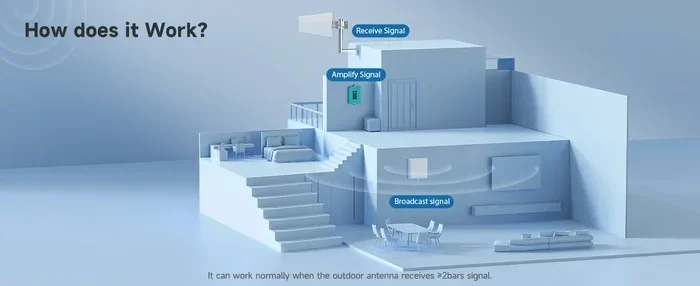
- Consider a signal booster: A signal booster can amplify your existing 5G signal and spread it throughout your home. These devices are affordable and easy to set up.
- Check for obstructions: Large furniture, appliances, and even fish tanks can block signals. Move your device away from these obstacles when possible.
- Keep your device updated: Software updates often improve network coverage and antenna performance. Make sure your phone is running the latest firmware.
Some people also explore alternatives like getting just Wi-Fi at home instead of relying solely on cellular data. If you already have a strong home internet connection, using Wi-Fi for most tasks and reserving 5G for on-the-go use can be a smart strategy. You can also look into getting a hotspot instead of Wi-Fi in areas where home internet is unreliable.
Does 5G Get Better Reception Indoors At Work?
Workplace connectivity is a growing concern. Many offices are large buildings with lots of walls, floors, and electronic equipment. All of these can weaken your 5G signal. So, does 5G get better reception indoors at work? The short answer is that office environments often present unique challenges.
Office Building Challenges
Office buildings are notorious for poor indoor cellular reception. Here is why.
- Energy-efficient windows: Modern offices often use coated glass that blocks radio signals. This is great for energy savings but terrible for cellular reception.
- Multiple floors and thick walls: Elevators, stairwells, and reinforced concrete floors create barriers between you and the nearest cell tower.
- Electronic interference: Offices are full of computers, printers, and other electronics. These devices can create interference that weakens your signal.
- Far from cell towers: Many office buildings are in commercial districts where towers may be farther away than in residential areas.
If you work in a large office building, you have probably noticed that your network coverage drops in certain areas. Conference rooms in the center of the building are often the worst spots. Hallways near windows tend to be the best.
Solutions for Workplace Connectivity
There are several ways to improve workplace connectivity and get better 5G reception at the office.
- Install a signal booster: Enterprise-grade signal boosters are designed for large buildings. They capture outdoor signals, amplify them, and redistribute them indoors.
- Use Wi-Fi for data-heavy tasks: If your office has a strong Wi-Fi network, use it for streaming, large downloads, and video calls. This reduces strain on your cellular connection.
- Position your desk wisely: If you have flexibility, sit near a window or in areas with fewer walls between you and the outside. This improves signal penetration from cell towers.
- Talk to your IT department: Many offices use wireless connectivity solutions like distributed antenna systems (DAS). Your IT team may already have solutions in place.
For employees who need reliable connectivity everywhere, having a 5G compatible device with good antenna performance makes a big difference. Some carriers also offer business plans with priority data, which helps during times of network congestion.
5G vs Wi-Fi: Which Is Better for Indoor Use?
This is a common question. People often compare 5G network coverage with their home Wi-Fi. Both have strengths and weaknesses for indoor use.
Wi-Fi is great for high-speed internet inside your home. It uses a router connected to your internet service provider. Wi-Fi speeds can be very fast, especially with modern Wi-Fi 6 and Wi-Fi 7 standards. The downside is that Wi-Fi only works within range of your router. If you move to another room, your signal may weaken.
5G offers the advantage of mobility. You are not tied to a router. You can move around your home or office and still have a connection. 5G mobile data speeds can rival or even exceed Wi-Fi speeds, especially with mmWave 5G in ideal conditions. But indoor 5G coverage is less consistent than Wi-Fi because it depends on external cell towers and building materials.
In most cases, the best approach is to use both. Use Wi-Fi for stationary tasks like streaming and working at your desk. Use 5G for mobility and when Wi-Fi is not available. If you do not have home internet, you might explore options like getting a Wi-Fi stick for your PC or setting up a hotspot. Some people even use scanning a QR code to get their Wi-Fi password for quick guest access.
For those in rural or underserved areas, satellite internet like Starlink is another option worth exploring. Not everyone can get Starlink due to availability restrictions, but it is worth checking if it serves your area.
How to Boost Your Indoor 5G Signal
If you are struggling with weak 5G signal strength indoors, there are several solutions you can try. These range from free simple fixes to paid hardware solutions.
Free and Simple Fixes
- Change your location: Even moving to a different room can make a big difference. Try different spots in your home or office to find where the signal is strongest.
- Remove obstructions: Move large objects away from windows and walls where your device sits. Clear the area around your device for better signal penetration.
- Restart your device: Sometimes a simple reboot fixes temporary network issues. Your phone may reconnect to a stronger cell tower after a restart.
- Toggle airplane mode: Turning airplane mode on and off forces your phone to reconnect to the network. This can help it find a better signal.
Paid Solutions
- Signal boosters: These devices amplify your existing 5G signal and broadcast it indoors. They range from small personal boosters to whole-home systems. A good signal booster can dramatically improve indoor coverage.
- 5G home internet: Some carriers offer 5G home internet plans. These use a specialized router that connects to 5G towers and broadcasts Wi-Fi inside your home. This can be a great alternative to traditional home internet.
- Distributed antenna systems (DAS): For large buildings or offices, DAS installations provide comprehensive indoor coverage by distributing signals from multiple antennas throughout the building.
- Wi-Fi mesh systems: While not a 5G solution, a mesh Wi-Fi system ensures strong wireless connectivity throughout your home. This reduces your reliance on cellular data indoors.
The right solution depends on your budget, your building, and your needs. Start with the free fixes and work your way up to paid solutions if needed. Even a small change like moving your desk closer to a window can improve your cellular reception noticeably.
The Future of Indoor 5G Coverage
The future of indoor 5G reception looks promising. Telecom companies are investing heavily in improving indoor coverage. New technologies are being developed to push 5G signals deeper into buildings.
One exciting development is the use of small cell technology. Small cells are low-power cell towers that can be installed on buildings, lampposts, and even inside structures. They bring the cell tower closer to you, which means stronger signal strength indoors. As more small cells are deployed, indoor 5G coverage will continue to improve.
Another trend is the integration of 5G with Wi-Fi 6 and Wi-Fi 7. Carriers are exploring ways to blend cellular and Wi-Fi networks seamlessly. This means your device will switch between 5G and Wi-Fi automatically, giving you the best of both worlds. The goal is to make indoor wireless connectivity faster, more reliable, and more consistent than ever before.
Carrier aggregation is another technology that helps. It allows your device to use multiple frequency bands at the same time. This improves network coverage and speeds, especially indoors where signal is weaker. As these technologies mature, the question of does 5G get better reception indoors will have a more confident yes as the answer.
Building materials and construction standards are also evolving. Newer buildings are being designed with indoor signal reception in mind. Some modern offices and homes now include dedicated antenna systems or signal-friendly materials in their construction. This trend will only grow as 5G becomes more essential for daily life.
Conclusion
So, does 5G get better reception indoors? The answer is that it depends. 5G indoor reception is influenced by many factors. The frequency band, building materials, your device, and your distance from cell towers all matter. Sub-6 GHz 5G generally performs better indoors than mmWave. But even sub-6 GHz can struggle in buildings with thick concrete or metal.
At home, simple steps like moving near windows and using a signal booster can make a big difference. At work, solutions like enterprise signal boosters and smart desk placement help improve workplace connectivity. The future of indoor 5G looks bright. New technologies like small cells and carrier aggregation are making indoor coverage better every year.
The key takeaway is that you do not have to accept poor indoor cellular reception. With the right knowledge and tools, you can significantly improve your 5G experience inside your home or office. Start with the free tips, explore paid solutions if needed, and stay informed about new developments in 5G network coverage. Better indoor reception is within your reach.
Take action today. Test your signal, try the tips in this article, and enjoy a stronger, faster 5G connection indoors. Your home network and workplace connectivity will thank you.
Frequently Asked Questions
Why is my 5G signal weak indoors?
Several factors can cause weak indoor 5G signals. Building materials like concrete and metal block signals. Distance from cell towers also matters. The type of 5G band your carrier uses plays a big role too. mmWave signals struggle indoors while sub-6 GHz performs better.
Can I use a signal booster to improve indoor 5G reception?
Yes, signal boosters are one of the most effective ways to improve indoor 5G reception. They capture existing outdoor signals, amplify them, and redistribute them inside your home or office. Both personal and enterprise-grade boosters are available at various price points.
Is 5G better than Wi-Fi for indoor use?
It depends on your needs. 5G offers mobility and fast speeds without a router. Wi-Fi provides consistent speeds within range of your router. For most indoor tasks, using both together gives the best experience. Wi-Fi is great for stationary use while 5G shines when you are moving around.
Does the type of building affect 5G indoor coverage?
Absolutely. Buildings made of concrete, brick, or metal block 5G signals more than wooden or glass structures. Energy-efficient windows can also reflect signals. The number of floors and wall thickness also impact how well 5G penetrates your space.
What is the difference between mmWave and sub-6 GHz 5G indoors?
mmWave 5G delivers very fast speeds but has poor building penetration. It struggles to get through walls and windows. Sub-6 GHz 5G travels farther and penetrates buildings much better. It offers more reliable indoor coverage though speeds may not be as high as mmWave in ideal conditions.
How can I test my indoor 5G signal strength?
You can use your phone’s built-in signal indicator or download a signal testing app. Walk around your home or office and note where the signal is strongest. Check different rooms, near windows, and in the center of your space. This helps you identify the best spots for calls and data use.
=== CONCLUSION ===
Does 5G get better reception indoors? The answer is nuanced. Indoor 5G reception depends on frequency bands, building materials, and your specific environment. Sub-6 GHz 5G generally performs better indoors than mmWave. Simple steps like moving near windows and using signal boosters can significantly improve your experience. Whether at home or at work, understanding your signal environment is the first step toward better connectivity.