Do You Get Charged For Tethering On Your Mobile Phone
Do you get charged for tethering? The answer depends on your carrier, your plan, and the type of tethering you use. Many mobile providers do charge extra for mobile hotspot and data tethering, while some unlimited data plans include it at no added cost. Understanding how internet sharing works can save you from surprise data overage charges and help you pick the right cellular provider plan.
This is a comprehensive guide about Do You Get Charged For Tethering.
Key Takeaways
- Tethering costs vary: Some carriers include it free, while others add monthly fees or reduce your speeds.
- Plan type matters: Unlimited plans are more likely to include tethering than capped data plans.
- Different tethering methods exist: Wi-Fi hotspot, Bluetooth, and USB tethering each have unique pros and cons.
- Hidden fees are real: Always check your terms of service to avoid unexpected charges.
- Alternatives exist: Portable Wi-Fi devices and temp Wi-Fi plans can replace phone tethering.
[FEATURED_IMAGE_PLACEHOLDER]
Do you get charged for tethering on your mobile phone? It is a question more people are asking every day. With mobile hotspot usage growing fast, knowing the costs upfront can save you a lot of money and frustration.
Tethering means sharing your phone’s internet connection with other devices. You might turn your phone into a portable hotspot for your laptop or tablet. It is convenient, but it can also come with hidden costs that many users do not expect.
In this guide, we will break down everything you need to know. We will look at how tethering works, which carriers charge, and how to avoid surprise fees. By the end, you will have a clear picture of what to expect from your cellular provider.
Let us dive in and make sure you are not paying more than you need to for mobile connectivity.
What Is Tethering and How Does It Work?
Tethering is the process of connecting your phone’s internet to another device. Think of it as turning your phone into a mobile modem. Your phone uses its cellular data connection and shares it through Wi-Fi, Bluetooth, or a USB cable.
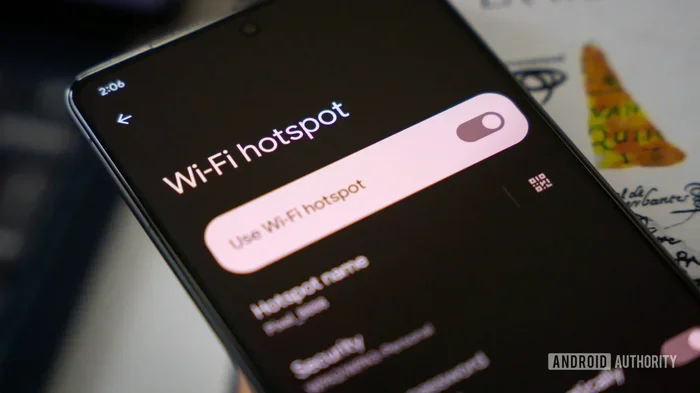
The most common form is Wi-Fi hotspot mode. When you enable it, your phone creates a small wireless network. Other devices can connect to it just like they would connect to a home router.
Bluetooth tethering uses a short-range wireless connection. It is slower but uses less battery. USB tethering connects your phone to a computer with a cable. It tends to be the fastest and most stable option.
Each method has its own advantages. But here is the big question: does your carrier care which method you use? The short answer is yes. Most carriers treat all forms of network sharing the same way when it comes to billing.
Types of Tethering Methods
Not all tethering is the same. Here are the three main types and how they work:
- Wi-Fi Hotspot: Creates a wireless network that nearby devices can join. This is the most popular method.
- Bluetooth Tethering: Connects one device at a time using Bluetooth. Slower but uses less power.
- USB Tethering: Uses a USB cable to connect your phone to a computer. Fast and reliable.
No matter which method you choose, your phone still uses its mobile data plan. The data you consume while tethering counts against your monthly allowance. This is where costs can sneak up on you.
Do Carriers Charge for Tethering?
This is the million-dollar question. The truth is there is no single answer. It depends on your carrier, your plan, and where you live. Let us break it down.
Some carriers include tethering at no extra cost. Others charge a flat monthly fee. And some reduce your speeds if you tether too much. Understanding your specific situation is the first step to avoiding bill shock.
Carriers That Include Tethering for Free
A growing number of carriers now offer unlimited data plans that include tethering. These plans are designed for users who need mobile bandwidth on the go without worrying about extra charges.
For example, some major cellular providers have shifted toward including hotspot data in their base plans. This makes it easier for families and remote workers to stay connected without a second data line.
However, even “free” tethering often comes with a catch. Many carriers set a data cap on how much hotspot data you can use. After you hit that limit, they may slow your speeds or charge extra.
Carriers That Charge Extra for Tethering
Several carriers still charge a separate fee for tethering. This fee can range from a few dollars a month to a significant chunk of your bill. The idea is to discourage heavy internet sharing and protect their network resources.
Some carriers offer add-on plans specifically for tethering. You pay a monthly fee, and in return, you get a set amount of hotspot data. This can be a good deal if you only need occasional tethering.
Always read the fine print. Some plans advertise “unlimited data” but then impose a data cap specifically for tethering. This is a common practice that catches many users off guard.
What Happens When You Exceed Your Tethering Data Limit?
If your plan has a tethering data limit and you go over, you will likely face one of two outcomes. Your carrier may either charge data overage fees or throttle your speeds to a crawl.
Overage fees can add up quickly. Some carriers charge per gigabyte, which can make your bill spiral out of control. Throttling is less expensive but equally frustrating. Your connection becomes painfully slow, making basic tasks difficult.
The best approach is to monitor your mobile data usage regularly. Most phones have built-in tools that show exactly how much data your hotspot is consuming.
How Tethering Affects Your Data Plan
When you tether, you are using your phone’s cellular data to provide internet to other devices. Every megabyte your laptop, tablet, or other device downloads counts against your phone’s data allowance.
This is different from regular phone use. Streaming a movie on your phone uses roughly the same data as streaming it through a tethered connection. But tethering often involves heavier usage because people tend to do more data-intensive tasks on laptops.
Here is how tethering impacts your plan in real terms:
- Video streaming: A one-hour HD video uses about 3 GB of data. That is a big chunk of most plans.
- Video calls: Zoom or FaceTime calls use roughly 1 GB per hour.
- Web browsing: Light browsing uses about 60 MB per hour.
- Software updates: A single laptop update can consume 2 GB or more.
These numbers add up fast. If you tether regularly, you need a plan with enough mobile bandwidth to handle the extra load.
Understanding Data Caps and Throttling
A data cap is the maximum amount of data you can use in a billing cycle. Once you reach it, your carrier may cut off your data or slow it down significantly.
Throttling is when your carrier intentionally slows your connection. They do this to manage network traffic. For tethering users, throttling can make even simple web pages take forever to load.
If you frequently tether, look for plans with high or no data caps. Unlimited data plans are the best option, but even these often have a fair use policy that limits heavy tethering.
How to Avoid Extra Tethering Charges
Nobody wants a surprise bill at the end of the month. The good news is there are several ways to avoid extra tethering charges and keep your costs under control.
Choose the Right Plan
The easiest way to avoid tethering fees is to pick a plan that includes it. Before signing up, ask your carrier directly whether tethering is included in the plan price.
Look for plans that offer generous hotspot data allowances. Some unlimited data plans include 15 GB to 50 GB of hotspot data per month. That is plenty for most users.
If you only need occasional tethering, a plan with a smaller hotspot allowance might be enough. Just make sure you understand the limits before you commit.
Monitor Your Data Usage
Keep a close eye on how much data you use while tethering. Most smartphones have a built-in data tracker. You can also download third-party apps that give you detailed breakdowns.
Set up alerts so your phone warns you when you are approaching your limit. This simple step can prevent data overage charges from sneaking up on you.
Use Wi-Fi When Available
One of the simplest ways to save mobile data is to connect to Wi-Fi whenever possible. At home, at work, or at a café, Wi-Fi can handle most of your data needs.
Save your tethering for when you really need it. Use it on commutes, trips, or when you are away from reliable Wi-Fi. This strategy alone can significantly reduce your data consumption.
If you travel frequently, consider looking into temporary Wi-Fi options that can serve as an alternative to phone tethering. Similarly, a Wi-Fi stick can provide dedicated mobile internet without draining your phone’s battery or eating into your hotspot data.
Consider Alternative Connectivity Solutions
Phone tethering is not your only option. Several alternatives can provide internet to your other devices without using your phone’s hotspot.
Portable Wi-Fi hotspots, also known as mobile routers, are a great alternative. These devices use a SIM card and create a Wi-Fi network just like your phone does. The advantage is they do not drain your phone battery and they often have better range.
Some carriers sell dedicated mobile hotspot devices that are designed specifically for this purpose. They tend to be more efficient and offer better performance than tethering from your phone.
Tethering and Network Performance
Tethering does not just affect your wallet. It can also impact your network performance and the experience of others on the same network.
When you tether, your phone becomes a mobile router. It handles incoming and outgoing data for multiple devices. This puts extra strain on your phone’s processor and battery.
It also puts strain on the cellular network. Heavy tethering uses more bandwidth than typical phone use. In crowded areas, this can slow down the connection for everyone nearby.
This is why some carriers limit tethering speeds or data amounts. They need to manage their network resources fairly across all users.
Does Tethering Drain Your Phone Battery?
Yes, tethering can drain your battery quickly. Running a hotspot uses significant power, especially if multiple devices are connected.
USB tethering is the most battery-efficient option because your phone charges while connected. Bluetooth tethering uses less power than Wi-Fi hotspot but offers slower speeds.
If you need to tether for long periods, consider keeping your phone plugged in. A portable battery pack can also help extend your phone’s life while you work on the go.
Tethering Laws and Terms of Service
Did you know that tethering can sometimes violate your carrier’s terms of service? While most carriers allow tethering in some form, the details vary widely.
Some plans explicitly prohibit tethering altogether. Others allow it but charge extra. And some plans include it freely but reserve the right to throttle speeds during heavy use.
Violating your terms of service can have consequences. Your carrier could charge you fees, slow your connection, or even terminate your service in extreme cases.
Always read your plan’s terms carefully. If you are unsure whether tethering is allowed, contact your carrier directly. A quick phone call can save you from costly mistakes.
Expert Insights on Tethering Costs
Industry experts agree that tethering costs are shifting. More carriers are moving toward inclusive plans that bundle hotspot data at no extra charge. This trend is driven by consumer demand and the rise of remote work.
However, experts also warn that “unlimited” does not always mean unlimited. Many plans have a fair use policy that limits tethering data to a specific amount. After that limit, speeds drop significantly.
The key takeaway from experts is to read the fine print. Understand exactly what your plan covers before you start tethering regularly. A few minutes of research can save you hundreds of dollars over the life of your plan.
Conclusion
So, do you get charged for tethering? The answer is: it depends. Your carrier, your plan, and your usage all play a role in determining whether you pay extra for mobile hotspot and data tethering.
The best way to avoid surprise charges is to understand your plan before you start tethering. Check whether your unlimited data plan includes hotspot data. Monitor your usage regularly. And consider alternatives like portable Wi-Fi sticks or mesh routers for home internet when tethering is not the best option.
Tethering is a powerful tool for staying connected on the go. With the right plan and a little awareness, you can use it without breaking the bank. Take control of your mobile data today and enjoy worry-free internet sharing wherever you are.
Frequently Asked Questions
Is tethering free on all unlimited plans?
Not always. While many unlimited plans include tethering, some still impose a data cap on hotspot usage. Always check your plan details to confirm what is included.
Can my carrier detect that I am tethering?
Yes, most carriers can detect tethering through network monitoring. They can identify when your phone is sharing its connection with other devices.
Does USB tethering use less data than Wi-Fi hotspot?
No, the amount of data used is the same regardless of the tethering method. USB, Bluetooth, and Wi-Fi hotspot all consume your mobile data equally.
What is the difference between a mobile hotspot and tethering?
They are essentially the same thing. Tethering is the general term for sharing your phone’s internet connection. A mobile hotspot is a specific type of tethering that uses Wi-Fi.
Can I tether without my carrier knowing?
Some users try to hide tethering using third-party apps, but this violates most carrier terms of service. If caught, you could face fees or service termination.
How much data does tethering use per hour?
It depends on what you are doing. Light browsing uses about 60 MB per hour, while video streaming can use 3 GB or more per hour. Check your activity to estimate your usage.