Do Microsoft Computers Come With Word Preinstalled Software
Do Microsoft computers come with Word? The short answer is yes, but with some important details you should know. Most new Microsoft-branded PCs and laptops ship with Microsoft Word ready to use, often through a Microsoft 365 trial or a preinstalled Office suite. However, the exact setup depends on the model, the Windows version, and whether you own a consumer or business device. This guide breaks down everything you need to know about Microsoft Word preinstalled software, from activation to alternatives.
If you have ever unboxed a new Microsoft computer and wondered what software came along for the ride, you are not alone. The question do Microsoft computers come with Word comes up all the time, and for good reason. Word is one of the most popular word processor tools in the world. Millions of people use it every day for work, school, and personal projects. So it makes sense that you would want to know if your new device has it ready to go right out of the box.
The truth is, the answer depends on a few factors. The model you buy, the version of Windows it runs, and whether you purchase a consumer or business device all play a role. In this article, we will walk you through everything you need to know about Microsoft Word preinstalled software. We will cover what comes standard, how to check your system, and what to do if Word is not already on your PC. By the end, you will have a clear picture of exactly what to expect from your new Microsoft computer.
Key Takeaways
- Most Microsoft computers include Word: New PCs and laptops from Microsoft typically come with Word preloaded or available through a trial.
- Microsoft 365 is the modern way to access Word: A subscription gives you the latest version of Word and other Office apps across all your devices.
- Older or budget models may only include a trial: Some devices ship with a limited-time Office trial that requires a purchase or subscription to keep using.
- You can check your installed apps easily: Use the Start menu or Settings to see if Word is already on your computer.
- Free alternatives exist if Word is not included: Tools like Google Docs and LibreOffice offer solid document editing without extra cost.
- Licensing matters: Understand the difference between a one-time purchase and a subscription to avoid surprises.
📑 Table of Contents
- What Software Comes Preinstalled on Microsoft Computers
- Does Every Microsoft Computer Include Microsoft Word?
- How to Check If Word Is Already Installed on Your PC
- What to Do If Word Is Not Preinstalled
- Microsoft 365: The Modern Way to Get Word
- Common Mistakes People Make About Word Licensing
- Quick Tips for Getting the Most Out of Word on Your Microsoft Computer
- Final Thoughts
What Software Comes Preinstalled on Microsoft Computers
When you buy a new computer from Microsoft, the device does not just show up with an empty hard drive. Microsoft puts a set of built-in apps and software on every device it sells. These apps are designed to help you get started right away. But the exact list of preinstalled software can vary depending on the device type and the Windows version it runs.
The Default Microsoft Office Suite
Microsoft computers that run Windows 11 or Windows 10 typically include access to the Microsoft Office suite. This suite is a collection of productivity tools that people use every day. The most well-known app in the suite is Microsoft Word, which is used for creating and editing documents. Other apps in the suite include Excel for spreadsheets, PowerPoint for presentations, and Outlook for email.
On newer Microsoft computers, you will often find a Microsoft 365 trial preinstalled. This trial gives you full access to Word and all the other Office apps for a limited time, usually 30 days. After the trial ends, you will need to either purchase a Microsoft 365 subscription or use a product key to keep using the software. Some older models may come with a permanent version of Office, but this is less common now.
Built-In Windows Apps and Utilities
Beyond the Office suite, Microsoft computers also come with a range of built-in Windows apps. These apps handle everyday tasks like browsing the web, taking notes, and managing files. The Microsoft Store is preinstalled as well, giving you easy access to download more apps and software. Windows also includes tools like Paint, Notepad, and the Windows Media Player for basic tasks.
It is worth noting that the built-in apps are different from the Office apps. The built-in Windows apps come free with the operating system. The Office apps, including Word, may come with a trial or a full license depending on the device. This distinction is important because it affects how long you can use Word without paying.
Does Every Microsoft Computer Include Microsoft Word?
The short answer is no, not every single Microsoft computer includes Word permanently. While most devices do come with some form of Word access, the type of access can vary. Understanding the different models and licensing options will help you know exactly what you are getting.
Consumer vs Business Models
Consumer Microsoft computers, like the Surface Pro or Surface Laptop sold through retail stores, usually come with a Microsoft 365 trial. This trial gives you full access to Word, Excel, PowerPoint, and other Office apps. After the trial period, you will need to subscribe or purchase a license to continue using the software.
Business computers, on the other hand, often come with a different licensing setup. Companies that buy Microsoft devices in bulk may receive full Office licenses tied to their business accounts. These devices may include a permanent version of Word rather than a trial. If you are buying a Microsoft computer for business use, it is a good idea to check with the seller about the exact software bundle included.
Microsoft 365 vs One-Time Purchase
Microsoft offers two main ways to get Word on your computer. The first is through a Microsoft 365 subscription. This is a subscription model that gives you access to Word and all other Office apps. You pay a monthly or annual fee, and your subscription includes cloud storage, regular updates, and support. The second option is a one-time purchase of a standalone version of Office. This is less common now, but you can still buy it in some cases.
Most new Microsoft computers are set up for the subscription model. This means the preinstalled Word app will prompt you to sign in with a Microsoft account and start a trial. If you do not want to pay for a subscription, you can use the free web version of Word through your browser. The web version has fewer features but is completely free to use.
How to Check If Word Is Already Installed on Your PC
If you have a new Microsoft computer and want to know if Word is already on it, checking is very simple. You do not need to be a tech expert to find out. There are a few quick ways to check whether Microsoft Word is installed and ready to use.
First, click the Start button on your taskbar. Type “Word” into the search bar. If Word shows up in the results, it is already installed on your computer. You can click on it to open it and start using it right away. If Word does not show up in the search results, it may not be installed, or you may still be in the trial period.
Another way to check is through the Settings app. Go to Settings, then click on Apps, and look for Microsoft Word in the list of installed programs. If you see it there, you are good to go. If you do not see it, you may need to download it from the Microsoft Store or sign up for a Microsoft 365 trial.
You can also open the Microsoft Store app and search for Word. If Word is already installed, the Store will show a message saying it is already on your device. If it is not installed, you can download it directly from the Store. This is a quick and easy way to get Word on your computer, even if it did not come preinstalled.
What to Do If Word Is Not Preinstalled
There are a few reasons why Word might not be on your new Microsoft computer. Maybe you bought a budget model that only includes the basics. Maybe the trial period has already expired. Or maybe you reset your device and lost the preinstalled apps. Whatever the reason, the good news is that getting Word on your computer is easy.
The first thing you should do is check the Microsoft Store. Microsoft offers a free version of Word through the web, and you can also download the Word app from the Store. If you have a Microsoft account, you can sign in and start using Word online at no cost. This is a great option if you only need to do basic document editing.
If you need the full desktop version of Word, you have a few options. You can purchase a Microsoft 365 subscription, which gives you access to Word and all other Office apps. You can also buy a one-time Office license if you prefer not to subscribe. Some third-party retailers also sell Office product keys at a discount. Just make sure you buy from a trusted source to avoid counterfeit software.
Another option is to use a free alternative to Microsoft Word. Google Docs is a popular choice that works right in your web browser. It offers most of the same features as Word, including document creation, editing, and file sharing. LibreOffice is another free option that you can install on your computer. It is a full office suite that is compatible with Microsoft file formats. These alternatives are great if you do not want to pay for Word.
Microsoft 365: The Modern Way to Get Word
Microsoft 365 has changed the way people access Word and other Office apps. Instead of buying a one-time license, you now subscribe to a service that gives you the latest tools and features. This subscription model has become the standard for most Microsoft computers sold today. It offers several benefits that make it a great choice for most users.
With a Microsoft 365 subscription, you get access to Word, Excel, PowerPoint, Outlook, and more. You can install these apps on up to five devices at the same time. This means you can use Word on your Microsoft laptop, your home desktop, and even your tablet or phone. The apps are always up to date, so you never have to worry about missing out on new features or security patches.
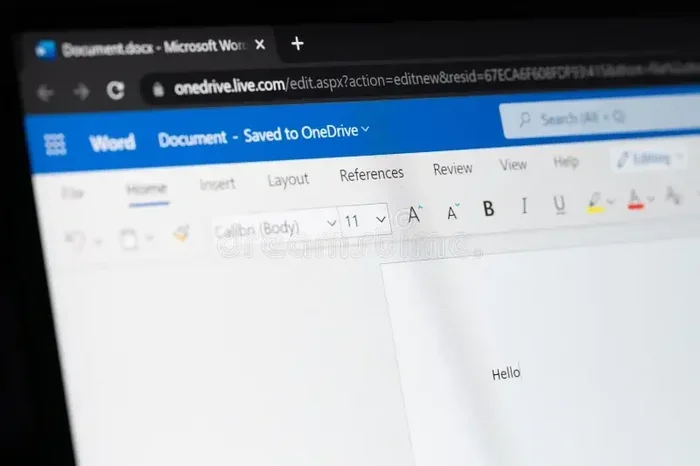
Microsoft 365 also includes 1 TB of cloud storage through OneDrive. This means you can save your documents online and access them from any device. You can share files with friends and coworkers easily. The subscription also includes premium support from Microsoft, so if you run into any issues, help is always available.
For students and educators, Microsoft offers a special Microsoft 365 Education plan. This plan is often free or heavily discounted. It includes Word and all other Office apps, plus extra cloud storage. If you are a student, it is worth checking if you qualify for this plan before paying for a regular subscription.
Common Mistakes People Make About Word Licensing
There are a few common mistakes that people make when it comes to Word licensing and preinstalled software. Avoiding these mistakes can save you time, money, and frustration. Here are some of the most common pitfalls to watch out for.
One of the biggest mistakes is assuming that the trial version of Word is the same as the full version. A Microsoft 365 trial gives you full access to Word for a limited time, usually 30 days. After the trial ends, you will lose access to the premium features unless you pay for a subscription. Make sure you understand the trial terms before you start using Word.
Another mistake is not checking the license type before you buy a Microsoft computer. Some devices come with a one-time license, while others only include a trial. If you need Word permanently, make sure the device you are buying includes a full license or that you are prepared to purchase one separately. Reading the product details carefully can save you from an unpleasant surprise later.
Some people also forget to activate their Word copy. When you install Word, you need to sign in with a Microsoft account and enter a product key or activate your subscription. If you skip this step, Word may not work properly or may limit some features. Always take a few minutes to activate your software after installation.
Finally, do not ignore updates. Microsoft regularly releases updates for Word that fix bugs, improve performance, and add new features. Keeping your Word app updated ensures you get the best experience and the highest level of security. You can turn on automatic updates in the Microsoft 365 settings to make this process easy.
Quick Tips for Getting the Most Out of Word on Your Microsoft Computer
Here are a few quick tips to help you get started with Word on your new Microsoft computer. First, sign in with your Microsoft account to unlock all the features. This also gives you access to cloud saving and collaboration tools. Second, explore the templates available in Word. Word comes with hundreds of ready-made templates for resumes, letters, reports, and more. These templates can save you a lot of time and effort.
Third, learn the keyboard shortcuts. Shortcuts like Ctrl + S to save and Ctrl + B to bold text can speed up your workflow significantly. Fourth, use the Tell Me feature to find commands quickly. Just type what you want to do in the search bar at the top of Word, and it will show you the right tools. Fifth, take advantage of the free training resources Microsoft offers. Microsoft has a library of tutorials and guides that can help you become more productive in Word.
Final Thoughts
So, do Microsoft computers come with Word? The answer is yes for most models, but the details matter. Most new Microsoft computers include Word through a preinstalled Microsoft 365 trial or a full Office license. The exact setup depends on the device model, the Windows version, and whether you are buying a consumer or business product. By understanding these differences, you can make informed decisions about your software needs.
Whether you use the preinstalled version, sign up for a Microsoft 365 subscription, or explore free alternatives, you have plenty of options for getting Word on your computer. The key is to check what is included with your device and understand the licensing terms. With the right setup, you will be creating and editing documents in no time. Take a few minutes to explore the software on your new Microsoft computer, and you will be well on your way to getting the most out of your device.
Frequently Asked Questions
Do all Microsoft computers come with Microsoft Word?
Most Microsoft computers do come with Word, but it may be a trial version rather than a permanent license. Newer models typically include a Microsoft 365 trial that gives you full access to Word for about 30 days. After the trial, you will need a subscription or a product key to keep using it.
Can I use Word for free on a Microsoft computer?
Yes, you can use the free web version of Word through your browser. You just need a Microsoft account to sign in. The web version has most of the basic features and is a great option if you do not want to pay for a subscription.
How do I activate Word on my new Microsoft computer?
To activate Word, open the app and sign in with your Microsoft account. If you have a Microsoft 365 subscription, it will activate automatically. If you have a product key, you can enter it during the setup process. If Word came with a trial, you will be prompted to start or purchase a subscription when the trial ends.
What is the difference between a one-time purchase and a Microsoft 365 subscription?
A one-time purchase gives you a permanent license for a specific version of Office, including Word. A Microsoft 365 subscription is a recurring payment that gives you access to the latest versions of all Office apps, plus cloud storage and regular updates. Most new Microsoft computers are set up for the subscription model.
Can I install Word on multiple devices with one subscription?
Yes, a Microsoft 365 subscription allows you to install Word and all other Office apps on up to five devices at the same time. This includes PCs, Macs, tablets, and phones. You can sign in to any of these devices and access your documents through OneDrive.
What should I do if Word is not working properly on my Microsoft computer?
First, make sure your Windows and Word apps are up to date. You can check for updates through the Microsoft Store or the Microsoft 365 settings. If the problem continues, try repairing the app through the Settings menu. You can also visit the Microsoft support website for additional troubleshooting steps and help.
=== CONCLUSION ===
Do Microsoft computers come with Word? Yes, they do, and now you know exactly what to expect. Most Microsoft computers ship with Word ready to use, either through a preinstalled Office suite or a Microsoft 365 trial. Understanding the difference between a trial and a full license, knowing how to check if Word is installed, and learning your options for activation will help you get the most out of your new device.
Whether you are a student, a professional, or someone who just needs to write a simple document, Microsoft Word remains one of the best tools for the job. With the right setup and a clear understanding of your licensing options, you can start creating, editing, and sharing documents from day one. Take advantage of the preinstalled software on your Microsoft computer, explore the Microsoft 365 ecosystem, and enjoy a smooth, productive experience with one of the world’s most trusted word processor tools.