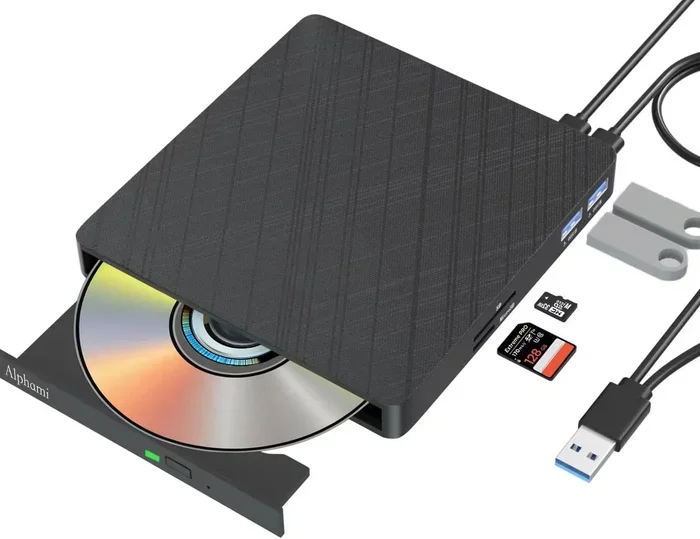
Do External Dvd Drives Play Cds And Dvd Discs Today
Yes, external DVD drives absolutely play CDs and DVDs. These portable USB drives work with most laptops, desktops, and even some tablets to read and play your favorite discs. Whether you want to watch movies, listen to music, or install older software, an external optical drive has you covered.
Do you miss the days of popping a CD into your computer and hearing your favorite album? Or maybe you have a stack of old DVDs collecting dust and want to watch them again. Whatever your reason, you might be wondering if an external DVD drive can handle the job. The good news is that yes, these handy little devices still play CDs and DVDs just fine.
Many modern laptops and desktops no longer include a built-in optical drive. This leaves people searching for a simple way to access their disc collections. An external DVD drive solves this problem quickly and affordably. You plug it in, insert your disc, and you are good to go.
External DVD drives play CDs and DVDs. This is the simple truth. But there is a bit more to know. Not all drives are created equal. Some handle Blu-ray discs too. Some burn discs. And some work better with certain devices than others. Let us walk through everything you need to know about using an external DVD drive for your CDs and DVDs.
Key Takeaways
- External DVD drives play both CDs and DVDs: Most modern USB DVD drives handle both formats with ease.
- Plug-and-play setup is standard: You just connect the drive via USB and start using it right away.
- Blu-ray compatibility varies by model: Not all external drives can read Blu-ray discs, so check specs before buying.
- Region coding may affect playback: Some DVDs have regional locks that can limit where you play them.
- Streaming has not killed the disc drive: Many people still prefer physical media for quality and ownership.
- Laptop users benefit the most: Modern laptops often lack built-in optical drives, making external options essential.
📑 Table of Contents
- What Is an External DVD Drive?
- Do External DVD Drives Play CDs?
- Do External DVD Drives Play DVDs?
- Which Devices Work with External DVD Drives?
- Things to Consider Before Buying an External DVD Drive
- Common Problems and How to Fix Them
- External DVD Drive vs. Streaming: Which Is Better?
- Quick Tips for Getting the Most from Your External DVD Drive
- Final Thoughts
What Is an External DVD Drive?
An external DVD drive is a portable device that connects to your computer through USB. It reads CDs, DVDs, and sometimes Blu-ray discs. Unlike internal drives built into your computer tower, external drives sit outside and plug in when you need them.
These drives are slim, lightweight, and easy to carry. Many are about the size of a small book. You can toss one in your laptop bag and take it anywhere. This makes them perfect for people who need disc playback on the go.
How Do External DVD Drives Work?
External DVD drives use a laser to read the tiny bumps and grooves on a disc surface. This laser translates those physical patterns into data your computer can understand. The process is the same whether you are reading a CD or a DVD.
The drive connects to your computer via USB. Most drives use USB 3.0, which offers fast data transfer. Some older models use USB 2.0, which still works but is slower. Once connected, your computer should recognize the drive automatically. You can then open your disc and start playing or accessing files.
Do External DVD Drives Play CDs?
The short answer is yes. External DVD drives play CDs without any issues. CDs store music, software, and data files. Your external drive can read all of these formats.
CD Formats Supported by External Drives
Most external DVD drives support a wide range of CD formats. Here is a quick look at what you can expect:
- CD-ROM: Read-only discs with data or software
- CD-R: Recordable discs you can write to once
- CD-RW: Rewritable discs you can erase and reuse
- Audio CDs: Standard music discs for car stereos and players
- MP3 CDs: Discs with compressed audio files
If you have old CDs with music or software, your external drive will handle them. Just pop the disc in, wait a moment, and your computer should recognize the content. For music CDs, you can rip the tracks to your computer or play them directly through your media player.
Audio CD Playback Quality
Many people worry about sound quality when playing CDs on external drives. The truth is, the playback quality depends more on your computer’s sound card and speakers than on the drive itself. A good external DVD drive will deliver clean, clear audio from your CDs.
If you want the best sound, try using quality headphones or speakers connected to your computer. You will be surprised how good old CDs sound through a decent setup.
Do External DVD Drives Play DVDs?
Yes, external DVD drives play DVDs. This is their primary purpose, after all. DVDs hold more data than CDs and deliver better video and audio quality for movies and TV shows.
DVD Formats You Can Expect
Most external DVD drives support the following DVD formats:
- DVD-ROM: Read-only discs with data or movies
- DVD-R: Recordable discs for one-time writing
- DVD+R: Another recordable format, similar to DVD-R
- DVD-RW and DVD+RW: Rewritable disc formats
- DVD-Video: Standard movie discs for home viewing
When you insert a DVD movie into your external drive, your computer should automatically launch your default media player. If it does not, you can open your player software manually and select the disc. Popular media players like VLC handle almost all DVD formats without extra codecs.
Can External DVD Drives Play Blu-ray Discs?
Not all external DVD drives play Blu-ray discs. Standard DVD drives cannot read Blu-ray format. You need a specific Blu-ray compatible external drive for that. These drives cost more but offer full support for Blu-ray movies and data discs.
If you want to play Blu-ray discs, look for drives that clearly state Blu-ray support in their specifications. Some popular brands that offer Blu-ray external drives include LG, ASUS, and Samsung.
Which Devices Work with External DVD Drives?
One of the best things about modern external DVD drives is their versatility. They work with many different devices beyond just desktop computers. Let us look at what you can connect them to.
Laptops
Most external DVD drives work perfectly with laptops. This is the most common use case. Since many modern laptops do not include a built-in optical drive, an external drive fills that gap nicely. You can use it with Windows laptops, MacBooks, and Chromebooks.
If you use a Chromebook, you might wonder about compatibility. Can I Do Everything I Need On A Chromebook? External DVD drives work with Chromebooks that support USB mass storage. You may need to check your specific Chromebook model for full disc playback support.
Desktop Computers
Desktop computers also work well with external DVD drives. This is especially useful for older desktops that lost their internal drive or newer compact PCs that never had one. Just plug the drive into a USB port and start using it.
Televisions and Monitors
Some external DVD drives can connect directly to smart TVs or monitors with USB ports. This lets you watch DVDs on a bigger screen without using a computer. However, compatibility varies by TV model. Not all TVs can read video files from external drives.
If you want to watch DVDs on a larger display, you might also consider whether you can connect your laptop to a TV or monitor. Can I Remove Laptop Screen And Just Use External Monitor? Yes, you can use an external display with your laptop and connect your DVD drive to play movies on the bigger screen.
Gaming Consoles and Media Devices
Some people wonder if they can use an external DVD drive with gaming consoles. Most modern consoles like the PlayStation and Xbox do not support external USB DVD drives for game discs. However, you can use them with computers for media playback.
If you want to play older game discs on your TV, you might explore options like connecting retro consoles. Can I Play Nintendo 64 On Hdtv? Yes, you can connect retro consoles to modern TVs with the right cables and adapters.
Things to Consider Before Buying an External DVD Drive
Not all external DVD drives are the same. Before you buy one, consider these important factors to make sure you get the right drive for your needs.
Connection Type
Most external DVD drives connect via USB. USB 3.0 offers the fastest speeds and best performance. USB 2.0 works but is slower, especially with larger files. Some drives also come with USB-C connections for newer laptops.
Make sure the drive you choose matches the ports available on your computer. You can always use an adapter if needed.
Disc Compatibility
Check which disc formats the drive supports before purchasing. If you only need to play CDs and standard DVDs, most drives will work fine. If you need Blu-ray support, you will need a more expensive model.
Burning Capability
Some external DVD drives can only read discs. Others can also burn (write) to recordable discs. If you want to create your own CDs or DVDs, look for a drive that lists burning support in its specs.
Portability
If you travel often, choose a slim and lightweight drive. Many external DVD drives weigh under half a pound and fit easily in a bag. Larger drives may offer better performance but are less convenient to carry around.
Brand and Reliability
Stick with reputable brands like LG, ASUS, Samsung, or Lenovo. These brands offer reliable drives with good customer support. Cheaper no-name drives might save you money upfront but could fail faster or have compatibility issues.
Common Problems and How to Fix Them
Even though external DVD drives are simple devices, you might run into occasional issues. Here are some common problems and quick fixes.
Drive Not Recognized by Computer
If your computer does not detect the drive when you plug it in, try these steps:
- Unplug the drive and reconnect it to a different USB port
- Try a different USB cable if one came with the drive
- Restart your computer with the drive plugged in
- Check your device manager for any driver issues
Disc Won’t Play
If a disc does not play, it might be scratched or dirty. Clean the disc gently with a soft cloth. Also, check if the disc has region coding restrictions. Some DVDs are locked to specific regions and may not play on drives from other regions.
Slow Performance
If your drive reads discs slowly, make sure you are using a USB 3.0 port. Also, close other programs running on your computer to free up resources. A dusty connection port can also slow things down.
External DVD Drive vs. Streaming: Which Is Better?
With streaming services like Netflix and Spotify so popular, you might wonder if you even need a physical disc drive anymore. Both options have pros and cons.
Streaming offers convenience and a huge library of content. You can watch almost anything instantly without leaving your couch. But streaming requires a strong internet connection and monthly subscriptions.
Physical discs offer ownership and often better quality. You do not need internet access to watch a DVD. The video quality on a DVD can sometimes surpass compressed streaming versions. And you can build a collection of your favorite movies and music.
Some people use both methods. They stream new content and keep their disc collections for favorite titles. An external DVD drive lets you enjoy both worlds without sacrificing your existing collection.
Quick Tips for Getting the Most from Your External DVD Drive
Here are some handy tips to keep your drive working well:
- Always eject discs properly: Use the eject button or software command instead of pulling discs out by force
- Keep the lens clean: Use a lens cleaning disc periodically to maintain read quality
- Store discs properly: Keep discs in their cases away from heat and direct sunlight
- Update your drivers: Check for driver updates from the manufacturer’s website
- Use a surge protector: Plug your drive into a surge protector to prevent electrical damage
Final Thoughts
So, do external DVD drives play CDs and DVDs? Absolutely. These simple, affordable devices bring back the joy of physical media in a portable package. Whether you want to listen to your old music CDs, watch classic DVDs, or install software from discs, an external DVD drive handles it all.
The key is to choose the right drive for your needs. Consider what formats you need, which devices you will use it with, and whether you want burning capability. With the right drive, your disc collection stays alive and accessible.
Physical media is not dead yet. Many people still love the quality, ownership, and nostalgia of CDs and DVDs. An external DVD drive keeps that experience alive in a modern, convenient package. Grab one, pop in your favorite disc, and enjoy.
Frequently Asked Questions
Can an external DVD drive play CDs and DVDs on a Mac?
Yes, most external DVD drives work with Mac computers. They connect via USB and are recognized as plug-and-play devices. Make sure to check compatibility with your specific Mac model before purchasing.
Why won’t my external DVD drive read a disc?
This can happen if the disc is scratched, dirty, or has region coding restrictions. Try cleaning the disc gently and make sure it is not a Blu-ray disc in a standard DVD drive. Restarting your computer with the drive connected can also help.
Can I use an external DVD drive with a smart TV?
Some smart TVs support USB-connected external DVD drives, but compatibility varies by brand and model. Check your TV’s manual or specifications to confirm if it supports disc playback through USB.
Do I need special software to play DVDs on an external drive?
Most computers come with built-in media players that handle DVDs. If your player does not support DVD playback, free software like VLC Media Player works great and handles nearly all disc formats.
Can I burn CDs and DVDs with an external drive?
It depends on the model. Some external DVD drives only read discs, while others can also burn and write to recordable discs. Check the product specifications to confirm burning capability before you buy.
Are external DVD drives still worth buying in 2024?
Yes, they are still worth it if you have existing disc collections or need to access physical media. They are affordable, portable, and easy to use. For people who value ownership and quality over streaming, external DVD drives remain a great investment.