Do All TVs Have Composite Inputs And Why It Matters
Not all TVs have composite inputs anymore. Modern flat-screen models often dropped these legacy ports in favor of HDMI and digital connections. However, many older TVs and some budget models still include composite inputs, making them useful for retro gaming, VCRs, and other older devices.
Do all TVs have composite inputs? The short answer is no. But the full story is much more interesting. If you have ever plugged in an old VCR or retro game console and found no matching port, you already know the frustration. The world of TV connections has changed dramatically over the past two decades. Today, we will explore what composite inputs are, which TVs still have them, and why this matters more than you might think.
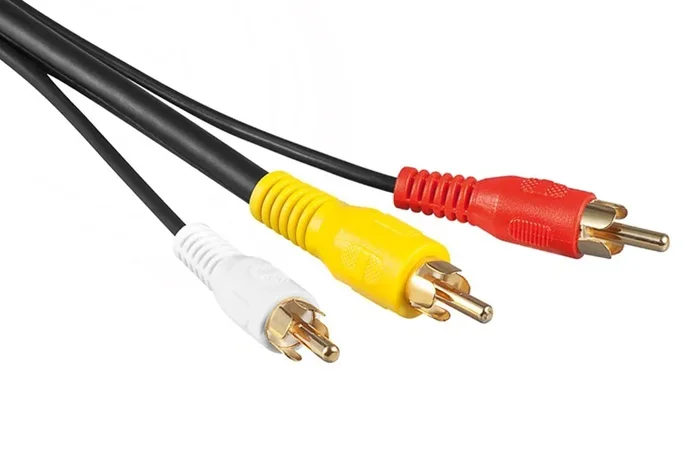
Composite inputs use a specific type of cable known as the RCA connector. Most people recognize the classic yellow, red, and white cables. These carry analog video and audio signals to your television. They were the standard connection method for decades. But as display technology advanced, manufacturers began shifting toward digital options like HDMI. This shift left many people wondering whether their older devices still have a place in modern setups.
In this article, we will cover everything you need to know about composite inputs on today’s TVs. We will look at which TVs still include them, how they work, and what you can do if your TV does not have one. Whether you are a retro gaming fan, a VCR collector, or just trying to set up an older device, this guide has you covered.
Key Takeaways
- Composite inputs are not universal: Many modern TVs have eliminated them entirely in favor of digital connections.
- Legacy devices still rely on composite: VCRs, older game consoles, and retro setups need composite ports to work properly.
- Adapters can bridge the gap: You can use composite-to-HDMI converters to connect older devices to newer TVs.
- Analog vs. digital matters: Composite carries an analog signal, which differs significantly from the digital signals used by HDMI and other modern ports.
- Budget and older TVs often still include them: Not every manufacturer has removed composite inputs from all models.
- Understanding your connection options helps: Knowing what ports your TV has saves time and money when setting up your home entertainment system.
📑 Table of Contents
What Are Composite Inputs?
A composite input is a type of analog connection used to transmit audio and video signals to a television. The term “composite” refers to the way the signal is combined. In a composite cable, the video and audio signals are merged into a single channel. This is different from component video, which separates the signal into multiple channels for better quality.
The most recognizable part of a composite connection is the RCA connector. These are the round, color-coded plugs that most people associate with older electronics. The yellow plug carries the video signal. The red and white plugs carry the right and left audio channels respectively. Together, they form a complete audio and video connection.
Composite connections dominated the television industry from the 1980s through the early 2000s. Almost every VCR, DVD player, and early video game console used them. They were simple, reliable, and universally compatible. Even today, many devices still include composite outputs, which makes understanding this connection type important.
The History of Composite Connections
Composite video cables became popular in the 1980s. Before that, TVs used antenna connections or coaxial cables. The composite RCA connector offered a huge improvement in picture quality and ease of use. You did not need technical knowledge to plug in a VCR or game console. Just match the colors and you were good to go.
Throughout the 1990s and early 2000s, composite was the go-to connection for most home entertainment devices. DVD players, cable boxes, and early gaming consoles all relied on these cables. The simplicity of the analog signal made it easy for manufacturers and consumers alike.
However, as TVs evolved, so did the demand for better picture quality. Composite video carries a single channel of analog video, which limits resolution and clarity. This limitation paved the way for better connection types like component video, S-Video, and eventually HDMI.
Do All TVs Have Composite Inputs?
The answer to this question depends on the age and type of TV you own. Not all TVs have composite inputs, and the trend has been moving away from them for years.
Older CRT (cathode ray tube) TVs almost always included composite inputs. These bulky televisions were the standard for decades, and composite ports were a core feature. If your TV was made before 2005, there is a very good chance it has at least one composite input.
Modern flat-screen TVs, including LED, LCD, OLED, and QLED models, are a different story. Many of these sets have completely removed composite ports. Manufacturers made this decision to save space, reduce costs, and push consumers toward digital connections like HDMI and USB ports. The shift away from analog connections was gradual but steady.
That said, some budget TVs and smaller models still include composite inputs. Portable TVs, monitors used as secondary displays, and certain smart TVs aimed at older demographics may still offer these ports. The key takeaway is that you cannot assume a TV has composite inputs just because it is a TV. You need to check the specific model.
How to Check if Your TV Has Composite Inputs
Checking for composite inputs is straightforward. Look at the back or side of your TV for the round, color-coded RCA ports. If you see a yellow port for video and red and white ports for audio, your TV has composite inputs. Some TVs label these ports clearly, while others may group them under a general “AV” or “Video” label.
If you cannot find any RCA ports, your TV likely does not support composite inputs. In that case, you have a few options. You can use a composite-to-HDMI converter, which we will discuss later in this article.
How Composite Inputs Work
Understanding how composite inputs work helps you appreciate why they are still relevant. A composite cable carries a single analog signal that contains both brightness and color information. This combined signal travels through the yellow RCA connector. The audio signals travel separately through the red and white connectors.
The analog nature of composite signals means they are more susceptible to interference. This can result in a lower-quality image compared to digital connections. However, for older devices and retro setups, the picture quality is often perfectly acceptable. Many people actually prefer the look of composite video for nostalgic reasons.
Composite inputs also support standard definition resolution. This means the maximum quality you can get is 480i or 576i, depending on your region. This is far below the high-definition and 4K standards of today. But for retro gaming and older media, this resolution is more than enough.
Composite vs. Component Video
It is easy to confuse composite with component video. Both use RCA connectors, but they work differently. Composite combines all video information into one cable. Component splits the video signal into three separate cables for better quality. If you want to know more about how different connection types compare, you might find our article on how devices connect to WiFi and other home networks helpful for understanding broader connectivity concepts.
Component video offers significantly better picture quality than composite. However, component ports have also become rare on modern TVs. Both composite and component are analog connections, which means they are being phased out in favor of digital alternatives.
Common Devices That Use Composite Connections
Many older devices still rely on composite inputs. If you have any of these devices, knowing whether your TV supports composite is essential.
VCRs are the most common devices that use composite connections. Almost all VCRs output video through composite RCA cables. If you still have a VCR and want to watch old tapes, you need a TV with composite inputs or a converter.
Retro game consoles are another major use case. Classic systems like the Nintendo Entertainment System, Super Nintendo, Sega Genesis, and original PlayStation all use composite outputs. Retro gaming has exploded in popularity in recent years. Many collectors and enthusiasts want to play their original cartridges and discs on modern setups.
DVD players from the late 1990s and early 2000s often used composite connections. While many modern DVD players include HDMI, older models may only offer composite or component outputs.
Older cable boxes and satellite receivers also used composite connections. If you have an older set-top box from a provider, it may only output through composite ports.
Camcorders and older cameras sometimes include composite output ports for viewing footage on a television. This was a common way to watch home videos before digital sharing became the norm.
Retro Gaming and Composite Inputs
Retro gaming deserves special attention because it is one of the biggest reasons people still need composite inputs. Playing original game cartridges on a CRT TV provides the most authentic experience. The picture quality, scan lines, and overall feel of composite video on a CRT screen is part of the charm.
Many retro gamers prefer CRT televisions specifically because of how they display composite signals. LCD and OLED screens can introduce input lag and display artifacts when showing analog signals. A CRT handles composite video in a way that many gamers find more pleasing and authentic.
If you are a retro gaming enthusiast, keeping a CRT TV with composite inputs is a smart move. These televisions can often be found at thrift stores, garage sales, and online marketplaces for reasonable prices.
Composite vs. Other TV Connection Types
To understand where composite inputs fit in today’s world, it helps to compare them with other connection types. TVs today offer a variety of ports, and each serves a different purpose.
| Connection Type | Signal Type | Max Resolution | Common Uses |
|---|---|---|---|
| Composite (RCA) | Analog | 480i / 576i | VCRs, retro consoles, older DVD players |
| Component Video | Analog | 480p / 576p / 1080i | Older DVD players, retro consoles, projectors |
| HDMI | Digital | 4K and beyond | Streaming devices, modern consoles, Blu-ray players |
| USB | Digital | Varies | Media playback, firmware updates |
| DisplayPort | Digital | 4K and beyond | PC monitors, some smart TVs |
| SCART | Analog | 480i / 576i / 1080i | European TVs, retro devices |
As you can see from the table, composite inputs offer the lowest resolution among all connection types. They also use an analog signal, which is more prone to interference and signal degradation. However, they remain the most widely compatible connection for older devices.
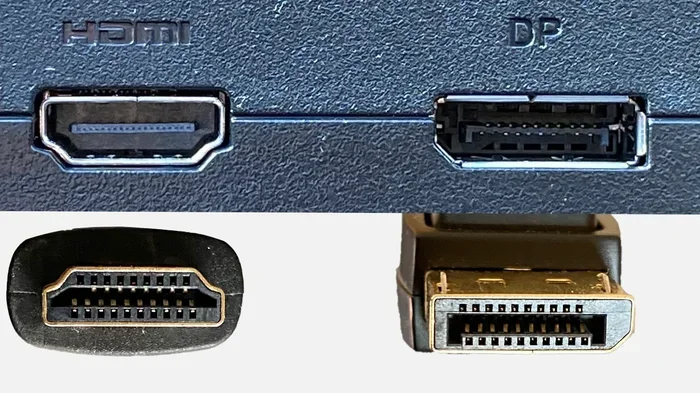
HDMI has become the dominant connection type for modern TVs. It offers superior digital quality, supports high resolutions, and carries both audio and video through a single cable. Most modern devices, from streaming sticks to gaming consoles, use HDMI exclusively.
Some TVs still include older connection types like SCART, which is common in European markets. SCART connectors can carry composite, component, and RGB signals through a single large rectangular plug. If you live in Europe or have European electronics, you may encounter SCART more frequently than composite RCA ports.
Why Manufacturers Removed Composite Ports
Manufacturers stopped including composite ports for several reasons. First, digital connections like HDMI offer much better picture and sound quality. Second, removing old ports saves space inside the TV and reduces manufacturing costs. Third, pushing consumers toward digital connections encourages them to upgrade their devices, which benefits manufacturers.
However, this shift has left many people with older devices and no way to connect them. This is why understanding composite inputs and knowing your options remains important.
How To Connect Composite Devices To Modern TVs
If your TV does not have composite inputs, you are not completely out of luck. Several solutions exist that let you connect older devices to modern televisions. These options range from simple adapters to more complex conversion boxes.
Composite-to-HDMI converters are the most popular solution. These small devices accept composite RCA inputs and convert the analog signal to a digital HDMI output. You plug your composite cables into the converter, then connect an HDMI cable from the converter to your TV. The converter processes the signal and displays it on your modern screen.
When choosing a composite-to-HDMI converter, look for one that supports upscaling. Some converters simply pass through the original resolution, which may look blurry on a large modern TV. Upscaling converters improve the image quality by stretching the signal to match your TV’s resolution.
AV receivers with composite inputs can also bridge the gap. Many AV receivers still include composite ports and can output to HDMI. This option is great if you have a more complex home theater setup. It also lets you connect multiple older devices to a single modern TV.
Some people use USB capture cards to connect composite devices to smart TVs or computers. These cards accept composite inputs and digitize the signal for display. However, this method works best for recording or streaming rather than everyday viewing.
Quick Tips for Composite Connections
- Always check your TV’s manual or specs online to confirm which ports are available before buying cables or adapters.
- Use high-quality RCA cables to reduce signal interference and improve picture quality.
- Keep composite cables short. Longer cables are more prone to signal loss and interference.
- If you are using a converter, make sure it supports your TV’s resolution for the best results.
- For the best retro gaming experience, consider using a CRT TV with native composite inputs rather than a converter on a modern screen.
Common Mistakes When Using Composite Connections
One of the most common mistakes is assuming all RCA cables are the same. Composite cables use the yellow plug for video, while component cables use green, blue, and red plugs. Plugging a composite cable into a component port will not work correctly.
Another mistake is using cheap, low-quality converters. These devices can introduce lag, noise, and poor image quality. Investing in a reputable brand pays off in the long run.
Some people also forget that composite cables carry standard definition only. If you are hoping to watch high-definition content through a composite connection, you will be disappointed. Composite is best suited for older media and legacy devices.
Why Composite Inputs Still Matter
You might wonder why composite inputs even matter in a world of 4K HDR and smart streaming. The answer is simple. Many people still own older devices that they use regularly. VCRs, retro consoles, and classic DVD players hold sentimental and entertainment value for millions of people.
Retro gaming has become a massive industry. Companies like Nintendo and Sega continue to release mini consoles that support classic games. Many collectors also own original hardware that requires composite connections. Without composite inputs or a way to convert them, these devices become useless to many people.
VHS tapes remain popular among collectors and fans of physical media. The warm, nostalgic look of VHS playback is something digital streaming cannot replicate. To watch VHS tapes, you need a working VCR and a TV that accepts composite inputs. This simple setup brings joy to many people who grew up with this technology.
Even in professional settings, composite connections still have uses. Security cameras, surveillance systems, and some industrial equipment use composite video outputs. Understanding these connections helps people work with a wide range of equipment in both home and professional environments.
For those who set up home networks and smart home ecosystems, it is worth noting that devices like smart doorbells and security cameras often connect through WiFi networks. If you are curious about how different smart home devices connect to your network, you can read more in our guide on whether all Ring devices are connected to WiFi, which covers broader connectivity topics.
The bottom line is that composite inputs represent an important part of television and home entertainment history. They connect us to decades of media and memories. Even as the world moves toward digital and wireless connections, the need for composite ports remains real for many people.
Looking Ahead: The Future of TV Connections
The trend in TV connections is clearly moving toward digital and wireless options. HDMI continues to evolve with new versions offering higher bandwidth and better features. Wireless display technologies like Chromecast, AirPlay, and Miracast are reducing the need for physical cables altogether.
However, analog connections like composite are unlikely to disappear completely. The retro and collector markets ensure ongoing demand for these ports. Manufacturers may never bring composite inputs back to mainstream TVs, but third-party converters and adapters will continue to fill the gap.
Understanding where composite inputs fit in the broader landscape of connection types helps you make informed decisions about your home entertainment setup. Whether you are preserving a retro gaming collection, watching old home videos, or simply trying to connect an older device, knowing your options makes all the difference.
Final Thoughts
So, do all TVs have composite inputs? No, they do not. Modern TVs have largely moved away from these legacy ports in favor of digital connections like HDMI. However, many older TVs and some budget models still include composite inputs, and they remain essential for anyone with retro devices, VCRs, or classic game consoles.
If your TV does not have composite inputs, do not worry. Converters, adapters, and AV receivers offer practical solutions that let you connect older devices to modern screens. The key is knowing what you have and what options are available to you.
Composite inputs may be a legacy technology, but their importance has not faded. They connect us to older media, classic games, and cherished memories. Understanding how they work and how to use them ensures that your older devices continue to bring joy and entertainment for years to come.
Take a moment to check your TV’s ports today. If you find composite inputs, you are one step ahead. If you do not, now you know exactly what to do about it. The world of TV connections keeps changing, but with the right knowledge, you can keep all your devices working together in harmony.
Frequently Asked Questions
What is a composite input on a TV?
A composite input is an analog connection that uses a yellow RCA plug for video and red and white RCA plugs for audio. It was the standard connection method for TVs, VCRs, and game consoles from the 1980s through the early 2000s.
Can I connect a VCR to a modern TV without composite inputs?
Yes, you can use a composite-to-HDMI converter. These devices accept RCA composite cables and convert the analog signal to HDMI, allowing you to connect a VCR to any modern TV with an HDMI port.
Why do modern TVs not have composite inputs?
Modern TVs have removed composite inputs to save space, reduce manufacturing costs, and push consumers toward digital connections like HDMI. Digital connections offer better picture and sound quality and support higher resolutions.
Is composite video the same as component video?
No, they are different. Composite video uses a single yellow RCA plug to carry the video signal, while component video uses three separate cables (green, blue, and red) for better image quality. Both are analog connections, but component offers superior resolution.
Can I use composite inputs for gaming?
Yes, composite inputs work well for retro gaming. Classic consoles like the NES, SNES, Sega Genesis, and original PlayStation all use composite outputs. Many retro gamers prefer the authentic look of composite video on CRT televisions.
What is the best way to connect older devices to a new TV?
The best method depends on your devices and TV. A composite-to-HDMI converter is the most versatile option. For the most authentic experience with retro gaming, consider using a CRT TV that has native composite inputs. This avoids potential lag and image issues that can occur with converters on modern displays.