Do All Car Stereos Have Bluetooth Wireless Streaming
Not all car stereos come with Bluetooth built in. While most newer vehicles include wireless streaming as a standard feature, older models and budget stereos often lack it. You can still add Bluetooth connectivity to any car stereo using adapters, FM transmitters, or aftermarket upgrades. This guide covers everything you need to know about car stereo Bluetooth compatibility and how to get wireless audio in your vehicle.
Do all car stereos have Bluetooth? The short answer is no. While wireless streaming has become incredibly popular, not every car stereo includes it. Many older vehicles and budget-friendly models still rely on traditional radio and wired connections. But here is the good news: you have plenty of options to add Bluetooth to almost any car audio system.
Bluetooth technology has transformed how we listen to music in our cars. Instead of fumbling with CDs or FM radio presets, you can stream your favorite playlists directly from your phone. Bluetooth connectivity also makes hands-free calling safer and more convenient. But before you assume your stereo already has it, it helps to understand what you are working with.
This article breaks down everything you need to know. We will cover how to check if your stereo has Bluetooth, what to do if it does not, and the best ways to add wireless streaming to any car audio system. Whether you drive a new sedan or a classic truck, you will find practical solutions here.
Key Takeaways
- Not all car stereos have Bluetooth: Older models and basic factory stereos often lack wireless connectivity.
- Most modern vehicles include Bluetooth: Cars made after 2015 commonly feature built-in wireless streaming.
- You can add Bluetooth to any stereo: Adapters, FM transmitters, and aftermarket head units make it easy to upgrade.
- Wired connections work as alternatives: Aux inputs and USB cables can stream audio even without Bluetooth.
- Bluetooth offers hands-free calling: Beyond music, it lets you make and receive phone calls safely while driving.
- Wireless adapters are affordable: You don’t need to replace your entire stereo to enjoy wireless audio.
- Check your stereo’s manual: The quickest way to confirm Bluetooth support is to review your user guide or model number online.
📑 Table of Contents
- What Is Bluetooth in a Car Stereo?
- Do All Car Stereos Come With Bluetooth?
- How to Check If Your Car Stereo Has Bluetooth
- How to Add Bluetooth to Any Car Stereo
- Benefits of Bluetooth in a Car Stereo
- Common Problems With Car Stereo Bluetooth
- Alternatives to Bluetooth for Car Audio
- Expert Tips for Getting the Best Bluetooth Experience in Your Car
- Final Thoughts
What Is Bluetooth in a Car Stereo?
Bluetooth is a wireless technology that lets devices connect and share data over short distances. In a car stereo, it allows your phone to connect to the audio system without any cables. Once paired, you can play music, make calls, and even use voice commands through your car’s speakers.
Most people think of Bluetooth as just a way to stream music. But it does much more than that. Bluetooth hands-free calling lets you answer phone calls through your car’s microphone and speakers. This means you keep your hands on the wheel and your eyes on the road. Many modern car stereos also support Bluetooth audio streaming for podcasts, audiobooks, and navigation apps.
How Bluetooth Connectivity Works in Vehicles
When your phone connects to a car stereo via Bluetooth, it creates a short-range wireless network between the two devices. The stereo acts as a receiver, pulling audio signals from your phone. The connection typically works within a 30-foot range, which is more than enough for a vehicle.
Most car stereos support the Bluetooth Hands-Free Profile for calls and the Bluetooth Advanced Audio Distribution Profile for music streaming. These profiles ensure that both calling and audio playback work smoothly. Some stereos also support Bluetooth multipoint, which lets you connect to two devices at the same time.
Do All Car Stereos Come With Bluetooth?
The honest answer is no. While Bluetooth has become standard in most new vehicles, many car stereos still do not include it. Your stereo’s Bluetooth capability depends on several factors, including the age of your vehicle, the make and model, and the trim level.
Factory Stereos With Bluetooth
Most cars manufactured after 2015 come with factory stereos that include Bluetooth. Even many budget models from that era offer wireless connectivity as a standard feature. If you drive a relatively new car, there is a good chance your stereo already supports Bluetooth.
However, not all factory stereos are created equal. Some base-level trims may only offer Bluetooth for phone calls but not for music streaming. This is an important distinction. Before you assume your stereo has full wireless capabilities, check whether it supports both hands-free calling and audio streaming.
Older Car Stereos Without Bluetooth
If you drive a car made before 2010, there is a strong chance your stereo does not have Bluetooth. Older factory stereos relied on CD players, FM radio, and sometimes cassette decks. These systems were built long before wireless streaming became mainstream.
Even some cars from the early 2010s may lack Bluetooth, especially in lower trim levels. Automakers often reserved wireless features for higher-end models. So if you drive an older or base-model vehicle, you should not be surprised if your stereo does not support wireless audio.
Budget and Aftermarket Stereos
Budget aftermarket stereos sometimes skip Bluetooth to keep costs low. If you bought a cheap stereo online or from a discount auto parts store, check the specifications carefully. Not all budget stereos include Bluetooth connectivity, even in 2024.
On the other hand, most mid-range and premium aftermarket stereos include Bluetooth as a standard feature. Brands like Pioneer, Kenwood, and Sony typically offer wireless connectivity across their product lines. If Bluetooth is important to you, always verify the specs before purchasing.
How to Check If Your Car Stereo Has Bluetooth
If you are not sure whether your stereo supports Bluetooth, there are a few easy ways to find out. You do not need to be a tech expert to check this.
Step-by-Step Ways to Verify Bluetooth Support
- Check your stereo’s display screen: Many stereos show a Bluetooth icon when wireless features are available. Look for a Bluetooth symbol in the settings menu.
- Look in the user manual: Your stereo’s manual will list all features, including Bluetooth support. If you do not have the physical manual, search for the model number online.
- Check the stereo’s model number: Search the model number on the manufacturer’s website. The product page will list all connectivity options.
- Try pairing your phone: Go to your stereo’s settings and look for Bluetooth options. If you see a pairing menu, your stereo likely supports Bluetooth.
- Check your car’s infotainment system: Some cars list Bluetooth under the settings or phone menu on the dashboard display.
If none of these methods work, you can always check the stereo’s model number on the manufacturer’s website. Most companies list detailed specifications for every model they produce.
How to Add Bluetooth to Any Car Stereo
If your stereo does not have Bluetooth, do not worry. You have several options to add wireless streaming to your car audio system. You do not need to replace your entire stereo to enjoy Bluetooth music.
Bluetooth Car Adapters
A Bluetooth car adapter is one of the simplest and most affordable ways to add wireless streaming. These small devices plug into your stereo’s aux input or cassette deck and create a Bluetooth connection. You pair your phone with the adapter, and audio streams through your car speakers.
Most Bluetooth adapters cost between $15 and $50. They are easy to install and work with almost any stereo that has an aux input. Some adapters also include a built-in microphone for hands-free calling. This makes them a great budget-friendly option for older cars.
FM Bluetooth Transmitters
An FM Bluetooth transmitter connects to your phone via Bluetooth and broadcasts audio over an FM frequency. You tune your car stereo to the matching frequency and listen through your existing speakers. These devices are wireless and require no installation.
FM transmitters are convenient but have some limitations. They can sometimes experience interference from local radio stations. The audio quality may also not be as good as a direct aux connection. Still, they are a popular choice for people who want a quick, no-wires solution.
Aftermarket Bluetooth Stereo Upgrades
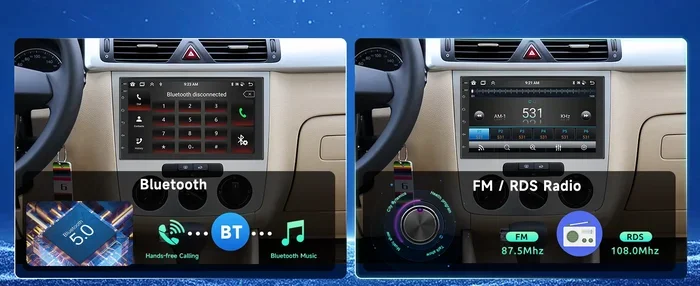
If you want a more permanent solution, consider upgrading to an aftermarket stereo with built-in Bluetooth. A new head unit gives you modern features like wireless streaming, smartphone integration, and better audio quality. Many aftermarket stereos also support Apple CarPlay and Android Auto.
Upgrading your stereo is a bigger investment, but it transforms your entire car audio experience. You get better sound quality, more features, and seamless wireless connectivity. If you have been thinking about a stereo upgrade, adding Bluetooth is a great reason to pull the trigger.
For those wondering whether they can upgrade an existing stereo to support Bluetooth, the answer is yes. You can either add an external adapter or replace the head unit entirely. Both approaches work well depending on your budget and how much you want to change your setup.
Can You Make an Old Stereo Bluetooth?
Absolutely. Making an old stereo Bluetooth is one of the most popular upgrades car owners make today. You do not need to be a mechanic to do it. A simple Bluetooth adapter or FM transmitter can bring wireless streaming to even the oldest car audio systems.
Many people ask, “Can I make my old stereo Bluetooth?” The answer is yes with the right accessory. A Bluetooth adapter that connects to your aux input or cassette deck works in almost every car. This simple upgrade lets you enjoy wireless audio without replacing your entire stereo.
Some car owners also explore options like using a smart speaker in their car as a Bluetooth receiver. While this is not a traditional approach, it can work in certain situations. However, a dedicated Bluetooth adapter remains the most reliable and affordable solution.
Benefits of Bluetooth in a Car Stereo
Bluetooth has become the standard for car audio connectivity, and for good reason. Here are the main benefits of having Bluetooth wireless streaming in your car stereo:
- Wireless convenience: No cables to manage. Just pair your phone and go.
- Hands-free calling: Answer calls safely through your car’s speakers and microphone.
- Access to your entire music library: Stream any song, playlist, or podcast from your phone.
- Multiple device pairing: Connect more than one phone to the stereo and switch between them.
- No wires to clutter your dashboard: Keep your car interior clean and organized.
- Easy to use: Pairing usually takes just a few seconds and is straightforward.
- Better integration with your phone: Many stereos display song info and caller ID on the screen.
Beyond music, Bluetooth also supports podcast streaming and audiobook playback. If you spend a lot of time commuting, wireless streaming turns your car into a personal entertainment hub. You can also use voice assistants like Siri or Google Assistant through your car’s Bluetooth connection.
Common Problems With Car Stereo Bluetooth
Bluetooth is convenient, but it is not perfect. Here are some common issues car owners face with car stereo Bluetooth and how to fix them:
Connection Drops Frequently
If your Bluetooth connection keeps dropping, the issue is usually distance or interference. Make sure your phone is within range of the stereo. Also, check if other wireless devices are causing interference. Restarting both devices often solves temporary connection problems.
Poor Audio Quality
Some Bluetooth connections produce lower audio quality than wired connections. This is because Bluetooth compresses audio data to transmit wirelessly. If audio quality matters to you, look for stereos that support aptX or LDAC codecs. These technologies deliver better sound over Bluetooth.
Pairing Issues
Sometimes your phone will not pair with the stereo. Try deleting the old pairing from both devices and starting fresh. Also, make sure Bluetooth is turned on and visible on your phone. Restarting both devices often resolves pairing problems.
Bluetooth Works for Calls but Not Music
This is a common issue with some factory stereos. The stereo may support Bluetooth hands-free calling but not audio streaming. Check your stereo’s settings to see if there is a separate Bluetooth music option. If your stereo truly does not support music streaming, you will need an adapter or upgrade.
Alternatives to Bluetooth for Car Audio
Bluetooth is not the only way to stream audio in your car. If your stereo does not support Bluetooth or you prefer a different approach, consider these alternatives:
- Aux input: A simple 3.5mm cable connects your phone directly to the stereo. It is reliable and does not require any setup.
- USB connection: Many stereos support USB connections for both charging and audio playback.
- FM transmitter: Broadcasts audio from your phone over an FM frequency your stereo can pick up.
- Cassette adapter: For cars with cassette decks, a cassette adapter plugs in and plays audio from your phone.
- CarPlay or Android Auto: These systems wirelessly or wired connect your phone to the stereo for music, navigation, and more.
Each alternative has its pros and cons. Aux cables offer the best audio quality but require a physical connection. FM transmitters are wireless but can have interference. Choose the option that fits your needs and your car’s capabilities.
Some drivers also explore using a Bluetooth radio in their car as a standalone device. These compact radios connect to your phone via Bluetooth and broadcast audio to your car speakers. They are a great option for cars with older stereos that lack any modern connectivity.
Expert Tips for Getting the Best Bluetooth Experience in Your Car
Want to get the most out of your car stereo’s Bluetooth? Follow these expert tips for a better experience:
- Keep your firmware updated: Check for stereo firmware updates that can improve Bluetooth performance and fix bugs.
- Keep your phone close: Place your phone in a cup holder or mount near the stereo for a stronger signal.
- Minimize interference: Turn off unused wireless devices that might compete with the Bluetooth signal.
- Use high-quality audio files: Streaming high-quality music files over Bluetooth makes a noticeable difference in sound.
- Reset connections regularly: If you experience issues, deleting paired devices and reconnecting often helps.
- Use a dedicated Bluetooth adapter for older stereos: A quality adapter can dramatically improve wireless audio in older cars.
These simple tips can make a big difference in your Bluetooth experience. A little maintenance goes a long way toward keeping your wireless streaming smooth and reliable.
Final Thoughts
So, do all car stereos have Bluetooth? No, but most modern ones do. If your stereo lacks Bluetooth, you have plenty of options to add it. From affordable Bluetooth adapters to full stereo upgrades, there is a solution for every budget and every car.
The best approach depends on your situation. If you have an older car with a basic stereo, a simple Bluetooth adapter or FM transmitter might be all you need. If you want a complete audio overhaul, an aftermarket stereo with built-in Bluetooth is the way to go.
Whichever route you choose, adding Bluetooth to your car stereo is one of the best upgrades you can make. It brings convenience, safety, and entertainment together in one seamless wireless connection. Your daily commute will never feel the same once you can stream music without cables or hassle.
Take some time to check your current stereo’s capabilities. If it does not have Bluetooth, explore the options above. You will be surprised how easy and affordable it is to bring wireless streaming to your car. Start today, and enjoy the freedom of wireless audio on every drive.