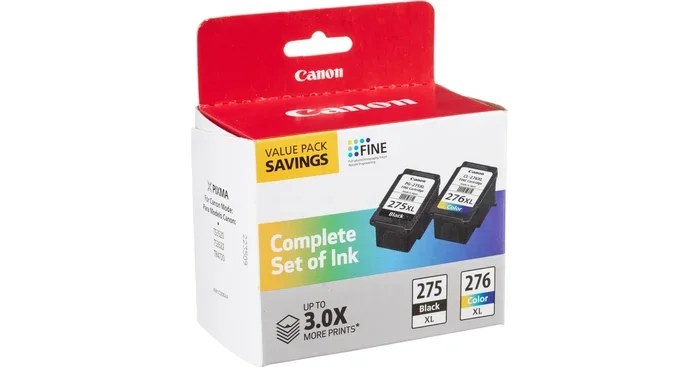
Do All Canon Printers Use The Same Ink Cartridges Explained
No, not all Canon printers use the same ink cartridges. Canon uses different cartridge systems depending on the printer model, series, and type. Understanding which cartridges fit your specific printer saves money, prevents damage, and keeps your prints looking great every time.
When you need a new ink cartridge, the last thing you want is to buy the wrong one. But here is the truth: do all Canon printers use the same ink cartridges? The short answer is no. Canon makes dozens of printer models, and each one uses a different ink system. Some cartridges are small and compact. Others are large and designed for heavy printing. The cartridge your printer needs depends on the model, the series, and even the year it was made.
This guide breaks down everything you need to know about Canon ink cartridge compatibility. You will learn how Canon organizes its cartridge systems, how to find the right cartridge for your printer, and how to save money without sacrificing print quality. By the end, you will never buy the wrong cartridge again.
Let us start with the basics. Canon does not use one universal ink cartridge across all its printers. This is different from some other brands that do use a one-size-fits-all approach. Instead, Canon groups its printers into series, and each series has its own cartridge family. Think of it like how not all rings are connected to wifi — different devices serve different purposes and need different setups.
Key Takeaways
- Different Canon series use different cartridges: PIXMA, MAXIFY, and imagePROGRAF models all have unique ink systems.
- Cartridge numbers matter: Each Canon printer requires specific cartridge numbers like PGI-250 or CLI-251.
- Genuine and compatible options exist: You can save money with third-party cartridges while still getting quality prints.
- High-yield cartridges save more: They cost more upfront but print significantly more pages.
- Using the wrong cartridge can damage your printer: Always double-check compatibility before purchasing.
- Like how not all rings are connected to wifi, not all Canon printers share the same ink setup: each model has its own specific requirements.
📑 Table of Contents
- Why Canon Printers Don’t All Use the Same Ink Cartridges
- Understanding Canon’s Ink Cartridge System
- Canon PIXMA vs MAXIFY: Different Cartridges Explained
- How to Find the Right Ink Cartridge for Your Canon Printer
- Genuine vs Compatible Ink Cartridges
- Common Mistakes People Make with Canon Ink Cartridges
- Expert Insights on Canon Ink Compatibility
- Key Takeaways
- Conclusion
Why Canon Printers Don’t All Use the Same Ink Cartridges
Canon designs its printers for different needs. A home printer that prints photos needs different ink than a large office printer that prints hundreds of documents every day. Because the printing demands vary so much, Canon builds different cartridge systems for each job.
Here is why cartridge compatibility varies across Canon printers:
- Print quality requirements: Photo printers need finer ink droplets and more color options. Office printers need bold black text and fast printing.
- Page yield differences: Some printers are built for low volume. Others handle high volume. The cartridges reflect these different usage levels.
- Printer size and design: Compact home printers use smaller cartridges. Large office machines use bigger ones that hold more ink.
- Cost and value: Canon balances cartridge cost with printer cost. Some printers are cheap but use expensive cartridges. Others cost more upfront but save on ink over time.
- Technology evolution: Newer Canon printers use updated cartridge designs that are not backward compatible with older models.
Understanding these differences helps you make smarter buying decisions. It also prevents frustrating mistakes like ordering the wrong cartridge and waiting for a replacement.
Understanding Canon’s Ink Cartridge System
Canon uses a numbering system for its ink cartridges. Each cartridge has a specific model number that tells you exactly which printers it fits. The two main cartridge families are the PGI series and the CLI series. Let us break down what each one does.
PGI Cartridges: The Pigment Black Ink
The PGI cartridges use pigment-based black ink. This type of ink produces sharp, crisp text. It is the go-to choice for documents, essays, and anything where clarity matters. PGI cartridges are known for their durability and resistance to water fading.
Common PGI cartridge numbers include:
- PGI-250 — Standard yield black cartridge
- PGI-250XL — High yield black cartridge for more pages
- PGI-280 — Standard yield for newer PIXMA models
- PGI-280XL — High yield version of the PGI-280
CLI Cartridges: The Chroma Lifestyle Ink
The CLI cartridges carry color ink. The name stands for Chroma Lifestyle Ink, and these cartridges handle everything except the black text. They come in cyan, magenta, yellow, and sometimes light versions for richer photo prints.
Common CLI cartridge numbers include:
- CLI-251 — Color cartridge set for standard yield
- CLI-251XL — High yield color cartridges
- CLI-271 — Color cartridges for newer PIXMA models
- CLI-271XL — High yield color option
Most Canon PIXMA printers use a combination of one PGI black cartridge and one or more CLI color cartridges. This setup gives you flexibility. You can replace the black cartridge alone when it runs out, or replace all colors at once for photo printing.
Canon PIXMA vs MAXIFY: Different Cartridges Explained
Canon has two major consumer printer lines that use completely different cartridge systems. The PIXMA series targets home users and small offices. The MAXIFY series targets larger offices and high-volume printing. Let us compare them side by side.
| Feature | Canon PIXMA Series | Canon MAXIFY Series |
|---|---|---|
| Target User | Home users, students, small offices | Large offices, businesses |
| Cartridge Type | PGI and CLI cartridges | PGI and CLI cartridges (different numbers) |
| Standard Cartridge Yield | 180-300 pages | 300-1500 pages |
| High Yield Available | Yes (XL versions) | Yes (higher page counts) |
| Photo Printing | Excellent — designed for photos | Good — optimized for documents |
| Ink Cost Per Page | Moderate | Lower cost per page at high volume |
| Typical Cartridge Numbers | PGI-250, CLI-251 | PGI-545, CLI-546 |
The key takeaway here is that even within the same brand, cartridge numbers change between series. A PGI-250 cartridge will not fit a MAXIFY printer that needs a PGI-545. Always check your printer model number before buying cartridges.
How to Find Your Printer Model Number
Finding your printer model number is the first step to buying the right cartridge. You can usually find it on the front or back of the printer. It looks something like “Canon PIXMA TS3420” or “Canon MAXIFY MB5420.” Write this number down before you shop for ink.
You can also find the model number on the original packaging or in the printer’s settings menu. On most Canon printers, you can press the info button or check the LCD screen to display the model name and number.
How to Find the Right Ink Cartridge for Your Canon Printer
Finding the correct cartridge does not have to be confusing. Canon makes it easy once you know where to look. Here is a simple step-by-step process to identify the right cartridge for your printer.
- Check your printer model number. Look on the front, back, or top of the printer.
- Visit Canon’s official website. Go to the support section and enter your model number.
- Look for the supplies or ink section. Canon lists all compatible cartridges for your model.
- Note the cartridge numbers. Write down the exact PGI and CLI numbers you need.
- Compare prices from different sellers. Check both genuine Canon and compatible options.
This process works for every Canon printer model. Whether you own a PIXMA TS series, a PIXMA TR series, or a MAXIFY MB series, the same steps apply. Just make sure you are looking at the correct model because cartridge compatibility changes even between similar-looking printers.
Quick Tip: Use the Canon Cartridge Finder Tool
Canon offers a handy cartridge finder tool on its website. You enter your printer model, and it shows you every compatible cartridge. This saves time and prevents ordering mistakes. It is one of the easiest ways to confirm that you are buying the right ink for your specific printer.
Genuine vs Compatible Ink Cartridges
When you shop for Canon ink, you will see two main options: genuine Canon cartridges and compatible (third-party) cartridges. Both have pros and cons. Let us look at each one so you can decide what works best for you.
Genuine Canon Cartridges
Genuine cartridges are made by Canon itself. They come in Canon packaging and carry the Canon brand. Here is what you get with genuine cartridges:
- Guaranteed compatibility: They are designed specifically for Canon printers.
- Consistent print quality: Colors are vibrant and text is sharp.
- Printer warranty protection: Using genuine ink helps keep your warranty valid.
- Reliable chip communication: The cartridge chip talks to the printer correctly every time.
The downside is cost. Genuine Canon cartridges are more expensive than compatible options, especially the high-yield versions. But many users feel the print quality and reliability are worth the extra price.
Compatible and Remanufactured Cartridges
Compatible cartridges are new cartridges made by third-party manufacturers. Remanufactured cartridges are used genuine cartridges that have been cleaned, refilled, and tested. Both options cost less than genuine cartridges.
Here is what to know about compatible cartridges:
- Lower cost: You can save 30% to 70% compared to genuine cartridges.
- Good quality: Many compatible brands now match or exceed genuine print quality.
- Warranty considerations: Using compatible ink does not automatically void your printer warranty in most cases.
- Chip issues: Some compatible cartridges have chip problems that can cause error messages.
If you print often and want to save money, compatible cartridges are a solid choice. Just buy from reputable sellers with good reviews to avoid quality issues.
Common Mistakes People Make with Canon Ink Cartridges
Even careful buyers sometimes make mistakes when purchasing Canon ink cartridges. Here are the most common errors and how to avoid them.
Buying Based on Price Alone
The cheapest cartridge is not always the best deal. A cheap cartridge that runs out after 50 pages costs more per page than a quality cartridge that prints 300 pages. Always check the page yield before you buy.
Ignoring the High-Yield Option
Many people buy standard yield cartridges because they cost less upfront. But high-yield cartridges (the XL versions) offer a much lower cost per page. If you print regularly, the XL version saves you money in the long run.
Not Checking Cartridge Expiration Dates
Ink cartridges have expiration dates. An expired cartridge may not work properly or may produce poor print quality. Always check the expiration date before purchasing, especially if you buy cartridges in bulk.
Forgetting to Reset the Cartridge Chip
Some Canon printers do not automatically recognize a new cartridge until you reset the chip. This usually involves removing the cartridge, waiting a few seconds, and reinserting it. If your printer shows an error after installing a new cartridge, try this simple step.
Mixing Old and New Cartridges
Do not mix a nearly empty cartridge with a new one in the same printer. The printer may stop printing or produce inconsistent results. Replace all cartridges that are low or empty at the same time for the best results.
Expert Insights on Canon Ink Compatibility
Printer experts agree that understanding your cartridge needs is the key to saving money and getting great prints. Here are some insider tips from experienced users and technicians.
Tip 1: Keep a spare cartridge on hand. Nothing is more frustrating than running out of ink in the middle of an important print job. Keep at least one spare cartridge stored in a cool, dry place.
Tip 2: Use the printer regularly. Ink cartridges can dry out if the printer sits unused for weeks. Print at least once a week to keep the ink flowing smoothly through the printhead.
Tip 3: Clean the printhead regularly. Most Canon printers have a built-in printhead cleaning function. Run this utility once a month to prevent clogs and maintain print quality.
Tip 4: Store cartridges properly. Keep unused cartridges in their original packaging. Store them at room temperature away from direct sunlight. Proper storage extends the life of the ink inside.
Tip 5: Check for bundle deals. Many sellers offer cartridge bundles that include one black and three or four color cartridges at a discounted price. Bundles often save more money than buying cartridges individually.
Tip 6: Consider the Canon MegaTank system. If you print a lot, Canon’s MegaTank printers use refillable ink tanks instead of cartridges. They cost more upfront but can print thousands of pages before needing a refill. Over time, they are one of the most economical options available.
Key Takeaways
- Different Canon series use different cartridges: PIXMA, MAXIFY, and MegaTank models all have unique ink systems and cartridge numbers.
- Cartridge numbers matter: Each Canon printer requires specific cartridge numbers like PGI-250 or CLI-251. Always match the number to your model.
- Genuine and compatible options exist: You can save money with third-party cartridges while still getting quality prints.
- High-yield cartridges save more: They cost more upfront but print significantly more pages, reducing the cost per page.
- Using the wrong cartridge can damage your printer: Always double-check compatibility before purchasing any ink cartridge.
- Like how not all rings are connected to wifi, not all Canon printers share the same ink setup: each model has its own specific requirements that must be respected.
- MegaTank printers offer a cartridge-free alternative: They use refillable tanks and are ideal for high-volume printing environments.
Conclusion
The answer to the question “do all Canon printers use the same ink cartridges” is a clear no. Canon uses different cartridge systems across its printer lineup, and each system has its own set of compatible cartridges. Whether you own a PIXMA home printer or a MAXIFY office machine, knowing your cartridge numbers is essential.
Take the time to check your printer model, find the right cartridge numbers, and choose between genuine and compatible options based on your budget and printing needs. A little research goes a long way in saving money and preventing printing problems.
With the information in this guide, you are now equipped to make confident decisions about Canon ink cartridges. You will never accidentally buy the wrong cartridge again, and you will get the best possible print quality from every print job. Keep this guide bookmarked for future reference whenever you need to replace your ink.
Frequently Asked Questions
Can I use a PGI-250 cartridge in any Canon printer?
No, the PGI-250 cartridge is designed for specific Canon PIXMA models. It will not fit all Canon printers. Always check your printer model number and confirm the cartridge compatibility before purchasing. Using the wrong cartridge can cause printing errors or damage the printer.
What is the difference between standard yield and high-yield cartridges?
Standard yield cartridges print fewer pages but cost less upfront. High-yield cartridges (often labeled XL) print more pages and cost more initially but offer a lower cost per page. If you print frequently, high-yield cartridges are the better value.
Are compatible Canon ink cartridges safe to use?
Yes, most compatible cartridges are safe and work well with Canon printers. They are made by third-party manufacturers and cost significantly less than genuine cartridges. Buy from reputable sellers with positive reviews to ensure quality and avoid potential issues like chip errors or poor print quality.
How long do Canon ink cartridges last before they expire?
Canon ink cartridges typically last about two years from the manufacture date when stored properly. Once installed in the printer, they should be used within a few months for best results. Expired cartridges may not work or may produce faded or streaky prints.
Can I refill my Canon ink cartridge instead of buying a new one?
Yes, you can refill some Canon cartridges using a refill kit. However, refilled cartridges may not perform as well as new ones, and the printer may still show low ink warnings. Refilling works best for cartridges that support it and when done carefully with quality ink.
Do Canon MegaTank printers use the same cartridges as regular Canon printers?
No, Canon MegaTank printers use a completely different system. Instead of replaceable cartridges, they use refillable ink tanks that connect directly to the printhead. You buy bottled ink to refill the tanks. This system is designed for high-volume printing and offers a much lower cost per page than traditional cartridge systems.