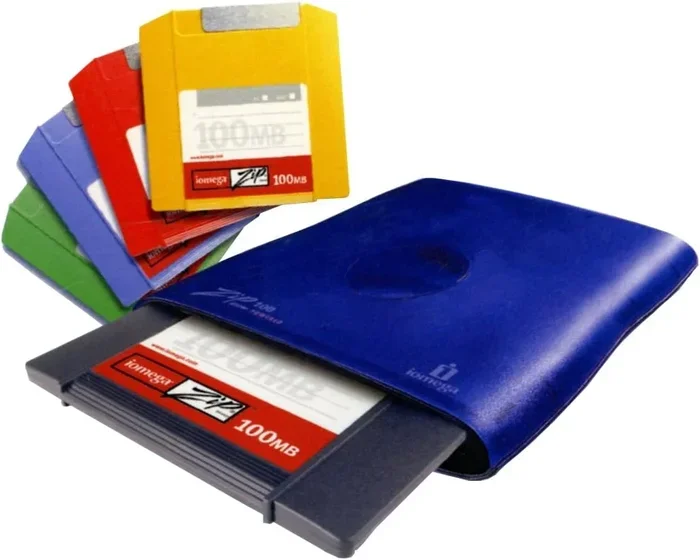
What Is the Difference Between Zip Drive and Flash Drive
The difference between Zip drive and Flash drive comes down to technology, speed, and modern compatibility. A Zip drive uses removable magnetic disks to store data, while a Flash drive uses solid-state memory with no moving parts. Zip drives were popular in the 1990s and early 2000s, but Flash drives have completely replaced them for everyday file transfer and portable storage.
Key Takeaways
- Zip drives use removable disks: They rely on Iomega Zip disks with capacities up to 750 MB.
- Flash drives use USB solid-state storage: They offer much faster speeds and larger capacities.
- Flash drives are far more portable: No external power or special drive is needed.
- Zip drives are legacy technology: They are rarely used today and lack modern OS support.
- Flash drives are the standard today: They work with virtually every computer and device.
- Cost per gigabyte favors Flash drives: They are much cheaper and more practical for storage.
- Both served the same purpose: Portable data storage and file transfer, but Flash drives won the evolution.
📑 Table of Contents
- What Is the Difference Between Zip Drive and Flash Drive?
- What Is a Zip Drive?
- What Is a Flash Drive?
- Zip Drive vs Flash Drive: Head-to-Head Comparison
- How Portable Storage Has Evolved
- When Would You Still Use a Zip Drive?
- How to Choose the Right Flash Drive
- Common Mistakes People Make with Portable Storage
- Expert Insights on Storage Technology
- Key Takeaways
- Conclusion
What Is the Difference Between Zip Drive and Flash Drive?
If you have ever stumbled across an old computer with a floppy disk drive, you might also remember the Zip drive. It was a big step forward from those tiny disks. But then the Flash drive came along and changed everything.
So what is the real difference between Zip drive and Flash drive? The short answer is that a Zip drive uses spinning magnetic disks, while a Flash drive uses solid-state memory chips. One is a relic of the past, and the other is everywhere today. In this article, we will break down every major difference so you understand why Flash drives took over.
We will cover storage capacity, speed, portability, and much more. Whether you are a tech enthusiast or just someone who wants to move files around, this guide will help you understand both devices clearly.
Why This Comparison Matters
Many people still have old Zip disks sitting in a drawer somewhere. You might wonder if they are still useful. Understanding how these two storage technologies differ helps you make better decisions about data storage and file management. It also gives you a sense of how far portable storage has come.
The difference between Zip drive and Flash drive is not just about old versus new. It is about understanding the basics of how we store and move digital information. Let us dive into the details.
What Is a Zip Drive?
A Zip drive is a portable storage device made by Iomega. It was introduced in 1994 and became very popular through the late 1990s and early 2000s. The drive reads and writes data to a small removable disk called a Zip disk.
Zip disks came in two main sizes. The original Zip disks held 100 MB of data. Later versions offered 250 MB and even 750 MB of storage. For its time, this was a huge improvement over the standard floppy disk, which held only 1.44 MB.
How a Zip Drive Works
A Zip drive uses a spinning magnetic disk inside a protective cartridge. The read/write head moves across the disk to access data. This is similar to how a hard drive works, but the disk is removable.
You insert the Zip disk into the drive, and the computer recognizes it as a separate drive letter. Files can be copied to and from the disk just like any other storage medium.
Pros of a Zip Drive
- Larger capacity than floppies: 100 MB to 750 MB was impressive in the 1990s.
- Removable and portable: You could carry disks around easily.
- Reliable for its era: Zip disks were more durable than regular floppy disks.
- Good for backups: Many people used Zip disks for backup storage of important files.
Cons of a Zip Drive
- Limited capacity by today’s standards: 750 MB is nothing compared to modern storage.
- Slow data transfer: Zip drives were much slower than modern alternatives.
- Moving parts: The spinning disk and mechanical parts made them prone to damage.
- Obsolete technology: Most modern computers do not support Zip drives anymore.
- Expensive per MB: Zip disks cost more per megabyte than modern storage media.
What Is a Flash Drive?
A Flash drive is a small, portable storage device that uses flash memory. It connects directly to a computer through a USB port. Flash drives are also called USB drives, thumb drives, or memory sticks.
Flash drives became widely available in the early 2000s and quickly replaced Zip drives, floppy disks, and CD-Rs for everyday file transfer. They have no moving parts, which makes them very durable and fast.
How a Flash Drive Works
A Flash drive stores data on NAND flash memory chips. When you plug it into a USB port, the computer recognizes it instantly. There is no need for special software or drivers in most cases.
Data is read and written electronically, not mechanically. This means data transfer speeds are much faster than any magnetic disk-based device could achieve.
Pros of a Flash Drive
- Very fast speeds: Modern USB 3.0 and USB 3.1 drives transfer data quickly.
- Large storage capacity: Flash drives are available from 8 GB up to 1 TB or more.
- No moving parts: They are durable and resistant to drops and shocks.
- Plug and play: They work on almost any computer without extra setup.
- Very portable: They are tiny enough to fit on a keychain.
- Affordable: Prices have dropped dramatically over the years.
Cons of a Flash Drive
- Limited write cycles: Flash memory can wear out after many write operations.
- Easy to lose: Their small size makes them easy to misplace.
- Not ideal for long-term archival: Data can degrade over many years without power.
- Security risks: They can be lost or stolen, exposing sensitive data.
Zip Drive vs Flash Drive: Head-to-Head Comparison
Now let us compare the two devices side by side. This storage device comparison will help you see exactly where each one stands.
Storage Capacity
Zip disks maxed out at 750 MB. That is less than one gigabyte. A typical Flash drive today starts at 8 GB and goes all the way up to 1 TB or more. A 1 TB Flash drive can hold over 1,300 times more data than a Zip disk.
Speed
Data transfer speed is where Flash drives really shine. A Zip drive typically transferred data at around 1 MB per second. A modern USB 3.0 Flash drive can transfer data at 100 MB per second or more. That is a hundredfold improvement.
Portability
Zip drives were somewhat bulky. You needed the drive itself plus the disk. A Flash drive is a single tiny device with no extra accessories needed. You can carry a Flash drive in your wallet or on a keychain.
Durability
Zip drives had spinning disks and mechanical parts. They were sensitive to drops and magnets. Flash drives have solid-state memory with no moving parts. They can survive drops, shakes, and even brief exposure to water much better.
Compatibility
Zip drives require a special Zip drive controller. Most modern computers do not have one. Flash drives use USB, which is universal. Virtually every desktop, laptop, and even many TVs and car stereos support USB Flash drives.
Cost
Zip disks were expensive when they were popular. A 100 MB Zip disk could cost as much as $20. Today, a 64 GB Flash drive costs around $10. The cost per gigabyte of a Flash drive is a tiny fraction of what a Zip disk cost.
Comparison Table
- Feature: Zip Drive | Flash Drive
- Storage Capacity: Up to 750 MB | 8 GB to 1 TB+
- Data Transfer Speed: ~1 MB/s | 10 MB/s to 400 MB/s
- Storage Technology: Magnetic disk | Solid-state flash memory
- Moving Parts: Yes | No
- Portability: Drive + disk required | Single small device
- USB Compatible: No | Yes
- Modern OS Support: Limited or none | Full support
- Current Availability: Discontinued | Widely available
- Cost per GB: High | Very low
How Portable Storage Has Evolved
Understanding the difference between Zip drive and Flash drive is easier when you see the bigger picture. Portable storage has come a long way over the past few decades.
In the early days, computers used floppy disks. These held just 1.44 MB of data. They were slow and unreliable for larger files. Then came the Zip drive, which was a massive leap forward. It gave people 100 MB or more in a removable format.
But even Zip drives were soon surpassed. CD-Rs and DVD-Rs offered more capacity at lower cost. Then USB Flash drives arrived and changed the game completely. They combined speed, capacity, and portability in a way nothing else had before.
Today, cloud storage has become the newest evolution. Services like Google Drive and Dropbox let you store files online. But Flash drives still matter. They work offline, they are fast, and they give you physical control over your data.
When Would You Still Use a Zip Drive?
You might be wondering if there is any reason to use a Zip drive today. The honest answer is very few.
Some people collect old computer hardware as a hobby. If you are into vintage computing, a Zip drive can be a fun piece of history. You might also have old Zip disks with irreplaceable data on them. In that case, you would need a working Zip drive to access those files.
Some creative professionals in the 1990s and 2000s used Zip drives for file transfer between work and home. If you find old Zip disks, the best move is to copy the data to a modern Flash drive or upload it to cloud storage.
For any practical, everyday use today, a Flash drive is the clear winner. Zip drives are simply legacy storage at this point.
How to Choose the Right Flash Drive
Since Flash drives have completely replaced Zip drives, let us talk about how to pick a good one. Not all Flash drives are created equal.
Consider the Storage Capacity
Think about what you will store on the drive. For documents and photos, 16 GB to 32 GB is usually enough. For large files like videos, look for 64 GB or more.
Check the USB Version
USB 3.0 and newer offer much faster speeds than USB 2.0. If your computer supports USB 3.0, get a Flash drive that does too. This will make data transfer much quicker.
Look for Durability
Some Flash drives are built with metal housings or waterproof designs. If you plan to carry it around daily, a rugged model is a smart choice.
Brand Matters
Stick with well-known brands like SanDisk, Kingston, and Samsung. They offer better reliability and often come with longer warranties. Cheap no-name drives sometimes use low-quality memory chips that fail quickly.
Encryption and Security
If you carry sensitive files, consider a Flash drive with built-in encryption. Some models require a PIN code before the drive will unlock. This adds a layer of security for personal or business data.
Common Mistakes People Make with Portable Storage
Whether you are using a Flash drive or you have old Zip disks, there are some common mistakes to avoid.
Not Backing Up Your Data
A Flash drive is not a backup solution on its own. If the drive fails, your files are gone. Always keep copies of important files in at least two places. Use cloud storage or an external hard drive as a second copy.
Removing Drives Improperly
Always use the “Safely Remove Hardware” option before pulling out a Flash drive. Removing it while data is being written can corrupt your files. This is a simple step that saves a lot of headaches.
Ignoring Drive Health
Flash drives can wear out over time. If you notice errors or slow performance, stop relying on that drive for important files. Move your data to a new drive right away.
Keeping Old Zip Disks Instead of Transferring Data
Old Zip disks degrade over time. The magnetic coating can break down. If you have data on Zip disks, transfer it to modern storage as soon as possible. Do not wait until the disks become unreadable.
Expert Insights on Storage Technology
According to technology historians, the difference between Zip drive and Flash drive represents one of the most dramatic shifts in personal computing. The Zip drive was a bridge between floppy disks and modern storage. It solved a real problem at the time but could not keep up with demand.
Flash drive technology benefited from advances in semiconductor manufacturing. As chip makers found ways to pack more memory into smaller spaces, Flash drives became faster, cheaper, and more capacious. This progress followed something similar to Moore’s Law, where computing power doubles roughly every two years.
Today, the idea of needing a separate physical drive to read removable media seems almost archaic. Everything is moving toward solid-state, seamless, and cloud-connected solutions. But Flash drives remain relevant because they offer offline, fast, and private storage that the cloud cannot always match.
Storage experts also point out that portable storage has become more about convenience than capacity. Most people now carry terabytes of storage in their pockets through smartphones and cloud services. Yet a Flash drive still serves a unique role in situations where internet access is limited or where privacy is a top priority.
Key Takeaways
- The difference between Zip drive and Flash drive comes down to magnetic disk technology versus solid-state memory.
- Zip drives are obsolete: They are no longer manufactured or supported by modern computers.
- Flash drives dominate portable storage: They are fast, affordable, and universally compatible.
- Capacity and speed favor Flash drives by a very wide margin.
- Zip disks had a role in storage history: They were an important stepping stone between floppies and modern media.
- If you have old Zip disks, transfer the data to a Flash drive or cloud storage right away.
- Choose a good Flash drive based on capacity, USB version, durability, and brand reputation.
Conclusion
The difference between Zip drive and Flash drive is really a story of technological progress. Zip drives were innovative for their time. They gave people a practical way to carry more data than floppy disks ever could. But technology does not stand still.
Flash drives took everything the Zip drive offered and made it better. They are faster, hold more data, cost less, and work with every modern computer. There is really no comparison when it comes to everyday use.
If you still have a Zip drive sitting around, it makes for a great conversation piece. But for actual file storage and transfer, a Flash drive is the way to go. Pick one that fits your needs, take care of it properly, and you will have reliable portable storage for years to come.
Understanding both devices helps you appreciate how far we have come. And it reminds you that the best way to protect your digital files is to use modern tools and keep good backups. So grab a Flash drive, copy your important files, and enjoy the convenience that today’s storage technology offers.
Frequently Asked Questions
Can a Zip drive be connected to a modern computer?
Most modern computers do not have Zip drive ports. You would need an older computer or a specialized USB Zip drive adapter. Even then, finding working Zip disks can be difficult. It is not practical for regular use in today’s computing environment.
Are Zip disks still sold anywhere?
New Zip disks are no longer manufactured. You might find them for sale on secondary markets like eBay, but they may be old and unreliable. If you find Zip disks, it is best to transfer any data on them to a modern Flash drive or cloud storage.
What is the lifespan of a Flash drive compared to a Zip disk?
A Flash drive can last many years with normal use, though the flash memory has a limited number of write cycles. A Zip disk uses magnetic storage that can degrade over time, especially if exposed to heat or magnets. Overall, Flash drives are more reliable for long-term storage.
Can I use a Flash drive to back up my entire computer?
It depends on the size of your computer’s data. A large Flash drive with 128 GB or more can hold a significant backup. However, for full system backups, an external hard drive or cloud backup service is often more practical and reliable.
Why did Flash drives replace Zip drives so completely?
Flash drives offered faster speeds, larger capacities, lower cost, and universal USB compatibility. They had no moving parts, making them more durable. Zip drives required special hardware and disks, which made them inconvenient compared to the simplicity of a Flash drive.
Is it safe to store sensitive data on a Flash drive?
It can be safe if you take precautions. Use a Flash drive with hardware encryption, keep the drive physically secure, and make sure your computer has up-to-date antivirus software. Never leave a Flash drive unattended in public places, and always have a backup copy of sensitive files.