Characteristics Of A Floppy Drive And What They Mean
The characteristics of a floppy drive define how this classic storage device reads, writes, and stores data on magnetic disks. Understanding floppy drive specs helps you appreciate legacy hardware and make informed decisions about data transfer and backup. This guide breaks down every important feature in simple, easy-to-understand terms.
Have you ever stumbled across a floppy drive and wondered what makes it tick? Maybe you found one in a garage sale or a dusty old computer lab. These small, rectangular devices once ruled the world of data storage and data transfer. Today, they feel like relics from another era. But understanding their characteristics tells a fascinating story about how far technology has come.
The characteristics of a floppy drive cover everything from its physical size to its storage capacity, read and write speeds, and how it connects to a computer. Each feature plays a role in how this removable media device functions. Whether you are a curious tech enthusiast or someone working with legacy hardware, knowing these details gives you a deeper appreciation for one of computing’s most iconic computer peripherals.
In this guide, we will walk through every important floppy drive characteristic. We will explain what each one means in plain language. You will learn how magnetic storage works, why disk size matters, and what makes different floppy drives unique. By the end, you will have a complete picture of how these drives operate and why they still matter in some settings.
Key Takeaways
- Floppy drives use magnetic storage: They read and write data using a magnetic head on a flexible disk.
- Storage capacity is limited: Standard floppy disks hold only 1.44 MB of data, which is tiny by today’s standards.
- Data transfer rates are slow: Floppy drives transfer data at a much slower pace compared to modern storage devices.
- Different sizes exist: The most common types are 5.25-inch and 3.5-inch floppy drives, each with unique specs.
- Write protection matters: A simple switch on the disk prevents accidental data loss or overwriting.
- Floppy drives still have niche uses: Some industrial and legacy systems still rely on floppy disk technology today.
- Seek time affects performance: The time it takes the drive to locate data impacts overall speed and efficiency.
📑 Table of Contents
- What Is a Floppy Drive?
- Key Characteristics of a Floppy Drive
- How Floppy Drives Store Data
- Types of Floppy Drives
- Floppy Drive Characteristics at a Glance
- Common Floppy Drive Problems and Mistakes
- Quick Tips for Using Floppy Drives
- Expert Insights on Floppy Drive Legacy
- Why Floppy Drives Still Matter
- Key Takeaways
What Is a Floppy Drive?
A floppy drive is a storage device that reads and writes data to a flexible magnetic disk. The disk itself is often called a floppy disk or floppy diskette. These drives were the go-to method for moving files between computers for decades. They started becoming popular in the 1970s and remained a household name through the early 2000s.
The name “floppy” comes from the flexible nature of the disk inside. Unlike a hard drive with rigid platters, a floppy disk has a soft, bendable magnetic coating wrapped around a plastic square. The floppy disk connector links the drive to the computer’s motherboard, allowing data transfer back and forth.
How Does a Floppy Drive Work?
Inside a floppy disk drive, you will find a read/write head. This tiny component floats just above the spinning disk surface. When the drive needs to save data, the head magnetizes tiny spots on the disk. When it needs to read data, it detects those magnetic patterns and converts them into digital information.
The process is similar to how a record player works. A needle reads grooves on a vinyl record, and a floppy drive head reads magnetic patterns on a disk. The difference is that floppy drives do this with digital data instead of sound. The disk formatting process organizes the magnetic surface into tracks and sectors, making it possible for the computer to find and access specific files.
Key Characteristics of a Floppy Drive
Every floppy drive has a set of defining features. These characteristics determine how well the drive performs, what disks it can use, and what kind of data it can handle. Let us break down the most important ones.
Storage Capacity
The most obvious characteristic of any floppy drive is its storage capacity. The standard 3.5-inch floppy disk holds just 1.44 megabytes of data. To put that in perspective, a single modern photo can be larger than that. A short music file might fill up an entire floppy disk.
Earlier floppy disks had even less capacity. The 5.25-inch floppy disks from the 1980s stored only 360 KB. That is less than one three-thousandth of a modern USB drive. Despite this tiny capacity, people managed to back up documents, share software, and transfer files for years using these disks.
Data Transfer Rate
Data transfer rate refers to how fast the floppy drive can move data between the disk and the computer. Standard floppy drives transfer data at about 250 kilobits per second. That sounds slow, and it is. Copying a 1.44 MB file could take anywhere from 30 seconds to over a minute.
Compare this to a modern USB 3.0 drive, which can transfer data at 5 gigabits per second. The difference is staggering. However, for the time, the data transfer rate of a floppy drive was perfectly acceptable. People were working with much smaller files back then.
Seek Time
Seek time is the time it takes for the read/write head to move to the correct track on the disk. Floppy drives typically have a seek time of around 100 to 200 milliseconds. This means there is a slight delay every time you open a file or save data.
Modern storage devices have seek times measured in fractions of a millisecond. So floppy drives feel painfully slow by comparison. But again, this was normal for the era. Users accepted the slight wait because it was the best option available.
Physical Size and Form Factor
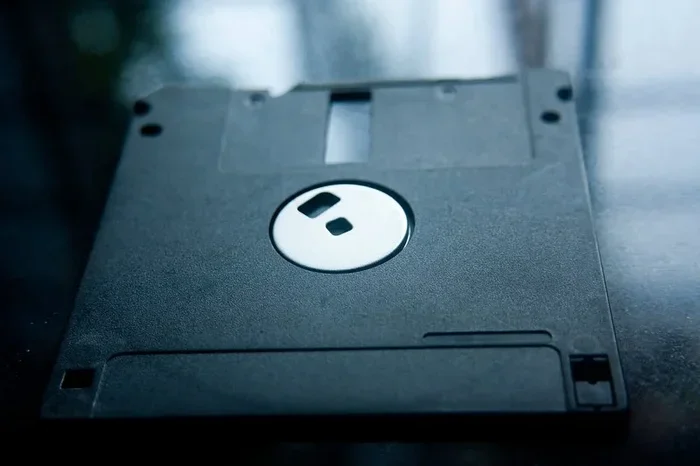
Floppy drives come in two main sizes. The 5.25-inch drive was common in the 1980s and early 1990s. The 3.5-inch drive became the standard from the mid-1990s onward. The 3.5-inch version is the one most people remember, with its hard plastic shell and metal sliding door.
The physical size of the drive affects what kind of computer it fits into. Desktop computers usually had a 5.25-inch bay for the larger drive. Laptops and newer desktops used the compact 3.5-inch floppy disk drive. The smaller size also helped the 3.5-inch disk become more durable and portable.
How Floppy Drives Store Data
Understanding magnetic storage is key to understanding floppy drives. The disk surface is coated with a thin layer of magnetic material. This material can be magnetized in different directions to represent ones and zeroes. The computer uses these binary patterns to store every file, photo, and program.
The Role of the Magnetic Coating
The magnetic coating on a floppy disk is what makes everything possible. Without it, there would be no way to record or retrieve data. The coating is made of iron oxide particles suspended in a resin. These particles align in specific directions when the read/write head applies a magnetic field.
Over time, the magnetic alignment can weaken. This is why old floppy disks sometimes become unreadable. The data fades as the magnetic particles lose their orientation. This is one reason why data backup on floppy disks was never a long-term solution.
Tracks and Sectors
A floppy disk is divided into concentric circles called tracks. Each track is further divided into smaller sections called sectors. The disk formatting process creates this structure so the drive can locate specific pieces of data quickly.
Think of it like a pie chart. Each slice represents a sector. The drive knows which track and sector to go to when it needs to read or write a file. This system works well for small amounts of data but becomes inefficient as storage needs grow.
Read/Write Head Movement
The read/write head moves across the disk surface to access different tracks. A small motor controls this movement. When you open a file, the drive spins the disk and moves the head to the correct track number. This mechanical movement is what creates the characteristic clicking sound floppy drives make.
The precision of the read/write head is remarkable for its time. It had to align perfectly with tiny magnetic patterns on a spinning disk. Even a small amount of dust or damage could cause read errors. This is why keeping floppy disks clean and stored properly was so important.
Types of Floppy Drives
Not all floppy drives are the same. Different types emerged over the years, each with its own set of characteristics. Knowing the differences helps you understand the evolution of portable removable media.
5.25-Inch Floppy Drive
The 5.25-inch floppy drive was the first widely adopted type. These drives were large by today’s standards. The disks were flexible and lacked a hard protective case. Users had to slide a metal cover over the disk to protect it from dust and damage.
The 5.25-inch disk came in two common formats. The double-density version stored 360 KB, while the high-density version could hold 1.2 MB. These drives were standard on computers through the early 1990s. Many people remember the satisfying click of inserting a 5.25-inch disk into a desktop machine.
3.5-Inch Floppy Drive
The 3.5-inch floppy drive changed everything. It was smaller, more durable, and more portable. The disk had a rigid plastic shell with a metal shutter that slid open when inserted into the drive. This design protected the delicate magnetic surface from dust and fingerprints.
The standard 3.5-inch floppy disk holds 1.44 MB of data. This became the most recognized format in the world. Almost every computer sold from the mid-1990s to the early 2000s included a 3.5-inch floppy disk drive. It was the default way to share files, install software, and create data backup copies.
Other Floppy Drive Variants
Beyond the two main sizes, a few other floppy drive types existed. The 8-inch floppy drive was used mainly in enterprise settings. It stored up to 1.2 MB and was much larger than the consumer versions. Zip drives and SuperDisk drives were also popular alternatives. They used similar removable media concepts but offered higher capacities of 100 MB or more.
These variants showed that the basic floppy drive concept had room for improvement. Engineers kept finding ways to increase storage capacity and data transfer rate within the same magnetic storage framework. However, none of these alternatives could compete with the rise of USB flash drives and optical media in the early 2000s.
Floppy Drive Characteristics at a Glance
To make all of this information easy to digest, here is a quick comparison of the main floppy drive characteristics.
| Characteristic | 5.25-Inch Drive | 3.5-Inch Drive |
|---|---|---|
| Storage Capacity | 360 KB (DD) / 1.2 MB (HD) | 720 KB (DD) / 1.44 MB (HD) |
| Data Transfer Rate | ~250 Kbps | ~250 Kbps (DD) / ~500 Kbps (HD) |
| Seek Time | ~100-200 ms | ~100-200 ms |
| Disk Material | Flexible magnetic disk | Flexible disk in rigid plastic shell |
| Write Protection | Adhesive tab on disk edge | Slide tab on disk corner |
| Connector Type | 50-pin edge connector | 34-pin edge connector |
| Common Era | Late 1970s to mid-1990s | Mid-1980s to early 2000s |
This table shows the clear differences between the two main types of floppy drives. The 3.5-inch version offers better capacity and a more durable disk design. Both types share similar data transfer rate and seek time values, which reflects the consistent technology used across both formats.
Common Floppy Drive Problems and Mistakes
Even when floppy drives worked well, they came with a set of common problems. Understanding these issues helps you appreciate the engineering challenges involved in magnetic storage.
Dirty Read/Write Heads
One of the most common problems with floppy drives is dirty read/write heads. Dust, fingerprints, and debris build up on the heads over time. This causes read errors, corrupted files, and failed data transfer. Cleaning the heads with a special floppy disk cleaning kit can often fix this issue.
Misaligned Disk Partitions
Another frequent problem is disk formatting mismatch. If you format a disk in one type of drive and try to use it in another, it may not work. The tracks and sectors need to align properly. This is why it was important to always format disks in the same type of floppy disk drive you planned to use them with.
Ignoring Write Protection
Forgetting to check the write protection switch is a common mistake. The write protection tab prevents accidental overwriting of data. If the switch is in the wrong position, you could accidentally erase important files. Always check this switch before inserting a disk, especially if it contains data you cannot replace.
Exposing Disks to Magnets and Heat
Floppy disks are sensitive to strong magnetic fields and heat. Placing a disk near a magnet can erase the data completely. Leaving a disk in a hot car can warp the flexible disk and damage the magnetic coating. Storing floppy disks in a cool, dry place away from magnetic sources is essential for long-term preservation.
Quick Tips for Using Floppy Drives
If you ever need to use a floppy drive, here are some practical tips to keep in mind.
- Always check the write protection tab before inserting a disk. This saves you from accidental data loss.
- Keep the drive clean. Use a head cleaning disk every few months to maintain good data transfer performance.
- Store floppy disks properly. Keep them in their original cases, away from magnets and direct sunlight.
- Format disks in the correct drive type. A 3.5-inch high-density disk will not work properly if formatted in a double-density drive.
- Make copies of important data. Because floppy disks degrade over time, keeping backup copies on a different medium is smart data backup practice.
- Handle disks by the edges. Touching the magnetic surface can transfer oils and cause read errors.
Expert Insights on Floppy Drive Legacy
According to computer historians, the floppy drive was more than just a storage tool. It was a gateway to personal computing. Before the internet made file sharing easy, floppy disks were the primary way people exchanged software, documents, and data transfer between machines.
Many legacy hardware systems still rely on floppy drives today. Industrial machines, medical equipment, and older manufacturing systems often use floppy disk removable media for updates and configuration. Replacing these systems is expensive, so the floppy drive remains in service in some surprising places.
Experts also note that the floppy drive played a key role in shaping modern storage device design. The concepts of disk formatting, track-based access, and removable computer peripherals all trace their roots back to floppy drive technology. Even today, the basic principles of magnetic data storage remain relevant in modern hard drives and SSDs.
Why Floppy Drives Still Matter
You might wonder why anyone still cares about floppy drive characteristics in an age of cloud storage and terabyte USB drives. The answer lies in history, education, and niche applications.
First, floppy drives are an important part of computing history. Understanding how they worked gives you context for why modern storage devices are designed the way they are. The limitations of floppy drives pushed engineers to develop better data transfer methods and higher capacity storage capacity solutions.
Second, floppy drives are still used in education. Many computer science courses teach students about magnetic storage using floppy drives as a practical example. It helps students understand the fundamentals of how read/write heads, disk formatting, and magnetic coating technology work.
Finally, some professional environments still depend on floppy drives. The legacy hardware in factories, hospitals, and government offices often cannot be upgraded easily. In these settings, the floppy drive is not obsolete. It is a necessary tool.
Key Takeaways
- The floppy drive is a magnetic storage device: It uses a flexible disk coated with magnetic material to store and retrieve data.
- Storage capacity was very limited: The standard 3.5-inch floppy disk holds just 1.44 MB, which is tiny compared to modern storage.
- Data transfer rates and seek times were slow: These characteristics made floppy drives suitable for small files but impractical for large ones.
- Two main sizes dominated the market: The 5.25-inch and 3.5-inch floppy drives each had unique physical and technical specs.
- Write protection and disk formatting are essential features: These characteristics protect data and ensure compatibility across different drives.
- Floppy drives still serve niche purposes: Legacy systems and industrial equipment continue to use floppy disk technology in limited settings.
- Understanding floppy drive characteristics builds foundational knowledge: The principles behind floppy drives still apply to modern storage devices today.
Frequently Asked Questions
What is the main characteristic of a floppy drive?
The main characteristic of a floppy drive is its use of magnetic storage on a flexible disk. The drive reads and writes data using a read/write head that interacts with a magnetized surface. This design made floppy disks a popular form of removable media for decades.
How much data can a floppy drive store?
A standard 3.5-inch floppy drive stores 1.44 MB of data. The older 5.25-inch format held between 360 KB and 1.2 MB. These storage capacity limits made floppy drives impractical for large files but perfect for documents and small software programs.
What does the write protection tab on a floppy disk do?
The write protection tab prevents the floppy drive from writing new data or erasing existing data on the disk. When the tab is in the protected position, the drive can only read the disk. This simple feature helps prevent accidental data loss during data transfer or file sharing.
Are floppy drives still used today?
Yes, in some niche environments. Certain industrial machines, medical devices, and legacy systems still rely on floppy disk technology. The legacy hardware in these settings often cannot be easily upgraded, so floppy drives remain a necessary computer peripheral for specific tasks.
Why did floppy drives become obsolete?
Floppy drives became obsolete because their storage capacity and data transfer rate could not keep up with growing file sizes. USB flash drives, CDs, and eventually cloud storage offered much faster and larger alternatives. The slow seek time of floppy drives also made them impractical for modern computing needs.
Can you still buy floppy disks and drives?
Yes, you can still find them online through specialty retailers and secondhand marketplaces. Some companies continue to manufacture floppy diskettes and floppy disk drives for industrial and legacy system use. However, they are no longer a mainstream storage device for everyday computing.
=== CONCLUSION ===
The characteristics of a floppy drive tell a story of innovation, limitation, and lasting impact. From the flexible magnetic disk to the precise read/write head, every feature played a role in making these devices the backbone of personal computing for over two decades. The storage capacity, data transfer rate, seek time, and physical design all worked together to create a removable media experience that millions of people relied on daily.
While floppy drives are no longer part of everyday computing, their legacy lives on. The principles of magnetic storage, disk formatting, and data backup that floppy drives pioneered still shape how modern storage devices work today. Understanding the characteristics of a floppy drive gives you valuable insight into the foundations of computer technology.
Whether you are a collector, a student, or someone working with legacy hardware, knowing how floppy drives operate is a worthwhile skill. The next time you encounter one of these classic computer peripherals, you will know exactly what makes it tick and why it mattered so much in the history of computing.