Can You Make A Hologram With Your Phone In Just Seconds
Yes, you can make a hologram with your phone using simple DIY tricks and free apps. Whether you want a 3D hologram projector from household items or a hologram app for cool effects, it is easier than you think. This guide walks you through every method, from the classic Pepper’s ghost technique to augmented reality experiences. You will learn how to create a smartphone hologram in minutes without expensive gear. Get ready to turn your phone screen into a holographic display that will wow your friends and family.
Key Takeaways
- DIY hologram projectors work: You can build a simple hologram viewer from a plastic sheet and your phone in under five minutes.
- Free apps create holographic effects: Many hologram apps let you display 3D images and videos right on your phone screen.
- No special hardware needed: A cardboard frame, clear plastic, and your phone are all you need for a basic setup.
- Pepper’s ghost is the secret behind most phone holograms: This classic illusion technique makes images appear to float in mid-air.
- Hologram technology is evolving fast: New AR apps and phone features are making real holographic displays more accessible every year.
- Common mistakes ruin the effect: Lighting, angle, and video choice all matter for a convincing hologram projection.
- It is fun and educational: Making a phone hologram is a great project for kids, students, and tech enthusiasts alike.
📑 Table of Contents
- Can You Make A Hologram With Your Phone?
- How Does a Phone Hologram Work?
- DIY Hologram Projector: Step-by-Step Guide
- Best Apps to Create Holograms With Your Phone
- Common Mistakes and How to Avoid Them
- Quick Tips for the Best Hologram Results
- Comparison: DIY Projector vs. App-Based Holograms
- Fun Ways to Use Your Phone Hologram
- Final Thoughts
Can You Make A Hologram With Your Phone?
Here is the short answer. Yes, you can make a hologram with your phone right now, today, without spending a dime. You do not need a fancy lab or a science degree. All you need is your smartphone, a few household items, and a little curiosity.
The idea of a hologram might sound like something from a sci-fi movie. But the truth is, you can create a convincing hologram illusion with things lying around your house. People have been doing this for years. And the best part? You can learn how in just a few minutes.
This article will show you every method that works. We will cover DIY hologram projectors, free apps, and even some cool augmented reality tricks. By the end, you will know exactly how to create a 3D hologram using nothing but your phone. Let us dive in.
Why Phone Holograms Are So Popular
Phone holograms have taken the internet by storm. You have probably seen those videos where a holographic image floats above a phone screen. They go viral because they look incredible. And they are surprisingly easy to make.
People love showing off hologram effects at parties and gatherings. Kids and adults alike get a kick out of watching a holographic display come to life from a simple setup. It is one of those projects that never gets old.
Beyond the fun factor, phone holograms teach you about light, reflection, and optics. They are a great way to explore hologram technology without investing in expensive equipment. Whether you are a student, a parent looking for a fun project, or just a tech lover, this is a rewarding activity.
How Does a Phone Hologram Work?
Understanding the science behind a phone hologram projector helps you get better results. The most common method uses a technique called Pepper’s ghost. This is a classic stage illusion that has been around since the 1800s.
Here is how it works in simple terms. You place a clear surface at an angle over your phone screen. The surface reflects the image from the screen upward. Your brain sees the reflected image as if it is floating in the air. That is the hologram illusion.
It is not a true hologram in the scientific sense. A real hologram records light waves on a special surface. But for everyday fun and impressive displays, the Pepper’s ghost technique does a fantastic job. It creates the same visual effect that most people associate with holograms.
The key ingredients for this illusion are simple. You need a light source (your phone screen), a reflective surface (clear plastic or glass), and a dark environment. When these elements come together, the magic happens.
The Role of Light and Reflection
Light travels in straight lines. When it hits a smooth surface, it bounces off at the same angle. This is called reflection. The holographic projection from your phone relies on this basic principle.
Your phone screen emits light. That light hits the angled plastic sheet. The plastic reflects the light toward your eyes. Because the plastic is transparent, you can see through it. This makes the reflected image appear to float above the surface. It is a clever trick of optics.
The darker your room, the better the effect works. Ambient light washes out the reflection. So dimming the lights is one of the easiest ways to boost your hologram display quality. Try it and see the difference.
DIY Hologram Projector: Step-by-Step Guide
This is the most popular method. You will build a simple hologram projector from things you already have at home. It takes less than five minutes. Let us get started.
What You Need
Gather these items before you begin:
- A clear plastic sheet or transparency film
- A ruler and a marker
- Scissors or a craft knife
- Tape or glue
- A smartphone
- A dark room with dim lighting
You do not need anything fancy. Even a clear plastic folder from a dollar store works great. The thinner the plastic, the clearer the hologram image will be.
Building the Hologram Pyramid
Follow these steps to build your DIY phone hologram projector:
- Draw a trapezoid shape on the plastic sheet. The bottom edge should be about 1 centimeter wide. The top edge should be about 3.5 centimeters wide. The height should be around 6 centimeters.
- Cut out the trapezoid shape carefully with your scissors.
- Use the cut piece as a template. Trace and cut three more identical trapezoids.
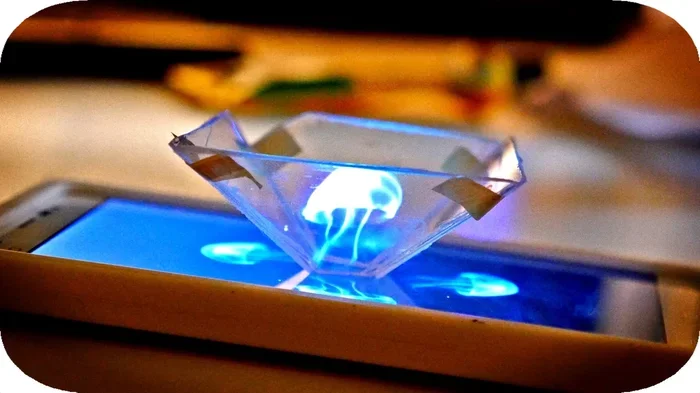
- Arrange the four trapezoids into a pyramid shape. The wide ends face up and the narrow ends meet at the center.
- Tape or glue the edges together to form a stable pyramid.
- Place the pyramid upside down on your phone screen.
That is it. You now have a hologram projector made from household items. Place your phone on a flat surface and play a specially prepared hologram video. The image will appear to float inside the pyramid. It looks amazing.
Where to Find Hologram Videos
You need the right video content for this to work. Regular videos will not create the hologram effect. You need videos that are split into four sections, one for each side of the pyramid.
Search for “hologram video template” on YouTube or other video platforms. Many free videos are designed specifically for this DIY setup. Some popular search terms include hologram video for phone projector and 3D hologram video for DIY.
You can also find apps that generate hologram-compatible content. These apps make it easy to find or create the right videos for your pyramid projector. More on that in the next section.
Best Apps to Create Holograms With Your Phone
Apps have made creating phone holograms even easier. You no longer need to build a physical projector. Many apps use your phone’s screen and camera to create stunning holographic effects.
Top Hologram Apps for Android and iPhone
Here are some of the best options available right now:
- Hologram Video Maker: This app lets you create hologram-style videos directly on your phone. It is free and easy to use.
- AR Hologram Creator: Uses augmented reality to place 3D holographic images in your real-world environment.
- Pepper’s Ghost App: Simulates the classic hologram illusion using your phone screen and a simple setup.
- Holo-Generator: Lets you project holographic images from your phone onto any surface.
Most of these apps are free or have free versions. They work on both Android and iPhone. Simply download one, follow the instructions, and you will be creating hologram effects in minutes.
How to Choose the Right App
Not all apps are created equal. Here are some tips for picking the best one:
- Check user reviews and ratings before downloading.
- Look for apps that are regularly updated.
- Choose apps that do not require in-app purchases to access core features.
- Make sure the app is compatible with your phone model.
- Test a few free options before committing to a paid app.
The right app depends on what you want to achieve. If you want a simple hologram illusion, a Pepper’s ghost app works great. If you want to place 3D objects in your room, an AR app is the better choice.
Common Mistakes and How to Avoid Them
Even though making a phone hologram is simple, some common mistakes can ruin the effect. Here is what to watch out for.
Using the Wrong Type of Plastic
Not all clear plastic works the same way. Thick or tinted plastic will distort the image and make it blurry. You want thin, clear, and as distortion-free as possible.
Transparency film from an office supply store works best. Clear plastic folders are a good budget option. Avoid colored plastic or textured surfaces. They scatter the light and weaken the holographic projection.
Not Dimming the Lights Enough
This is the number one mistake people make. If your room is too bright, the hologram effect disappears. The reflection becomes nearly invisible.
Turn off overhead lights. Close the curtains. Even dim your phone screen brightness slightly. A darker room makes the floating image much more vivid and convincing.
Using the Wrong Video Content
As mentioned earlier, you cannot just play any video. The video must be formatted specifically for the pyramid projector setup. Using a regular video will not produce the floating image effect.
Always use videos designed for DIY hologram projectors. These videos have the image split into four quadrants, each meant to be reflected by one side of the pyramid.
Placing the Pyramid at the Wrong Angle
The pyramid needs to sit centered on the phone screen. If it is tilted too much or too little, the image will look distorted or not appear at all.
Take your time to position everything correctly. A small adjustment can make a huge difference. Patience pays off when you are setting up a smartphone hologram display.
Quick Tips for the Best Hologram Results
Want your phone hologram to look its absolute best? Here are some pro tips that make a big difference.
- Use a dark background: A black surface behind the pyramid makes the floating image pop.
- Clean your plastic sheet: Fingerprints and smudges scatter light and reduce clarity.
- Use high-resolution videos: The clearer the source video, the sharper the hologram image.
- Experiment with angles: Slightly adjusting the pyramid position can improve the effect.
- Try different videos: Some hologram videos look better than others. Test several to find your favorites.
- Record your setup: Use another phone to film your hologram display. The results look even more impressive on video.
- Make it a group project: Building the pyramid is fun to do with friends or family.
Expert Insight: The Future of Phone Holograms
Technology is moving fast. Hologram technology on phones is evolving rapidly. Companies are working on true holographic displays that do not require any props or plastic sheets.
Some newer phones already feature light field displays that create depth without glasses. Augmented reality headsets are becoming more affordable. And software developers are creating increasingly realistic holographic displays for smartphones.
While a true hologram from a phone screen is still a few years away for most consumers, the gap is closing fast. The DIY methods described in this article remain the most accessible way to enjoy hologram effects right now. And they are a fantastic way to learn about optics and 3D projection technology.
Comparison: DIY Projector vs. App-Based Holograms
Both methods have their strengths. Here is a quick comparison to help you decide which approach works best for you.
| Feature | DIY Projector | App-Based Hologram |
|---|---|---|
| Cost | Nearly free | Free or low cost |
| Setup Time | 5-10 minutes | 1-2 minutes |
| Visual Impact | Very high | Moderate to high |
| Special Equipment | Plastic sheet, scissors | Just your phone |
| Works in Bright Light | No, needs dim room | Yes, mostly |
| Best For | Parties, demos, wow factor | Quick effects, everyday fun |
| Learning Value | High (optics and physics) | Moderate |
Many people enjoy doing both. The DIY projector is perfect for showing off at gatherings. The app-based approach is great for everyday hologram fun on the go. Why not try both and see which you prefer?
Fun Ways to Use Your Phone Hologram
Once you have your holographic display working, the fun really begins. Here are some creative ideas to try.
- Hologram birthday greetings: Create a floating birthday message that amazes your guests.
- Science fair projects: Demonstrate optics and reflection principles with a working hologram projector.
- Movie night decorations: Float a spooky hologram image for a Halloween party.
- Art projects: Display holographic art pieces that appear to float on your desk.
- Educational demos: Teach kids about light, reflection, and 3D imaging in a hands-on way.
- Social media content: Film your hologram setup and share it online. These videos always get great engagement.
The possibilities are limited only by your imagination. A phone hologram is a versatile tool for entertainment, education, and creative expression.
Final Thoughts
So, can you make a hologram with your phone? Absolutely yes. You have learned how to build a DIY hologram projector from scratch. You have explored the best apps for creating hologram effects. You know the science behind the Pepper’s ghost illusion. And you have tips to make your display look its best.
Making a hologram with your phone is one of those projects that combines fun, learning, and wow-factor in one simple activity. It costs almost nothing. It takes just minutes to set up. And the results are genuinely impressive.
Whether you are doing this for a school project, a party trick, or just for the joy of creating something cool, you now have everything you need. Grab your phone, gather a few household items, and start experimenting. The world of hologram technology is right at your fingertips. Have fun with it.
Frequently Asked Questions
Do I need any special equipment to make a hologram with my phone?
No special equipment is needed at all. A clear plastic sheet, scissors, tape, and your smartphone are everything you need for a DIY projector. If you prefer an app-based approach, you only need your phone. Most materials can be found around your house or purchased for under a few dollars.
Is a phone hologram a real hologram?
Technically, it is an illusion created by the Pepper’s ghost technique. A true hologram records light waves on a special medium. But the visual effect looks very similar to a real hologram. For fun and display purposes, the phone method creates a convincing floating image that most people cannot tell apart from a true hologram.
Can I make a hologram with any phone?
Yes, any smartphone with a screen can work. Both Android and iPhone models are compatible with the DIY projector method and hologram apps. The screen size may affect the viewing experience slightly, but the basic principle works the same on all phones. Larger screens tend to produce a bigger hologram image.
What kind of videos work best for a phone hologram projector?
Videos specifically designed for hologram pyramid projectors work best. These videos split the image into four quadrants, one for each side of the pyramid. You can find many free hologram videos online by searching for “hologram video template for DIY projector.” Avoid using regular videos as they will not create the floating image effect.
Can I make a hologram in a bright room?
The DIY projector method works best in dim or dark rooms. Ambient light washes out the reflected image and weakens the effect. If you need to use the hologram in a bright room, the app-based approach tends to work better since it does not rely on reflection. For the strongest results with a DIY projector, dim the lights and close the curtains.
Are there any apps that create real holograms on a phone?
While no app can create a true hologram that floats in free space without a surface, many apps create impressive holographic illusions. AR hologram apps use your phone’s screen and camera to place 3D images in your environment. These augmented reality effects are convincing and fun. They are the closest thing to a real hologram available on smartphones today.
=== CONCLUSION ===
Making a hologram with your phone is easier, cheaper, and more fun than most people think. You have all the tools you need right now. Whether you choose to build a DIY hologram pyramid or download a hologram app, the experience is rewarding and impressive.
Start with the simple DIY method. Play around with different videos and lighting setups. Then explore the world of augmented reality apps for even more holographic possibilities. Share your creations with friends and family. The hologram illusion never fails to amaze.
Remember, the key to a great phone hologram is patience and a dark room. Clean your plastic, use the right videos, and experiment with angles. Once you get the hang of it, you will be creating stunning holographic displays whenever you want.
So go ahead. Make your first phone hologram today. You will be surprised at how simple and satisfying it is. Happy projecting.