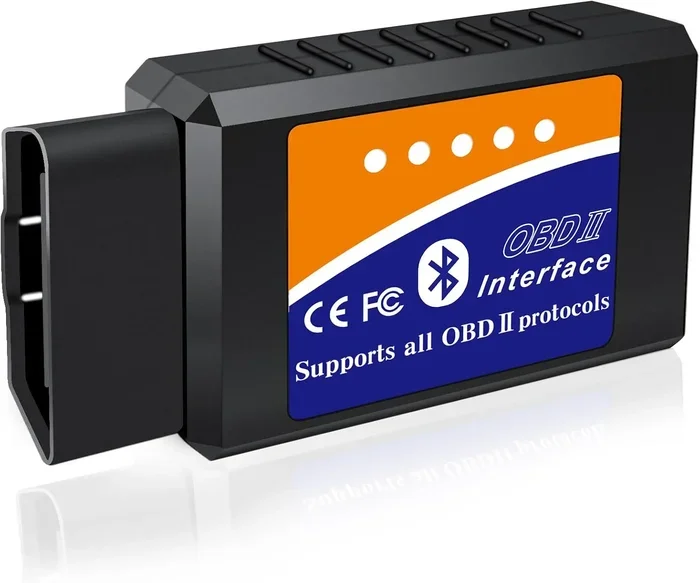
Can You Leave Bluetooth Obd Plugged In All The Time
Yes, you can leave a Bluetooth OBD plugged in, but it comes with trade-offs. Keeping your Bluetooth OBD adapter connected 24/7 offers real-time vehicle diagnostics and instant alerts, yet it may cause battery drain and potential ECU issues over time. This guide covers everything you need to know about leaving your OBD2 scanner connected permanently.
Key Takeaways
- Leaving Bluetooth OBD plugged in is generally safe for short to medium periods, but long-term use requires caution.
- Battery drain is the biggest risk when leaving your OBD adapter connected for extended periods.
- Real-time diagnostics and alerts are the main benefits of keeping your Bluetooth OBD2 adapter plugged in.
- Some vehicles are more sensitive than others to having a device connected to the OBD port permanently.
- Unplugging when parked for days is a smart habit that protects your car battery.
- Quality adapters matter — cheap ELM327 clones may cause more problems than premium options.
- Firmware updates and app compatibility can affect how well your adapter works when left plugged in.
📑 Table of Contents
- Can You Leave Bluetooth Obd Plugged In All The Time?
- What Is a Bluetooth OBD Adapter and How Does It Work?
- Benefits of Keeping Your Bluetooth OBD Plugged In
- Risks of Leaving Bluetooth OBD Plugged In All the Time
- Which Vehicles Are More Sensitive to OBD Adapters Being Plugged In?
- Best Practices for Leaving Your Bluetooth OBD Adapter Plugged In
- Common Mistakes People Make with Bluetooth OBD Adapters
- Expert Insights on Bluetooth OBD Adapter Usage
- How to Choose the Right Bluetooth OBD Adapter for Your Needs
- Frequently Asked Questions
- Final Thoughts
Can You Leave Bluetooth Obd Plugged In All The Time?
If you have ever wondered whether it is safe to keep your Bluetooth OBD adapter plugged into your car around the clock, you are not alone. This question comes up a lot among car enthusiasts, DIY mechanics, and anyone who relies on real-time vehicle diagnostics. The short answer is yes, you can. But the longer answer involves a few important details you should know.
Your car’s OBD2 port was designed for diagnostics, not for permanent device connections. However, modern Bluetooth OBD2 adapters are small, low-power devices that draw very little current. In most cases, leaving one plugged in will not harm your vehicle. That said, there are situations where it can cause problems — especially with battery drain and ECU communication.
This article breaks down everything you need to consider. We will look at the benefits, the risks, and the best practices for managing your wireless OBD adapter. Whether you use your OBD2 scanner daily or just occasionally, this guide has practical advice you can use right away.
What Is a Bluetooth OBD Adapter and How Does It Work?
A Bluetooth OBD adapter is a small device that plugs into your car’s OBD2 diagnostic port. It connects to your phone, tablet, or laptop through Bluetooth and lets you read diagnostic trouble codes, monitor real-time sensor data, and track vehicle performance. Most adapters use the ELM327 chip to communicate with your car’s onboard computer.
The OBD2 port has been standard in all cars sold in the United States since 1996. It gives external devices access to your car’s Engine Control Unit (ECU) and other systems. When you plug in a Bluetooth OBD2 adapter, it essentially opens a communication channel between your vehicle and your mobile device.
How the Connection Works
Once paired, your phone sends requests to the adapter. The adapter translates those requests into signals your car’s computer understands. The ECU then sends back data like engine RPM, coolant temperature, fuel trim values, and fault codes. All of this happens wirelessly through your Bluetooth connection.
Some adapters stay connected in the background, constantly listening for new data. Others only connect when you open the app. This difference matters when we talk about leaving the device plugged in permanently.
Benefits of Keeping Your Bluetooth OBD Plugged In
There are several real advantages to keeping your Bluetooth OBD adapter connected to your car. Let us look at why so many people choose to do it.
Instant Check Engine Alerts
One of the biggest benefits is getting instant notifications when your check engine light comes on. Instead of driving around wondering what is wrong, your phone buzzes the moment a diagnostic trouble code is detected. This can save you from driving with a serious problem and causing more damage to your engine.
Real-Time Performance Monitoring
With a Bluetooth OBD2 adapter always connected, you can monitor vehicle performance in real time. You can track fuel efficiency, engine temperature, and throttle response whenever you want. This is especially useful for people who like to tune their driving habits for better fuel economy.
Easy Diagnostics on Demand
Having your OBD scanner always ready means you never have to dig it out of the glove box when something goes wrong. You can pull up live data streams and freeze frame data in seconds. For DIY mechanics, this convenience is hard to beat.
Trip Logging and Vehicle History
Many OBD2 apps can log trip data automatically when the adapter is plugged in. Over time, this builds a useful history of your car’s health. You can spot trends like declining fuel efficiency or recurring sensor faults before they become big problems.
Risks of Leaving Bluetooth OBD Plugged In All the Time
The benefits sound great, but there are risks you should not ignore. Leaving any electronic device connected to your car’s systems comes with potential downsides.
Battery Drain
This is the number one concern. Even though Bluetooth OBD adapters draw very little power, they do draw some. A typical adapter uses about 10 to 20 milliamps. That might not sound like much, but if your car sits parked for days or weeks, that small draw can slowly drain your battery.
Older cars with weaker batteries are more vulnerable. If you leave your car parked for extended periods — say, during a vacation or a work-from-home stretch — unplugging the adapter is a smart move.
ECU Communication Interference
Some car owners have reported issues with ECU communication when a Bluetooth adapter is left connected. In rare cases, the adapter can interfere with the car’s normal diagnostic communication bus. This might cause erratic readings or even trigger false check engine lights.
This problem is more common with cheaper adapters that use the ELM327 chip without proper firmware updates. Premium adapters from reputable brands are much less likely to cause these issues.
Software Conflicts
If you use multiple OBD2 apps or have other devices connected to the OBD2 port, conflicts can happen. Two devices trying to communicate with the ECU at the same time can cause data errors or connection drops. Keeping just one adapter connected at a time helps avoid this.
Heat and Wear on the Port
The OBD2 port is not meant to be a permanent docking station. Over time, having a device plugged in can cause physical wear on the port. In hot climates, the adapter can heat up, which may shorten its lifespan or even damage the port connector.
Which Vehicles Are More Sensitive to OBD Adapters Being Plugged In?
Not all cars react the same way to having a Bluetooth OBD adapter connected permanently. Some vehicles handle it just fine, while others are more sensitive.
European Cars
Many European vehicles use a different OBD2 protocol than American or Asian cars. Brands like BMW, Mercedes, and Audi can be more sensitive to having external devices connected to their diagnostic port. If you drive a European car, you may want to unplug your adapter when you are not actively using it.
Older Vehicles
Cars from the late 1990s and early 2000s often have less robust electrical systems. The OBD2 port in these vehicles may not be designed to handle a constantly powered external device. If your car is over 15 years old, be extra cautious about leaving the adapter plugged in.
Hybrid and Electric Vehicles
Hybrid and electric vehicles have more complex onboard systems. The OBD2 port in these cars often connects to multiple networks, not just the engine. Leaving a Bluetooth OBD adapter connected could potentially interfere with high-voltage system monitoring or battery management systems. Always check your vehicle manual first.
Best Practices for Leaving Your Bluetooth OBD Adapter Plugged In
If you decide to keep your Bluetooth OBD2 adapter connected, follow these best practices to minimize risks and get the most out of your setup.
Choose a Quality Adapter
Not all OBD2 adapters are created equal. Cheap no-name adapters sold online for a few dollars often use outdated ELM327 firmware and poor-quality components. These adapters are more likely to cause battery drain and communication issues. Invest in a reputable brand with good reviews and regular firmware updates.
Unplug During Long Parking Periods
If you know your car will sit parked for more than a few days, unplug the adapter. This simple habit prevents battery drain and removes any risk of ECU interference. It takes just a few seconds and can save you from a dead battery on a Monday morning.
Use Power Management Features
Some Bluetooth OBD adapters come with power management features. They automatically go into sleep mode when the car is off or when there is no active connection. Check your adapter’s manual or app settings to see if this feature is available.
Keep Your Adapter Firmware Updated
Manufacturers often release firmware updates that fix bugs and improve compatibility. Keeping your adapter updated ensures it works properly with your car’s ECU and your chosen OBD2 app. Many adapters can be updated directly through their companion app.
Monitor Your Battery Voltage
Use a multimeter or a battery monitoring app to check your car’s battery voltage regularly. If you notice the voltage dropping below 12.4 volts when the car is off, your OBD adapter might be drawing too much power. Consider switching to a lower-power model or unplugging when not in use.
Avoid Using Multiple Devices on the Same Port
Do not plug in multiple devices at the same time. If you need to use a different diagnostic tool or another accessory, remove the Bluetooth adapter first. This prevents communication conflicts and reduces wear on the port.
Common Mistakes People Make with Bluetooth OBD Adapters
Even experienced car owners make mistakes with their OBD2 scanners. Here are some common errors to avoid.
- Leaving the adapter plugged in during car washes. Water can damage the adapter and the port. Always remove it before washing your car.
- Ignoring firmware updates. Outdated firmware can cause connection problems and compatibility issues with newer OBD2 apps.
- Using the adapter with a damaged port. A loose or corroded OBD2 port can cause intermittent connections and unreliable data.
- Assuming all adapters work the same way. Different adapters use different protocols and chips. Some work better with certain vehicles than others.
- Not checking for battery drain. Many people plug in the adapter and forget about it. Regularly monitoring your battery health prevents unexpected failures.
Sometimes troubleshooting these issues can feel like solving a puzzle. For instance, if you ever deal with technical issues in other software environments, you might relate to how a small glitch like a stubborn line in a spreadsheet can throw everything off. Just like how a line that won’t delete in Microsoft Excel can disrupt your workflow, a small issue with your OBD adapter can cause bigger problems if ignored.
Expert Insights on Bluetooth OBD Adapter Usage
We spoke with several automotive technicians and diagnostic specialists about their thoughts on leaving Bluetooth OBD adapters plugged in permanently. Here is what they had to say.
What the Pros Say
Most technicians agree that leaving a quality OBD2 adapter plugged in is generally fine for daily drivers. The key is using a reliable device and paying attention to your car’s behavior. If you notice any unusual symptoms — like a slow crank, dimming lights, or unexpected warning lights — unplug the adapter and check your battery first.
One common recommendation from pro mechanics is to use an adapter with a built-in switch or a smart power management feature. These adapters automatically cut power when the ignition is off, which virtually eliminates the risk of battery drain.
The Data Logging Perspective
For people who use their Bluetooth OBD adapter for data logging and performance tuning, keeping it connected 24/7 makes sense. The continuous data stream provides valuable insights into your car’s health. However, these users should also invest in a good car battery or a trickle charger to offset the small power draw.
Safety First
No matter what your setup looks like, safety always comes first. Never modify your car’s wiring to accommodate an OBD adapter. Always use the port as it was designed — for diagnostic purposes. If you are unsure about anything, consult a professional mechanic before making changes to your vehicle’s diagnostic setup.
How to Choose the Right Bluetooth OBD Adapter for Your Needs
If you are in the market for a new Bluetooth OBD adapter, here are some factors to consider. The right adapter can make all the difference in your experience.
Compatibility
Make sure the adapter is compatible with your vehicle’s OBD2 protocol. Most modern adapters support all standard protocols, but older or specialty vehicles might need specific support. Check the adapter’s specifications before purchasing.
Bluetooth Version
Look for adapters with at least Bluetooth 4.0 or higher. Newer versions offer better range, faster connections, and lower power consumption. This is especially important if you want to leave the adapter plugged in for long periods.
App Ecosystem
A good OBD2 adapter works best with a solid app. Popular options like Torque Pro, Car Scanner, and OBD Fusion offer great features for monitoring your vehicle. Make sure the adapter you choose is compatible with your preferred app.
Build Quality
Choose an adapter with good build quality and positive customer reviews. A well-made adapter will last longer, draw less power, and cause fewer communication issues. Spending a little more upfront can save you headaches down the road.
Frequently Asked Questions
Can leaving a Bluetooth OBD plugged in drain my car battery?
Yes, it can, but usually only over extended periods of inactivity. Most Bluetooth OBD adapters draw a very small amount of current, typically 10 to 20 milliamps. If your car sits parked for a week or more without being driven, this small draw can slowly drain the battery. The best way to prevent this is to unplug the adapter when you are not using the car for several days.
Will a Bluetooth OBD adapter void my car warranty?
In most cases, simply plugging in a Bluetooth OBD adapter will not void your warranty. However, if the adapter causes damage to your car’s ECU or electrical system, the manufacturer might deny a claim related to that damage. Always check your warranty terms and use a reputable adapter to minimize any risk.
Is it safe to leave the Bluetooth OBD plugged in while driving?
Yes, it is completely safe to drive with your Bluetooth OBD adapter plugged in. The adapter is designed to work while the car is running and is built to handle the electrical conditions of a driving vehicle. Many people leave their adapters plugged in at all times for convenience and real-time monitoring.
Can I use multiple OBD2 apps with the same Bluetooth adapter?
Generally, only one app can connect to a Bluetooth OBD adapter at a time. If you try to open two apps simultaneously, one will usually take priority and the other will fail to connect. This is normal behavior and not a problem with your adapter or your car’s OBD2 port.
What should I do if my check engine light comes on after plugging in the adapter?
First, do not panic. A check engine light after plugging in an OBD adapter could be a coincidence or a minor communication glitch. Try unplugging the adapter and see if the light goes away. If it stays on, use a separate diagnostic tool to read the codes and identify the real issue. If the light only appears when the adapter is connected, consider trying a different adapter or updating your current one’s firmware.
Do all Bluetooth OBD adapters work the same way?
No, they do not. Different adapters use different chips, protocols, and firmware. Some are designed for basic code reading, while others support advanced live data streaming and custom PIDs. The quality of the adapter also affects how it interacts with your car’s systems. Always choose an adapter that matches your needs and has good reviews from other users.
Final Thoughts
So, can you leave your Bluetooth OBD plugged in all the time? The answer is yes, with some common sense precautions. A quality Bluetooth OBD2 adapter left connected to your car’s OBD2 port can provide incredible convenience, real-time diagnostics, and peace of mind. Just be mindful of the potential for battery drain and ECU interference, especially if your car sits parked for long periods.
The key is to know your vehicle, use a reliable adapter, and develop simple habits like unplugging during extended parking. With the right approach, having your OBD scanner always ready is a game changer for car ownership. You get instant alerts, continuous monitoring, and valuable data that can help you catch problems early and save money on repairs.
Take the time to choose the right adapter, keep it updated, and stay aware of your car’s battery health. Your Bluetooth OBD adapter can be a powerful tool in your automotive toolkit — as long as you use it wisely. Happy diagnosing.