Can You Get Extensions For HDMI Cables And Here Is Why
Yes, you can get extensions for HDMI cables, and they are a game-changer for any home theater or office setup. HDMI extension cables and couplers let you run longer distances without losing signal quality. Whether you need a short boost or a long-distance run, the right extension keeps your audio and video crisp and reliable.
Can you get extensions for HDMI cables? The short answer is a resounding yes. If you have ever struggled with a cable that just does not reach your TV, projector, or monitor, you are not alone. HDMI extension cables solve this problem quickly and affordably. They come in many shapes, sizes, and quality levels. Whether you are setting up a home theater, a gaming station, or a conference room, the right HDMI extension keeps your audio and video signal strong and clear.
In this guide, we will walk you through everything you need to know about HDMI cable extensions. You will learn about the different types available, how to pick the best one, and common pitfalls to avoid. By the end, you will feel confident choosing and using an HDMI extension cable for your setup.
Key Takeaways
- HDMI extensions are widely available: You can find them in multiple types, including couplers, active boosters, and cable extenders.
- Signal quality matters: Choosing the right extension prevents signal loss, especially for 4K and high-resolution setups.
- Length and version compatibility are key: Always match your HDMI extension to your device specs and desired cable length.
- Installation is simple: Most HDMI extensions plug and play with no extra software or drivers needed.
- Common mistakes can ruin your setup: Avoid cheap, unshielded cables and mismatched HDMI versions for the best experience.
📑 Table of Contents
What Is an HDMI Cable Extension?
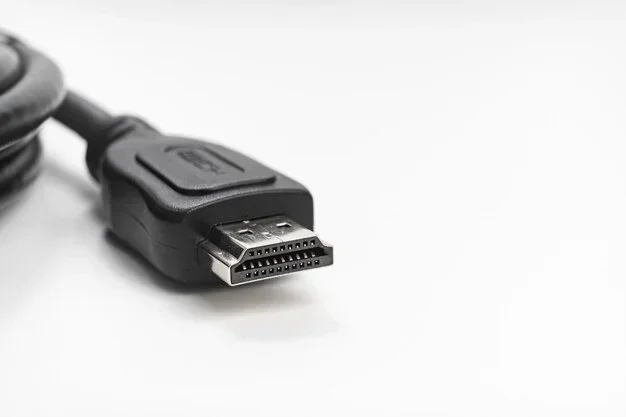
An HDMI extension cable is a device or cable that adds length to your existing HDMI connection. It sits between your source device and your display. Think of it as a bridge that carries your audio and video signal over a longer distance. Without an extension, you might find your cable falls short of where you need it.
HDMI extensions come in several forms. Some are simple couplers that join two cables together. Others are active devices that boost the signal for longer runs. The type you need depends on how far you want to extend the connection and what resolution you want to maintain.
Most modern devices use HDMI version 2.0 or HDMI version 2.1. These versions support 4K, 8K, and high refresh rates. When choosing an extension, make sure it supports the same version as your devices. This ensures you get the best picture and sound quality without any compromises.
Types of HDMI Cable Extensions
Not all HDMI extensions are the same. Each type serves a different purpose and works best in specific situations. Here is a closer look at the most common options available.
HDMI Couplers
An HDMI coupler is a small, passive device that connects two HDMI cables end to end. It is the simplest and most affordable option. You plug one cable into each side of the coupler, and the signal passes through. Couplers work well for short extensions, typically up to 10 to 15 feet total.
However, passive couplers can cause some signal loss over longer distances. If you need to extend your cable beyond 15 feet, a coupler alone may not be enough. You might notice a drop in picture quality or intermittent signal issues.
Active HDMI Extension Cables
Active HDMI extension cables have built-in electronics that boost the signal. They are much better for longer runs. An active extension can carry a strong signal over 30, 50, or even 100 feet. These cables often require external power, usually through a USB port or an AC adapter.
Active extensions are ideal for setups where your display is far from your source device. For example, if your projector is mounted on a ceiling and your Blu-ray player sits on a table across the room, an active extension will keep your signal pristine. Look for extensions that are HDCP compliant to ensure they support protected content like movies and streaming services.
HDMI Over Ethernet Extenders
An HDMI over Ethernet extender uses network cable to carry the HDMI signal. This is a great option for very long distances. You connect a sender unit to your source device and a receiver unit to your display. A standard Ethernet cable runs between them. These extenders can push HDMI signals over 100 feet or more with excellent quality.
If you are interested in network-based solutions, you might also want to explore the advantages and disadvantages of network cables to understand how Ethernet-based HDMI extenders compare to traditional HDMI options. This knowledge helps you make a smarter choice for your installation.
Wireless HDMI Extensions
Wireless HDMI extensions send the audio and video signal through the air using a transmitter and receiver pair. They eliminate the need for any cables between the source and display. This is perfect for situations where running a cable is impractical or ugly.
Wireless extenders work well for most home setups. They support 4K resolution in many models. However, they can be affected by walls, interference from other devices, and distance. If you want a clean, cable-free setup, a wireless HDMI extension is worth considering.
How to Choose the Right HDMI Extension
Choosing the right extension can feel overwhelming with so many options on the market. Here are the key factors to consider before you buy.
Check Your HDMI Version
First, check the HDMI version on your source device and your display. If both devices support HDMI 2.1, you need an extension that also supports HDMI 2.1. This ensures you can enjoy 4K at 120Hz, 8K resolution, and other advanced features. A mismatched extension will limit your setup and waste your money.
Consider the Distance
Measure the distance between your source device and your display. This tells you how much extension you need. For short distances under 15 feet, a passive coupler or a short active extension works fine. For distances between 15 and 50 feet, go with an active extension cable. For anything over 50 feet, consider an HDMI over Ethernet extender or a fiber-optic HDMI extension.
Think About Resolution and Bandwidth
Your desired resolution matters a lot. 4K and 8K signals need more bandwidth than 1080p signals. A cheap extension that does not support enough bandwidth will downgrade your picture quality. Always check the product specs for supported resolutions and bandwidth. Look for extensions rated at 18 Gbps or higher for 4K content.
Build Quality and Shielding
Good build quality makes a big difference in signal reliability. Look for extensions with shielded construction and gold-plated connectors. Shielding prevents electromagnetic interference from nearby electronics. Gold-plated connectors resist corrosion and provide a snug, reliable fit. Avoid extensions with flimsy plastic housings or thin cables. They may save you a few dollars now but cause headaches later.
Setting Up Your HDMI Extension
Setting up an HDMI extension cable is usually straightforward. Here is a step-by-step guide to get you started.
- Identify your source device. This could be a laptop, gaming console, Blu-ray player, or streaming stick.
- Determine your display location. Measure the distance from the source device to the display.
- Choose the right extension type. Based on your distance and resolution needs, pick a coupler, active cable, Ethernet extender, or wireless kit.
- Connect the extension. Plug the HDMI cable from your source device into the extension input. Then connect the extension output to your display.
- Power the extension if needed. Active extensions and Ethernet extenders usually need power. Plug them into a USB port or wall adapter.
- Test the connection. Turn on your source device and display. Check for a clear picture and sound. If you see any issues, try a different cable or reseat the connections.
For best results, keep your HDMI cables as short as possible between the source and the extension, and between the extension and the display. This minimizes signal degradation and keeps your setup running smoothly.
Common Problems and How to Fix Them
Even with the best HDMI extension, you might run into occasional issues. Here are the most common problems and their solutions.
No Signal or Intermittent Signal
If your display shows no signal or the picture keeps cutting out, the first thing to check is your connections. Make sure all HDMI cables are firmly seated in their ports. Loose connections are the number one cause of signal issues. If the connections are tight, try a different extension or cable to rule out a defective product.
Poor Picture Quality
Fuzzy or pixelated pictures usually mean your extension cannot handle the resolution or bandwidth you are sending. This happens often with cheap, unshielded extensions. Upgrade to a higher-quality extension that supports your desired resolution. Also, check that your extension supports the correct HDMI version.
No Audio
Sometimes the video works but the sound does not. This can happen if the extension does not pass through audio correctly. Check your device audio settings to make sure HDMI audio output is enabled. If the problem persists, try a different extension or a direct HDMI connection to isolate the issue.
Extension Does Not Support 4K
If your extension only supports 1080p, you will not get 4K quality. This is a common issue with older or budget extensions. Always verify the resolution support before purchasing. Look for extensions specifically rated for 4K or 8K to future-proof your setup.
Expert Tips for Getting the Most From Your HDMI Extension
Here are some practical tips from experts to help you get the best performance from your HDMI extension setup.
- Keep cables organized: Use cable ties or clips to manage your HDMI cables neatly. This prevents accidental disconnections and reduces clutter.
- Avoid sharp bends: HDMI cables should not be bent sharply. Sharp bends can damage the internal wiring and degrade the signal over time.
- Use quality cables for the full run: Do not pair a cheap HDMI cable with a cheap extension. The weakest link in the chain determines your overall quality.
- Update your device firmware: Some HDMI issues are caused by outdated device firmware. Check for updates on your source device and display before troubleshooting the extension.
- Test before installing permanently: Always test your extension setup before mounting devices or running cables through walls. This saves time and frustration if something does not work as expected.
- Consider future needs: If you plan to upgrade to 8K devices in the future, invest in an extension that supports the latest HDMI standards now. This saves you from replacing the extension later.
When planning a larger setup, understanding your overall cable infrastructure is important. If you are also dealing with network cables or other connectivity solutions, it helps to know the full picture of your setup. You can explore the advantages and disadvantages of network cables to better understand how different cable types fit into your home or office environment.
Final Thoughts
So, can you get extensions for HDMI cables? Absolutely. HDMI extensions are essential tools for anyone who needs more length in their audio and video setups. From simple couplers to advanced wireless extenders, there is an option for every need and budget. The key is to match your extension to your devices, distance requirements, and resolution goals.
Take the time to choose a quality extension from a reputable brand. Avoid the temptation of the cheapest option. A good HDMI extension cable will deliver reliable performance for years. It keeps your movies, games, and presentations looking and sounding their best.
With the right extension in place, you can place your display anywhere you want. No more stretching, no more signal loss, and no more frustration. Your setup will be clean, reliable, and ready for whatever you throw at it.
Frequently Asked Questions
Can I use an HDMI extension with a gaming console?
Yes, HDMI extensions work great with gaming consoles like PlayStation and Xbox. Just make sure your extension supports the HDMI version and bandwidth your console requires. For 4K gaming at high refresh rates, choose an extension rated for HDMI 2.1.
Do HDMI extensions reduce signal quality?
Passive HDMI extensions can cause some signal loss over longer distances. Active extensions with built-in signal boosters maintain much better quality. For the best results, choose an active extension for runs longer than 15 feet.
Can I daisy-chain multiple HDMI extensions together?
You can, but it is not recommended. Each connection point adds a chance of signal loss. If you need a very long cable, a single active extension or an HDMI over Ethernet extender is a much better choice.
Are wireless HDMI extensions reliable?
Most modern wireless HDMI extensions are quite reliable. They offer good range and support 4K resolution. However, they can be affected by physical obstacles like walls and interference from other wireless devices. Place the transmitter and receiver with a clear line of sight for the best performance.
What HDMI version should my extension support?
Your extension should support the same HDMI version as your source device and display. If you have 4K TVs or monitors, look for HDMI 2.0 or HDMI 2.1 extensions. For basic 1080p setups, HDMI 1.4 extensions work fine.
How long can an HDMI extension cable be?
A passive HDMI extension works well up to about 15 feet. Active extensions can reach 50 to 100 feet. HDMI over Ethernet extenders can push signals over 100 feet or more. The maximum length depends on the type of extension and the resolution you need.