Can You Add Bluetooth To An Existing Radio With Ease
Yes, you can add Bluetooth to an existing radio with relative ease. Whether your radio is in your car, kitchen, or living room, a Bluetooth adapter or module can transform it into a wireless streaming device. This guide walks you through every option, from simple plug-and-play receivers to full aftermarket upgrades, so you can enjoy hands-free audio without buying a new radio.
Key Takeaways
- Bluetooth adapters are affordable: Most options cost between $15 and $50, making wireless upgrades budget-friendly.
- Multiple connection types exist: You can use AUX input, FM transmitter, or a dedicated Bluetooth module depending on your radio.
- Installation is straightforward: Most adapters require no wiring or technical skills.
- Sound quality stays strong: Modern Bluetooth adapters support aptX and HD codecs for clear audio.
- Wireless streaming works beyond music: You can also take calls and use voice assistants through your upgraded radio.
- Retrofitting is reversible: You can remove the adapter anytime and restore your radio to its original state.
- Compatibility is broad: Nearly every radio made after 2005 can support a Bluetooth add-on.
📑 Table of Contents
- Can You Add Bluetooth To An Existing Radio?
- Why Add Bluetooth to Your Existing Radio?
- How to Add Bluetooth to an Existing Radio
- Comparison Table: Bluetooth Adapter Options
- Step-by-Step Installation Guide
- Common Mistakes to Avoid
- Expert Insights on Bluetooth Radio Upgrades
- Quick Tips for the Best Bluetooth Radio Experience
- Frequently Asked Questions
- Conclusion
Can You Add Bluetooth To An Existing Radio?
The short answer is yes. Adding Bluetooth to an existing radio is one of the easiest and most affordable upgrades you can make. Whether you have an old car stereo, a tabletop FM radio, or a home audio system, Bluetooth technology can breathe new life into it. You do not need to replace the entire unit. A small adapter does the heavy lifting for you.
Many people assume that their older radio is stuck in the past. But that is far from true. Wireless connectivity has become so accessible that almost any audio device can be upgraded. In this guide, we will show you exactly how it works, what options you have, and how to pick the best solution for your setup.
The process is simpler than most people think. Whether you want to stream music from your phone, take hands-free calls, or just enjoy wireless audio streaming, adding Bluetooth is the way to go. Let us break it all down for you.
Why Add Bluetooth to Your Existing Radio?
You might wonder why you should bother adding Bluetooth to a radio that already works fine. There are many compelling reasons. Here are the top benefits that make this upgrade worthwhile.
Enjoy Wireless Music Streaming
With a Bluetooth adapter, you can stream music directly from your phone, tablet, or laptop. No more cables. No more fumbling with CDs or FM stations. Just pair your device and play. Audio streaming has become the standard way people listen to music, and your radio should keep up.
Take Hands-Free Calls Safely
If you are upgrading a car radio, hands-free calling is a huge advantage. You can answer calls through your radio speakers without taking your hands off the wheel. This makes driving safer and keeps you connected without breaking any laws in many regions.
Save Money on a New System
A full new radio system can cost hundreds of dollars. A Bluetooth adapter costs a fraction of that. You get modern features without the upgrade expense. It is one of the best value moves in the audio world.
Keep Your Favorite Radio
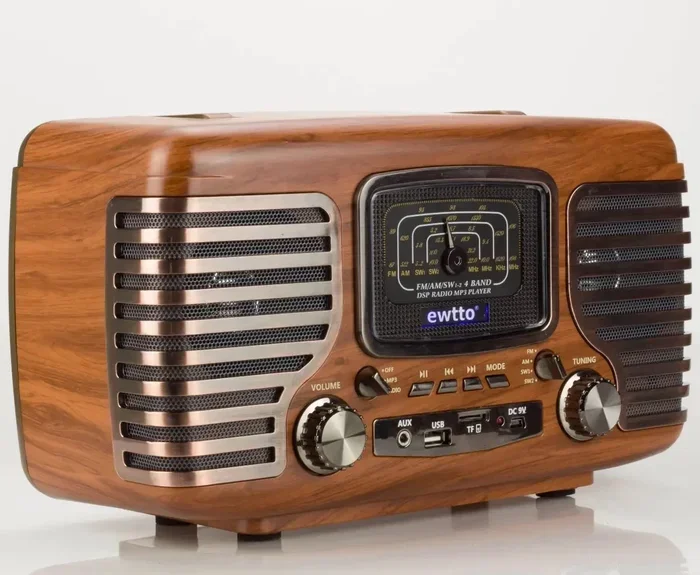
Maybe you love the look of your vintage radio. Or perhaps your car stereo still sounds great otherwise. Adding Bluetooth lets you keep what you love while gaining modern functionality. Retrofitting is a smart approach for anyone who values their current setup.
How to Add Bluetooth to an Existing Radio
There are several ways to add Bluetooth to your radio. The right method depends on what kind of radio you have and what inputs it supports. Let us walk through each option.
Option 1: Bluetooth AUX Adapter
This is the simplest and most popular method. A Bluetooth AUX adapter plugs into your radio’s auxiliary input. It receives the Bluetooth signal from your phone and sends it through the AUX cable to the radio speaker. Most car stereos and home radios made after 2005 have an AUX port.
Here is how it works:
- Find the AUX input on your radio.
- Plug in the Bluetooth AUX adapter.
- Pair your phone with the adapter.
- Play music and enjoy wireless sound.
These adapters are small, affordable, and easy to use. They are the best starting point for most people. If you are looking for a quick fix, this is it.
Option 2: FM Bluetooth Transmitter
An FM Bluetooth transmitter broadcasts the audio from your phone over an open FM frequency. Your radio tunes into that frequency and plays the sound. This method works great for radios that lack an AUX input or any direct audio connection.
Here is what you need to do:
- Plug the FM transmitter into your radio’s power source.
- Tune your radio to an empty FM frequency.
- Pair your phone with the transmitter.
- Play music from your phone.
The sound quality is good but not perfect. You may hear slight static depending on your location. Still, it is a reliable and easy option for many setups.
Option 3: Aftermarket Bluetooth Radio Module
This is the most permanent solution. You install a Bluetooth module directly into your radio’s circuit board. It connects internally and works seamlessly every time. This option is best for car stereos and home audio systems where you want a clean, built-in look.
However, this method requires some technical knowledge. If you are not comfortable with basic wiring, you may want to hire a professional. Many audio shops offer this service for a reasonable fee.
Option 4: Portable Bluetooth Speaker as a Bridge
This is a creative workaround. You place a small Bluetooth speaker near your radio and play audio through the speaker. The radio acts as a secondary sound source or simply stays off. This works well in kitchens, bedrooms, or offices.
If you are looking for a quick and easy setup, this is worth considering. It also ties into the broader world of smart gadgets. In fact, there are 10 gadgets to make moms life easier that include Bluetooth speakers and audio bridges like this one.
Comparison Table: Bluetooth Adapter Options
| Adapter Type | Ease of Setup | Sound Quality | Price Range | Best For |
|---|---|---|---|---|
| Bluetooth AUX Adapter | Very Easy | Excellent | $15 – $35 | Radios with AUX input |
| FM Bluetooth Transmitter | Easy | Good | $10 – $30 | Radios without AUX input |
| Aftermarket Bluetooth Module | Moderate | Excellent | $40 – $100 | Car stereos and home systems |
| Portable Bluetooth Speaker | Very Easy | Good | $20 – $60 | Temporary or flexible setups |
As you can see, each option has its strengths. Your choice depends on your radio type, budget, and how permanent you want the upgrade to be.
Step-by-Step Installation Guide
Let us walk through a typical installation using the most popular method: the Bluetooth AUX adapter. This process applies to most car radios and home audio systems.
Step 1: Check Your Radio’s Inputs
Look at the back or side of your radio. Do you see an AUX port? It is usually a 3.5mm jack labeled “AUX” or “Line In.” If your radio has this port, you are in great shape. The AUX adapter will work perfectly.
If your radio does not have an AUX port, do not worry. The FM transmitter option or the portable speaker bridge will still work for you.
Step 2: Choose and Purchase the Right Adapter
Look for a Bluetooth AUX adapter that supports the latest Bluetooth version. Bluetooth 5.0 or higher offers better range and stable connections. Check that the adapter supports your audio format needs. Most modern adapters handle standard formats without any issues.
Read reviews before buying. Look for adapters with good battery life if they are wireless. For car use, pick one with a built-in microphone for calls.
Step 3: Connect the Adapter
Plug the adapter into the AUX input. If it is a car adapter, you may need to connect it to a USB power port or the cigarette lighter. Make sure the connection is secure. A loose connection causes dropouts and static.
Step 4: Pair Your Device
Turn on Bluetooth on your phone or device. Put the adapter into pairing mode. Select the adapter from your device’s Bluetooth menu. Once paired, the connection should be automatic every time you get in the car or turn on the radio.
For tips on managing your phone’s connectivity settings, check out our guide on adding prefixes to numbers on iPhone for more ways to streamline your device setup.
Step 5: Test and Adjust
Play some music and test the sound. Adjust the volume on both your phone and your radio. If you notice any issues, try moving the adapter closer to the radio or switching to a different Bluetooth channel.
Common Mistakes to Avoid
Adding Bluetooth to your radio is easy, but people do make mistakes. Here are the most common ones and how to avoid them.
Buying the Wrong Adapter Type
Not all Bluetooth adapters work with all radios. Make sure you match the adapter to your radio’s input type. An AUX adapter will not work if your radio only has an FM antenna input. Check your radio’s specs before buying.
Ignoring Sound Quality
Cheap adapters can compress audio and reduce sound quality. Look for adapters that support higher-quality codecs like aptX or AAC. Your ears will thank you. The price difference is usually small, but the quality gap is big.
Poor Placement of the Adapter
In car setups, placing the adapter too far from your phone causes connection drops. Keep the adapter within a few feet of your phone’s usual spot. In home setups, avoid placing the adapter near microwaves or other wireless devices that cause interference.
Skipping Firmware Updates
Some Bluetooth adapters have firmware that can be updated. Updates improve performance and fix bugs. Check the manufacturer’s app or website for updates after your first few weeks of use.
Forgetting to Charge Wireless Adapters
If your adapter runs on battery, keep it charged. A dead adapter means no Bluetooth connection. Set a reminder to charge it weekly, or choose a model that plugs directly into a power source.
Expert Insights on Bluetooth Radio Upgrades
Audio professionals agree that adding Bluetooth to an existing radio is one of the best value upgrades available. According to sound engineers, modern Bluetooth codecs have closed the gap with wired connections. The difference in sound quality is negligible for most listeners.
“The days of Bluetooth sounding inferior are over,” says audio tech reviewer Mark Donovan. “With aptX and LDAC codecs, you can get near-lossless quality over a wireless connection. Adding Bluetooth to an older radio is a no-brainer.”
Another expert tip: always choose an adapter with a strong signal range. Bluetooth 5.0 offers up to 40 feet of range in open spaces. This means fewer dropouts and a more reliable connection while you drive or move around your home.
One thing to keep in mind is that Bluetooth technology continues to evolve. Newer versions offer better battery efficiency and faster pairing. When shopping for an adapter, always go with the latest Bluetooth version you can afford.
Also consider the aesthetics of your setup. Many modern adapters are small and discreet. They blend right into your radio or car dashboard. You do not need a bulky device hanging off your stereo anymore. The technology has gotten sleek and compact.
Quick Tips for the Best Bluetooth Radio Experience
- Keep your adapter firmware updated for the best performance and security.
- Use a short AUX cable to reduce signal loss and improve sound quality.
- Clear your paired devices list occasionally to keep connections fast and smooth.
- Store your adapter properly when not in use to extend its lifespan.
- Test the range by walking around your space to find the sweet spot for the strongest connection.
- Use voice assistant features on your phone to control playback hands-free through the radio.
- Clean the AUX port regularly to prevent dust buildup that can cause connection issues.
Frequently Asked Questions
Can I add Bluetooth to any radio?
Most radios can be upgraded with Bluetooth. If your radio has an AUX input, FM antenna, or even just a speaker output, there is a Bluetooth solution for you. Very old radios without any audio outputs may be difficult to upgrade, but most modern radios are fully compatible.
How much does it cost to add Bluetooth to a radio?
A Bluetooth AUX adapter costs between $15 and $35. FM transmitters are even cheaper, starting at around $10. Aftermarket Bluetooth modules for car stereos range from $40 to $100. Overall, it is one of the most affordable audio upgrades you can make.
Does adding Bluetooth affect radio sound quality?
Modern Bluetooth adapters have minimal impact on sound quality. High-end adapters with aptX or AAC codecs deliver near-lossless audio. For everyday listening, the difference between Bluetooth and a wired connection is barely noticeable.
Is it hard to install a Bluetooth adapter on a car radio?
Not at all. Most Bluetooth AUX adapters plug directly into the AUX port and connect to a USB or power source. No wiring or technical skills are needed. The whole process takes about five minutes. If you are uncomfortable, an audio shop can install it for you quickly.
Can I use Bluetooth with my car radio for phone calls?
Yes, many Bluetooth adapters include a built-in microphone. This allows you to take and make hands-free calls through your car radio speakers. It is a safer and more convenient way to stay connected while driving.
Will a Bluetooth adapter work with all my devices?
Bluetooth adapters work with virtually any device that supports Bluetooth. This includes smartphones, tablets, laptops, and even some smartwatches. As long as your device can connect to a Bluetooth speaker or headphone, it will work with your adapter.
Conclusion
Adding Bluetooth to an existing radio is simple, affordable, and incredibly rewarding. You do not need to buy a new radio or hire an expensive installer. A small adapter transforms your trusted radio into a modern wireless streaming device. Whether you are upgrading a car stereo, a kitchen radio, or a home audio system, the options are clear and accessible.
Pick the method that fits your radio and your budget. Follow the steps we outlined, avoid the common mistakes, and enjoy seamless wireless audio in no time. The technology is proven, the adapters are reliable, and the results speak for themselves.
Take the leap today. Your radio has been waiting for this upgrade. With just one small addition, you unlock a world of wireless music, hands-free calls, and modern convenience. The best part? You keep the radio you already love.