Can Someone See You Through Your Camera On Your Phone
Can someone see you through your camera on your phone? The short answer is yes, it is possible, but it is not as common as you might think. Hackers and spyware can gain unauthorized access to your front and rear cameras. This guide will show you how they do it and how to stop them. You will learn simple steps to block unauthorized access and protect your digital privacy right now.
Can Someone See You Through Your Camera On Your Phone? It sounds like a scary movie plot, but it is a real worry today. Your phone holds your whole life. It also holds your front camera and rear camera. People fear unauthorized access every single day. You want to keep your digital privacy safe. Let us find out how this works. We will look at phone security too. You will learn how to stay safe. Knowledge is your best defense. You deserve to feel secure in your own home.
Key Takeaways
- Unauthorized access is real: Malicious apps and spyware can secretly turn on your camera.
- Physical signs matter: Look for unusual battery drain or camera indicator lights.
- Use a webcam cover: A simple lens cap stops peeping eyes completely.
- Check app permissions: Restrict which apps can access your front and rear camera.
- Update your OS: Regular updates patch security holes that hackers exploit.
- Beware of phishing: Clicking bad links can install stalkerware on your device.
📑 Table of Contents
How Can Someone See You Through Your Phone Camera?
The idea of a camera hack is scary. Someone could watch you without you knowing. They might use spyware or malware. These bad tools let them spy on you. They do not even need to touch your phone. Sometimes they just need you to click a bad link. This is called phishing. It tricks you into giving access. They want remote access to your device. Understanding this is step one. You must know the enemy to fight them. Phone privacy is more important now than ever before. Let us break down the ways they get in.
The Truth About Remote Access
Remote access sounds very technical. But it is simple to understand. It means controlling your phone from far away. Hackers use this to turn on your camera. They do it silently. You might not even notice. They can use your front camera or rear camera. This is a huge breach of phone privacy. They can watch your home. They can watch your daily life. This is why phone security matters so much. You must stop unauthorized access right away. A simple lens cap can help. It blocks the lens completely. No one can see through it. Not even with remote access. Always use a webcam cover when you can.
How Malware Works on Your Device
Malware is a sneaky software. It hides on your phone. You might download it by accident. It looks like a normal app. But it has a hidden camera hack inside. Once installed, it runs in the background. It uses your microphone access too. It can record you at any time. Android devices face an Android vulnerability here. Some bad apps slip through the cracks. iOS security is usually stronger. But iPhones are not perfect either. Both systems need your care. You must check what you download. Only use trusted app stores. This keeps your digital privacy safe. Malware loves to steal data. It also loves to spy on you. Always check the app developer before you download.
Common Tricks Used by Hackers
Hackers use many tricks to get in. They might send you a fake text. The text looks like it is from your bank. It has a link inside. If you click it, malware installs. This is a classic phishing attack. They also use fake Wi-Fi networks. Public Wi-Fi is dangerous. Hackers can intercept your data. They can send spyware to your phone. You should avoid public Wi-Fi for banking. Use your mobile data instead. This is a key part of phone security. Your digital privacy depends on your habits. Stay away from suspicious links. They are the number one way stalkerware gets on your phone.
- Phishing links: You click a bad link in a text.
- Fake apps: You download an app that looks normal.
- Public Wi-Fi: Hackers intercept your data online.
- Malicious attachments: You open an email file that installs spyware.
- Stalkerware: Someone physically installs an app on your phone.
Each method leads to unauthorized access. They all threaten your digital privacy. You must be aware of them all. Prevention is much easier than fixing a problem. Always think before you click. Protect your phone security at all times.
Signs Someone Is Watching You Through the Camera
How do you know if someone is spying? You might think you are alone. But someone could be watching you right now. There are signs you can look for. Your phone might act weird. Trust your gut feelings. If something seems off, check it. You deserve to feel safe. Look for these warning signs often. Catching them early stops the damage.
Unusual Battery Drain and Phone Heat
Does your phone battery die fast? It could be a sign. Using the camera takes a lot of power. If someone is using your rear camera secretly, it drains battery. Your phone gets hot too. This happens when spyware runs in the background. It is doing surveillance all day long. You are not even using the camera. Yet the battery drops fast. Check your battery usage stats. See which apps use the most power. If you find strange apps, remove them right away. This is a key part of phone security. A healthy battery means a safe phone.
Weird Camera Behavior and Indicator Lights
Does your front camera light up by itself? This is a big red flag. Your phone has an indicator light for a reason. It tells you the camera is active. If you see the light and are not taking a photo, act fast. Someone might have remote access. They could be doing surveillance right now. Check your app permissions immediately. Close any apps that should not be open. Use a lens cap to block the lens. This gives you instant peace of mind.
Strange Sounds and Data Spikes
Do you hear weird clicks or voices? Your microphone access might be compromised. Spyware often uses the mic too. It records your private conversations. This is called stalkerware. It is very dangerous. Also, watch your data usage. Spying apps send video files to hackers. This uses a lot of data. Your phone plan might show a big spike. Check your phone stats often. This helps you catch spyware early. You can stop them before they send more files. Keep an eye on your digital privacy. Small changes in data use matter.
Who Is Most at Risk for a Camera Hack?
Anyone can be a target. But some people face higher risks. You might wonder who is most vulnerable. Understanding this helps you protect yourself better. Different phones have different risks. Let us look at the most vulnerable people. Knowledge is power when it comes to phone privacy.
Android vs iPhone Security
Android devices have an Android vulnerability. They allow more app installs. People download apps from outside the store. This opens the door to malware. You must only use the Google Play Store. Be very careful with third-party apps. Check the developer name before you download. Look at the reviews too. This is a key part of phone security. Your digital privacy depends on your choices.
iOS Users and iOS Security
iPhones have strong iOS security. Apple checks all apps carefully. But iPhones are not perfect either. Jailbroken phones lose their safety features. If you jailbreak your iPhone, you take a big risk. Stalkerware can sneak in more easily. Always keep your iOS updated. Apple patches bugs fast. Use your privacy settings to control access. Even with strong iOS security, you need a webcam cover. No system is 100% safe from a camera hack.
| Feature | Android | iPhone |
|---|---|---|
| App Store Control | More open, higher risk | Strict, lower risk |
| Camera Indicator | Varies by brand | Always shows a dot |
| Android Vulnerability | Higher for sideloading | Lower if not jailbroken |
| iOS Security | N/A | Strong built-in protection |
This table shows why checking your privacy settings is so important. Android users must be extra careful with app permissions. iPhone users should still use a webcam cover. Both platforms need your attention to stay safe. No phone is 100% safe from a camera hack. You must take action yourself.
How to Protect Your Phone Camera From Hackers
Now you know the risks. You also know the signs. What can you do about it? You can take steps today. These steps stop unauthorized access. They keep your digital privacy safe. You will feel much better. Protecting yourself is easier than you think. Let us look at the best ways to stay safe.
Step One: Get a Webcam Cover
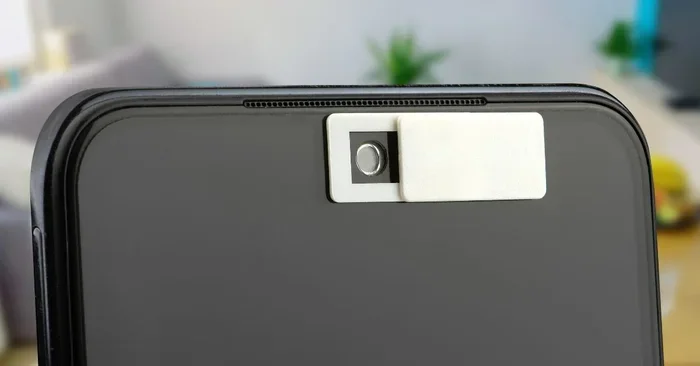
The easiest fix is a physical webcam cover. You put it over your lens. It is a simple lens cap. No one can see through it. Even if they hack your phone. It blocks the view completely. You can buy small stickers. They stick right over the front camera or rear camera. They slide open when you need them. This is a great tool for phone privacy. It costs very little too. Everyone should use one. It gives you peace of mind. You can even use a piece of tape. A lens cap is the best defense against a camera hack.
Step Two: Check Your App Permissions
Go to your privacy settings. Look at app permissions carefully. Does a flashlight app need your camera? Probably not. Does a game need microphone access? Think twice. Only give access to trusted apps. You can turn off permissions anytime. This stops stalkerware from working. It limits the damage of malware. Review these settings once a month. This is a smart phone security habit. Keep your digital privacy in your own hands. You are the boss of your phone. Do not let apps spy on you.
Step Three: Update Your Phone Regularly
Phone updates are not just for new features. They fix security holes too. Hackers love old software. They use known bugs to get in. Updates patch these holes. They boost your iOS security or Android safety. Always download the latest update. Set your phone to update overnight. This keeps your phone safe. It also stops camera hacks. Do not ignore update reminders. They are there to protect you. Your phone security depends on it. Updates are your shield against malware.
Step Four: Disable Camera for Unused Apps
Turn off camera access for apps you do not use. Go to your privacy settings. Find the camera option. Toggle it off for unused apps. This limits remote access. It stops apps from spying on you. Even if they try, they will fail. You are in control of your phone. Take back your digital privacy today. This simple step stops many threats. You will sleep better at night. It is a quick win for phone privacy.
Quick Tips for Everyday Phone Security
Small habits make a big difference. You do not need to be a tech expert. Just follow these simple tips. They keep your phone safe. They protect your digital privacy every single day. Build these habits now. They will save you from a lot of trouble.
Quick Tip: Avoid Public Wi-Fi
Public Wi-Fi is dangerous. Hackers can intercept your data. They can send spyware to your phone. You should avoid public Wi-Fi for banking. Use your mobile data instead. This is a key part of phone security. Your digital privacy depends on your habits. Stay away from suspicious networks. They are the number one way stalkerware gets on your phone. If you must use public Wi-Fi, use a VPN.
Quick Tip: Never Click Suspicious Links
Phishing is a common trick. You get a text or email. It has a suspicious link inside. Do not click it. The link might install malware. It could give hackers remote access. They could turn on your front camera. Always check the sender. If it looks weird, delete it. This is the best way to avoid a camera hack. Stay smart online. When in doubt, throw it out. Your phone security is worth the extra caution.
Quick Tip: Use a Strong Passcode
Weak passwords are easy to guess. Use strong passwords for your phone. Mix letters, numbers, and symbols. Turn on two-factor authentication too. This stops unauthorized access. It keeps stalkerware from resetting your phone. Strong passwords are your first line of defense. They protect your phone security every single day. Do not use the same password twice. A password manager helps you remember them all. It is an easy step for better digital privacy.
Conclusion
So, can someone see you through your camera on your phone? The answer is yes, they can. But you are not powerless. You now know how camera hacks work. You know the signs to watch for. You also know how to stop them. Use a webcam cover. Check your app permissions. Keep your phone updated. These steps protect your digital privacy. They give you real phone security. Do not let fear control you. Take action today. Your safety is worth it. Stay alert and stay safe. You have got this. Protect your front camera and rear camera now.
Frequently Asked Questions
Can someone hack my phone camera without touching it?
Yes, it is possible through a process called remote access. Hackers use malware or phishing links to install spyware on your device. Once installed, they can turn on your front camera or rear camera without you ever touching your phone. This is why you must check your app permissions and avoid suspicious links.
How do I know if someone is watching me through my phone camera?
Look for signs like unusual battery drain, your phone getting hot, or the camera indicator light turning on by itself. You might also notice strange sounds from your microphone access or a sudden spike in your data usage. These are common signs of stalkerware or unauthorized access doing surveillance on your device.
Is it safer to use an iPhone or an Android for camera privacy?
iPhones have strong iOS security and strict app store rules, which lowers the risk of malware. However, Android devices face an Android vulnerability because they allow more app installations. Both phones can still be hacked if you click bad links. You must use a webcam cover and review your privacy settings on any phone.
What is the easiest way to block people from seeing me through my camera?
The easiest and most effective method is to use a physical lens cap or webcam cover. You can buy small stickers that slide over your front camera or rear camera. This blocks the view completely, even if someone has remote access. It is a cheap, simple, and foolproof way to protect your digital privacy.
Can spyware turn on my microphone and camera at the same time?
Yes, advanced spyware can access both your microphone access and camera access simultaneously. This allows hackers to watch and listen to you for surveillance. They can record videos and audio to steal your personal data. This is why checking for unauthorized access and using a webcam cover is so important for phone security.
Will resetting my phone remove a camera hack?
Yes, a factory reset wipes all data, including malware and stalkerware. It removes any bad apps that are spying on you. However, you must back up your photos first before resetting. After the reset, be careful about what you download again. A reset gives you a fresh start for your phone privacy.