Can iPhone 14 Use WiFi 6E The Complete Answer Guide
The short answer is no. Can iPhone 14 Use WiFi 6E? The iPhone 14 does not support the WiFi 6E standard or the 6GHz band. It works with WiFi 6 and WiFi 5 networks but cannot connect to WiFi 6E routers on the 6GHz frequency. If you want WiFi 6E support, you need a newer Apple device like the iPhone 15 Pro or later. This guide breaks down everything you need to know about wireless connectivity, network compatibility, and what you can do to get the best performance from your current setup.
Have you ever wondered if your iPhone 14 can tap into the latest WiFi 6E technology? It is a fair question. Wireless connectivity has evolved fast, and staying up to date matters. Whether you are streaming movies, gaming, or just browsing, your wireless standard makes a big difference in how things feel.
The iPhone 14 is a solid phone. It has a great camera, strong battery life, and fast network performance. But when it comes to WiFi 6E, there is a catch. The iPhone 14 does not support the WiFi 6E standard. This means it cannot connect to the 6GHz band. In this article, we explain why. We also cover what wireless technology your phone does support and how you can get the most out of it.
If you are shopping for a new router or trying to understand your broadband connection, this guide is for you. We break down the technical details in simple terms. You will learn about network speed, router compatibility, and what to look for in your next Apple device. Let us dive in.
Key Takeaways
- iPhone 14 does not support WiFi 6E: It lacks the hardware needed for the 6GHz band and cannot connect to WiFi 6E networks.
- iPhone 14 works with WiFi 6 and WiFi 5: You still get fast wireless speeds on these proven standards.
- WiFi 6E requires a 6GHz-capable device: Only newer iPhones like the iPhone 15 Pro support the 6GHz frequency.
- You can still optimize your home network: Use a dual-band or tri-band router for the best experience with your iPhone 14.
- Future iPhones will support WiFi 6E: Apple has already added it to the iPhone 15 Pro lineup and newer models.
- Check your router settings: Simple changes like switching to the 5GHz band can significantly improve your wireless performance.
📑 Table of Contents
- What Is WiFi 6E and Why Does It Matter
- iPhone 14 Wireless Connectivity: What It Supports
- WiFi 6E vs WiFi 6: Key Differences Explained
- Can iPhone 14 Use WiFi 6E? Here Is Everything You Need to Know
- How to Maximize WiFi Performance with iPhone 14
- Future iPhone Models That Support WiFi 6E
- Should You Upgrade from iPhone 14 for WiFi 6E?
What Is WiFi 6E and Why Does It Matter
WiFi 6E is the newest evolution of wireless networking. The “E” stands for “Extended.” It builds on the foundation of WiFi 6 but adds a new frequency band. That band is the 6GHz band. This is a big deal for wireless connectivity and network performance.
Understanding the 6GHz Band
Traditional WiFi operates on two frequency bands. These are 2.4GHz and 5GHz. WiFi 6E opens up a third option: the 6GHz band. This new band offers several real advantages. It has more channels available. It also has much less congestion. Think of it like adding extra lanes to a highway. More lanes mean less traffic and faster travel for your wireless devices.
The 6GHz band is much wider than the other two bands combined. This means devices can communicate at higher speeds. Latency drops significantly too. For gamers and video streamers, this is a real game changer. Your internet speed can feel noticeably better when you are on a WiFi 6E network.
How WiFi 6E Improves Your Wireless Experience
Here are the real-world benefits of WiFi 6E for your home network:
- Faster speeds: You can see speeds up to 10Gbps in ideal conditions. That is blazing fast for any wireless protocol.
- Lower latency: Online gaming and video calls become smoother and more responsive.
- Less interference: The 6GHz band is far less crowded than 2.4GHz or 5GHz. This means fewer dropped connections.
- Better multitasking: Multiple devices can stream, download, and browse without slowing down your network speed.
- Improved network performance: Your home network runs more efficiently overall when you use the 6GHz band.
Quick Tip: If you have a tri-band router, it broadcasts on 2.4GHz, 5GHz, and 6GHz simultaneously. This lets your WiFi 6E devices use the cleanest and fastest band available. Look for routers that support the WiFi 6E specification for the best results.
iPhone 14 Wireless Connectivity: What It Supports
So, what does the iPhone 14 actually support? Let us look at the specs. Apple has always been clear about wireless capabilities. The iPhone 14 uses WiFi 6 (also known as 802.11ax). It also supports WiFi 5 (802.11ac) for backward compatibility with older routers.
WiFi Standards Supported by iPhone 14
The iPhone 14 wireless specifications include the following:
- WiFi 6 (802.11ax): The latest standard the phone supports. It offers great speed and efficiency on both 2.4GHz and 5GHz bands.
- WiFi 5 (802.11ac): For older routers. This ensures your phone works with a wide range of networking equipment.
- 802.11a/b/g/n: Even older standards. Your iPhone 14 can connect to very old routers if needed.
- Bluetooth 5.3: For wireless audio, earbuds, and smart accessories.
- 5G cellular: For mobile data when WiFi is not available or too slow.
Notice what is missing. There is no mention of WiFi 6E. There is no 6GHz support. This is a hardware limitation. The iPhone 14 simply does not have the radio chip needed for the 6GHz band. It is not something Apple can fix with a software update.
Bluetooth and Cellular Connectivity
While WiFi 6E is not available, the iPhone 14 still offers excellent wireless connectivity through other means. Bluetooth 5.3 provides fast and stable connections to your accessories. The 5G cellular modem ensures you stay connected on the go. These are important parts of your overall wireless technology ecosystem. Apple has always balanced multiple connectivity options in its devices.
Expert Insight: According to Apple’s own technical specifications, the iPhone 14 WiFi support ends at WiFi 6. The company introduced WiFi 6E support starting with the iPhone 15 Pro lineup. This is a common pattern in the tech world. New wireless standards often arrive with the next generation of flagship devices. Apple is no exception to this trend.
WiFi 6E vs WiFi 6: Key Differences Explained
It helps to understand the differences between WiFi 6 and WiFi 6E. Both are excellent standards. But they are not the same. Here is a simple breakdown of what sets them apart.
Speed and Bandwidth Comparison
WiFi 6 delivers excellent speeds. It can reach up to 9.6Gbps theoretically. In real-world use, most people see speeds between 1Gbps and 3Gbps. WiFi 6E uses the same base technology but adds the 6GHz band. This means higher speeds and less congestion on your broadband connection.
The 6GHz band offers up to 1200MHz of additional spectrum. This is a huge amount of new space for your wireless devices. More spectrum means more data can flow at once. Your network performance improves significantly when you have access to this extra bandwidth.
Range and Signal Behavior
There is one trade-off with the 6GHz band. Signals on 6GHz do not travel as far as signals on 2.4GHz or 5GHz. Walls and obstacles block 6GHz signals more easily. This means WiFi 6E works best in smaller spaces or open floor plans.
For most homes, this is not a problem. Your tri-band router can handle the 6GHz band in the rooms where you need it most. The 2.4GHz and 5GHz bands still cover the rest of your home network. Your signal strength will be strong in the immediate area of the router.
Comparison Table: WiFi 6 vs WiFi 6E
| Feature | WiFi 6 | WiFi 6E |
|---|---|---|
| Frequency Bands | 2.4GHz and 5GHz | 2.4GHz, 5GHz, and 6GHz |
| Max Theoretical Speed | 9.6Gbps | 9.6Gbps (with higher real-world speeds) |
| 6GHz Support | No | Yes |
| Additional Channels | Limited | 14 additional 80MHz channels |
| Congestion Level | Moderate to High | Low on the 6GHz band |
| iPhone 14 Support | Yes | No |
| iPhone 15 Pro Support | Yes | Yes |
| Backward Compatibility | Yes | Yes |
| Best For | Most homes and offices | High-density environments and heavy users |
This table makes it clear. WiFi 6E is a step up from WiFi 6. But the iPhone 14 cannot take advantage of the 6GHz band. It is limited to the two older bands. That said, WiFi 6 is still very fast and more than enough for most users.
Common Mistakes to Avoid:
- Thinking a software update will add 6GHz support: No iOS update can add WiFi 6E hardware support. It is physically impossible. The radio chip simply is not there.
- Buying a WiFi 6E router just for the iPhone 14: Your phone will not use the 6GHz band. You would be paying for a feature you cannot access with this device.
- Confusing WiFi 6 with WiFi 6E: Many people think they are the same. WiFi 6 and WiFi 6E are different standards. The iPhone 14 supports the former but not the latter.
Can iPhone 14 Use WiFi 6E? Here Is Everything You Need to Know
The direct answer to Can iPhone 14 Use WiFi 6E is no. The iPhone 14 lacks the hardware required for WiFi 6E connectivity. It cannot access the 6GHz band. This is not a software issue. It is a hardware limitation built into the phone’s wireless chip. Apple made a deliberate choice when designing the iPhone 14 to use a WiFi 6 chip instead of a WiFi 6E chip.
Why iPhone 14 Cannot Access WiFi 6E
Apple uses specific wireless chips in each iPhone model. The iPhone 14 uses a chip that supports WiFi 6 and earlier standards. It does not include the 6GHz radio. This is a design choice. Apple balances cost, performance, and battery life when selecting components for each model.
Here are the key reasons the iPhone 14 cannot use WiFi 6E:
- Missing 6GHz radio hardware: The wireless chip does not have the necessary radio for the 6GHz band. This is a physical component that cannot be added later.
- Firmware limitations: Even with software updates, the hardware cannot be changed. No iOS update will ever add WiFi 6E support to the iPhone 14.
- Antenna design: The antenna system in the iPhone 14 is tuned for 2.4GHz and 5GHz frequencies. It is not designed to handle 6GHz signals.
What Happens When iPhone 14 Meets a WiFi 6E Router
If you have a WiFi 6E router and an iPhone 14, here is what happens. Your phone will still connect to the router just fine. But it will use the 5GHz or 2.4GHz band. It will not access the 6GHz band. Your iPhone 14 will still work perfectly well. You will get WiFi 6 speeds on the 5GHz band. These speeds are already very fast. Most users will not notice a big difference in everyday use.
However, if you have many devices competing for bandwidth, the 6GHz band on a WiFi 6E router can help. Your iPhone 14 simply cannot access that advantage. The 6GHz band stays clear for your other WiFi 6E devices, like a newer iPad or Mac.
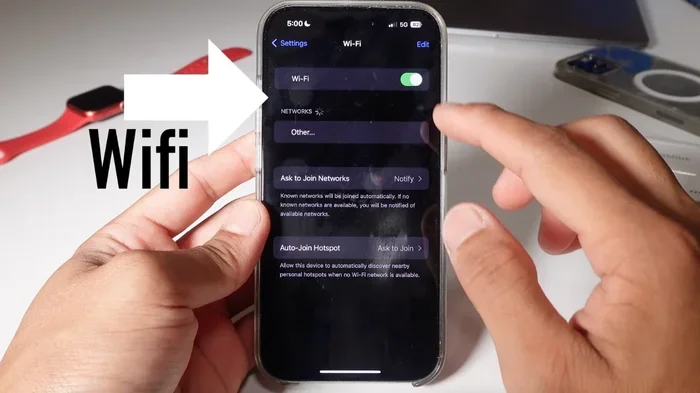
Quick Tip: If you already own a WiFi 6E router and an iPhone 14, do not worry. Your phone will still connect and work great. Just know that it will use the 5GHz band by default. You can check which band your phone is using by going to Settings, then WiFi, and tapping the info icon next to your network.
How to Maximize WiFi Performance with iPhone 14
Even though the iPhone 14 does not support WiFi 6E, you can still get great wireless performance. Here are practical steps to improve your network speed and wireless connectivity right now.
Choosing the Right Router
The router you use matters a lot. If you want the best experience with your iPhone 14, look for a WiFi 6 router. These routers are backward compatible. They work great with WiFi 6 devices like the iPhone 14. You do not need a WiFi 6E router to get fast speeds.
When shopping, look for these features:
- Dual-band or tri-band support: Dual-band is fine for most users. Tri-band is better if you have many devices competing for bandwidth.
- WiFi 6 certification: This ensures you get the full WiFi 6 speed benefits with your iPhone 14.
- Good range and signal strength: Look for routers with strong antennas or mesh systems for whole-home coverage.
- Quality of Service (QoS) settings: This lets you prioritize your iPhone’s traffic over other devices on your home network.
Optimizing Your Home Network Settings
Your router settings can make a big difference. Here are some tips that actually work:
- Use the 5GHz band: The iPhone 14 supports 5GHz. This band is faster than 2.4GHz and less congested. Go to your router settings and make sure the 5GHz band is enabled and has a strong name (SSID).
- Change your WiFi channel: If your neighborhood has many WiFi networks, interference can slow you down. Use a WiFi analyzer app to find the least crowded channel on both 2.4GHz and 5GHz bands.
- Update your router firmware: Manufacturers release updates that improve performance and fix bugs. Check for updates regularly in your router’s admin panel.
- Place your router centrally: Signal strength drops with distance and obstacles. A central location gives the best coverage throughout your home network.
- Reduce interference: Microwaves, cordless phones, and baby monitors can interfere with 2.4GHz signals. Keep your router away from these devices to improve your wireless frequency performance.
Quick Tips for Better Wireless Speed
Here are some simple tips you can try right now on your iPhone 14:
- Restart your router regularly: This clears the cache and refreshes connections. A simple restart can solve many network performance issues.
- Turn off WiFi Assist: This iPhone feature switches to cellular when WiFi is weak. It can use your data plan unnecessarily and drain your battery.
- Forget and reconnect to your network: This forces your phone to reconnect with fresh settings. It can fix slow connection issues.
- Keep your iPhone updated: Apple releases WiFi performance improvements in iOS updates. Always install the latest version.
- Use a WiFi analyzer app: These apps show you signal strength and channel congestion in real time. They help you pick the best channel for your router.
Expert Insight: Many users report that simply switching their router to the 5GHz band and changing the WiFi channel improved their network speed by 30 to 50 percent. These small changes cost nothing and take just a few minutes. Before spending money on new equipment, try optimizing your current setup first. You might be surprised at the results.
Future iPhone Models That Support WiFi 6E
If WiFi 6E support is important to you, you have options. Apple has already embraced this wireless standard in newer devices. Here is what you need to know about current and upcoming Apple devices.
iPhone 15 Pro and WiFi 6E
The iPhone 15 Pro and iPhone 15 Pro Max were the first iPhones to support WiFi 6E. These models include the hardware needed for the 6GHz band. If you want WiFi 6E on an iPhone, these are the minimum models you should consider. The iPhone 15 Pro also supports WiFi 6 and WiFi 5. It is fully backward compatible. You get the best of both worlds.
You can connect to WiFi 6E networks when they are available and fall back to WiFi 6 or WiFi 5 when needed. This seamless switching is one of the best features of WiFi 6E technology. Your wireless connectivity stays strong no matter what network you are near.
What to Expect from Upcoming Apple Devices
Apple has been consistent with its wireless upgrades. The iPhone 16 Pro and future models are expected to continue supporting WiFi 6E. Some rumors suggest the next generation may even support WiFi 7. This would be another leap forward in wireless technology and network speed.
Here is a quick look at what to expect:
- iPhone 15 Pro and 15 Pro Max: Support WiFi 6E and WiFi 6. These are the first iPhones with 6GHz capability.
- iPhone 16 Pro (expected): Likely to support WiFi 6E and possibly WiFi 7. Apple tends to iterate on its wireless features each year.
- Standard iPhone 16 models: May continue with WiFi 6 only, similar to the iPhone 14. Apple often reserves the newest wireless standards for Pro models.
- iPad and Mac: Apple has already introduced WiFi 6E support in some iPad and MacBook models. The M2 and M3 chipsets include WiFi 6E capability.
If you are planning to buy a new Apple device soon, consider WiFi 6E support. It is a feature that will become more important over time. As more routers adopt WiFi 6E, having a compatible device gives you a clear advantage. Your broadband connection will feel faster and more responsive.
Common Mistakes When Choosing a New Device:
- Assuming all iPhones support WiFi 6E: Only Pro models from the iPhone 15 lineup and later support it. Check the specs before you buy.
- Overlooking WiFi 6 on a budget: If WiFi 6E is not available, WiFi 6 is still excellent. The iPhone 14 handles WiFi 6 beautifully for most users.
- Ignoring your router: Even the best iPhone 15 Pro will not get WiFi 6E speeds without a WiFi 6E router. Both sides need to support the standard.
Should You Upgrade from iPhone 14 for WiFi 6E?
This is a question many people ask. The honest answer depends on your needs. If you are happy with your iPhone 14 and your current network speed is good, there is no urgent need to upgrade just for WiFi 6E. WiFi 6 on the 5GHz band is already very fast. Most users will not notice a big difference in everyday tasks.
However, if you are a heavy user who streams a lot of 4K content, game online frequently, or have many smart home devices competing for bandwidth, WiFi 6E can make a real difference. In that case, upgrading to an iPhone 15 Pro or later would give you access to the 6GHz band. You would also get other benefits like a faster processor, better camera, and improved battery life.
Before making any decision, think about what you actually need. Do not upgrade just because a new feature exists. Make sure it will genuinely improve your daily experience with your Apple devices and home network.
Can iPhone 14 Use WiFi 6E? The answer remains no. But your iPhone 14 is still a powerful and capable device. It supports fast WiFi 6 speeds and excellent wireless connectivity. By optimizing your router settings and choosing the right equipment, you can get the most out of your current phone. When the time comes for an upgrade, you will know exactly what to look for.
Frequently Asked Questions
Can I upgrade my iPhone 14 to support WiFi 6E through a software update?
No, you cannot. WiFi 6E requires specific hardware, including a 6GHz radio chip. The iPhone 14 does not have this hardware. No iOS or software update can add it. This is a physical limitation, not a software one.
Does WiFi 6E work with older routers?
WiFi 6E requires a router that specifically supports the 6GHz band. Older routers that only support WiFi 6 or WiFi 5 will not work with WiFi 6E devices. You need a WiFi 6E router to access the 6GHz band. However, WiFi 6E routers are backward compatible with older devices.
Is WiFi 6E worth it for average home users?
For most average home users, WiFi 6 is more than enough. WiFi 6E shines in homes with many devices, heavy streaming, or online gaming. If you have a large household with lots of connected wireless devices, WiFi 6E can improve your network performance noticeably. For basic browsing and streaming, WiFi 6 delivers excellent results.
Can I use a WiFi 6E router with my iPhone 14?
Yes, you can. Your iPhone 14 will connect to a WiFi 6E router without any problems. It will simply use the 5GHz or 2.4GHz band instead of the 6GHz band. Your phone will still get fast WiFi 6 speeds. The router will just not be able to use its 6GHz capabilities with your device.
What is the difference between WiFi 6 and WiFi 6E?
WiFi 6 operates on the 2.4GHz and 5GHz bands. WiFi 6E adds the 6GHz band on top of that. Both use the same base technology, but WiFi 6E offers more channels, less congestion, and higher speeds on the 6GHz frequency. Think of WiFi 6E as an expanded version of WiFi 6 with more space for your wireless devices.
Which iPhone models support WiFi 6E?
The iPhone 15 Pro and iPhone 15 Pro Max were the first iPhones to support WiFi 6E. All subsequent Pro models are expected to support it as well. Standard iPhone models (like the iPhone 14 and iPhone 15) do not support WiFi 6E. Always check Apple’s official specs before assuming a model has this feature.
=== CONCLUSION ===
The answer to Can iPhone 14 Use WiFi 6E is clear. The iPhone 14 does not support WiFi 6E or the 6GHz band. This is a hardware limitation that no software update can change. Your phone works with WiFi 6 and WiFi 5, both of which deliver fast and reliable wireless connectivity.
Even without WiFi 6E, you can still get excellent network performance from your iPhone 14. Choose a good WiFi 6 router, optimize your settings, and use the 5GHz band for the best speeds. Small changes can make a big difference in your daily wireless technology experience.
If WiFi 6E is a must-have for you, consider upgrading to an iPhone 15 Pro or later. These models include the hardware needed for the 6GHz band. They also offer many other benefits that make them worth the investment.
Stay informed about your wireless standard options. Understand what your device supports and what your router can do. This knowledge helps you make smarter decisions about your home network and your next Apple device. The world of wireless connectivity is always evolving, and staying ahead of the curve starts with understanding the basics.