Can I Use A Laptop Instead Of A Pc And Still Get Work Done
Yes, you can use a laptop instead of a PC and still get your work done effectively. Modern laptops offer powerful processing, ample storage, and excellent multitasking that rival traditional desktops. Whether you work remotely, travel often, or simply want a portable computing setup, today’s laptops handle everything from document editing to light video production with ease.
Key Takeaways
- Laptops have caught up to desktops: Modern processors, RAM, and storage make laptops fully capable desktop replacements for most work tasks.
- Portability is a major advantage: You can work from anywhere with a laptop, giving you flexibility that desktops simply cannot match.
- Peripheral accessories bridge the gap: External monitors, keyboards, and docking stations turn your laptop into a full desktop-like workstation.
- Heavy tasks may still favor desktops: Intensive gaming, 3D rendering, and large-scale data processing sometimes demand the power of a dedicated desktop.
- Battery life keeps you untethered: Long-lasting batteries mean you stay productive even without a power outlet nearby.
- Cloud tools reduce hardware dependency: Cloud computing and web-based apps let you work smoothly even on mid-range laptops.
- Ergonomics matter: Proper setup with stands and external peripherals prevents strain and boosts your work efficiency.
📑 Table of Contents
- Can I Use a Laptop Instead of a PC? The Short Answer Is Yes
- Why People Are Asking This Question Now
- Laptops vs Desktops: A Detailed Comparison
- When a Laptop Can Fully Replace a PC
- When You Still Need a Desktop
- How to Set Up Your Laptop for Maximum Productivity
- Common Mistakes When Switching from PC to Laptop
- Expert Insights: What Professionals Say About Using Laptops Instead of PCs
- Key Takeaways
- Conclusion: Can You Really Use a Laptop Instead of a PC?
Can I Use a Laptop Instead of a PC? The Short Answer Is Yes
Let us get one thing straight right away. Can I use a laptop instead of a PC and still crush your to-do list? Absolutely. The days when you needed a bulky desktop tower to handle real work are long gone. Today’s laptops pack serious processing power, crisp displays, and enough multitasking capability to keep professionals productive all day long.
Whether you are a freelancer, a student, a remote worker, or someone who simply wants to ditch the desk, a laptop can handle it. In this guide, we break down everything you need to know. We compare laptops against desktops, explore when each one makes sense, and share practical tips to help you get work done no matter what device you choose.
By the end, you will know exactly whether swapping your desktop for a laptop is the right call for your lifestyle and workflow.
Why People Are Asking This Question Now
The shift toward remote work changed everything. Millions of workers suddenly needed setups they could pack up and carry. Offices closed. Coffee shops became boardrooms. And the humble laptop became the go-to productivity tool for people everywhere.
The Rise of Remote and Hybrid Work
Working from home is now the norm for many industries. Companies invest in cloud computing platforms so teams can collaborate from different time zones. This environment makes portable computing not just nice to have but practically essential. A desktop locked to one chair simply does not fit this picture.
Technology Has Closed the Gap
Five years ago, desktops clearly outperformed laptops in raw computer performance. That is no longer true in many cases. Modern chips from Intel and AMD deliver desktop-level speeds inside slim laptop bodies. Storage capacity has also improved dramatically. Fast SSDs load files in seconds, and RAM requirements are easier to meet with expandable memory options.
Laptops vs Desktops: A Detailed Comparison
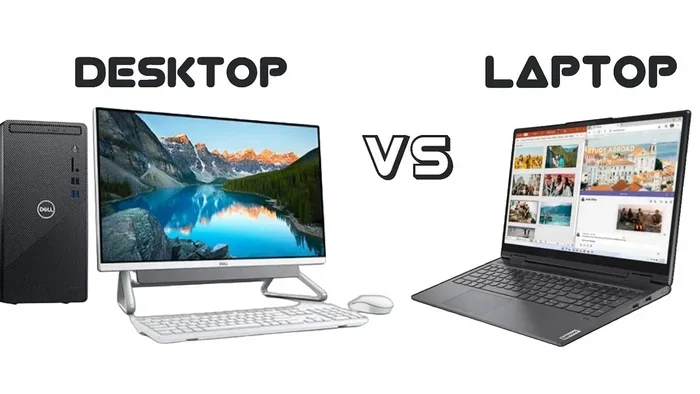
Let us look at how laptops and desktops stack up across the categories that actually matter for everyday work. This comparison table gives you a clear snapshot.
| Category | Laptop | Desktop |
|---|---|---|
| Portability | Excellent. Light and easy to carry. | Poor. Stays in one location. |
| Processing Power | Strong. Handles most tasks well. | Superior. Best for heavy workloads. |
| Screen Size | Typically 13 to 17 inches. | Easily 24 inches or larger. |
| Upgrade Options | Limited but improving. | Highly customizable. |
| Battery Life | 8 to 15 hours typical. | None. Needs constant power. |
| Peripheral Support | Works with docks and externals. | Built-in connectivity. |
| Price Range | $500 to $3,000+. | $400 to $3,000+. |
| Ergonomic Flexibility | Needs external setup for comfort. | Easy to optimize fully. |
As you can see, both options have real strengths. Your choice depends on what you value most. If work efficiency on the go matters to you, the laptop wins. If you need maximum graphics performance for creative or technical work, the desktop edge becomes clearer.
Where Laptops Win
- Mobility. Carry your entire workspace in a bag. Work from a park, a train, or a hotel lobby.
- Battery independence. Power outages do not stop your workflow. A charged laptop keeps running.
- All-in-one design. Screen, keyboard, trackpad, and speakers built into one device. No setup clutter.
- Docking station compatibility. Plug into monitors, speakers, and peripherals when you are at your desk.
Where Desktops Win
- Raw performance ceiling. High-end desktop processors and GPUs outperform even top laptops.
- Easy customization. Swap components, add drives, and upgrade without limits.
- Ergonomic control. Full-sized monitors, mechanical keyboards, and adjustable desks create ideal setups.
- Cooling. Larger fans and better airflow prevent thermal throttling during long heavy sessions.
When a Laptop Can Fully Replace a PC
Here is the part you really care about. When exactly can you ditch the desktop and rely entirely on a desktop replacement laptop? The answer depends on the type of work you do.
Office and Administrative Work
If your day involves email, spreadsheets, presentations, and document management, a laptop handles all of it with room to spare. Even a mid-range machine with 8GB of RAM and a solid processor flies through these tasks. Work from home setups built around laptops are incredibly common and effective.
Web Development and Programming
Developers use laptops every day. Code editors, terminal windows, browsers, and local servers run smoothly on modern machines. Cloud-based IDEs like GitHub Codespaces or Replit reduce processing power demands even further. You can write, test, and deploy code from virtually anywhere.
Creative Work with Light to Moderate Loads
Graphic designers, photographers, and video editors can use laptops for their craft. Devices with dedicated graphics cards and high-resolution screens deliver excellent results. Editing 1080p video or processing RAW photos runs well on machines with sufficient storage capacity and RAM requirements met.
Students and Researchers
For students, a laptop is practically mandatory. Note-taking apps, research databases, presentation software, and online classes all work seamlessly. Portability means you study in the library, the classroom, or your dorm without missing a beat. Portable computing fits student life perfectly.
When You Still Need a Desktop
Let us be honest. Laptops are not the perfect answer for every situation. Some workloads genuinely call for a traditional desktop setup. Knowing when to stick with a PC saves you frustration.
Heavy Video Editing and 3D Rendering
Working with 4K or 8K video footage puts extreme stress on hardware. Rendering engines need sustained computer performance that desktop processors and GPUs provide more reliably. Laptops can manage lighter projects, but long export times and thermal throttling slow you down on demanding timelines.
Professional Gaming and Streaming
Gamers who push frame rates at high resolutions benefit from desktop power. Graphics performance on laptops has improved, but desktops still offer better value per performance dollar. If streaming while gaming is your thing, a desktop handles the combined load more comfortably.
Data Science and Machine Learning
Training large models requires serious multitasking capability and memory. Workstations with multiple GPUs and hundreds of gigabytes of RAM lead this space. While laptop GPUs have advanced, they still trail desktops for intensive training jobs.
Servers and Always-On Systems
Some tasks need a machine that never sleeps. File servers, media servers, and monitoring systems run 24/7 on desktops or dedicated hardware. Laptops with battery life concerns and sleep modes do not serve these roles well.
How to Set Up Your Laptop for Maximum Productivity
Even if a laptop can fully replace your PC, how you set it up makes a huge difference. A poorly arranged laptop workspace leads to fatigue and slower output. A thoughtful setup turns your portable machine into a powerhouse.
Invest in External Peripherals
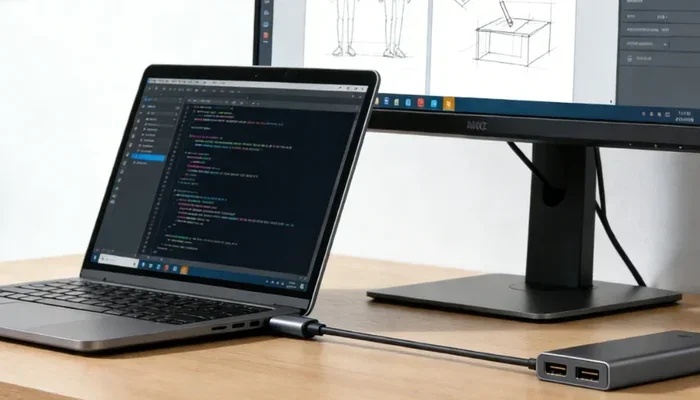
A good external monitor instantly expands your screen real estate. Pair it with a mechanical keyboard and an ergonomic mouse. These external peripherals transform your laptop into something that feels like a desktop without losing portability. When you travel, unplug and go. When you sit at your desk, plug in and power through.
Use a Docking Station
A docking station simplifies your connection to monitors, power, and peripherals. One cable links your laptop to your full workstation. USB-C and Thunderbolt docks have made this setup incredibly smooth. This is one of the best features of modern laptop instead of a PC workflows.
Prioritize Ergonomics
Laptops naturally place the screen too low. Use a laptop stand to raise the display to eye level. This reduces neck strain significantly. Pair that with an external keyboard so your arms stay at a comfortable height. Ergonomic setup is not optional if you work long hours. It protects your health and keeps you productive.
Optimize Your Software Environment
Use cloud storage so your files stay synced across devices. Tools like Google Workspace, Notion, Slack, and Trello run perfectly in a browser. Cloud computing means you do not need massive local storage for everything. Keep your essential apps on the laptop and let the cloud handle the rest.
Keep Your Laptop Cool
Heat throttles performance. Use a cooling pad during heavy sessions. Keep vents unblocked. Clean dust from fans every few months. These small habits preserve work efficiency and extend your device lifespan.
Quick Tips for Laptop-Only Workers
- Always carry a backup power bank for long days away from outlets.
- Use a quality laptop bag with padding to protect your device.
- Set up automatic cloud backups so you never lose important files.
- Keep your operating system and apps updated for security and speed.
- Consider a second monitor for your home desk setup.
- Use noise-canceling headphones in shared or public spaces.
Common Mistakes When Switching from PC to Laptop
Making the switch sounds simple, but people stumble on predictable issues. Avoiding these common mistakes saves time and headaches.
Buying Too Little RAM or Storage
Skimping on memory creates bottlenecks fast. Aim for at least 16GB of RAM if you multitask heavily. Choose 512GB SSD storage minimum, or 1TB if you work with large files. Upgrading later is often expensive or impossible on many laptop models.
Ignoring Screen Quality
A dull, low-resolution screen strains your eyes over time. Look for at least a Full HD display with good color accuracy. If you do visual work, consider an OLED or high-brightness IPS panel. Your screen size and quality directly affect comfort and output quality.
Neglecting Keyboard and Trackpad Feel
You will type thousands of words daily. Test the keyboard before buying. A shallow, mushy keyboard ruins the experience. Similarly, a responsive trackpad makes navigation smooth. These details matter more than people realize.
Forgetting Software Compatibility
Some specialized software runs best on Windows desktops. Check that your critical apps work on your chosen laptop operating system. Virtual machines help in some cases, but native support always performs better.
Underestimating Weight When Traveling
A 17-inch laptop is powerful but heavy. If you commute daily, a 13 or 14-inch model fits your lifestyle better. Lightweight computing reduces shoulder strain and makes portable computing actually enjoyable rather than a chore.
Expert Insights: What Professionals Say About Using Laptops Instead of PCs
We gathered perspectives from remote workers and IT consultants to understand real-world experiences.
Freelancers and Nomadic Workers
Freelancers almost universally prefer laptops. Flexibility drives their choice. A designer working with clients across cities needs a device she can pack in minutes. Remote work setup success depends on having a reliable, portable machine. Most report that modern laptops meet 90 to 95 percent of their workload needs without issues.
IT Consultants and Tech Leads
Many tech professionals recommend a hybrid approach. Use a laptop as your primary device but keep a desktop at your home office for heavy tasks. Laptop vs desktop debates often end with this balanced compromise. It gives you the best of both worlds without the stress of choosing one over the other.
Corporate Workers
Companies increasingly issue laptops to employees. Management likes the flexibility. Workers like the freedom. Work efficiency scores often improve when employees can choose where and how they work. Corporate IT departments support laptop fleets with security tools and cloud access, making the transition smooth.
Key Takeaways
- Modern laptops handle most professional tasks effectively. Processing power, storage, and multitasking capability now rival desktops for common work.
- Portability gives laptops a clear lifestyle advantage. Working from anywhere becomes effortless when your machine weighs just a few pounds.
- Peripheral accessories make the gap shrink further. External monitors, keyboards, and docking stations create desktop-quality setups from your laptop.
- Desktops still dominate heavy workloads. Intensive rendering, gaming, and data processing benefit from desktop-grade hardware.
- Cloud tools reduce hardware dependency significantly. Browser-based apps and cloud storage keep you productive on mid-range machines.
- Ergonomics must be planned intentionally. Proper stands, keyboards, and monitor placement protect your health during long sessions.
- Your specific work determines the right device. Evaluate your tasks, travel frequency, and performance needs before committing to one option.
Conclusion: Can You Really Use a Laptop Instead of a PC?
So, can I use a laptop instead of a PC and still get meaningful, high-quality work done? The evidence points to a confident yes for most people. Modern laptops deliver the processing power, storage capacity, and multitasking capability that everyday professionals need. Add a docking station, an external monitor, and a comfortable chair, and your laptop becomes a fully capable desktop replacement laptop setup.
There are still situations where desktops shine brighter. Heavy creative work, competitive gaming, and always-on server tasks benefit from desktop advantages. But for the majority of workers, students, freelancers, and remote professionals, a laptop covers everything required.
The real secret lies in setting up your workspace thoughtfully. Invest in the right peripherals. Maintain good ergonomics. Use cloud tools to stay organized. Take care of your device with regular maintenance. Do all of this and your laptop will keep up with any PC you would have chosen instead.
Now you know the full picture. Pick the device that fits your life, set it up right, and get to work. The flexibility and freedom of portable computing are waiting for you.
Frequently Asked Questions
Can I use a laptop instead of a PC for programming?
Absolutely. Modern laptops handle coding environments, local servers, and version control tools with ease. Many developers use laptops as their primary machine. Cloud-based IDEs further reduce hardware demands and let you code from any device.
Will a laptop be slower than a desktop for everyday tasks?
Not for typical everyday tasks like email, web browsing, document editing, and video calls. Modern laptops match desktop speeds for these activities. You may only notice differences during extremely heavy workloads like large-scale rendering or simultaneous heavy multitasking.
What is the best laptop size for replacing a desktop?
A 15 to 17-inch laptop offers a good balance between screen space and portability. If you prioritize travel ease, a 14-inch model works well with an external monitor at your desk. Screen size matters less when you plan to use external peripherals regularly.
Can a laptop handle video editing like a desktop PC?
Laptops with dedicated graphics cards and at least 16GB of RAM handle 1080p and moderate 4K editing well. For heavy 4K or 8K projects with complex effects, desktops still offer better sustained performance and cooling. Choose a powerful laptop if this is your main use case.
Do I need a docking station if I use a laptop instead of a PC?
A docking station is highly recommended but not mandatory. It lets you connect monitors, keyboards, and power with one cable. Without a dock, you can still use individual peripherals connected through USB ports and HDMI cables. A dock simply makes the setup and teardown process much smoother.
How important is battery life when choosing a laptop for work?
Battery life matters a lot if you work away from power outlets regularly. Look for laptops offering 10 or more hours of real-world usage. This ensures you stay productive during travel, commutes, and meetings without constantly searching for an outlet.