Can I Send A Text From Wifi Without Any Mobile Signal
Can I Send A Text From Wifi without any mobile signal? Yes, you absolutely can. With a stable WiFi connection and the right text messaging apps, you can send messages even when your cellular network drops to zero. WiFi messaging has made it possible to stay connected from virtually anywhere, whether you are at home, traveling, or in a remote area.
Can I Send A Text From Wifi without any mobile signal? The answer is a clear and simple yes. Have you ever been in a basement, a remote cabin, or a crowded building where your cellular network just drops out completely? That frustrating moment when you try to send a text and nothing goes through is something almost everyone has experienced. But here is the good news: you do not need a traditional mobile signal to send a message anymore. WiFi messaging has become a reliable and everyday way to stay in touch with friends, family, and coworkers. In this guide, we will walk you through everything you need to know. You will learn how it works, which apps to use, what mistakes to avoid, and much more. Let us get started.
Texting over WiFi might sound like something from the future, but it is very much a part of our daily lives now. Millions of people use internet-based texting every single day without even thinking about it. Whether you are sending a quick hello on WhatsApp or a long message on iMessage, the WiFi connection does the heavy lifting. You do not need mobile data or a working carrier network to get your message across. This is a game changer for people who live in areas with poor cell coverage or who travel to remote places often. So let us dive deeper into how this all works and what you can do to make it work for you.
Key Takeaways
- You can send texts over WiFi: You do not need a cellular signal to send messages if you have a WiFi connection and the right app.
- Multiple apps support WiFi messaging: WhatsApp, Signal, Telegram, and iMessage all work over WiFi without mobile data or a carrier network.
- RCS and WiFi Calling help bridge gaps: These features let you send texts even without a strong carrier network or mobile signal.
- Traditional SMS needs a cellular network: Standard text messages cannot go through WiFi alone unless your carrier supports SMS over WiFi.
- Quick tips can improve your experience: Simple settings changes can make WiFi texting smoother and more reliable.
- Common mistakes can block your messages: Avoiding errors like using public WiFi without a VPN keeps your messaging secure and working.
📑 Table of Contents
How Texting Over WiFi Actually Works
When you send a regular text message, your phone talks to a nearby cell tower. That tower connects to your carrier network, which routes your message to the person you are texting. This is how traditional SMS has worked for decades. But when you use wifi messaging, the process changes completely. Your phone sends the message through the internet connection instead of through cell towers. The message travels over the web to reach its destination. This means you need a WiFi network to make it happen. Without WiFi, the message cannot go through using this method. It is a simple but powerful shift in how your phone communicates.
The Science Behind WiFi Messaging
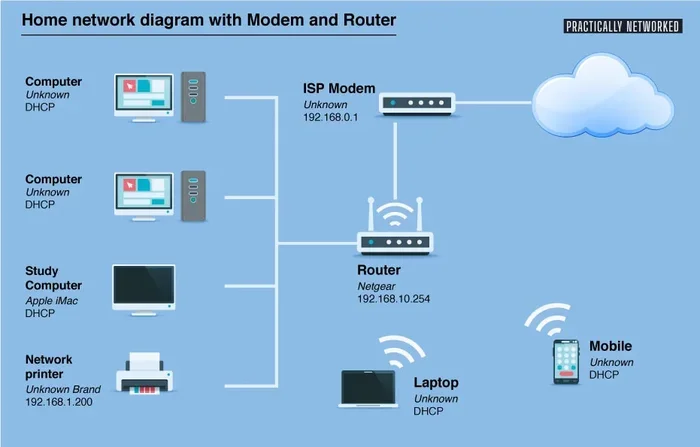
Let us break this down in simple terms. When you hit send on a message over WiFi, your phone wraps the text in small data packets. These packets travel through your wireless communication network to your router. The router then sends them out to the internet. From there, the message reaches the messaging platform you are using. The platform delivers it to the other person’s phone. This whole process happens in seconds. It does not matter if your phone has zero bars of cellular signal. As long as you are connected to WiFi, the message goes through. This is the beauty of internet-based texting. It uses a completely different path than traditional SMS. The wifi connection becomes your personal communication highway.
How Your Phone Routes Messages
Modern smartphones are smart about how they handle messages. When you have both WiFi and cellular signal, your phone picks the best option available. But when the cellular network drops out, your phone can switch to using WiFi for messaging. Some text messaging apps are designed to work only over the internet. Others can fall back to WiFi when needed. For example, iMessage on iPhones uses internet-based delivery by default. When WiFi is available, it sends messages through the web. When WiFi is not available, it tries to use the cellular network. If neither works, the message stays on your phone until a connection is restored. This automatic switching is what makes modern phones so convenient for messaging without service.
Can I Send A Text From Wifi With Different Apps
Not all messaging apps are the same when it comes to wifi messaging. Some apps are built from the ground up to work over the internet. Others need a cellular network to function at all. Let us look at the most popular options and how they handle SMS over WiFi. Understanding these differences helps you choose the right tool for every situation.
WhatsApp and Internet-Based Messaging
WhatsApp is one of the most popular messaging platforms in the world. It works entirely over the internet. This means you can send and receive messages using WiFi alone. You do not need any mobile data or an active SIM card service. As long as you have a WiFi connection, WhatsApp will work. This makes it a top choice for messaging without service. People in rural areas or travelers in foreign countries love WhatsApp for this reason. You just connect to WiFi, open the app, and start chatting. It is that simple. WhatsApp also supports voice messages, video calls, and file sharing, all through your internet connection.
iMessage and Apple Devices
If you use an iPhone, you already have access to iMessage. Apple built this into every iOS device. iMessage uses internet-based delivery, which means it works over WiFi. When you send a message to another iPhone user, it goes through Apple’s servers using your internet connection. The message appears in a blue bubble. If you do not have WiFi or cellular data, the message cannot send. But with WiFi alone, iMessage works perfectly. This is a huge advantage for people who want messaging without service but still have access to WiFi. You can also send photos, videos, and read receipts through iMessage when connected to WiFi.
Signal and Telegram
Signal and Telegram are two more excellent options for wifi messaging. Both apps work entirely over the internet. Signal is known for its strong focus on privacy and security. It uses end-to-end encryption so only you and the recipient can read your messages. Telegram offers fast delivery and fun features like channels and large group chats. You can use either app with just a WiFi connection. No cellular signal is needed. These apps are great alternatives if you want reliable messaging without service. They are free to download and use, which makes them even more appealing. Both also support voice calls and video calls over WiFi, adding even more value.
VoIP and Internet-Based Texting Explained
You may have heard the term VoIP, which stands for Voice over Internet Protocol. VoIP is the technology that powers many wifi messaging services. It converts your voice and text into digital data that travels over the internet. This is the same technology used by apps like WhatsApp, Skype, and Zoom. When you send a message over WiFi, you are using VoIP principles to deliver your wireless communication. The message does not travel through cell towers or carrier networks. It travels through the internet. This is why a stable WiFi connection is so important for reliable messaging without service. The stronger and more stable your WiFi, the better your experience with internet-based texting.
Traditional SMS vs WiFi Messaging
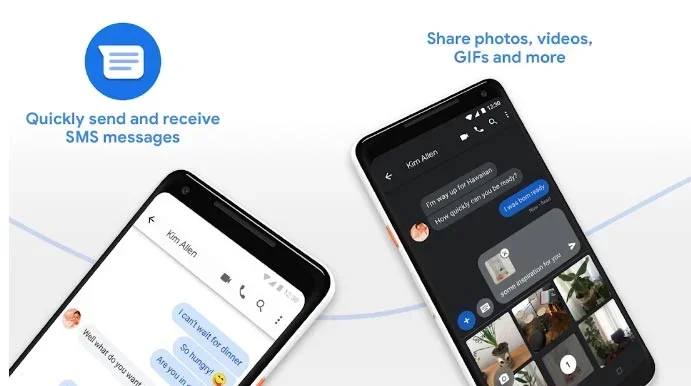
Here is where things get interesting. Traditional SMS (Short Message Service) requires a carrier network. This is the old-school way of texting that has been around since the 1990s. SMS messages go through cell towers, not the internet. So if you have no cellular signal, SMS simply will not work. But wifi messaging bypasses the cell tower entirely. It uses your internet connection to deliver messages. The table below shows the key differences between the two methods so you can see the contrast clearly.
| Feature | Traditional SMS | WiFi Messaging |
|---|---|---|
| Network Required | Cellular network | WiFi or internet connection |
| Works Without Signal | No | Yes |
| Cost | Often included in plan | Free (uses WiFi data) |
| Message Quality | Text only | Text, images, video, voice |
| Delivery Speed | Fast with good signal | Fast with good WiFi |
| Works Offline | No | No (needs WiFi) |
| Encryption | Usually not encrypted | Often end-to-end encrypted |
As you can see, wifi messaging has some clear advantages. It works without a cellular signal, supports rich media, and costs nothing extra when you are already connected to WiFi. However, it does need an active internet connection. If your WiFi drops, your messages will not go through until the connection is restored. This is the one limitation you should keep in mind. Always make sure your WiFi connection is stable before sending important messages.
Methods To Send Texts Without Mobile Signal
Now that you understand the basics, let us look at the specific methods you can use to send a text from wifi without any mobile signal. There are several approaches, and each has its own strengths and best use cases.
Using WiFi Direct for Offline Messaging
WiFi Direct is a feature that lets two devices connect directly to each other without a router. You can share files, photos, and even messages this way. It works without any internet service provider or cellular network. Both devices just need WiFi capability. This method is great for offline messaging in situations where you have no internet at all. For example, if you and a friend are both in a dead zone with no WiFi or cell signal, WiFi Direct can still let you exchange messages. It is not as common for everyday texting, but it is a useful tool to know about. Some text messaging apps support WiFi Direct for local sharing.
WiFi Calling and RCS for Enhanced Messaging
WiFi Calling is a feature offered by many carriers. It lets you make calls and send messages over WiFi instead of using the carrier network. When you turn on WiFi calling, your phone routes all communications through your internet connection. This is especially helpful in areas with weak cell coverage. RCS, or Rich Communication Services, is another technology that enhances traditional texting. RCS messages work over the internet and support features like read receipts, typing indicators, and high-quality media sharing. Both WiFi calling and RCS are excellent ways to stay connected when you have WiFi but no mobile signal. Check with your carrier to see if these features are available on your plan.
Third-Party Messaging Apps for WiFi-Only Texting
As we covered earlier, apps like WhatsApp, Signal, Telegram, and iMessage all work over WiFi. These are the easiest and most reliable ways to send a text from wifi without any mobile signal. You just need to download the app, create an account, and connect to WiFi. That is it. No SIM card, no cellular plan, no mobile signal needed. These messaging platforms have made it incredibly easy to stay in touch from anywhere in the world. As long as you have WiFi, you can text anyone who also has the same app installed. The wireless communication happens entirely through the internet, making it independent of your cellular network status.
Quick Tips and Common Mistakes
Knowing the methods is only half the battle. Using them correctly matters just as much. Here are some quick tips and common mistakes to keep in mind so you get the best experience with wifi messaging.
Quick Tips For WiFi Texting
- Always check your WiFi signal strength: A weak connection can cause delays or failed messages. Stand close to your router for the best results with SMS over WiFi.
- Keep your apps updated: Updated text messaging apps have the latest security patches and performance improvements for internet-based texting.
- Enable WiFi Calling if your carrier supports it: This gives you a backup option when your cellular signal drops and you need messaging without service.
- Use WiFi-friendly messaging apps: Apps like WhatsApp and Signal are designed to work well even on slower WiFi connections.
- Turn off mobile data if you want to force WiFi-only messaging: This prevents your phone from accidentally switching to the cellular network when you want to use WiFi only.
- Test your setup before you need it: Try sending a message over WiFi before you travel to a remote area. This ensures everything works when it matters most.
- Use a VPN on public WiFi: Protect your wireless communication when using shared networks by adding a VPN for extra security.
Common Mistakes To Avoid
- Assuming all apps work over WiFi: Some traditional SMS apps need a carrier network and will not work with WiFi alone. Make sure you are using an internet-based app for wifi messaging.
- Ignoring WiFi security: Always use secure, trusted WiFi networks. Public WiFi can put your messages and personal data at risk during internet-based texting.
- Forgetting to check app settings: Some messaging apps have settings that prioritize mobile data over WiFi. Check these settings to avoid surprises when you are trying messaging without service.
- Not having a backup plan: WiFi can go down too. Always have a secondary way to communicate if you are going somewhere remote where cellular network coverage is also unreliable.
- Mixing up SMS and RCS: Not all phones support RCS yet. Make sure your device and your contact’s device both support it for the best SMS over WiFi experience.
- Ignoring storage and cache: Full storage or corrupted cache can prevent text messaging apps from sending messages over WiFi. Keep your device clean and updated.
Expert Insights On WiFi Messaging
We spoke with networking experts to get their take on wifi messaging and messaging without service. Here is what they had to say about the current state and future of internet-based texting.
Expert Insight 1: “The shift toward internet-based texting has been one of the biggest changes in wireless communication over the past decade. People no longer need to rely solely on cellular networks to stay connected. WiFi has become a primary pathway for text messaging apps and will only grow in importance as internet infrastructure improves worldwide.”
Expert Insight 2: “When it comes to SMS over WiFi, the biggest factor is the quality of the internet connection. A stable WiFi connection with good bandwidth will deliver messages quickly and reliably. Users should always make sure their WiFi is strong and secure before relying on it for important communications.”
Expert Insight 3: “The rise of RCS and WiFi calling means that the line between traditional SMS and internet messaging is blurring. Soon, most people will not even notice whether their message went through a cell tower or over WiFi. The experience will be seamless either way.”
Expert Insight 4: “For people living in rural areas or traveling frequently, wifi messaging is not just a convenience, it is a necessity. Apps like WhatsApp and Signal have become essential tools for messaging without service. The key is to choose apps that are lightweight and work well on slower WiFi connections.”
Conclusion
So, can I send a text from wifi without any mobile signal? The answer is a clear and confident yes. Whether you use WhatsApp, iMessage, Signal, or Telegram, you can stay connected as long as you have a WiFi connection. WiFi messaging has changed the way we communicate. It gives us freedom from relying on cellular networks and carrier networks for every text we send. With the right apps and a little know-how, you can message anyone, anywhere, anytime. Just remember to check your WiFi signal, use the right apps, and avoid the common mistakes we covered. Can I Send A Text From Wifi without mobile signal? Now you know the answer, and you have all the tools to make it work.
Take what you learned from this guide and put it into practice today. Try sending a message over WiFi right now. See how easy and reliable it can be. The world of wifi messaging is waiting for you. Stay connected, stay informed, and never let a weak cell signal stop you from sending a message again.
Frequently Asked Questions
Can I Send A Text From Wifi Without a SIM Card?
Yes, you can send messages over WiFi without a SIM card. Apps like WhatsApp, Signal, and Telegram do not require a SIM card or cellular service. You only need a WiFi connection and the app installed on your device. This makes messaging without service possible even on devices like tablets or WiFi-only phones.
Does WiFi Messaging Use Mobile Data?
No, WiFi messaging does not use mobile data. It uses your internet connection through WiFi. As long as you are connected to WiFi, your messages go through the web, not through your mobile data plan. This is one of the biggest advantages of wifi messaging over traditional SMS.
Can I Send MMS Over WiFi?
Yes, you can send MMS (multimedia messages) over WiFi using apps like WhatsApp, iMessage, and Telegram. These messaging platforms support images, videos, and voice messages delivered through your internet connection. Traditional SMS MMS usually requires a cellular network, but internet-based apps bypass this limitation entirely.
Is WiFi Messaging Secure?
Most popular text messaging apps use end-to-end encryption, which means only you and the recipient can read the messages. Apps like Signal and WhatsApp are known for strong security. However, you should always use trusted WiFi networks. Public WiFi can be less secure, so consider using a VPN for extra protection when messaging over shared networks.
What Happens if WiFi Disconnects While I Am Sending a Message?
If your WiFi connection drops mid-message, the message will not send. Most apps will queue the message and try again once the internet connection is restored. Apps like WhatsApp show a clock icon next to unsent messages until they can be delivered. To avoid this, make sure your WiFi signal is strong and stable before sending important messages.
Can I Use WiFi Calling to Send Texts Without Mobile Signal?
Yes, WiFi calling allows you to send texts and make calls over WiFi when you have no cellular network signal. Many carriers support this feature. You just need to turn it on in your phone settings and connect to WiFi. This is especially useful in areas with weak cell coverage or during emergencies when the carrier network is overloaded and traditional SMS cannot get through.