Can I Just Buy A Better Router To Fix My Slow Internet
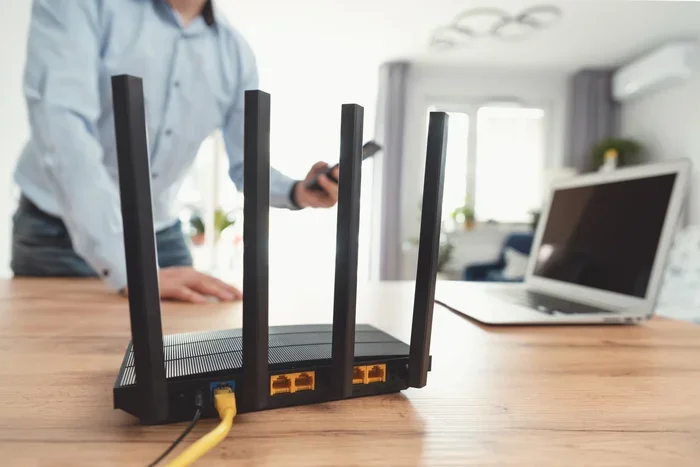
Can I just buy a better router to fix my slow internet? The short answer is sometimes yes, but not always. A router upgrade can boost your Wi-Fi speed if your current device is outdated or underpowered. However, slow internet often comes from other sources like your internet plan, ISP issues, or network congestion. This guide walks you through when a new wireless router actually makes a difference and when you need to look elsewhere for a fix.
You are sitting on the couch. Your favorite show keeps buffering. The page takes forever to load. And that frustrating thought crosses your mind: can I just buy a better router?
It makes sense. Your router sits in the corner doing its job every single day. If it is old or weak, it seems like swapping it out would solve everything. And sometimes, it really does. But other times, a new wireless router will not fix the problem at all.
This guide breaks down everything you need to know. We will cover when a router upgrade actually helps. We will explore what causes slow internet in the first place. And we will give you clear steps to figure out if your current device is holding you back. By the end, you will know exactly what to do. No guesswork. No wasted money.
Key Takeaways
- Router upgrades help but are not a magic fix: A new wireless router improves Wi-Fi speed only when the router itself is the bottleneck.
- Check your internet plan first: Your ISP plan speed limits what any router can deliver.
- Look for Wi-Fi 6 and dual-band support: These features make a real difference in network congestion and signal strength.
- Placement matters just as much as hardware: Even the best router performs poorly if placed in a bad spot.
- Mesh systems solve dead zone problems: A mesh network extends coverage across large homes far better than a single unit.
- Run a speed test before buying anything: This simple step saves money and prevents unnecessary router upgrades.
- Firmware updates can fix old routers: Before spending money, try updating your existing device first.
📑 Table of Contents
Why Your Internet Feels Slow
Before you rush out to buy a new device, you need to understand what slows down your connection. Most people blame their router when the real issue is something completely different. Let us look at the common culprits.
Your Internet Plan Has a Speed Cap
Your internet service provider (ISP) gives you a certain amount of bandwidth. Think of it like a highway. If the highway only has two lanes, no amount of fast cars will make traffic move faster. If your plan only gives you 25 Mbps, a top-of-the-line wireless router cannot make your connection go beyond that limit.
Run a speed test on your computer using a wired connection. If the results match what your plan promises, your ISP is delivering what you pay for. The problem then lies in how your router distributes that speed wirelessly.
Network Congestion Slows Things Down
Do you have five phones, three laptops, a smart TV, and two tablets all connected at once? That is a lot of devices sharing one bandwidth pipe. When too many devices use the network at the same time, everything slows down. This is called network congestion.
Older routers struggle with multiple connections. They were built for fewer devices. A modern dual-band router or Wi-Fi 6 model handles heavy traffic much better. So if your household is full of connected gadgets, congestion could be your main issue.
Your Modem Might Be Outdated
People often confuse the modem with the router. Your modem brings the internet signal into your home from the ISP. The router then splits that signal and sends it to your devices. If your modem is old, it might not support the speeds your plan offers.
Sometimes replacing the modem fixes the problem. Sometimes you need both a new modem and a router upgrade. Check with your ISP to see if your modem supports the speeds you are paying for.
When A Router Upgrade Actually Helps
Not all slow internet situations require a new wireless router. But there are clear signs that a router upgrade will make a real difference. Let us walk through them.
Your Router Is More Than Five Years Old
Technology moves fast. Wi-Fi standards improve every few years. A router from 2015 or earlier uses older Wi-Fi 5 or even Wi-Fi 4 technology. These older standards cannot handle modern speeds or many devices.
If your router is more than five years old, an upgrade can dramatically improve your Wi-Fi speed. Newer models support faster wireless speeds, better range, and smarter traffic management. The difference can feel like going from a dirt road to a highway.
You Have Dead Zones in Your Home
Do you get a strong signal in the living room but zero bars in the bedroom? That is a Wi-Fi dead zone. It happens when your router cannot push the signal far enough or through thick walls.
A standard single-unit router has limits. But a mesh network system uses multiple units placed around the house. These units work together to cover every room. If dead zones are your main complaint, a mesh Wi-Fi system is a much better solution than just buying a stronger single router.
You Are Gaming or Streaming in 4K
Online gaming needs low latency. That is the time it takes for data to travel from your device to the server and back. High latency causes lag. It makes games unplayable and video calls choppy.
Standard routers often have high latency under heavy use. A gaming router is built to prioritize real-time traffic. It reduces latency and keeps your connection smooth. If you game or stream 4K video regularly, a router upgrade to a gaming model can transform your experience.
How To Know If Your Router Is The Problem
You suspect your router is holding you back. But how do you actually confirm it? You do not need to be a tech expert. A few simple checks will tell you everything.
Step One: Run a Speed Test
Go to a speed test website on your phone or computer. First, test with a wired ethernet connection. Then test wirelessly from the same spot. Compare the results.
If the wired speed matches your plan but the wireless speed is much lower, your router is likely the bottleneck. A router upgrade should help. If both speeds are slow, the problem is probably your ISP or internet plan.
Step Two: Check Your Router’s Age
Look at the model number on the back of your router. Search it online to find out what Wi-Fi standard it supports. If it does not support Wi-Fi 5 or higher, it is time for a replacement.
Also check if your router receives firmware updates. Manufacturers stop supporting older models. Without updates, your device becomes less secure and less efficient over time.
Step Three: Count Your Connected Devices
Log into your router settings and check how many devices are connected. If you see more than 10 to 15 devices, your current router might be overwhelmed. Modern households easily have 20 or more connected gadgets. A newer wireless router handles this load far better.
What To Look For In A New Router
If you have decided a router upgrade is the right move, you need to know what to look for. Not all routers are created equal. Some are great for basic browsing. Others are built for heavy use.
Wi-Fi 6 Is the Current Sweet Spot
Wi-Fi 6 (also called 802.11ax) is the latest widely available standard. It offers faster speeds, better signal strength, and handles many devices at once. If you are buying a new wireless router today, Wi-Fi 6 should be your baseline.
Wi-Fi 6E and Wi-Fi 7 are newer but still expensive. They offer extra benefits like access to the 6GHz band. For most homes, Wi-Fi 6 provides excellent value and performance.
Dual-Band and Tri-Band Options
A dual-band router sends signals on two frequencies: 2.4GHz and 5GHz. The 2.4GHz band reaches farther but is slower. The 5GHz band is faster but has shorter range.
A tri-band router adds a second 5GHz band. This reduces network congestion in homes with many devices. If you have a large household with heavy internet use, a tri-band model is worth the extra cost.
Consider a Mesh System for Large Homes
If your home is larger than 2,000 square feet, a single router may not be enough. A mesh network uses multiple units to blanket your home with strong Wi-Fi coverage.
Mesh systems are easy to set up. You place one unit near your modem and put the others in distant rooms. They work as one seamless network. Your devices automatically connect to the strongest unit as you move around the house.
Check the Ports and Connectivity
Look for a router with gigabit ethernet ports. These ports let you connect devices like desktop PCs and gaming consoles with a wired cable for maximum speed.
Some routers also include USB ports. These let you share a printer or external hard drive across your network. Small features like these add real everyday value.
Common Mistakes People Make When Buying Routers
Buying a router seems simple. But many people make mistakes that waste money and leave them disappointed. Here are the most common ones.
Buying the Most Expensive Model
The priciest router is not always the best one for your home. If you have a small apartment and basic internet needs, a high-end gaming router is overkill. Match the router to your actual needs, not the marketing hype.
Ignoring Your Internet Plan
A top-of-the-line wireless router cannot make your internet plan faster than what your ISP provides. If your plan gives you 50 Mbps, no router will deliver 500 Mbps. Always check your plan speed before investing in new hardware.
Skipping Firmware Updates on the New Router
Even brand-new routers need firmware updates after purchase. These updates fix bugs, improve performance, and patch security holes. Set a reminder to check for updates during the first week after setup.
Placing the Router in a Bad Spot
The best router in the world cannot help if you hide it in a closet or behind a TV. Place your router in a central, elevated location. Keep it away from thick walls, microwaves, and metal objects. Good router placement makes a huge difference in signal strength.
Expert Tips For Getting The Most From Your New Router
You just bought a shiny new wireless router. Now what? A few smart steps will help you get the most out of your router upgrade.
Optimize Your Channel Settings
Wi-Fi channels are like lanes on a highway. If your neighbors all use the same channel, there is traffic. Go into your router settings and switch to a less crowded channel. Many modern routers do this automatically, but checking never hurts.
Set Up Quality of Service (QoS)
Quality of Service lets you prioritize certain devices or activities. You can tell your router to give more bandwidth to your work laptop or gaming console. This prevents network congestion from slowing down the things that matter most to you.
Reboot Your Router Regularly
Even new routers benefit from a regular restart. Schedule a weekly reboot to clear the memory and refresh connections. Many modern routers let you set an automatic restart schedule in the settings.
Keep Your Router Firmware Updated
Firmware updates improve performance and security. Check your router app or admin panel once a month for updates. This small habit keeps your network running smoothly and safely.
Conclusion
So, can I just buy a better router? The answer is yes, but only when the router is actually the problem. A router upgrade can dramatically improve your Wi-Fi speed, reduce latency, and eliminate dead zones. It can also make a crowded network feel faster and more responsive.
But a new wireless router is not a cure-all. If your internet plan is too slow, no router will fix that. If your ISP has a poor connection, a new device will not help either. Always diagnose the real cause of slow internet before spending your hard-earned money.
Start with a speed test. Check your router age and placement. Look at how many devices are connected. Then decide if a router upgrade is the right move. With the right router, good placement, and a solid internet plan, you can enjoy fast, reliable Wi-Fi throughout your home.
Take action today. Run that speed test. Check your current router model. And make an informed decision. Your slow internet days do not have to last forever.
Frequently Asked Questions
Will buying a better router increase my internet speed?
It depends on your situation. If your current router is old or weak, a new one can boost your Wi-Fi speed significantly. But if your internet plan from your ISP is slow, a new router cannot make it faster than what you pay for.
How do I know if my router needs replacing?
Check the age of your router. If it is more than five years old, it likely uses outdated Wi-Fi standards. Also run a speed test comparing wired and wireless results. If wireless speeds are much lower, your router is probably the issue.
Is a mesh system better than a single router?
For large homes or homes with Wi-Fi dead zones, a mesh network is usually better than a single router. Mesh systems use multiple units to cover every room with strong signal strength. A single router works fine for smaller spaces.
What is the difference between a modem and a router?
Your modem brings the internet signal into your home from your ISP. Your router then splits that signal and sends it to your devices wirelessly. Some devices combine both into one unit called a gateway.
Can too many devices slow down my router?
Yes, absolutely. When too many devices connect at once, network congestion occurs. Older routers struggle with heavy device loads. Newer models with Wi-Fi 6 handle many devices much better without slowing down.
Should I buy a gaming router even if I do not game?
You do not need a gaming router just for browsing or streaming. However, gaming routers offer features like low latency and quality of service settings that benefit any heavy internet user. They are worth considering if you stream a lot or have many connected devices.
=== META DESCRIPTION ===
Wondering if buying a better router can fix your slow internet? Learn when a router upgrade helps and when the real problem lies elsewhere.