Can Cardo And Sena Pair Together For Wireless Riders
Many riders wonder if Cardo and Sena devices can pair together for wireless communication on the road. The short answer is yes, under certain conditions and with the right setup. Cross-brand pairing between Cardo and Sena is possible using Bluetooth technology, though it comes with some limitations. In this guide, we break down everything you need to know about connecting these two popular brands. You will learn how pairing works, what devices are compatible, and practical tips for a smooth experience.
Key Takeaways
- Cross-brand pairing is possible: Cardo and Sena devices can connect via Bluetooth under compatible conditions.
- Not all models work together: You need to check specific device compatibility before attempting to pair.
- Mesh technology plays a role: Sena uses mesh intercom while Cardo uses a different system, which affects pairing.
- Paired devices work best for basic tasks: Calls, music sharing, and GPS navigation pair well between brands.
- Audio quality may vary: Cross-brand connections may not deliver the same sound quality as same-brand pairs.
- Follow the right steps: Proper pairing procedures make a big difference in connection stability.
- Keep firmware updated: Both devices should have the latest firmware for the best cross-brand experience.
📑 Table of Contents
- Can Cardo And Sena Pair Together For Wireless Riders
- Understanding Cardo And Sena Communication Systems
- Can You Actually Pair Cardo And Sena Devices?
- How To Pair Cardo And Sena Devices Together
- Best Devices For Cross-Brand Pairing
- Common Problems And How To Fix Them
- Expert Tips For Riders Who Mix Brands
- Is Cross-Brand Pairing Worth It?
- Final Thoughts
Can Cardo And Sena Pair Together For Wireless Riders
Motorcycle riders love their gear. And when it comes to staying connected on the road, two names stand out: Cardo and Sena. Both brands make excellent wireless communication systems. But here is the big question many riders ask. Can Cardo and Sena pair together?
The answer is not a simple yes or no. It depends on the models you own and what you want to do. Some riders have successfully connected a Cardo headset with a Sena device. Others have run into frustrating problems. This guide will walk you through everything you need to know. We will cover compatibility, pairing steps, limitations, and pro tips. By the end, you will know exactly what to expect when trying to pair these two brands.
Wireless rider communication has come a long way. A few years ago, you could only talk to riders using the same brand and model. Today, Bluetooth technology makes cross-brand connections possible. But not all connections are created equal. Let us dive into the details of pairing Cardo and Sena devices together.
Understanding Cardo And Sena Communication Systems
Before we talk about pairing, it helps to understand what each brand offers. Both Cardo and Sena are leaders in the motorcycle communication space. But they use different technologies and approaches.
What Is Cardo?
Cardo Systems is a well-known brand in the motorcycle intercom world. They make wireless headsets and communication devices for riders. Cardo is famous for its Packtalk lineup. These devices use a technology called Dynamic Mesh. This means the devices create a network between themselves. The more riders you have, the stronger the network becomes.
Cardo devices are popular among touring riders and group rides. They offer great audio quality and long range. Many riders also love the voice control features. You can change songs, answer calls, and adjust volume without taking your hands off the handlebars.
What Is Sena?
Sena is another major player in the motorcycle communication market. They also make Bluetooth headsets and intercom systems. Sena devices are known for their ease of use. They work well for solo riders and groups alike. The Sena 50R and Sena 20S are two of their most popular models.
Sena uses its own mesh communication system too. But it works a bit differently than Cardo’s approach. Sena devices also support features like music sharing, GPS navigation, and phone calls. Many riders choose Sena because of its wide range of compatible accessories.
How Do They Compare?
Both brands offer high-quality wireless communication. But there are some differences. Cardo tends to focus on group ride features. Sena leans toward ease of use and versatility. When it comes to cross-brand pairing, these differences matter. Each brand has its own Bluetooth protocols and pairing methods.
| Feature | Cardo | Sena |
|---|---|---|
| Mesh Technology | Dynamic Mesh | Sena Mesh |
| Typical Range | Up to 1.6 km | Up to 1.6 km |
| Voice Control | Yes | Yes |
| Music Sharing | Yes | Yes |
| Group Ride Support | Excellent | Very Good |
| Cross-Brand Pairing | Limited | Limited |
Can You Actually Pair Cardo And Sena Devices?
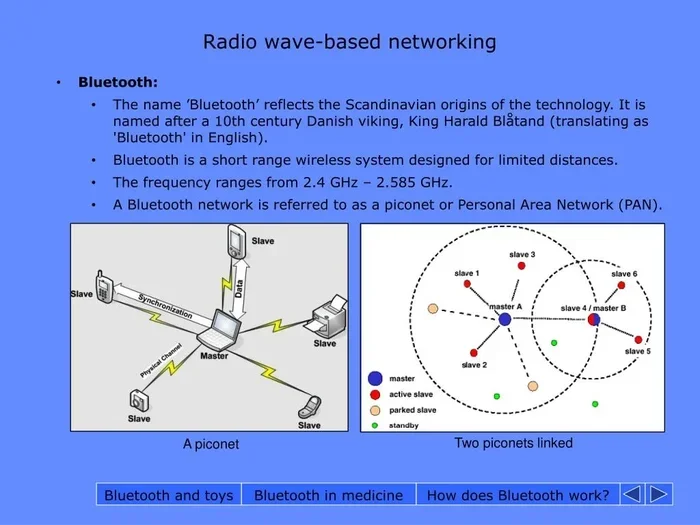
Now for the real question. Can you pair a Cardo device with a Sena device? The answer is yes, but with some important caveats. Bluetooth is a universal standard. This means devices from different brands can often connect to each other. But the experience may not be as smooth as pairing two devices from the same brand.
When you pair a Cardo headset with a Sena headset, you are using basic Bluetooth connectivity. This works for certain tasks. But it does not unlock the full mesh network features. You cannot expect the same dynamic group riding experience across brands.
What Works For Cross-Brand Pairing?
Here are the things that usually work when you pair Cardo and Sena devices:
- Phone calls: You can answer calls on either device through the Bluetooth connection.
- Music streaming: You can share music from one phone to both headsets.
- GPS navigation: Audio directions from your phone work across both brands.
- Basic audio sharing: You can listen to audio from a single source.
What Does Not Work Well?
There are also limitations. Cross-brand pairing does not support some advanced features:
- Full mesh intercom: You cannot use the full mesh network across both brands.
- Advanced group riding: Group features from each brand do not work together.
- Firmware updates across brands: Each device updates independently.
- Unified voice commands: Voice commands may not work the same way on both devices.
Keep these limitations in mind. If you need full mesh communication with a mixed group, same-brand pairing is better. But for basic wireless rider communication, cross-brand pairing can work fine.
How To Pair Cardo And Sena Devices Together
If you want to try pairing your Cardo and Sena devices, here is a step-by-step guide. Follow these steps carefully for the best results.
Step 1: Check Compatibility
Not all Cardo and Sena models can pair with each other. Check the Bluetooth version on both devices. Most modern devices use Bluetooth 4.0 or higher. This makes cross-brand pairing much easier. Look up your specific model numbers online if you are unsure.
Step 2: Update Firmware
This is a very important step. Before pairing, update the firmware on both devices. Manufacturers often release updates that improve Bluetooth connectivity and fix bugs. Use the official app for each brand to check for updates.
For Cardo, use the Cardo Connect app. For Sena, use the Sena Riding App. Keeping both devices updated ensures the best chance of a successful connection.
Step 3: Put Both Devices In Pairing Mode
Each brand has its own way to enter pairing mode. Here is how to do it for each:
- Cardo: Hold the power button and the volume down button together. Wait for the flashing light.
- Sena: Hold the phone button and the volume up button together. The LED will start flashing rapidly.
Once both devices are in pairing mode, they should search for each other. One device will appear on the other’s screen. Select it to complete the connection.
Step 4: Test The Connection
After pairing, test the connection. Try making a phone call. Play some music. Check the audio quality on both sides. If the sound is clear and the connection is stable, you are good to go.
If you run into problems, try resetting both devices. Turn them off completely and turn them back on. Then repeat the pairing process. Sometimes a fresh start solves connection issues.
Quick Tips For A Successful Pairing
- Keep both devices within 3 feet of each other during pairing.
- Make sure no other Bluetooth devices are interfering.
- Turn off other wireless connections like Wi-Fi temporarily.
- Be patient. It may take a few attempts the first time.
- Restart both devices if the connection fails.
Best Devices For Cross-Brand Pairing
Not all Cardo and Sena models pair equally well. Some combinations work better than others. Here are some popular devices that riders have successfully paired together.
Cardo Devices That Work Well With Sena
- Cardo Packtalk Edge: This is one of Cardo’s top models. It pairs well with most Sena devices using Bluetooth.
- Cardo Packtalk Bold: Another strong option. Riders report good results when pairing this with Sena headsets.
- Cardo Packtalk Sport: A more affordable option that still offers solid cross-brand connectivity.
Sena Devices That Work Well With Cardo
- Sena 50R: This is a popular Sena model with great Bluetooth range. It pairs well with Cardo devices.
- Sena 20S Evo: A favorite among solo riders. It connects easily to Cardo headsets for basic tasks.
- Sena 10C Pro: This model includes a camera. It also supports Bluetooth pairing with Cardo devices.
When choosing devices, look for Bluetooth 5.0 or higher. Newer Bluetooth versions offer better range and stability. This makes cross-brand pairing much more reliable.
Common Problems And How To Fix Them
Cross-brand pairing is not always perfect. Riders often run into a few common issues. Here is what to do when things go wrong.
Paired But No Sound
This is a common problem. If the devices connect but you cannot hear anything, try this:
- Check the audio source on your phone. Make sure it is set to Bluetooth output.
- Lower the volume on both devices. Then slowly raise it back up.
- Make sure the correct Bluetooth profile is selected on your phone.
Connection Keeps Dropping
An unstable connection can be frustrating. Here are some fixes:
- Move closer to the other rider. Distance weakens Bluetooth signals.
- Remove obstacles like buildings or thick trees between the devices.
- Check if other riders are on the same Bluetooth channel.
- Update the firmware on both devices again.
One Device Will Not Show Up
If one device does not appear during pairing:
- Make sure both devices are in pairing mode.
- Turn off Bluetooth on your phone temporarily and turn it back on.
- Reset both devices to factory settings and try again.
- Check that neither device is already connected to another phone.
Voice Commands Not Working
Voice commands may not work the same way across brands:
- Train the voice recognition on each device separately.
- Speak clearly and at a normal volume.
- Some commands may only work within the same brand ecosystem.
Most of these problems have simple solutions. Patience and a little troubleshooting go a long way. Do not give up after the first failed attempt.
Expert Tips For Riders Who Mix Brands
Many riders own devices from both Cardo and Sena. Maybe one rider has a Cardo Packtalk and another has a Sena 50R. Here are some expert tips to make mixed-brand rides work better.
Use One Brand As The Audio Source
Designate one device as the main audio source. For example, connect your phone to the Cardo device. Then use the Sena device as a secondary headset. This keeps the connection simpler and more stable.
Stick To Basic Functions
Cross-brand pairing works best for basic functions. Use it for phone calls, music, and GPS. Do not expect advanced mesh features to work across brands. Keep your expectations realistic and you will be happy with the results.
Consider A Universal Bluetooth Adapter
Some riders use a universal Bluetooth adapter to bridge the gap between brands. These small devices act as a middleman. They can help stabilize the connection between different headsets. It is an affordable solution worth considering.
Keep Your Group Size Small
When pairing across brands, keep your riding group small. Two to three riders work best. Larger groups can cause connection issues, especially when mixing different brands and models.
Test Before Your Ride
Always test your cross-brand connection before hitting the road. Do it in a safe, stationary location. Make sure both riders can hear clearly. Fix any problems before you start riding. This simple step saves a lot of frustration on the road.
Is Cross-Brand Pairing Worth It?
So, is it worth pairing Cardo and Sena devices together? The answer depends on your needs. If you occasionally ride with someone who uses a different brand, cross-brand pairing is a great option. It lets you stay connected without buying new gear.
For regular group rides with the same brand, stick with same-brand pairing. You will get better performance and more features. But for casual rides or occasional meetups, Cardo and Sena pairing works well enough for most basic needs.
The bottom line is this. Both Cardo and Sena make excellent wireless communication devices. They each shine in their own ecosystem. But when you need to connect across brands, Bluetooth makes it possible. Just know what to expect and plan accordingly.
Riders who have tried cross-brand pairing report mixed but generally positive results. The connection works for calls and music. The audio quality is decent. It is not perfect, but it is good enough for most riders. As technology improves, we can expect better cross-brand compatibility in the future.
Final Thoughts
Can Cardo and Sena pair together? Yes, they can. Cross-brand wireless pairing is possible and practical for many riders. You just need to understand the limitations and follow the right steps. Update your firmware, put both devices in pairing mode, and test the connection before your ride.
Whether you ride solo or in a small group, knowing how to connect different brands gives you flexibility. You do not have to worry about what brand your riding buddy uses. You can still stay connected and enjoy the ride.
Take the time to experiment with your setup. Every rider and every device combination is a little different. What works for one pair of riders might need tweaking for another. But once you find the right settings, cross-brand communication becomes second nature.
So go ahead. Try pairing your Cardo and Sena devices. Stay connected on the road. And enjoy the freedom that wireless rider communication brings. The open road is better when you can share it with your fellow riders, no matter what gear they wear.
Frequently Asked Questions
Can I use Cardo and Sena devices in the same group ride?
Yes, you can use both brands in the same group ride. However, you will be limited to basic Bluetooth functions. Full mesh intercom features will not work across brands. Keep your group small for the best experience.
Why won’t my Cardo and Sena devices pair?
Several things can cause pairing failures. Make sure both devices are in pairing mode. Check that their firmware is up to date. Also ensure no other Bluetooth devices are interfering. Try resetting both devices and attempting the process again.
Does cross-brand pairing affect audio quality?
Cross-brand pairing may result in slightly lower audio quality compared to same-brand pairing. The difference is usually small and not noticeable during normal use. Music and calls still sound clear in most cases.
What Bluetooth version do I need for cross-brand pairing?
Bluetooth 4.0 or higher is recommended for the best cross-brand experience. Most modern Cardo and Sena devices support Bluetooth 5.0. Newer versions offer better range and more stable connections.
Can I pair more than one Sena device with one Cardo device?
Yes, you can pair multiple Sena devices with one Cardo device. But the connection may become unstable with more than two or three devices. For larger groups, same-brand pairing is more reliable.
Are there any apps that help with cross-brand pairing?
Both Cardo and Sena have their own official apps. These apps help you manage settings and update firmware. There is no single app that controls both brands. Use each brand’s app separately for the best results.