Can Anyone Listen To My Bluetooth Without Me Knowing
Can anyone listen to your Bluetooth without you knowing? The short answer is yes, but the real risk depends on your device settings, Bluetooth version, and how you use your gadgets. Bluetooth eavesdropping, wireless hacking, and signal interception are real threats that many people overlook. This guide breaks down exactly how Bluetooth security vulnerabilities work, what attackers can do, and the simple steps you can take right now to lock down your devices.
You are sitting in a coffee shop, listening to music through your wireless earbuds. A stranger sits a few tables away. Can that person somehow connect to your Bluetooth and listen to what you are hearing? It sounds like something out of a spy movie, but the truth is more complicated than you might think.
Bluetooth technology makes our lives easier. We use it for wireless headphones, speakers, car audio, fitness trackers, and even smart home gadgets. But convenience comes with a cost. Every wireless connection creates a potential opening for someone with the right knowledge and tools. The good news is that understanding the risks puts you ahead of most people.
This article dives deep into the world of Bluetooth security. You will learn how Bluetooth connections work, whether someone can truly listen in on your device, what the real threats look like, and exactly how to protect yourself. Let us get into it.
Key Takeaways
- Bluetooth can be intercepted: Unsecured Bluetooth connections allow nearby attackers to potentially listen in on your audio or data.
- Older devices are more vulnerable: Bluetooth versions before 5.0 lack modern encryption and are easier to exploit.
- Simple habits make a big difference: Turning off Bluetooth when not in use and keeping devices updated are two of the most effective protections.
- Families need extra awareness: Kids’ Bluetooth gadgets often have weaker security and need parental oversight.
- Myth vs. reality: You cannot be hacked from miles away, but Bluetooth range is typically 30 feet or less for most devices.
📑 Table of Contents
- How Bluetooth Works and Why It Matters for Privacy
- Can Someone Actually Listen Through Your Bluetooth?
- Common Bluetooth Security Threats You Should Know About
- How to Protect Your Bluetooth Devices from Unwanted Listening
- Bluetooth Safety for Families and Kids
- When to Worry and When You Should Not
- Final Thoughts on Bluetooth Security
How Bluetooth Works and Why It Matters for Privacy
Before we can talk about risks, you need to understand how Bluetooth actually works. Think of Bluetooth as a short-range wireless conversation between two devices. When you pair your phone with your headphones, they create a tiny private network. Only those two devices are supposed to be part of that network.
But here is the thing. That private network is not always as private as you might assume. Bluetooth signals travel through the air. Anyone with a receiver nearby could potentially pick up that signal. The question is whether they can decode it. That depends on several factors.
The Basics of Bluetooth Technology
Bluetooth uses radio waves to transmit data between devices. It operates on the 2.4 GHz frequency band, which is the same band used by Wi-Fi and microwaves. Bluetooth devices constantly hop between different frequencies within that band. This hopping pattern is called frequency-hopping spread spectrum.
The idea behind frequency hopping is to reduce interference and improve security. By jumping between channels dozens of times per second, it becomes harder for someone to lock onto your signal. But older Bluetooth versions did not hop as frequently or use as strong encryption. That makes them much easier targets.
When two devices pair, they exchange encryption keys. These keys scramble the data so that only the intended devices can understand it. If the encryption is weak or outdated, a nearby attacker might be able to crack the code. This is where Bluetooth security risks start to creep in.
How Bluetooth Connections Are Made
Pairing happens in one of two ways. The first is just-in-time pairing. You make your device discoverable, and the other device finds it. You confirm a PIN or passkey, and the connection is established. The second is legacy pairing, which was used in older devices and is less secure.
Many devices also use a feature called Bluetooth visibility. When visibility is turned on, your device broadcasts its presence to nearby Bluetooth devices. This is useful when you are trying to pair something new. But it also means anyone nearby can see that your device exists.
The moment your device is discoverable or visible, it is more exposed. Think of it like leaving your front door unlocked while you walk to the mailbox. It only takes a few seconds for someone to slip inside.
Can Someone Actually Listen Through Your Bluetooth?
This is the question everyone wants answered. Can someone listen to your Bluetooth without you knowing? The honest answer is yes, under certain conditions. But it is not as simple as someone hacking your headphones from across the city.
Let us break down what is realistically possible and what is mostly myth.
Understanding Bluetooth Eavesdropping
Bluetooth eavesdropping happens when someone intercepts the wireless signal between two paired devices. This is also called wireless eavesdropping or Bluetooth snarfing. The attacker needs to be within Bluetooth range, which is typically about 30 feet for most devices. Some Class 1 Bluetooth devices can reach up to 300 feet, but those are rare in everyday use.
Once within range, an attacker can use tools to scan for active Bluetooth connections. If the connection is not properly encrypted, the attacker might be able to listen to audio or capture data being transmitted. This is especially true for older devices that use weak encryption standards.
For example, imagine you are using a cheap Bluetooth speaker in a public park. If that speaker uses an older Bluetooth version with weak security, someone sitting on a bench nearby could potentially connect to it without your knowledge. They might hear your music, your phone calls, or even your voice commands.
Real-World Examples of Bluetooth Snooping
Bluetooth snooping is not just theoretical. Security researchers have demonstrated real-world attacks for years. One well-known attack is called Bluebugging. In a Bluebugging attack, a hacker gains access to your phone’s Bluetooth connection and can make calls, send messages, and access your contacts. This usually requires the attacker to be within 30 feet of your device.
Another threat is Bluesnarfing. This involves stealing data from a Bluetooth-connected device without the owner’s permission. An attacker can access emails, text messages, photos, and contact lists. Bluesnarfing was more common in the early days of Bluetooth, but it still works on devices that have not been updated.
Then there is Bluetooth tracking. Some attackers use Bluetooth signals to track people’s movements. Your phone constantly broadcasts Bluetooth identifiers, and stores can use receivers to follow you through a mall. This is not quite listening to your Bluetooth, but it is a related privacy concern.
You might also want to check out 10 Gadgets To Make Moms Life Easier for some helpful Bluetooth-enabled tools that can keep your family connected safely.
Common Bluetooth Security Threats You Should Know About
Not all Bluetooth threats are the same. Some are serious. Others are more of a nuisance. Understanding the different types of threats helps you know what to watch out for.
Bluesnarfing and Bluebugging Explained
Bluesnarfing and Bluebugging are two of the most well-known Bluetooth attacks. Bluesnarfing focuses on data theft. Bluebugging focuses on device control. Both exploit vulnerabilities in the Bluetooth protocol.
Here is how Bluesnarfing works. Your phone is in discoverable mode. An attacker uses a tool to connect to your phone without your knowledge. Once connected, the attacker can pull data from your phone. This includes your contact list, call logs, emails, and text messages. On older phones with outdated Bluetooth versions, this attack can happen in seconds.
Bluebugging is different. The attacker takes control of your phone’s Bluetooth connection. They can make phone calls, send text messages, and even listen to your conversations. This attack requires the attacker to be very close to your device, usually within 10 to 30 feet. But once they are in, they have significant access.
Bluetooth Tracking and Location Risks
Your Bluetooth device constantly sends out signals. These signals contain unique identifiers that can be used to track your movements. Retailers and advertisers sometimes use this data to understand customer behavior. But malicious actors can use it for stalking or other harmful purposes.
Some Bluetooth tracking attacks involve devices like AirTags or similar Bluetooth beacons. While these are designed to help you find lost items, they can also be misused by someone who wants to track you without your knowledge.
The Bluetooth protocol has built-in protections against tracking, but they are not perfect. Your phone’s Bluetooth address can change, but some devices do not rotate their identifiers frequently enough to prevent tracking.
Man-in-the-Middle Bluetooth Attacks
A man-in-the-middle attack happens when an attacker inserts themselves between two Bluetooth devices. The attacker intercepts the communication and can read or even alter the data being transmitted. Both devices think they are communicating directly with each other, but the attacker is secretly in the middle.
This type of attack is more common in public places with many Bluetooth devices. Coffee shops, airports, and shopping malls are prime locations. The attacker needs specialized equipment and knowledge, but the tools required are increasingly accessible.
How to Protect Your Bluetooth Devices from Unwanted Listening
The good news is that you do not need to be a tech expert to protect yourself. Simple steps can dramatically reduce your risk of Bluetooth eavesdropping and unauthorized access.
Simple Steps to Secure Your Connections
Start with the basics. Here are the most effective things you can do right now:
- Turn off Bluetooth when you are not using it. This is the single most effective step. If Bluetooth is off, no one can connect to your device.
- Keep your devices updated. Software updates often include security patches that fix known Bluetooth vulnerabilities.
- Make your devices non-discoverable. Only make your device discoverable when you are actively trying to pair it.
- Use Bluetooth 5.0 or newer. Newer versions have stronger encryption and better security features.
- Avoid pairing in public places. Public spaces are where attackers are most likely to be lurking.
- Delete old pairings. Remove devices you no longer use from your Bluetooth memory.
These steps take just a few minutes but provide strong protection. Think of them as basic hygiene for your Bluetooth devices.
Bluetooth Privacy Settings Everyone Should Adjust
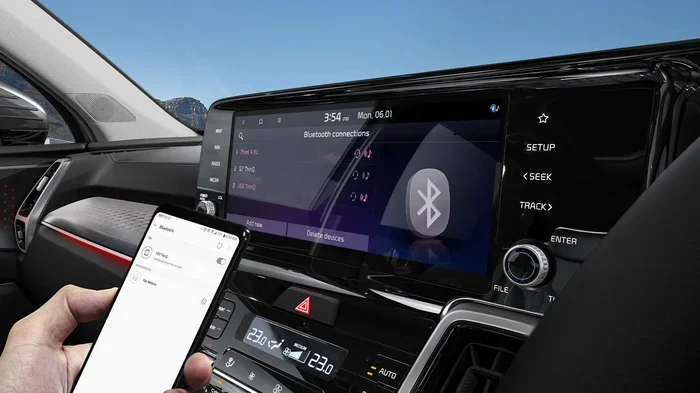
Most smartphones and devices have Bluetooth privacy settings that you should review regularly. On iPhone, go to Settings, then Bluetooth, and check which devices are paired. On Android, the path is similar under Settings and Connections.
Look for options like Bluetooth privacy mode or randomized MAC address. These features make it harder for attackers to track your device over time. If you see devices in your Bluetooth list that you no longer use, unpair them.
You should also check the privacy settings on your Bluetooth accessories. Wireless earbuds, smart speakers, and fitness trackers all have their own apps with security settings. Spend a few minutes exploring those settings. You might be surprised by what you find.
For families looking for safe and fun tech options, you might also explore 10 Gadgets To Make Moms Life Easier which features Bluetooth devices with family-friendly security features.
Bluetooth Safety for Families and Kids
Children are especially vulnerable to Bluetooth security risks. Their devices often have weaker security settings, and they may not understand the dangers of connecting to unknown devices.
Protecting Children’s Bluetooth Devices
If your child uses Bluetooth headphones, a smartwatch, or a tablet, take extra precautions. Start by setting up parental controls on the device. Most modern tablets and smartphones have built-in family safety features that limit Bluetooth connections to approved devices only.
Teach your kids not to accept Bluetooth connection requests from strangers. This sounds obvious, but children are naturally trusting. A friendly message asking to pair a device can be very tempting for a curious kid.
Consider using Bluetooth devices designed with children in mind. Many kids’ smartwatches and tablets now include parental controls and encrypted Bluetooth connections. These devices are built with security in mind from the ground up.
Also, make it a habit to review your child’s Bluetooth paired devices regularly. If you see a device you do not recognize, unpair it immediately and have a conversation about device safety.
When to Worry and When You Should Not
It is easy to fall into two extremes. Either you panic about every Bluetooth connection, or you ignore the risks entirely. The truth is somewhere in the middle.
Understanding the Real Risks vs. Myths
Let us clear up some common myths. You cannot be hacked through Bluetooth from miles away. Bluetooth range is limited, typically to about 30 feet for most consumer devices. An attacker needs to be physically close to you.
You also do not need to worry about every Bluetooth device you own. Modern devices with Bluetooth 5.0 or newer use strong encryption that is very difficult to crack. The risk is much higher for older devices, cheap gadgets, and devices that have not received software updates.
You should be concerned if you notice unusual activity on your Bluetooth devices. Signs to watch for include:
- Your battery draining faster than usual
- Unknown devices appearing in your Bluetooth list
- Strange sounds during phone calls
- Apps opening or closing on their own
- Your device feeling unusually warm
If you notice any of these signs, take action immediately. Turn off Bluetooth, restart your device, and run a security scan. When in doubt, consult a professional or contact the device manufacturer.
Final Thoughts on Bluetooth Security
Bluetooth is an amazing technology that has transformed the way we live and work. From wireless earbuds to smart home speakers, Bluetooth makes our devices more convenient and connected. But with that convenience comes responsibility.
The question “can anyone listen to my Bluetooth” has a real answer. Yes, it is possible under certain conditions. But with the right knowledge and habits, you can dramatically reduce your risk. Keep your devices updated, turn off Bluetooth when you are not using it, and be mindful of where and how you pair devices.
Security is not about being paranoid. It is about being prepared. A few simple steps today can save you from a major headache tomorrow. Stay safe, stay connected, and stay aware.
You might also want to explore 10 Gadgets To Make Moms Life Easier for more Bluetooth tools that combine convenience with security for the whole family.
Frequently Asked Questions
Can someone hack my Bluetooth from a distance?
No, Bluetooth hacking requires the attacker to be within range, typically 30 feet or less for most devices. Bluetooth signals do not travel far enough for remote attacks from miles away. The attacker must be physically close to you.
How do I know if someone is connected to my Bluetooth?
Check your Bluetooth settings for unknown paired devices. Also watch for signs like rapid battery drain, strange sounds during calls, or unexpected data usage. If something feels off, turn off Bluetooth and investigate.
Is Bluetooth 5.0 more secure than older versions?
Yes, Bluetooth 5.0 and newer versions include stronger encryption and better security features. They also support longer range and faster data transfer, which makes connections more efficient and harder to intercept.
Can Bluetooth be used to track my location?
Yes, Bluetooth signals can be used for location tracking. Your device broadcasts unique identifiers that can be picked up by receivers. This is how some stores track customer movement, and it is also how Bluetooth trackers like AirTags work.
Should I turn off Bluetooth when I am not using it?
Yes, turning off Bluetooth when you are not actively using it is one of the best security practices. It closes the door on potential attackers and also saves battery life on your device.
Are cheap Bluetooth earbuds safe to use?
Cheap Bluetooth earbuds often use older Bluetooth versions with weaker encryption. They may also lack regular software updates. If possible, choose reputable brands that use Bluetooth 5.0 or newer and provide regular security updates.
=== CONCLUSION ===
Can anyone listen to my Bluetooth without me knowing? The answer is yes, but the risk is manageable. By understanding how Bluetooth works, recognizing the real threats, and following the security tips in this guide, you can enjoy the convenience of wireless technology with confidence. Stay informed, stay cautious, and keep your devices secure.