How Are Wifi Speakers Powered and What You Need to Know
Wifi speakers are powered through rechargeable batteries, wall outlets, USB cables, or even solar panels depending on the model. Understanding how your wifi speaker gets its power helps you choose the right charging method, extend battery life, and avoid common mistakes. This guide breaks down every power option so you can get the most out of your wireless speaker setup.
Key Takeaways
- Multiple Power Options: Wifi speakers can run on rechargeable lithium-ion batteries, AC wall adapters, USB charging, or even solar power depending on the design.
- Battery Life Varies: Most wifi speakers offer 8 to 20 hours of playback on a single charge, but usage volume and connectivity affect runtime significantly.
- Charging Matters: Using the right cable and adapter ensures faster, safer charging and prolongs battery health over time.
- Power Efficiency Differs: Some wifi speakers are designed for low power consumption, making them ideal for all-day use without frequent recharging.
- Safety First: Always use certified power adapters and avoid overcharging to protect both your speaker and your home.
📑 Table of Contents
- How Are Wifi Speakers Powered
- Types of Power Sources for Wifi Speakers
- Battery-Powered vs Plug-In Wifi Speakers
- How to Charge Your Wifi Speaker Properly
- Power Consumption and Efficiency
- Common Power Problems and How to Fix Them
- Expert Tips for Maximizing Your Wifi Speaker’s Power Life
- Final Thoughts
How Are Wifi Speakers Powered
Wifi speakers have changed the way we listen to music at home, outdoors, and everywhere in between. But one question keeps coming up: how are wifi speakers powered? The answer is more interesting than you might think. These handy devices use a mix of battery technology, wall power, and USB charging to keep the music flowing.
Whether you just bought your first wifi speaker or you are looking to upgrade, understanding the power side of things makes a big difference. It helps you pick the right model, charge it properly, and get the most hours of playback every day. Let us walk through everything you need to know about powering your wireless speaker.
The good news is that most wifi speakers are designed to be simple and user-friendly. You do not need an engineering degree to figure out where the power goes. Still, knowing the basics gives you an edge when it comes to battery life, charging speed, and overall performance. So let us dive right in.
Why Power Matters for Your Wifi Speaker
Power is the backbone of any wireless speaker. Without it, your wifi speaker is just a fancy paperweight. The way a speaker is powered affects how long it plays, how portable it is, and even how good the sound quality stays over time.
Think about it this way. You would not buy a phone without understanding how it charges, right? The same logic applies here. When you know how your speaker gets and holds power, you can make smarter buying decisions and get better results every single day.
Types of Power Sources for Wifi Speakers
Not all wifi speakers are built the same way. Different models use different power sources, and each has its own strengths. Here are the most common ways wifi speakers get their energy.
Rechargeable Lithium-Ion Batteries
The most popular power source for portable wifi speakers is the rechargeable lithium-ion battery. These batteries are lightweight, hold a lot of charge, and can be recharged hundreds of times. Almost every major brand uses them, from JBL to Bose and Sonos.
Lithium-ion batteries are great because they do not suffer from the “memory effect” that older battery types had. You can charge them partially without hurting their lifespan. Most speakers with these batteries offer between 8 and 20 hours of playback per charge, depending on volume and features used.
One thing to keep in mind is that battery capacity is measured in milliamp hours (mAh) or watt hours (Wh). Higher numbers mean longer runtime. When shopping, look for this spec to compare models side by side.
AC Wall Adapters
Many wifi speakers come with an AC wall adapter for permanent or semi-permanent setups. These plug directly into a wall outlet and power the speaker continuously. You will often find this design in home stereo systems and smart speakers like the Google Nest Audio or Amazon Echo.
Wall-powered speakers do not need to be charged. They draw power directly from your home’s electrical system. This means unlimited playback as long as the speaker stays plugged in. The trade-off is that you lose some portability.
If you plan to keep your speaker in one spot, like on a kitchen counter or a bookshelf, a wall adapter is a fantastic option. It also means you never have to worry about the battery dying mid-podcast.
USB Charging
USB charging is another common way to power wifi speakers, especially smaller portable models. You can plug them into a laptop, a wall USB charger, or even a portable power bank. This flexibility is a huge plus for people who love taking their speakers on the go.
Not all USB cables are the same, though. Some speakers use standard USB-A cables, while others use USB-C. Using the wrong cable can slow down charging or, in rare cases, damage the device. Always check what your speaker needs before grabbing any old cable off the shelf.
Interestingly, not all USB cables are the same for charging, and this applies directly to wifi speakers too. A high-quality cable with proper wattage support can cut your charging time in half.
Solar Power and Alternative Options
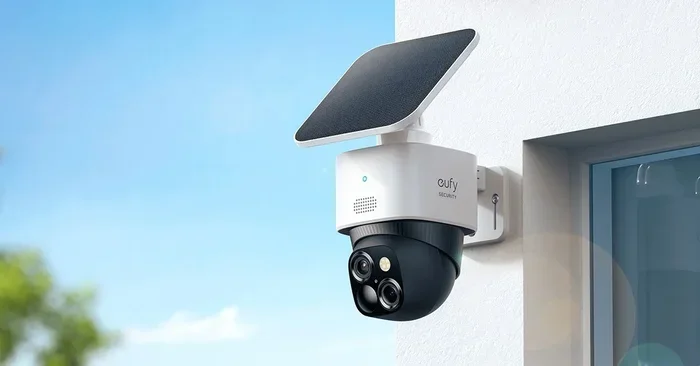
Some newer wifi speakers feature built-in solar panels or support external solar chargers. These are perfect for camping trips, backyard parties, or anyone who wants a greener power option. Solar-powered speakers are still niche, but they are growing in popularity.
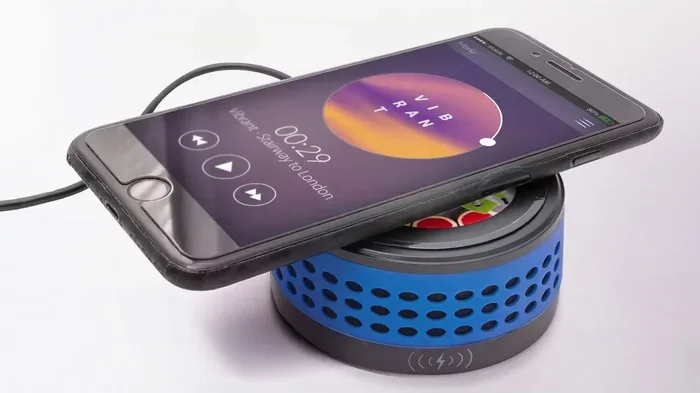
Other alternative power options include hand-crank generators and wireless charging pads. These are less common but show up in specialty models. If sustainability matters to you, keep an eye out for these innovative designs.
Battery-Powered vs Plug-In Wifi Speakers
One of the biggest decisions you will face when buying a wifi speaker is choosing between battery-powered and plug-in models. Each type has clear advantages, and the right choice depends on how and where you plan to use the speaker.
Battery-Powered Wifi Speakers
Battery-powered wifi speakers are all about portability. You can carry them to the beach, the park, the shower, or the backyard. As long as the battery is charged, you have music anywhere.
These speakers typically weigh less and are built with durability in mind. Many are waterproof or at least splash-resistant. The downside is that you need to keep track of charging, and battery life will eventually degrade over several years of use.
If you love wireless freedom, a battery-powered wifi speaker is the way to go. Just make sure you charge it after every few uses to keep the battery healthy.
Plug-In Wifi Speakers
Plug-in wifi speakers are designed for stationary use. They sound great, never run out of power mid-song, and often deliver stronger audio performance because they do not need to conserve battery.
These speakers tend to be larger and offer richer sound with deeper bass. They are ideal for home offices, living rooms, or any space where you do not need to move the speaker around.
The main drawback is that you are tied to a wall outlet. You cannot just pick it up and bring it to the pool. But for home use, the convenience of always-on power is hard to beat.
Which One Should You Choose?
Here is a quick comparison to help you decide.
- Portability: Battery-powered wins hands down.
- Sound Quality: Plug-in models often deliver more power and deeper sound.
- Convenience: Plug-in speakers never need charging, but battery-powered speakers go anywhere.
- Price: Both types are available at various price points, so budget is not a major differentiator.
Think about where you will use the speaker most. If it is mostly at home, go plug-in. If you want it to travel with you, battery-powered is the clear winner.
How to Charge Your Wifi Speaker Properly
Charging seems simple enough, but there are right ways and wrong ways to do it. How you charge your wifi speaker directly affects battery health, charging speed, and long-term performance.
Use the Right Charger and Cable
Always use the charger and cable that came with your speaker, or a certified replacement. Cheap knockoff cables can deliver inconsistent power, which stresses the battery and slows down charging.
If your speaker uses USB-C, make sure the cable supports the right power delivery standard. A standard USB 2.0 cable will charge much slower than a USB-C cable with power delivery support. This is especially true for speakers with larger batteries.
Avoid Overcharging
Most modern wifi speakers have built-in protection against overcharging. Once the battery hits 100 percent, the charging circuit stops pushing power. However, it is still a good habit to unplug the speaker once it is fully charged.
Leaving a speaker plugged in for days on end is not ideal. It keeps the battery at maximum voltage for extended periods, which can slightly reduce battery lifespan over months and years.
Charge in a Cool, Dry Place
Heat is the enemy of lithium-ion batteries. Avoid charging your wifi speaker in direct sunlight or near a heat source. A cool, dry room is the best environment for safe and efficient charging.
Similarly, do not charge your speaker right after heavy use when the battery is hot. Let it cool down for a few minutes first. This small habit can add years to your battery’s life.
How Long Does Charging Take?
Charging times vary widely depending on battery size and charger power. Most wifi speakers take between 2 and 4 hours to fully charge from empty. Smaller portable speakers often charge faster, while larger speakers with bigger batteries take a bit longer.
Quick tip: Many speakers have an LED indicator that shows charging status. A solid light usually means full, while a blinking light means it is still charging. Check your speaker’s manual if you are unsure what the lights mean.
Power Consumption and Efficiency
Not all wifi speakers use power the same way. Some are incredibly efficient, while others drain the battery quickly, especially at high volumes. Understanding power consumption helps you get the most out of every charge.
What Affects Power Usage?
Several factors determine how much power your wifi speaker draws:
- Volume Level: Higher volume uses more power. Playing at 50 percent volume uses significantly less battery than maxing it out.
- Connectivity: Wifi and bluetooth both use power. If you are connected to wifi and also streaming via bluetooth, the speaker uses more energy than a simple bluetooth connection alone.
- Built-In Features: Lights, voice assistants, and extra drivers all draw power. A speaker with RGB lights and Alexa built in will use more battery than a basic model.
- Audio Content: Bass-heavy music at high volume demands more power than a podcast at moderate volume.
How to Reduce Power Consumption
Want your wifi speaker to last longer on a single charge? Try these simple tips:
- Keep the volume at a moderate level.
- Turn off LED lights if your speaker has them.
- Use bluetooth instead of wifi when possible for basic streaming.
- Disable the voice assistant if you do not use it.
- Turn off the speaker when not in use instead of leaving it on standby.
These small changes add up and can extend your runtime by a couple of hours or more. It is easy to do and makes a real difference.
Common Power Problems and How to Fix Them
Even with the best wifi speakers, power issues can pop up. Here are the most common problems and what you can do about them.
Speaker Won’t Turn On
If your speaker will not turn on, the battery may be completely drained. Try plugging it in and waiting at least 30 minutes before attempting to power it on. Sometimes deeply drained batteries need a long charge before they wake up.
If that does not work, try a different cable or charger. A faulty cable is one of the most overlooked reasons a speaker will not charge. Also check the power outlet to make sure it is working.
Battery Drains Too Fast
Batteries degrade over time, especially after 2 to 3 years of regular use. If your speaker used to last 12 hours but now dies after 4, the battery is likely wearing out.
You can also check if any background features are draining power. Voice assistants and constant wifi searching can eat through battery surprisingly fast. Turn off features you do not actively use.
Charging Takes Too Long
If charging feels slower than it should, inspect your cable first. Damaged or worn-out cables are a common culprit. Also make sure you are using a wall adapter with enough wattage. A low-power USB port on a computer will charge much slower than a proper wall charger.
And remember, not all cables handle the same amount of current. A quality usb cable for charging makes a noticeable difference in speed and safety.
Expert Tips for Maximizing Your Wifi Speaker’s Power Life
Getting the most out of your wifi speaker’s battery comes down to a few smart habits. These tips come straight from what works best for long-term battery health.
First, do not let the battery hit zero percent every time. Charging between 20 and 80 percent is the sweet spot for lithium-ion longevity. Think of it like eating a balanced meal instead of starving and then bingeing.
Second, store your speaker in a cool, dry place when not in use. Extreme heat and cold both harm battery performance. A bedroom closet or a desk drawer is perfect.
Third, update your speaker’s firmware when updates are available. Manufacturers often include battery optimization improvements in firmware updates. A simple update can make your speaker more power-efficient.
Fourth, if you are buying a new speaker, look for models with power-saving modes. Many modern wifi speakers include an auto-sleep feature that turns the speaker off after a period of inactivity. This saves power and extends battery life.
Finally, keep your speaker clean. Dust and debris can block vents and cause the speaker to heat up during charging or playback. Heat means more stress on the battery, which means shorter lifespan over time.
Final Thoughts
So how are wifi speakers powered? The answer is that they use a combination of rechargeable batteries, wall adapters, USB cables, and sometimes even solar energy. Each power source has its own benefits, and the best choice depends on your lifestyle and how you plan to use the speaker.
Understanding the power side of your wifi speaker helps you get better performance, longer battery life, and fewer headaches. Whether you prefer the freedom of a battery-powered model or the steady reliability of a plug-in speaker, knowing how to charge and care for the power source is the key.
Take a few minutes to learn about your specific model. Check the manual, follow the charging tips above, and treat your speaker’s battery well. A little attention goes a long way toward making sure your music never stops.
With the right knowledge and a few simple habits, your wifi speaker will keep powering up your favorite playlists for years to come. Enjoy the music and happy listening.
Frequently Asked Questions
Can I use any USB cable to charge my wifi speaker?
Not all USB cables are created equal. While most wifi speakers will work with any standard USB cable, using the cable that came with the speaker or a certified high-quality cable ensures faster and safer charging. Cheap or damaged cables can slow down charging and may even damage the battery over time.
How long does a wifi speaker battery last on a single charge?
Most wifi speakers last between 8 and 20 hours on a single charge. The exact runtime depends on the volume level, connectivity type, and features used. Speakers with larger battery capacity generally last longer, so check the mAh rating when comparing models.
Can I leave my wifi speaker plugged in all the time?
Yes, you can leave a wifi speaker plugged in, especially if it uses a wall adapter for continuous power. Most modern speakers have built-in protection that stops charging once the battery reaches 100 percent. However, for battery-powered models, it is better to unplug once fully charged to preserve long-term battery health.
Do wifi speakers use a lot of electricity?
Wifi speakers are generally very energy-efficient. A typical wifi speaker uses between 5 and 20 watts depending on volume and features. This is similar to a small light bulb, so running one all day costs very little on your electricity bill.
What should I do if my wifi speaker battery is draining too fast?
First, check if any power-hungry features like voice assistants or LED lights are enabled. Lowering the volume and turning off unused connectivity options can help. If the battery still drains quickly after these steps, the battery may be degrading and could need replacement after several years of use.
Can I use a power bank to charge my wifi speaker outdoors?
Absolutely. Most wifi speakers charge via USB, so a portable power bank is a great option for outdoor use. Look for a power bank with at least 10,000 mAh capacity to give your speaker one or two full charges. Just make sure the power bank output matches your speaker’s charging requirements.