Examples Of Hardware Firewalls To Protect Your Business
Hardware firewalls are dedicated security devices that sit between your business network and the outside world, filtering every packet of data that enters or leaves. They offer stronger protection than software solutions because they work independently of individual computers. In this guide, we walk through real examples of hardware firewalls, how they work, and why every business needs one.
This is a comprehensive guide about Examples Of Hardware Firewalls.
Key Takeaways
- Hardware firewalls act as a physical barrier between your business network and external threats like hackers and malware.
- Next-generation firewalls (NGFW) combine traditional filtering with deep packet inspection and intrusion prevention.
- UTM appliances bundle multiple security features like antivirus, VPN, and content filtering into one device.
- Proper firewall deployment requires careful planning, regular updates, and ongoing monitoring for best results.
- Small businesses benefit too from affordable hardware firewall options designed for lower traffic volumes.
- Enterprise-grade firewalls from brands like Cisco, Fortinet, and Palo Alto offer advanced threat protection at scale.
[FEATURED_IMAGE_PLACEHOLDER]
What Is a Hardware Firewall and Why Does It Matter?
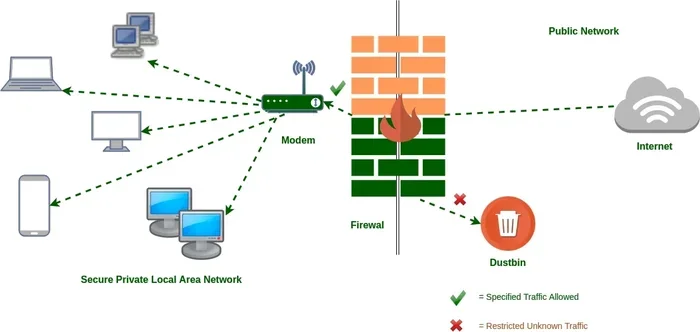
A hardware firewall is a physical device that sits at the edge of your network. It inspects every data packet that tries to enter or leave your system. Think of it like a bouncer at a club door. It checks everyone before letting them in.
Unlike software firewalls that run on individual computers, a hardware firewall appliance protects your entire network at once. This makes it a cornerstone of any solid network security strategy. When you invest in threat protection hardware, you’re building a strong first line of defense.
Many business owners think they don’t need a hardware firewall. They rely on antivirus software or the router that came with their internet plan. But those tools alone are not enough. Cyber threats evolve fast, and your perimeter defense needs to keep up. A dedicated hardware device handles this job much better.
The basic components of microprocessors inside these appliances work tirelessly to analyze traffic at high speeds. They can process millions of packets per second without slowing down your network. That kind of power is essential for any business that depends on a stable and secure business network.
Top Examples of Hardware Firewalls for Businesses
Not all hardware firewalls are the same. Different businesses need different levels of protection. Let’s explore the most common examples of hardware firewalls that you can consider for your organization.
1. Unified Threat Management (UTM) Appliances
A UTM appliance is a single device that combines multiple security features. It includes firewall filtering, antivirus scanning, intrusion detection, and sometimes even content filtering. All of this runs on one security appliance, which makes it very convenient.
UTM devices are popular among small and medium-sized businesses. They are easy to set up and manage. You don’t need a large IT team to run them. Many UTM firewall models also support VPN connections, so remote workers can stay secure.
Here are some well-known UTM brands:
- Fortinet FortiGate – Known for strong performance and affordable pricing.
- Sophos XG – Offers excellent threat intelligence and easy management.
- WatchGuard – Great for businesses that need reliable network perimeter security.
One major advantage of a UTM device is that it simplifies your security stack. Instead of juggling multiple tools, you get everything in one box. This also reduces the chance of configuration gaps that hackers could exploit.
2. Next-Generation Firewalls (NGFW)
Next-generation firewalls go far beyond basic packet filtering. They use deep packet inspection to look inside each data packet. This means they can detect hidden threats that traditional firewalls would miss.
NGFWs also include application awareness. They can identify which apps are being used on your network and apply firewall rules accordingly. For example, you can block social media apps during work hours while allowing business tools like email and cloud storage.
These devices are ideal for enterprise security needs. They handle complex environments with many users and devices. Leading NGFW brands include:
- Palo Alto Networks – Offers industry-leading threat prevention.
- Cisco Firepower – A trusted name in enterprise security with deep integration.
- Check Point – Known for robust intrusion prevention capabilities.
If your business handles sensitive data like customer records or financial information, an NGFW is a smart choice. The intrusion prevention engine actively blocks attacks in real time, giving you peace of mind.
3. Traditional Packet Filtering Firewalls
Packet filtering is the oldest and most basic type of firewall technology. It looks at the header of each data packet and makes decisions based on source IP, destination IP, and port numbers. This type of firewall deployment is simple but effective for basic needs.
Many routers include built-in packet filtering. However, a standalone hardware firewall with this capability offers better performance. It won’t slow down your network traffic the way a software solution might.
Packet filtering works well for businesses with straightforward security needs. It’s affordable and easy to maintain. But it does have limitations. It cannot inspect the contents of packets, so it may miss advanced threats.
4. Hardware Firewalls with VPN Support
Remote work has made VPN support a must-have feature. A hardware firewall with built-in VPN lets you create secure tunnels for remote employees. This ensures that data protection remains strong even when workers are off-site.
These devices encrypt all traffic between the remote user and your network. No one can intercept or read the data. Brands like Cisco and Fortinet offer models with excellent VPN capabilities.
Some devices also support split tunneling. This lets remote workers access the internet directly for non-work tasks while keeping work traffic routed through the secure tunnel. It improves speed without compromising security gateway protection.
5. Cloud-Managed Hardware Firewalls
Cloud-managed firewall appliances let you control your security from anywhere. You access a web dashboard to monitor traffic, update firewall rules, and receive alerts. This is perfect for businesses with multiple locations or remote teams.
These devices often come with automatic updates. The manufacturer pushes new threat definitions regularly. You don’t have to manage updates manually. This reduces the workload on your IT team and keeps your network security current.
Cloud-managed models also provide detailed reports. You can see which devices are accessing your network and what kind of traffic they generate. This visibility helps you spot suspicious activity early.
How Hardware Firewalls Protect Your Business Network
Understanding how a hardware firewall works helps you appreciate its value. Let’s break down the key ways these devices defend your business network.
Packet Inspection and Filtering
Every piece of data that travels across your network is broken into packets. A hardware firewall examines each packet closely. It checks the source, destination, and type of traffic. If a packet doesn’t meet your firewall rules, it gets blocked.
This happens in milliseconds. Your employees won’t even notice the filtering process. But behind the scenes, the firewall is working hard to keep threats out. It stops unauthorized access before it can reach your systems.
Intrusion Detection and Prevention
Many modern firewalls include intrusion detection and intrusion prevention systems. These tools monitor your network for suspicious patterns. If they detect an attack, they can block it immediately.
Intrusion prevention goes a step further. It actively stops the attack in progress. This is different from intrusion detection, which only alerts you. The prevention feature takes action automatically, which is critical when seconds matter.
Bandwidth Management
Hardware firewalls don’t just protect your network. They also help manage bandwidth management. You can prioritize certain types of traffic, like video calls or customer-facing applications. This ensures your most important services always run smoothly.
Some firewalls even let you set usage limits for specific users or departments. This prevents one person from hogging all the bandwidth. It keeps your network running at peak performance.
Content Filtering
Content filtering lets you block access to certain websites or categories of content. You can prevent employees from visiting malicious sites or wasting time on non-work-related pages. This adds another layer of cyber threat protection.
Many firewalls also scan downloaded files for malware. If someone tries to download a dangerous file, the firewall blocks it. This kind of proactive threat protection is invaluable for keeping your systems clean.
Hardware Firewall vs Software Firewall: Which Is Better?
It’s a common question. Should you use a hardware firewall or a software firewall? The truth is, both have their place. But for business protection, hardware firewalls offer clear advantages.
A software firewall runs on individual computers. It protects that one device. But it doesn’t protect your entire network. If a laptop connects from home or a guest joins your Wi-Fi, that device may not have a software firewall installed.
A hardware firewall appliance protects every device on your network. It works at the perimeter, before traffic reaches any individual computer. This centralized approach is much more efficient and reliable.
Here’s a quick comparison:
- Hardware firewalls protect the whole network and work independently of individual devices.
- Software firewalls protect single devices and rely on the user to keep them updated.
- Hardware solutions require upfront investment but offer better long-term value.
- Software solutions are cheaper upfront but harder to manage across many devices.
For any business serious about network security, a hardware firewall is the better choice. It provides consistent protection without depending on each user’s setup. Think of it as the difference between a security guard at the front door and asking every employee to lock their own office.
When you’re setting up your network, you might also consider how your devices connect. For instance, if you’re using wired connections, you’ll want to understand are there two types of micro USB cables for your hardware setup. Similarly, if you’re managing printers on your network, knowing are there different types of USB printer cables helps you plan your infrastructure properly.
How to Choose the Right Hardware Firewall for Your Business
Choosing the right hardware firewall depends on several factors. Not every business has the same needs. Here’s what you should consider before making a purchase.
Assess Your Network Size
How many devices connect to your network? A small office with 10 computers has very different needs than a company with 500 devices. Make sure the firewall you choose can handle your network traffic without becoming a bottleneck.
Check the device’s throughput rating. This tells you how much data it can process per second. If you buy a firewall that’s too small for your network, it will slow everything down. On the other hand, buying one that’s too large wastes money.
Consider Your Security Needs
What kind of data do you handle? If you store customer payment information, you need strong data protection features. Look for firewalls with encryption, intrusion prevention, and compliance certifications.
If you have remote workers, prioritize models with robust VPN support. If you run an e-commerce site, you need advanced threat protection to defend against attacks targeting online transactions.
Think About Management and Maintenance
Do you have an IT team, or are you managing everything yourself? Some firewall appliances require technical expertise to configure and maintain. Others are designed for easy setup and day-to-day management.
Cloud-managed options are great for businesses without dedicated IT staff. They handle updates and monitoring automatically. You just log in to the dashboard when you need to check something.
Also consider the buying refurbished tech option. Many businesses save significant money by purchasing certified refurbished firewall appliances. These devices are tested and certified to work like new. They offer the same protection at a fraction of the cost.
Check for Scalability
Your business will grow. Your firewall should grow with it. Look for models that allow you to add features or upgrade capacity as needed. This saves you from replacing the entire device every few years.
Scalable firewall deployment also means you can add new sites or offices without overhauling your security setup. Just connect the new location to your existing firewall infrastructure and configure the rules.
Common Mistakes Businesses Make With Hardware Firewalls
Even the best hardware firewall won’t protect you if it’s not set up correctly. Here are some common mistakes to avoid.
Neglecting Regular Updates
Firewall firmware needs regular updates. These updates patch security vulnerabilities and improve performance. If you skip updates, your device becomes an easy target for attackers.
Set a schedule to check for updates at least once a month. Many modern devices support automatic updates. Enable this feature if available. It removes the burden from your team.
Overly Permissive Rules
It’s tempting to set firewall rules that allow everything through. After all, you don’t want to block anything important. But overly permissive rules defeat the purpose of having a firewall in the first place.
Review your rules regularly. Remove anything that’s no longer needed. Apply the principle of least privilege. Only allow the traffic that’s absolutely necessary for your business to function.
Ignoring Logs and Alerts
A hardware firewall generates logs and alerts. These tell you what’s happening on your network. If you ignore them, you could miss warning signs of an attack.
Make it a habit to review your firewall logs weekly. Look for unusual patterns or repeated blocked attempts. These could be signs that someone is probing your network perimeter for weaknesses.
Using Default Passwords
Many hardware firewalls ship with default admin passwords. Leaving these unchanged is a serious security risk. Hackers know the default credentials for popular models and can easily gain access.
Change the admin password during initial setup. Use a strong, unique password. This simple step dramatically reduces your risk of unauthorized access to your security gateway.
Forgetting About Wireless Security
Hardware firewalls protect wired connections well. But what about Wi-Fi? If your wireless network isn’t secured, attackers can bypass your firewall entirely.
Make sure your Wi-Fi uses WPA3 encryption. Change the default SSID. Disable WPS. These steps complement your hardware firewall and close potential gaps in your network security setup.
You might also wonder about connectivity options. If you’re deciding between wired and wireless setups, understanding whether you can get a hotspot instead of Wi-Fi can help you make better infrastructure decisions for your office.
Expert Insights on Hardware Firewall Best Practices
We spoke with several IT security professionals about their top tips for hardware firewall management. Here’s what they had to say.
Start with a network assessment. Before buying any device, map out your network. Know how many devices connect, what kind of traffic flows, and where your vulnerabilities lie. This helps you choose the right firewall appliance from the start.
Layer your security. A hardware firewall is essential, but it shouldn’t be your only defense. Combine it with antivirus software, regular backups, and employee training. This layered approach, sometimes called defense in depth, gives you much stronger protection.
Train your employees. Many security breaches start with human error. Teach your team to recognize phishing emails and suspicious links. A well-trained workforce is one of the best defenses against cyber threats.
Monitor performance regularly. Your firewall should be checked at least quarterly. Review logs, update firmware, and adjust firewall rules as your business needs change. Consistent monitoring keeps your security appliance running at peak efficiency.
Consider professional installation. If you’re not confident in your technical skills, hire a professional. A proper firewall deployment ensures that every setting is optimized for your specific environment. It’s worth the investment for the peace of mind it provides.
Conclusion
Examples of hardware firewalls show us that there’s no one-size-fits-all solution. Every business has unique needs, and the right firewall depends on your size, budget, and security requirements. Whether you choose a UTM appliance, a next-generation firewall, or a simple packet filtering device, the key is to have one in place.
A hardware firewall is one of the most important investments you can make for your business. It protects your data, your customers, and your reputation. It gives you the confidence to operate online without constantly worrying about attacks.
Take the time to evaluate your options. Consider your current needs and future growth. And don’t forget to maintain your device properly. Regular updates, monitoring, and rule reviews keep your network security strong over time.
Start today. Explore the examples of hardware firewalls discussed in this guide and find the one that fits your business. Your future self will thank you when you avoid a costly security breach.
When planning your full network infrastructure, remember that connectivity matters too. Understanding different types of Bluetooth connections can help you secure all wireless devices on your network. Also, if you’re exploring ways to save on equipment, check out buying refurbished tech to get quality hardware at a better price.
Frequently Asked Questions
What is the main difference between a hardware firewall and a software firewall?
A hardware firewall is a physical device that protects your entire network at the perimeter. A software firewall runs on individual computers and protects only that device. For business protection, hardware firewalls offer centralized and more reliable security.
Do small businesses really need a hardware firewall?
Yes, absolutely. Small businesses are often targeted by cybercriminals because they typically have weaker defenses. A hardware firewall provides strong perimeter protection without requiring a large IT team to manage it.
How often should I update my hardware firewall firmware?
You should check for firmware updates at least once a month. Many modern firewalls support automatic updates, which is the easiest way to ensure your device always has the latest security patches.
Can a hardware firewall block all types of cyber threats?
A hardware firewall blocks many threats, but no single device can stop everything. For best results, combine your firewall with antivirus software, regular backups, and employee security training. This layered approach covers more attack vectors.
What should I look for when buying a hardware firewall?
Consider your network size, the type of data you handle, your budget, and whether you need VPN or remote access features. Also check the device’s throughput rating to make sure it can handle your network traffic without slowing things down.
Are refurbished hardware firewalls a good option?
Yes, certified refurbished firewalls can save you significant money while still providing strong protection. Make sure to buy from reputable sellers who test and certify the devices. This way, you get reliable performance at a lower cost.