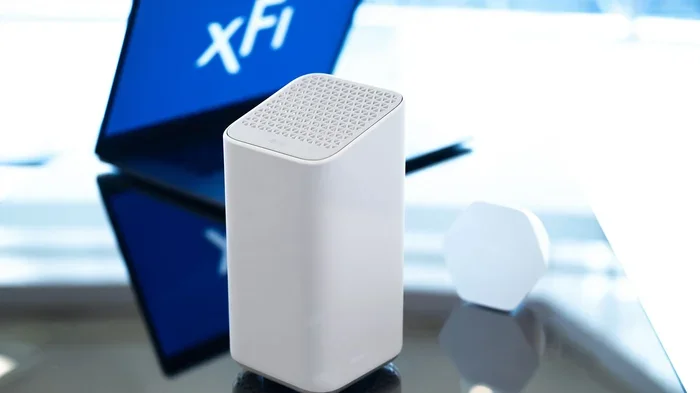
Does Xfinity Have Wi Fi 6 Here Is What You Need to Know
Yes, Xfinity offers Wi-Fi 6 through its xFi Gateway and xFi Advanced Gateway devices. Xfinity has rolled out Wi-Fi 6 and Wi-Fi 6E plans to select customers, delivering faster speeds, better range, and improved performance for smart homes. Whether you are a casual browser or a heavy streamer, understanding what Xfinity Wi-Fi 6 brings to the table helps you decide if an upgrade makes sense.
Does Xfinity have Wi-Fi 6? This is a question many homeowners are asking right now. With internet speeds getting faster and smart home devices multiplying, people want to know if their internet provider keeps up with the latest wireless technology. The short answer is yes. Xfinity has embraced Wi-Fi 6 and even Wi-Fi 6E in many of its plans and gateway devices. But there is more to the story than just a simple yes or no.
In this guide, we break down everything you need to know about Xfinity Wi-Fi 6. We cover what it is, which Xfinity plans include it, what equipment you need, and whether upgrading makes sense for your home. By the end, you will have a clear picture of where Xfinity stands with the latest wireless standard. You will also know exactly what to do next.
Wi-Fi 6 is the sixth generation of wireless networking technology. It is also known as 802.11ax. Compared to older standards like Wi-Fi 5 (802.11ac), Wi-Fi 6 offers significantly better speed, efficiency, and device handling. Xfinity has integrated Wi-Fi 6 into its newer gateway devices, making it available to customers on eligible plans. This means if you have a recent Xfinity installation or upgraded your equipment, you may already be enjoying Wi-Fi 6 benefits without even realizing it.
The wireless standard has become a big deal for households with many connected devices. Smart TVs, security cameras, gaming consoles, laptops, and phones all compete for bandwidth. Wi-Fi 6 handles this traffic much better than older standards. It uses technologies like OFDMA and MU-MIMO to manage multiple connections simultaneously. This reduces lag and improves the overall experience for everyone on the network.
Key Takeaways
- Xfinity offers Wi-Fi 6: Xfinity provides Wi-Fi 6 and Wi-Fi 6E through its xFi Advanced Gateway and xFi Gateway Pro devices.
- Faster speeds and better performance: Wi-Fi 6 delivers higher bandwidth, lower latency, and improved handling of multiple devices.
- Not all plans include it: Wi-Fi 6 availability depends on your Xfinity internet plan and the equipment you have.
- You may need new equipment: Older Xfinity gateways may not support Wi-Fi 6, so a hardware upgrade could be necessary.
- Wi-Fi 6E is the latest: Xfinity’s newest gateways support the 6GHz band for even less congestion and faster speeds.
- Smart homes benefit the most: Households with many connected devices see the biggest improvements with Wi-Fi 6.
- Check your plan: Contact Xfinity or log in to your account to confirm whether your current setup supports Wi-Fi 6.
📑 Table of Contents
- What Is Wi-Fi 6 and Why Does It Matter?
- Does Xfinity Offer Wi-Fi 6?
- Xfinity Wi-Fi 6 Plans and Pricing
- Xfinity Wi-Fi 6 Equipment: What You Need to Know
- How to Check If You Already Have Wi-Fi 6 with Xfinity
- Should You Upgrade to Xfinity Wi-Fi 6?
- Comparing Xfinity Wi-Fi 6 to Other Providers
- Final Thoughts
What Is Wi-Fi 6 and Why Does It Matter?
Understanding the Basics of Wi-Fi 6
Wi-Fi 6 is the newest wireless standard approved by the Wi-Fi Alliance. It builds on everything Wi-Fi 5 offered but adds major improvements. The most notable upgrades include faster data rates, better range, and the ability to connect more devices without slowdowns. Think of it like upgrading from a two-lane road to a four-lane highway. More data can flow at the same time, and traffic jams are less likely.
For the average home, this means smoother streaming, faster downloads, and less buffering. If you have ever experienced slow internet when everyone in the house is online, Wi-Fi 6 is designed to fix that problem. It uses a technique called OFDMA, which stands for Orthogonal Frequency Division Multiple Access. This allows the router to talk to multiple devices at once instead of one at a time.
Another key feature is MU-MIMO, or Multi-User Multiple Input Multiple Output. This lets your router communicate with several devices simultaneously. Older routers could only talk to one device at a time, even if they used MU-MIMO technology. Wi-Fi 6 changes that completely. The result is a much more responsive and reliable home network.
Key Benefits of Wi-Fi 6 for Home Users
- Faster speeds: Wi-Fi 6 can deliver up to 9.6 Gbps in theory, though real-world speeds are lower. Still, it is much faster than Wi-Fi 5.
- Better device handling: It can manage dozens of devices without slowing down.
- Lower latency: Gaming and video calls become smoother with reduced lag.
- Improved battery life: Devices connected to Wi-Fi 6 use less power thanks to Target Wake Time technology.
- Better range: Wi-Fi 6 signals travel farther and penetrate walls better than older standards.
- Less congestion: In apartment buildings or neighborhoods with many networks, Wi-Fi 6 performs much better.
Does Xfinity Offer Wi-Fi 6?
Yes, Xfinity does offer Wi-Fi 6. The company has been rolling out Wi-Fi 6-capable gateway devices to its customers for several years now. If you are a current Xfinity subscriber, you may already have a Wi-Fi 6 gateway without knowing it. Xfinity uses two main types of gateways that support the latest wireless standard.
The first is the xFi Advanced Gateway, which supports both Wi-Fi 6 and Wi-Fi 6E. The second is the xFi Gateway Pro, which also features Wi-Fi 6 capabilities. These devices replace older gateways that only supported Wi-Fi 5 or earlier standards. When you rent or purchase one of these gateways from Xfinity, you get access to the latest wireless technology right out of the box.
However, availability depends on your specific Xfinity internet plan. Not all plans automatically include Wi-Fi 6 equipment. Some older plans may still use older gateway hardware. If you are unsure, you can check your account online or call Xfinity customer service. They can confirm whether your current plan and equipment support Wi-Fi 6.
It is also worth noting that Xfinity has been actively upgrading its network infrastructure to support the latest standards. This means new customers signing up for higher-tier plans are more likely to receive Wi-Fi 6 equipment automatically. Existing customers may need to request an equipment upgrade or visit a local Xfinity store to get a Wi-Fi 6 gateway.
Xfinity Wi-Fi 6 Plans and Pricing
Which Xfinity Plans Include Wi-Fi 6?
Xfinity offers Wi-Fi 6 access across several internet tiers. The higher your plan speed, the more likely you are to receive a Wi-Fi 6 gateway. Here is a general breakdown of how Xfinity plans relate to Wi-Fi 6 support:
- Performance Pro and above: These plans typically include the xFi Advanced Gateway with Wi-Fi 6 support.
- Gigabit and above: Higher-tier plans almost always come with Wi-Fi 6 equipment included.
- Entry-level plans: Some lower-speed plans may still use older gateway hardware. You may need to request an upgrade.
Xfinity also offers the xFi Complete and xFi Premium packages. These bundles include advanced gateway equipment, security features, and sometimes access to Xfinity WiFi hotspots nationwide. If you want the full Wi-Fi 6 experience, these packages are worth considering. They ensure you have the right hardware and support for the fastest wireless speeds available.
How Much Does Wi-Fi 6 Cost with Xfinity?
The cost of Wi-Fi 6 with Xfinity varies depending on your plan and whether you rent or buy the equipment. Most Xfinity internet plans include the gateway as part of your monthly bill. If you already pay the equipment rental fee, you may just need to request a gateway upgrade to get Wi-Fi 6. There is usually no extra charge for the upgrade itself, but you should confirm this with Xfinity before proceeding.
If you prefer to own your equipment, you can purchase a compatible Wi-Fi 6 router separately. However, this may affect your ability to use certain Xfinity features like xFi home coverage maps and advanced security tools. Many customers find that renting the xFi Advanced Gateway from Xfinity is the simplest and most cost-effective path to Wi-Fi 6.
Xfinity Wi-Fi 6 Equipment: What You Need to Know
The xFi Advanced Gateway
The xFi Advanced Gateway is Xfinity’s flagship router and modem combo. It supports the latest Wi-Fi 6 and Wi-Fi 6E standards. This device delivers speeds up to 1.2 Gbps on the 5GHz band and includes a built-in modem for Xfinity’s cable internet service. It is a powerful all-in-one solution for most households.
The xFi Advanced Gateway also features a dedicated 2.5 Gigabit Ethernet port. This is perfect for connecting a gaming PC or smart TV directly to the router for the fastest possible wired speeds. The device also supports Xfinity xFi advanced features like parental controls, device prioritization, and network security scanning.
The xFi Gateway Pro
The xFi Gateway Pro is another Wi-Fi 6 option from Xfinity. It offers slightly different specs compared to the Advanced Gateway but still delivers excellent Wi-Fi 6 performance. This gateway is designed for medium to large homes and provides solid coverage across multiple floors and rooms.
Both gateways are easy to set up through the Xfinity xFi app. The app lets you manage your network, see connected devices, run speed tests, and troubleshoot issues. It is a very user-friendly way to control your home wireless network without needing technical expertise.
Do You Need a Separate Wi-Fi 6 Router?
In most cases, no. The xFi Advanced Gateway and xFi Gateway Pro are powerful enough for most homes. However, if you have a very large house or experience dead zones, you might consider adding Xfinity xFi Mesh nodes. These extend your Wi-Fi 6 coverage throughout the home. They work seamlessly with Xfinity gateways and are a great solution for stubborn coverage problems.
Some power users prefer to use their own third-party Wi-Fi 6 router with Xfinity internet. This is possible in most cases, but you will need to put the Xfinity gateway into bridge mode first. This setup gives you more control over your network settings and can unlock advanced features not available in the xFi app. Just keep in mind that you may lose some Xfinity-specific tools when you go this route.
How to Check If You Already Have Wi-Fi 6 with Xfinity
If you are an existing Xfinity customer, you might wonder whether you are already using Wi-Fi 6. The good news is checking is very simple. You can do it from your phone or computer in just a few minutes.
- Open the Xfinity xFi app. Log in with your Xfinity account credentials.
- Go to the Gateway section. Look for your gateway device details.
- Check the wireless specifications. The app should display the Wi-Fi standard your gateway supports.
- Look for “Wi-Fi 6” or “802.11ax.” If you see either of these, you already have Wi-Fi 6.
You can also check the label on your physical gateway device. Most Xfinity gateways have a sticker on the bottom or back that lists the model number and supported standards. Search for the model number online if you are unsure what it means.
If you find that your current gateway does not support Wi-Fi 6, do not worry. Xfinity makes it easy to request an equipment upgrade. You can do this through the xFi app, online, or by calling customer service. In many cases, the new gateway will be shipped to you for free or at a small fee. Once it arrives, simply follow the setup instructions and you will be on Wi-Fi 6 in minutes.
Should You Upgrade to Xfinity Wi-Fi 6?
Who Benefits Most from Wi-Fi 6?
Wi-Fi 6 is not just for tech enthusiasts. It benefits a wide range of users. Here are some scenarios where upgrading to Xfinity Wi-Fi 6 makes the most sense:
- Large households: If you have five or more connected devices, Wi-Fi 6 handles the load much better than older standards.
- Gamers: Lower latency and more stable connections make gaming more enjoyable.
- Streamers: 4K streaming on multiple TVs simultaneously works flawlessly with Wi-Fi 6.
- Remote workers: Video calls and file uploads benefit from the improved bandwidth and stability.
- Smart home owners: Homes with many smart devices, from cameras to smart locks, perform better with Wi-Fi 6.
If you have a small household with only a few devices, you might not notice a huge difference. Wi-Fi 5 is still perfectly fine for basic browsing and light streaming. But as the number of connected devices grows, Wi-Fi 6 becomes increasingly valuable. It future-proofs your home network and ensures you are ready for whatever new technology comes next.
Common Mistakes to Avoid When Upgrading
- Not checking your plan: Some customers upgrade their router but not their internet plan. Make sure your plan speed matches your new Wi-Fi 6 equipment.
- Ignoring placement: Even the best Wi-Fi 6 router performs poorly if it is hidden in a closet or basement. Place it in a central, open location.
- Forgetting to update firmware: Keep your gateway firmware up to date for the best performance and security.
- Not securing your network: Use a strong password and enable WPA3 encryption if your gateway supports it.
- Skipping the Xfinity app: The xFi app offers useful tools like device management and coverage maps. Use them to get the most out of your Wi-Fi 6 setup.
Comparing Xfinity Wi-Fi 6 to Other Providers
Xfinity is not the only provider offering Wi-Fi 6. Other major ISPs like AT&T, Verizon, and T-Mobile also provide Wi-Fi 6 equipment to their customers. However, Xfinity has one of the largest Wi-Fi hotspot networks in the country. This means Xfinity customers get access to millions of hotspots nationwide, which is a huge advantage for people who work or travel frequently.
When it comes to raw speed and reliability, Xfinity Wi-Fi 6 holds its own against competitors. The xFi Advanced Gateway delivers excellent performance in real-world testing. For customers who also need TV and phone services bundled with internet, Xfinity’s Wi-Fi 6 offering is hard to beat. The combination of speed, equipment quality, and hotspot access makes it a compelling choice.
Final Thoughts
So, does Xfinity have Wi-Fi 6? The answer is a clear yes. Xfinity has made Wi-Fi 6 available through its xFi Advanced Gateway and xFi Gateway Pro devices. These gateways bring faster speeds, better device handling, and improved range to your home network. Whether you are a casual internet user or a power user with dozens of connected devices, Wi-Fi 6 is a meaningful upgrade.
If you are already an Xfinity customer, check your current equipment and plan to see if Wi-Fi 6 is available to you. If not, reaching out to Xfinity for an equipment upgrade is a simple process. The benefits of Wi-Fi 6 are real and noticeable. From smoother streaming to faster gaming, the upgrade is well worth it for most households. Take a few minutes today to check your setup and see if Xfinity Wi-Fi 6 is ready for you.
Also, if you are considering setting up a home network without a wired connection, you might want to explore how to connect your PC to Wi-Fi without Ethernet. This can help you get the most out of your wireless setup. And if you are concerned about network security, learning how to block a device from using your Xfinity Wi-Fi is a smart step to protect your network.
Finally, if you are exploring options for getting standalone Wi-Fi without a full cable package, check out whether you can get just Wi-Fi at home through Xfinity or other providers. Understanding all your options ensures you make the best decision for your household needs and budget.
Frequently Asked Questions
Does Xfinity charge extra for Wi-Fi 6?
In most cases, no. If you are on an eligible Xfinity internet plan, the Wi-Fi 6 gateway is included in your standard equipment rental fee. However, some lower-tier plans may not automatically include Wi-Fi 6 hardware. You may need to request an upgrade or switch to a higher-speed plan to get a Wi-Fi 6 gateway at no extra charge.
Can I use my own Wi-Fi 6 router with Xfinity internet?
Yes, you can use your own Wi-Fi 6 router with Xfinity internet. You will need to put the Xfinity gateway into bridge mode first. This allows your personal router to handle all Wi-Fi duties while the Xfinity gateway acts as a modem. Keep in mind that using your own router may limit access to Xfinity features like the xFi app and home security tools.
What is the difference between Wi-Fi 6 and Wi-Fi 6E?
Wi-Fi 6E is an extension of Wi-Fi 6 that adds support for the 6GHz wireless band. This band is less crowded than the 2.4GHz and 5GHz bands, which means less interference and faster speeds. Xfinity’s xFi Advanced Gateway supports both Wi-Fi 6 and Wi-Fi 6E, giving you access to the newest wireless technology available.
How do I know if my device supports Wi-Fi 6?
Most modern devices released in the last few years support Wi-Fi 6. Check your device specifications in the settings menu or on the manufacturer’s website. Look for “Wi-Fi 6” or “802.11ax” in the wireless specifications. Older devices will still connect to a Wi-Fi 6 network but will not be able to take advantage of the new features.
Will upgrading to Xfinity Wi-Fi 6 improve my internet speed?
Upgrading to Wi-Fi 6 can improve your wireless speeds, but your overall internet speed is still limited by your Xfinity internet plan. If you have a 400 Mbps plan, Wi-Fi 6 will help you get closer to that speed wirelessly. If your plan is slower, upgrading the router alone will not make your internet faster. You may need to upgrade your internet plan as well.
Do I need a technician to install a Xfinity Wi-Fi 6 gateway?
Not always. Many customers can request a Wi-Fi 6 gateway upgrade online or through the Xfinity app, and the new equipment ships to their home with simple setup instructions. However, if you need a technician visit to swap out existing equipment or run new cables, there may be an installation fee. Check with Xfinity to understand the options available for your specific situation.