Does Wifi 6e Improve Range Compared to Older Standards
WiFi 6E does improve range in some ways, but the real game-changer is less congestion and faster speeds on the new 6GHz band. Compared to WiFi 5 and WiFi 6, WiFi 6E offers a cleaner wireless experience with more available channels. If you are tired of slow connections and dead zones, understanding what WiFi 6E brings to the table can help you make a smarter upgrade decision.
Let us talk about something that confuses a lot of people. Does WiFi 6E improve range? It sounds like a simple question. But the answer is more interesting than you might think. WiFi 6E is the newest wireless standard, and it promises better speed, less lag, and wider coverage. But does it actually reach farther than older WiFi standards? The short answer is yes and no. The longer answer is what this article is all about.
In this guide, we will break down everything you need to know. We will compare WiFi 6E to WiFi 5 and WiFi 6. We will look at how the 6GHz band changes the game. And we will give you practical advice on whether upgrading makes sense for your home. Whether you are setting up a new router or trying to fix a weak signal, this guide has you covered.
Key Takeaways
- WiFi 6E opens up the 6GHz band: This new frequency range reduces interference and improves overall wireless performance.
- Range improvements are real but nuanced: The 6GHz band has shorter range than lower frequencies, but the lack of congestion makes connections more reliable.
- Older WiFi standards still work fine for many homes: WiFi 5 and WiFi 6 cover most everyday needs, but WiFi 6E is built for the future.
- Mesh systems benefit the most from WiFi 6E: Adding mesh WiFi to an existing router can maximize the range benefits of WiFi 6E.
- Hardware matters a lot: You need WiFi 6E-compatible devices and routers to see any improvement.
- Interference drops significantly: The 6GHz band is much less crowded than the 2.4GHz and 5GHz bands.
📑 Table of Contents
- What Is WiFi 6E and Why Does It Matter?
- How WiFi 6E Range Compares to Older Standards
- Does WiFi 6E Improve Range in Real Homes?
- The Role of the 6GHz Band in WiFi 6E Range
- What Equipment Do You Need for WiFi 6E?
- Common Mistakes That Limit WiFi 6E Range
- Expert Tips to Maximize WiFi 6E Range
- Is WiFi 6E Worth the Upgrade for Better Range?
- Conclusion
What Is WiFi 6E and Why Does It Matter?
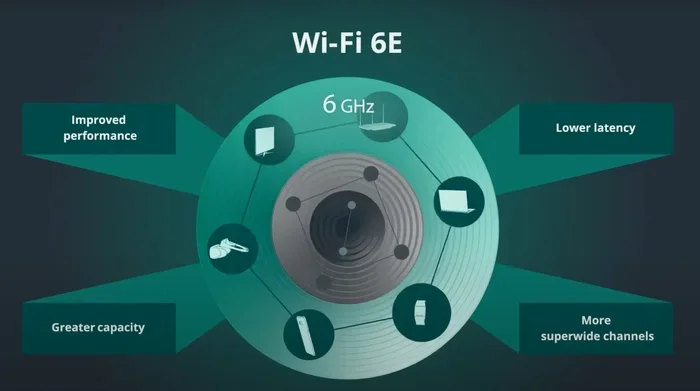
WiFi 6E stands for WiFi 6 Extended. It is an extension of the WiFi 6 standard. The big difference is that WiFi 6E adds access to the 6GHz frequency band. Older WiFi standards like WiFi 5 (also called 802.11ac) and WiFi 6 (802.11ax) only use the 2.4GHz and 5GHz bands. WiFi 6E opens up a brand new highway of wireless spectrum.
Think of it like adding extra lanes to a crowded highway. The 2.4GHz band is like a road that everyone uses. The 5GHz band is a little less crowded. But the 6GHz band is a whole new road with almost no traffic. This means your WiFi 6E devices face much less interference. Less interference leads to stronger connections and more stable performance.
The Three WiFi Frequency Bands
To understand WiFi 6E, you need to understand the three frequency bands. Here is how they compare:
- 2.4GHz band: This is the oldest and most widely used band. It has great range but is very crowded. Microwaves, Bluetooth devices, and older smart home gadgets all compete for space on this band.
- 5GHz band: This band offers faster speeds and less interference than 2.4GHz. However, its range is shorter, especially through walls and obstacles.
- 6GHz band (WiFi 6E only): This is the newest band. It offers the fastest speeds and the least congestion. However, its range is the shortest of the three bands.
So when people ask, does WiFi 6E improve range, the answer depends on what kind of range they mean. The 6GHz band does not reach as far as the 2.4GHz band. But because it is so clear and free from interference, your devices maintain a stronger connection over their effective range. This is a subtle but important distinction.
How WiFi 6E Range Compares to Older Standards
Now let us get into the real comparison. How does WiFi 6E range stack up against WiFi 5 and WiFi 6? This is where things get interesting. Each standard has its own strengths and weaknesses when it comes to coverage.
WiFi 6E vs WiFi 6
WiFi 6 and WiFi 6E share the same core technology. They both use OFDMA, MU-MIMO, and 1024-QAM modulation. The key difference is the addition of the 6GHz band in WiFi 6E. In terms of raw range on the 2.4GHz and 5GHz bands, WiFi 6E performs the same as WiFi 6. But the 6GHz band changes the overall picture.
Here is the thing about the 6GHz band. The signals on this band have a harder time penetrating walls and traveling long distances. The range of a 6GHz signal is typically shorter than a 5GHz signal. However, because there are so many more channels available and almost no interference, your devices stay connected more reliably within that range. In real-world terms, this means fewer dropped connections and more consistent speeds.
WiFi 6E vs WiFi 5
WiFi 5 (802.11ac) is an older standard that only uses the 5GHz band. It was a big step forward when it came out. But compared to WiFi 6E, it has some clear limitations:
- Fewer channels: WiFi 5 has far fewer channels available, which means more congestion in dense areas.
- Slower speeds: WiFi 6E offers much higher theoretical speeds thanks to wider channel widths and better modulation.
- Less efficient: WiFi 6E handles multiple devices much better, which is important for modern homes with dozens of connected gadgets.
When it comes to range, WiFi 5 on the 5GHz band has similar limitations to WiFi 6E on the 6GHz band. Both have shorter range than the 2.4GHz band. But WiFi 6E compensates with better efficiency and less interference, which can make the effective range feel longer.
Does WiFi 6E Improve Range in Real Homes?
This is the question most people really want answered. And the honest answer is: it depends on your home. Let us look at different scenarios to understand when WiFi 6E truly helps with range and coverage.
Small to Medium Apartments
If you live in a small apartment or a condo, WiFi 6E might not dramatically improve your range. In a small space, older WiFi standards already do a good job. The 6GHz band works best when you are relatively close to the router. In a small apartment, you are almost always close enough to get the full benefit of the 6GHz band.
However, you will still notice the difference in speed and stability. Because the 6GHz band is less congested, your devices will connect faster and stay connected more reliably. This is especially true if you live in an apartment building with many neighboring WiFi networks.
Large Houses with Multiple Floors
For larger homes, WiFi 6E can be a game-changer. But it works best when combined with the right setup. A single WiFi 6E router might still struggle to reach every corner of a large house. This is where adding extra access points or a mesh system becomes important.
If you have a large home and are considering your options, you might want to look into whether you can extend WiFi with an Ethernet cable to connect additional access points. This approach gives you the best of both worlds: the speed of WiFi 6E and the coverage you need for a big home.
Dense Neighborhoods
Living in a neighborhood with lots of WiFi networks? The 6GHz band is your best friend. Because this band is brand new, very few devices and routers currently use it. This means your WiFi 6E connection will face almost no interference from your neighbors. In crowded areas, this is a huge advantage over older standards.
The practical result is a more stable and reliable connection, even at distances where a 2.4GHz or 5GHz signal might struggle. So in a way, WiFi 6E does improve effective range in dense environments because the signal stays clean and strong for longer.
The Role of the 6GHz Band in WiFi 6E Range
The 6GHz band is the heart of WiFi 6E. It is what sets this standard apart from everything that came before. Let us take a closer look at what makes this band special and how it affects range.
More Channels, Less Congestion
The 6GHz band offers 1200MHz of spectrum. That is a huge amount of space compared to the 2.4GHz and 5GHz bands. With more channels available, your devices are less likely to compete for bandwidth. This reduces latency and improves connection stability.
Think of it this way. Imagine you are trying to have a conversation at a loud party. The 2.4GHz band is like shouting over loud music. The 5GHz band is like talking in a busy restaurant. The 6GHz band is like having a quiet room to yourself. Your voice carries clearly, and you do not have to strain to be heard.
Why the 6GHz Band Has Shorter Range
Every wireless signal loses strength as it travels. Higher frequency signals lose strength faster than lower frequency signals. This is a basic law of physics. The 6GHz band operates at a higher frequency than both 2.4GHz and 5GHz. So it naturally has a shorter range.
But here is the important part. The 6GHz band also uses wider channels, often 160MHz or even 320MHz wide. These wide channels carry a massive amount of data. They are great for speed and capacity. But wider channels are more susceptible to obstacles like walls and furniture. This is why the 6GHz band works best when your devices are in the same room or nearby.
Using the Right Band for the Right Purpose
One of the best things about WiFi 6E is that it is smart about band selection. Modern WiFi 6E routers can assign devices to the best available band automatically. Your phone might connect to the 6GHz band when you are in the same room as the router. When you walk into the kitchen down the hall, it might switch to the 5GHz band. And when you go out to the backyard, it might use the 2.4GHz band for better range.
This smart switching means you get the best of all three bands. You get speed when you need it, and range when you need that instead. It is one of the biggest advantages WiFi 6E has over older standards.
What Equipment Do You Need for WiFi 6E?
Here is something important that many people overlook. WiFi 6E only works if both your router and your devices support it. You cannot get the benefits of WiFi 6E with an older router or an older phone. Let us break down what you need.
WiFi 6E Routers
To use the 6GHz band, you need a WiFi 6E router. These routers have all the features of WiFi 6 routers plus the ability to broadcast on the 6GHz band. Popular WiFi 6E routers include models from brands like ASUS, Netgear, TP-Link, and Linksys.
If you are considering buying your own equipment instead of renting from your internet provider, you might wonder if you can buy your own WiFi box. The answer is yes, as long as it is compatible with your internet service provider and supports WiFi 6E.
WiFi 6E Devices
Your devices also need to support WiFi 6E. Many newer smartphones, laptops, and tablets now include WiFi 6E support. But older devices will only connect to the 2.4GHz or 5GHz bands. They will not be able to use the 6GHz band at all.
This means that even if you buy a WiFi 6E router, your older devices will not see any range or speed improvement. They will still work fine, but they will not take advantage of the new 6GHz band. Over time, as more devices support WiFi 6E, the benefits will become more widespread.
Do You Need a Special Adapter?
If your laptop or desktop does not have built-in WiFi 6E support, you might need a WiFi 6E adapter or a new USB WiFi dongle. Some people wonder if they can connect to WiFi without a dedicated adapter. The truth is, every device needs some form of wireless hardware to connect to a WiFi network. Without a WiFi adapter, there is no way to connect wirelessly.
If you are using a device like a gaming console or smart TV that does not have WiFi 6E support, you will still benefit from a WiFi 6E router. The router can use the 6GHz band for your WiFi 6E devices while still serving older devices on the 5GHz or 2.4GHz bands.
Common Mistakes That Limit WiFi 6E Range
Even with the best WiFi 6E equipment, poor setup can limit your range. Here are some common mistakes to avoid.
Placing the Router in a Bad Location
Where you put your router matters a lot. If you hide it in a closet or place it behind a thick wall, the signal will struggle to reach your devices. The 6GHz band is especially sensitive to obstacles. Keep your router in a central, open location for the best coverage.
Ignoring Interference from Other Devices
Even though the 6GHz band is less crowded, some devices can still cause interference. Microwave ovens, baby monitors, and some smart home devices can disrupt your wireless signal. Keep your router away from these devices for the best performance.
Not Updating Router Firmware
Router manufacturers often release firmware updates that improve performance and fix bugs. If you do not update your router’s firmware, you might be missing out on range improvements and other optimizations. Check for updates regularly and install them when available.
Using Old Cables or Equipment
Your router is only as good as the connection feeding it. If you are using old Ethernet cables or outdated modem equipment, your WiFi speeds and range will suffer. Make sure your Ethernet cables support at least Gigabit speeds, and check that your modem is compatible with your internet plan.
Expert Tips to Maximize WiFi 6E Range
Want to get the most out of your WiFi 6E setup? Here are some expert tips that really work.
- Place the router high up. Signals travel downward better than upward. Put your router on a shelf or mount it on a wall for the best coverage.
- Use a mesh WiFi system for large homes. A single router might not cover every room. A mesh system uses multiple nodes to extend coverage throughout your home. You can add mesh WiFi to your existing router to boost range without buying a whole new system.
- Enable band steering. Most WiFi 6E routers have a feature called band steering. It automatically directs devices to the best available band. Make sure this feature is turned on in your router settings.
- Reduce wireless interference. Keep your router away from other electronics, metal objects, and thick walls. The fewer obstacles between your router and your devices, the better your range will be.
- Update your devices. Make sure your phones, laptops, and tablets have the latest software updates. Many updates include improvements to WiFi performance and compatibility.
Some people also wonder if using a TV antenna can help with WiFi range. While TV antennas are designed for a completely different purpose, they do not work for WiFi signals. If you are looking for ways to boost your WiFi, focus on proper router placement, mesh systems, and wired backhaul instead.
Is WiFi 6E Worth the Upgrade for Better Range?
After all of this, you might be wondering if WiFi 6E is worth it for your specific situation. The answer depends on a few factors.
If you live in a small apartment with a few devices, your current WiFi 5 or WiFi 6 router might be just fine. You may not see a dramatic range improvement with WiFi 6E. But you will enjoy faster speeds and less interference.
If you live in a large house, a dense neighborhood, or a home with many connected devices, WiFi 6E can make a real difference. The 6GHz band gives you a clean, fast connection that older standards simply cannot match. And when combined with a mesh system or wired access points, WiFi 6E can deliver excellent coverage throughout your entire home.
The technology is still relatively new, but it is growing fast. More devices are supporting WiFi 6E every year. As prices come down, WiFi 6E routers are becoming more accessible. If you are planning a new router purchase or building a new home network, WiFi 6E is definitely worth considering.
For those dealing with specific connectivity challenges, like staying connected while traveling, the principles of modern wireless technology apply everywhere. Understanding how wireless signals work in different environments helps you make better decisions about your home setup and beyond.
Conclusion
So, does WiFi 6E improve range? The answer is more nuanced than a simple yes or no. WiFi 6E does not magically make your signal reach farther in every situation. The 6GHz band actually has a shorter physical range than older bands. But what WiFi 6E does is improve the effective range by reducing interference, increasing stability, and delivering faster speeds within its coverage area.
When you combine WiFi 6E with good router placement, a mesh system, and modern devices, you get a wireless network that performs better than any older standard could. The 6GHz band is a powerful tool that opens up new possibilities for home networking.
If you are ready to upgrade, make sure your router and devices both support WiFi 6E. Take the time to set up your network properly. And remember that range is just one piece of the puzzle. Speed, stability, and capacity all matter too. With WiFi 6E, you get all of them.
The future of wireless is here. And WiFi 6E is leading the way. Take advantage of it while it is still early, and you will enjoy a faster, more reliable home network for years to come.
Frequently Asked Questions
Does WiFi 6E have better range than WiFi 6?
WiFi 6E and WiFi 6 perform the same on the 2.4GHz and 5GHz bands. The difference is that WiFi 6E adds the 6GHz band. The 6GHz band has a shorter physical range but offers much less interference. This means your devices stay connected more reliably within the effective range of the 6GHz band.
Can I use WiFi 6E with my old devices?
Yes, but your old devices will not connect to the 6GHz band. They will still work on the 2.4GHz and 5GHz bands. You will not get the full benefits of WiFi 6E unless your devices also support the 6GHz band. Check your device specs to see if it supports WiFi 6E.
Why does the 6GHz band have a shorter range?
Higher frequency signals lose strength faster over distance. The 6GHz band operates at a higher frequency than both 2.4GHz and 5GHz. This means it does not travel as far and has a harder time penetrating walls and obstacles. However, the trade-off is much faster speeds and far less interference.
Do I need a special router for WiFi 6E?
Yes, you need a WiFi 6E compatible router to access the 6GHz band. Standard WiFi 5 or WiFi 6 routers do not support the 6GHz band. If you want to take advantage of WiFi 6E, make sure your router specifically supports the “6E” standard.
Will WiFi 6E improve my internet speed?
WiFi 6E can improve your wireless speeds significantly, especially in crowded areas. The 6GHz band offers wider channels and less congestion. But your actual internet speed also depends on your internet plan, your modem, and your ISP. WiFi 6E maximizes the speed your network can handle, but it does not increase your internet plan speed.
Is WiFi 6E the same as a mesh WiFi system?
No, they are not the same thing. WiFi 6E is a wireless standard, like WiFi 5 or WiFi 6. A mesh WiFi system is a type of network setup that uses multiple devices to cover a large area. You can have a WiFi 6E mesh system, which combines both technologies for the best of both worlds. Check out whether you can add mesh WiFi to an existing router to extend coverage in your home.