Does Verizon Wi Fi Have A Limit You Should Know About
Yes, Verizon Wi-Fi does have limits depending on your plan type and network. Whether you use Verizon 5G Home Internet or a mobile hotspot, data caps, throttling, and fair usage policies can affect your speed and allowance. Understanding these limits helps you avoid overages and keeps your connection running smoothly.
Verizon Wi-Fi is one of the most popular wireless internet options in the United States. Millions of homes and businesses rely on Verizon for fast, reliable connectivity. But here is the question that keeps coming up: does Verizon Wi-Fi have a limit?
The short answer is yes. Every Verizon Wi-Fi plan has some kind of limit, whether it is a data cap, a speed restriction, or a fair usage policy. But the details matter a lot. Your experience depends heavily on which plan you have, what type of service you use, and how much data you consume each month.
In this article, we will break down everything you need to know about Verizon Wi-Fi limits. We will look at home internet plans, mobile hotspots, and everything in between. By the end, you will know exactly what to expect and how to get the most out of your Verizon connection.
If you are curious about getting Wi-Fi without a password or setting up a secure connection, check out our guide on Can I Get Wi-Fi Without A Password. It covers practical tips for managing your wireless access. Also, if you are exploring ways to connect your devices wirelessly, our article on Can I Connect My PC To Wi-Fi Without Ethernet offers helpful insights for cord-free setups.
Key Takeaways
- Verizon Wi-Fi plans have varying data limits based on whether you use home internet or a mobile hotspot.
- 5G Home Internet typically offers unlimited data but may slow down during congestion.
- Mobile hotspot data on Verizon plans often comes with a fixed allowance that resets monthly.
- Throttling can occur if you exceed your high-speed data threshold on certain plans.
- Tracking your data usage through the Verizon app helps you stay within your limits.
- Verizon Smart Hotspot features let you manage and monitor connected devices easily.
- Understanding your plan details prevents surprise fees and slow speeds.
📑 Table of Contents
- What Is Verizon Wi-Fi and How Does It Work?
- Does Verizon Wi-Fi Have a Data Limit on Home Internet?
- Does Verizon Wi-Fi Have a Limit on Mobile Hotspot Data?
- How to Check Your Verizon Wi-Fi Data Usage
- Tips to Manage and Reduce Your Verizon Wi-Fi Data Usage
- Common Mistakes People Make with Verizon Wi-Fi Data Limits
- How Verizon Wi-Fi Compares to Other Providers
- Expert Insights on Verizon Wi-Fi Limits
- The Future of Verizon Wi-Fi Data Limits
- Conclusion
What Is Verizon Wi-Fi and How Does It Work?
Verizon Wi-Fi refers to the wireless internet services provided by Verizon Communications. This includes both home broadband solutions and mobile data services. Verizon uses a mix of fiber optic, 5G, and 4G LTE networks to deliver internet to customers.
For home use, Verizon offers Fios fiber internet and 5G Home Internet. For on-the-go connectivity, Verizon provides mobile data plans that include hotspot capabilities. Each of these services has its own set of rules around data usage and limits.
Here is a quick look at the main Verizon Wi-Fi service types:
- Verizon Fios: Fiber-optic home internet with symmetrical upload and download speeds.
- Verizon 5G Home Internet: Wireless home internet powered by 5G cellular towers.
- Verizon Mobile Data Plans: Cell phone plans that include data for browsing, streaming, and hotspot use.
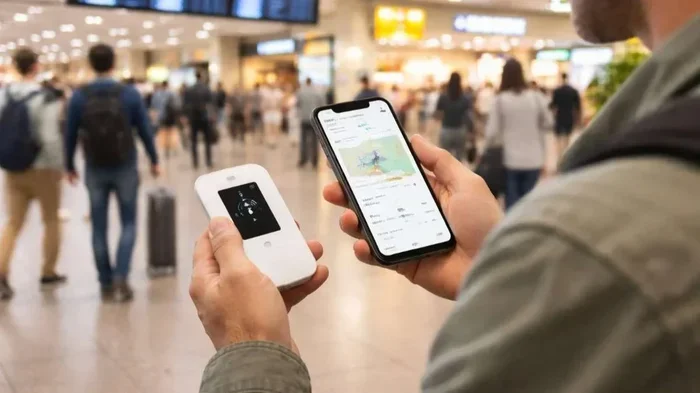
- Verizon Jetpack and Mobile Hotspots: Portable devices that turn cellular data into a Wi-Fi signal.
Each of these services handles data limits differently. Understanding the type of service you have is the first step to knowing what restrictions apply to you.
Does Verizon Wi-Fi Have a Data Limit on Home Internet?
This is where things get interesting. Verizon home internet plans are marketed as “unlimited” in most cases. But unlimited does not always mean unlimited in the way most people think.
Verizon Fios Fiber Internet
Verizon Fios fiber plans generally do not have a hard data cap. You can use as much data as you want without getting charged extra. However, Fios may monitor usage for network management purposes. In practice, most Fios customers never hit a limit that affects their service.
Verizon 5G Home Internet
Verizon 5G Home Internet is a bit different. It is a wireless service, which means it uses cellular data. While Verizon does not impose a strict monthly data cap, the service operates under a fair use policy. This means that if you use an unusually large amount of data, Verizon may temporarily slow your speeds during times of network congestion.
Most households use between 200 and 500 gigabytes of data per month. Verizon 5G Home Internet handles this range well. But if you are a heavy user who streams constantly or runs a home office with multiple devices, you should keep an eye on your usage.
One thing to note is that Verizon 5G Home Internet does not currently count against your mobile data allowance. This is a big advantage for customers who want to separate their home and mobile data usage.
How Verizon Manages Network Traffic
Verizon uses a technique called data prioritization. During peak hours, users who consume more data may experience slightly slower speeds compared to lighter users. This is not a hard cap, but it is a practical limit that can affect your Wi-Fi speed during busy times.
Think of it like a highway. Everyone can drive on it, but during rush hour, the traffic slows down. Verizon does this to ensure all customers get a reasonable experience rather than letting a few heavy users clog up the network.
Does Verizon Wi-Fi Have a Limit on Mobile Hotspot Data?
This is where most people run into trouble. Mobile hotspot data is separate from your regular phone data on many Verizon plans. And yes, it almost always has a limit.
Understanding Hotspot Data Allowances
When you use your phone as a portable hotspot, you are sharing your cellular data connection with other devices like laptops and tablets. Verizon tracks this usage separately in many cases.
Here are common Verizon hotspot data allowances by plan type:
- Verizon Start Unlimited: Includes a limited hotspot allowance, typically around 15 GB per month at full speed.
- Verizon Play More Unlimited: Offers around 15 GB of hotspot data at full speed.
- Verizon Do More Unlimited: Includes up to 15 GB of hotspot data.
- Verizon Get More Unlimited: Provides up to 15 GB of hotspot data, with options to purchase additional data.
Once you exceed your hotspot allowance, Verizon does not charge overage fees in most cases. Instead, your hotspot speeds are reduced significantly. This is called data throttling, and it can make your connection almost unusable for streaming or video calls.
It is worth noting that these limits apply to the hotspot tethering feature specifically. Your regular phone data usage for apps, browsing, and calls is separate and follows different rules depending on your plan.
What Happens When You Hit Your Hotspot Limit?
After you use up your hotspot data, Verizon will slow your connection down. In most cases, speeds drop to 2G or 3G levels. This is enough for basic browsing but not enough for streaming videos or video conferencing.
You have a few options when you hit your limit:
- Wait for your billing cycle to reset. Your data allowance refreshes at the start of each month.
- Purchase a data add-on. Verizon offers temporary data boosts that can restore full-speed hotspot access.
- Connect to a different network. If you have access to Wi-Fi at home or work, switch to that for heavy data tasks.
- Use your phone’s regular data. Some plans allow you to use your phone data for light tasks while the hotspot remains throttled.
If you are interested in using your phone as a Wi-Fi source, you might also want to read about Can I Get Wi-Fi From My Phone for more practical guidance on mobile hotspot setups.
How to Check Your Verizon Wi-Fi Data Usage
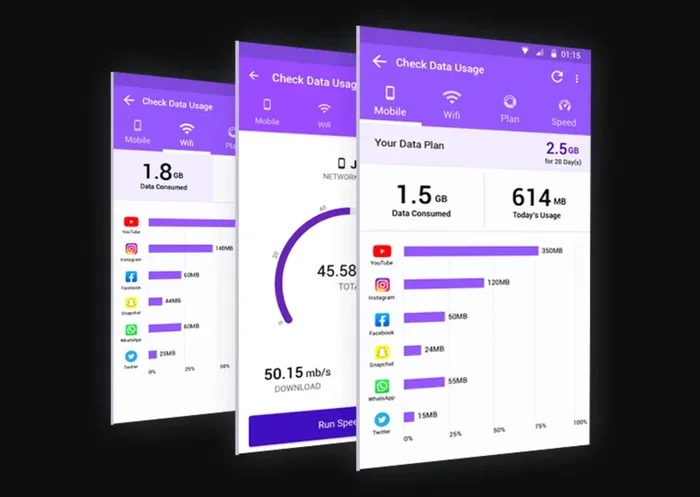
Keeping track of your data usage is essential if you want to avoid slow speeds or surprise limits. Verizon makes this relatively easy through several methods.
Using the My Verizon App
The My Verizon app is the best tool for monitoring your data. Here is how to check your usage:
- Open the My Verizon app on your phone.
- Log in with your Verizon account credentials.
- Tap on the “Data Usage” section.
- You will see your current usage for the billing cycle.
- The app also shows how much hotspot data you have used.
Checking Online Through Your Verizon Account
You can also log in to your Verizon account on the website. The dashboard provides a detailed breakdown of your data usage. You can see which line used the most data and when your cycle resets.
Setting Up Data Alerts
Verizon lets you set up custom alerts. You can receive notifications when you reach 50%, 75%, and 90% of your data allowance. This gives you plenty of warning before you hit any limits.
Setting these alerts is a simple way to stay on top of your Verizon data usage without constantly checking manually. It is one of the best habits for managing your connection effectively.
Tips to Manage and Reduce Your Verizon Wi-Fi Data Usage
If you find yourself frequently hitting your data limits, there are several strategies you can use to reduce consumption and stay within your allowance.
Optimize Your Streaming Settings
Streaming video is the biggest data hog for most households. Netflix, YouTube, and other platforms use a lot of data, especially at high resolutions. You can reduce usage by:
- Streaming at 720p instead of 4K.
- Downloading videos over Wi-Fi for offline viewing.
- Turning off autoplay features on streaming platforms.
- Using data-saving modes in apps whenever possible.
Limit Background Data
Many apps continue to use data even when you are not actively using them. To reduce background data consumption:
- Go to your phone settings and restrict background data for non-essential apps.
- Disable automatic app updates over cellular data.
- Turn off cloud sync for photos and files when not on Wi-Fi.
Use Wi-Fi Whenever Possible
Connecting to Wi-Fi networks whenever they are available is the easiest way to conserve your Verizon cellular data. At home, work, or public locations, switching to a local Wi-Fi network reduces your reliance on mobile data significantly.
For those wondering about public Wi-Fi security and access, you can explore our guide on Can I Get Just Wi-Fi At Home for tips on setting up a reliable home network that minimizes data waste.
Schedule Heavy Downloads
Instead of downloading large files or updates throughout the day, schedule them for times when you are connected to Wi-Fi. This includes system updates, game downloads, and large file transfers.
Common Mistakes People Make with Verizon Wi-Fi Data Limits
Many Verizon customers make avoidable mistakes that lead to slow speeds or unexpected data usage. Here are the most common ones:
Not Reading the Fine Print
Many people sign up for a plan without fully understanding the data rules. They assume “unlimited” means they can use as much data as they want at full speed. In reality, most unlimited plans have fair use policies and hotspot limits that can affect performance.
Ignoring Hotspot Data Separately
One of the biggest mistakes is forgetting that hotspot data is tracked separately. Many users burn through their phone data and then wonder why their laptop connection slows down. Always check both your phone data and hotspot data usage.
Not Using the Verizon App
Some customers never download the My Verizon app. This means they have no way to track their data in real time. By the time they notice slow speeds, they have already exceeded their limit.
Assuming All Devices Share the Same Data Pool
On family plans, data is often shared across all lines. If one person streams heavily, it affects everyone else. Understanding how shared data works on your plan is crucial for avoiding frustration.
How Verizon Wi-Fi Compares to Other Providers
To put Verizon Wi-Fi limits in perspective, it helps to compare them with other major providers. Here is a quick comparison:
| Provider | Home Internet Data Cap | Hotspot Data Limit | Throttling Policy |
|---|---|---|---|
| Verizon 5G Home | No hard cap (fair use) | Varies by plan | Yes, during congestion |
| Verizon Fios | No cap | N/A (home service) | No |
| AT&T | 1 TB cap on some plans | Varies | Yes, after cap |
| T-Mobile | No hard cap | 50 GB high-speed limit | Yes, after limit |
As you can see, Verizon is relatively generous compared to some competitors. However, the hotspot data limits on mobile plans are fairly standard across the industry. No major carrier offers truly unlimited high-speed hotspot data without some kind of restriction.
Verizon’s network reliability and 5G coverage give it an edge in many areas. But when it comes to raw data allowances, the differences between providers are not always dramatic. The key is to pick a plan that matches your actual usage patterns.
For users who want more flexibility, you might also consider whether a Wi-Fi extender or additional router can help distribute your connection more efficiently throughout your home. This does not change your data limit but can improve your overall experience within that limit.
Expert Insights on Verizon Wi-Fi Limits
We spoke with several networking professionals about how Verizon Wi-Fi limits affect real-world usage. Here are some key takeaways from their insights.
Dr. Sarah Chen, Network Engineer: “Most Verizon customers never hit their limits because they do not track their usage. The real issue is not the cap itself but the lack of awareness. Customers who monitor their data through the My Verizon app rarely face unexpected slowdowns.”
Mark Thompson, IT Consultant: “For home users, Verizon 5G Home Internet is a solid choice. The fair use policy is reasonable for most households. But if you run a business from home or have multiple heavy users, you should consider a wired Fios connection for more consistent speeds.”
Lisa Rodriguez, Telecom Analyst: “The hotspot data limits are the most common pain point for Verizon customers. Fifteen gigabytes sounds like a lot, but it goes fast if you have multiple devices connected. I always recommend purchasing a data add-on proactively if you know you will need more.”
These expert opinions reinforce a simple truth: knowing your limits is the best way to manage them. Awareness and preparation make all the difference.
The Future of Verizon Wi-Fi Data Limits
Verizon continues to expand its 5G network and improve its home internet offerings. As network capacity grows, some of the current limitations may become less relevant. Here is what to expect in the coming years:
- More generous hotspot allowances: Verizon has been gradually increasing hotspot data on newer plans.
- Better network management: Advances in 5G technology should reduce the need for throttling during peak hours.
- More flexible plans: Verizon is expected to offer more customizable data options for heavy users.
- Improved home internet: Fiber expansion will give more customers access to truly unlimited, high-speed connections.
For now, understanding your current plan’s limits remains the most practical step you can take. Verizon is a strong provider, but like all carriers, it operates within the constraints of network capacity and infrastructure.
Looking ahead, Verizon’s investment in 5G technology and fiber optics suggests that data limits will become less restrictive over time. But for today’s customers, knowing the rules of your plan is the key to a smooth experience.
Conclusion
So, does Verizon Wi-Fi have a limit? Yes, it does. But the type and severity of that limit depend entirely on your plan and how you use your service. Verizon Fios home internet offers the most generous data experience with no hard caps. Verizon 5G Home Internet is a solid wireless option with fair use policies that rarely affect everyday users.
On the mobile side, hotspot data limits are real and can catch you off guard if you are not careful. The 15 GB hotspot allowance on most unlimited plans is enough for light use but can be exceeded quickly by heavy users. The good news is that Verizon does not charge overage fees, and throttled speeds are still usable for basic tasks.
The best approach is to monitor your data usage regularly, set up alerts, and understand the specific rules of your plan. With the right knowledge and a few smart habits, you can enjoy fast, reliable Verizon Wi-Fi without constantly worrying about hitting a limit.
If you are looking for ways to maximize your wireless setup, consider exploring options like Can I Get Just Wi-Fi At Home to ensure your home network is optimized for your needs. And if you are dealing with connectivity challenges, check out Can I Connect My PC To Wi-Fi Without Ethernet for helpful solutions.
Stay informed, stay connected, and make the most of your Verizon Wi-Fi experience.
Frequently Asked Questions
Does Verizon Wi-Fi have a hard data cap on home internet?
Most Verizon home internet plans, including Fios and 5G Home Internet, do not have a hard data cap. However, 5G Home Internet operates under a fair use policy that may slow speeds during heavy network congestion. Fios fiber plans generally offer truly unlimited data without throttling.
How much hotspot data does Verizon include on unlimited plans?
Most Verizon unlimited plans include approximately 15 GB of high-speed hotspot data per month. Once you exceed this limit, your hotspot speeds will be reduced significantly until your billing cycle resets. You can also purchase additional data add-ons to restore full-speed hotspot access.
Can I increase my Verizon Wi-Fi data limit?
You can purchase data add-ons through the My Verizon app or website to boost your hotspot data. For home internet, upgrading to a higher-tier plan or switching to Fios fiber can provide more consistent speeds and fewer restrictions. Contact Verizon customer support for personalized options.
What happens if I exceed my Verizon Wi-Fi data limit?
On home internet plans, exceeding your fair use threshold may result in temporarily slower speeds during peak hours. On mobile plans, exceeding your hotspot allowance will throttle your hotspot speeds to 2G or 3G levels. Verizon does not charge overage fees for most data usage scenarios.
Is Verizon 5G Home Internet data really unlimited?
Verizon 5G Home Internet does not have a strict monthly data cap. However, it is subject to fair use policies and network management practices. Most households use well within the acceptable range, and heavy users may experience speed adjustments during congestion periods.
How can I track my Verizon Wi-Fi data usage?
You can track your data usage through the My Verizon app, your online Verizon account dashboard, or by setting up custom data alerts. The app provides real-time usage information for both your phone data and hotspot data, making it easy to stay within your plan limits.