Does Netflix Work On Delta Wi Fi On Your Next Flight
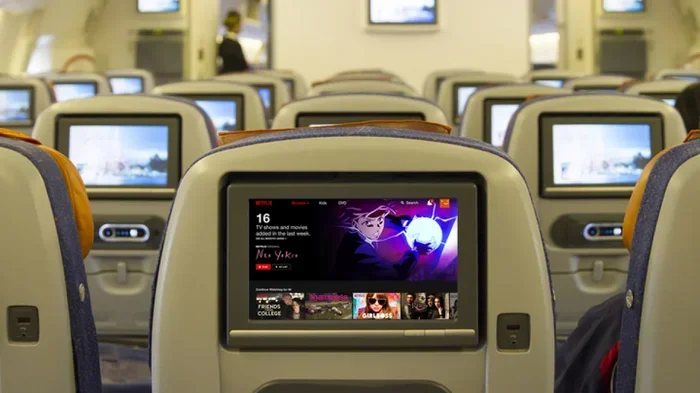
Yes, Netflix can work on Delta Wi-Fi, but your experience depends on your flight route, the Wi-Fi plan you choose, and the streaming quality you select. Delta offers both free and paid Wi-Fi options, and while basic browsing is usually smooth, streaming Netflix requires a solid connection and the right plan. This guide covers everything you need to know about watching Netflix on Delta flights, from setup steps to troubleshooting tips.
This is a comprehensive guide about Does Netflix Work On Delta Wi Fi.
Key Takeaways
- Netflix does work on Delta Wi-Fi: You can stream on select Delta flights with the right plan and a stable connection.
- Delta offers free Wi-Fi on some routes: Basic messaging and browsing are free, but streaming usually requires a paid plan.
- Speed matters a lot: Netflix recommends at least 5 Mbps for HD streaming, and Delta Wi-Fi speeds vary by route and aircraft.
- Use the Delta Wi-Fi portal to check your connection: You can test your speed before starting a movie to avoid buffering.
- Downloading content before your flight is a smart backup: This lets you watch offline without relying on Wi-Fi at all.
- Common issues include slow speeds and connection drops: Knowing how to troubleshoot saves a lot of frustration mid-flight.
[FEATURED_IMAGE_PLACEHOLDER]
Have you ever been stuck on a long Delta flight, bored out of your mind, and thought about firing up Netflix to pass the time? It is a pretty common question. Does Netflix work on Delta Wi-Fi? The short answer is yes, but the full story is a bit more nuanced. Whether you are on a short hop or a cross-country marathon, your ability to stream Netflix depends on several factors that we are going to break down in this guide.
Delta Air Lines has invested heavily in its in-flight Wi-Fi system over the past few years. They offer different tiers of connectivity, and not all flights are created equal. Some aircraft have the latest satellite technology, while others rely on older systems that struggle with streaming. This means your experience can vary quite a bit from one flight to the next. In this article, we will walk you through everything you need to know about streaming Netflix on Delta Wi-Fi, including how the system works, what plans you need, and practical tips to get the best experience.
What Is Delta Wi-Fi and How Does It Work?
Delta Air Lines uses a satellite-based Wi-Fi system to connect passengers to the internet while in the air. The technology works by linking your device to a satellite dish on the airplane, which then communicates with ground stations on the earth. This allows you to browse the web, check email, and yes, stream content like Netflix while cruising at 35,000 feet.
Delta has two main Wi-Fi providers: Viasat and Delta Speed. Viasat is the newer and faster system that Delta has been rolling out across its fleet. It offers significantly better speeds compared to the older Ku-band satellite systems. Delta Speed is the airline’s own branded service that uses Viasat technology on newer aircraft. The type of system on your flight depends on the specific plane assigned to your route, and Delta does not always make this easy to predict when you book.
Types of Delta Wi-Fi Connections
Not all Delta Wi-Fi connections are the same. Here are the main types you might encounter:
- Viasat Wi-Fi: This is the fastest option Delta currently offers. It can deliver speeds of up to 100 Mbps on some routes, which is more than enough for HD Netflix streaming.
- Ku-Band Satellite: This is the older system found on some older aircraft. Speeds are typically slower, ranging from 1 to 10 Mbps, which can make streaming a bit choppy.
- Ground-Based Wi-Fi: Some flights over land use ground-based towers, similar to how your phone connects to cell towers. This can be fast but is limited to areas with tower coverage.
The type of connection you get depends entirely on the aircraft and the route. If you want to know more about how Wi-Fi connectivity works on different devices, you can check out our guide on Can I Connect My Pc To Wi Fi Without Ethernet for useful background on wireless connectivity.
Does Netflix Actually Work on Delta Wi-Fi?
The honest answer is yes, but with caveats. Netflix can work on Delta Wi-Fi, but the quality of your experience depends on several factors. Let us break them down so you know what to expect.
Speed Requirements for Netflix Streaming
Netflix has specific speed recommendations for different streaming qualities. Here is what you need to know:
- Standard Definition (SD): Requires at least 3 Mbps. This is the minimum for a watchable experience.
- High Definition (HD): Requires at least 5 Mbps. This gives you a clear, sharp picture.
- Ultra HD (4K): Requires at least 15 Mbps. This is the best quality but demands a strong connection.
Delta’s Viasat Wi-Fi can easily handle SD and HD streaming. However, 4K streaming on a plane is still a stretch because of the shared bandwidth and the number of users on the same network. If you are on a flight with 150 other passengers all trying to stream at the same time, speeds will drop for everyone.
Which Delta Flights Support Netflix?
Not every Delta flight has Wi-Fi, and not every Wi-Fi-enabled flight supports streaming. Delta has been expanding its Wi-Fi coverage, but there are still gaps. Here is what to keep in mind:
- Domestic US flights: Most Delta domestic flights now have Wi-Fi, but streaming support varies. Short flights under two hours may not have the bandwidth for smooth streaming.
- International flights: Long-haul international routes are more likely to have Viasat Wi-Fi with enough speed for Netflix. These flights also tend to have more passengers, which can slow things down.
- Delta One and premium cabins: Some premium cabins have dedicated bandwidth, which means better streaming speeds compared to economy.
If you are curious about how Wi-Fi works on different devices and platforms, our article on Can I Game On My Wi Fi covers similar bandwidth and connectivity concepts that apply to streaming as well.
Delta Wi-Fi Plans and What They Offer
Delta offers different Wi-Fi plans, and understanding them is key to knowing whether you can stream Netflix. Here is a breakdown of what Delta currently offers.
Free Messaging
Delta provides free Wi-Fi for messaging apps like iMessage, WhatsApp, and Facebook Messenger on most flights. This is great for staying in touch, but it will not help you stream Netflix. The free tier is designed for light use only and does not support video streaming.
Delta Wi-Fi Pass (Paid)
For a fee, you can upgrade to a full Wi-Fi pass. Delta offers several pricing tiers:
- Same-Day Pass: Usually priced between $7 and $28 depending on the flight. This gives you full internet access for the duration of the flight.
- Monthly Pass: Around $49.95 per month. This is a good deal if you fly Delta frequently and want consistent access.
- Annual Pass: Around $499.95 per year. Best for frequent flyers who need Wi-Fi on every trip.
The paid plans generally support streaming, but the actual experience depends on the aircraft and the number of users. If you want to learn more about setting up Wi-Fi on your device before a trip, you might find our article on Can I Add Wi Fi To My Pc helpful for understanding how to get your device ready.
Delta Free Wi-Fi Expansion
Delta has been gradually expanding its free Wi-Fi offerings. In some cases, they have offered free basic Wi-Fi on select routes as a promotional move. However, free Wi-Fi typically does not support streaming. Always check the Delta Wi-Fi portal when you board to see what options are available on your specific flight.
| Plan | Price | Streaming Support | Best For |
|---|---|---|---|
| Free Messaging | $0 | No | Text messages and basic browsing |
| Same-Day Pass | $7 – $28 | Yes (on supported flights) | One-time streaming and browsing |
| Monthly Pass | $49.95 | Yes (on supported flights) | Frequent Delta flyers |
| Annual Pass | $499.95 | Yes (on supported flights) | Heavy users and business travelers |
Tips for Streaming Netflix on Delta Flights
If you want to watch Netflix on your next Delta flight, there are several things you can do to improve your chances of a smooth experience. These tips come from real-world testing and common passenger feedback.
Download Content Before Your Flight
This is the single best tip we can give you. Download your Netflix shows or movies before you board. Netflix allows you to download content to your phone, tablet, or laptop for offline viewing. This way, you do not need Wi-Fi at all, and you can watch without worrying about buffering or connection drops.
To download content, open the Netflix app, find the show or movie you want, and tap the download icon. Make sure you have enough storage space on your device before you start. Downloading over Wi-Fi at home or at the airport is much faster than relying on in-flight Wi-Fi.
Use the Delta Wi-Fi Portal to Test Your Speed
Once you are connected to Delta Wi-Fi, open your browser and go to the Delta Wi-Fi portal. It usually appears automatically when you connect, or you can navigate to it manually. The portal often includes a speed test tool that lets you check your current connection speed.
If your speed is below 5 Mbps, you may want to stick with SD quality on Netflix. If you are getting 10 Mbps or more, HD streaming should be fine. If the speed is below 3 Mbps, you might be better off downloading content beforehand or using the free messaging tier for something else.
Choose the Right Time to Stream
Not everyone on the plane is streaming at the same time. If you are on a red-eye flight or a short domestic hop, there is a good chance fewer people will be using the Wi-Fi for streaming. This means better speeds for you. On the other hand, if you are on a long international flight with hundreds of passengers, expect more competition for bandwidth.
Use a VPN if Needed
Some passengers have reported that using a VPN can help with streaming on airline Wi-Fi. A VPN can sometimes bypass restrictions and improve connection stability. However, a VPN can also slow down your connection if the server is far away, so this is a bit of a trade-off. If you want to learn more about using Wi-Fi securely, check out our article on Can Guest Wi Fi See What You Search for useful tips on protecting your data on public networks.
Keep Your Device Charged
Streaming Netflix uses a lot of battery, especially on a plane where you might not have easy access to an outlet. Make sure your device is fully charged before the flight. If you have a long-haul flight, consider bringing a portable charger. There is nothing worse than your phone dying right in the middle of a great movie.
Common Problems and How to Fix Them
Streaming Netflix on Delta Wi-Fi is not always smooth sailing. Here are the most common issues passengers face and how to deal with them.
Slow Speeds
This is the number one complaint. Slow speeds on Delta Wi-Fi are usually caused by too many users on the same network, older aircraft with slower systems, or weak satellite signals over certain areas. To fix slow speeds, try the following:
- Switch to SD quality on Netflix instead of HD.
- Close other apps and tabs that might be using bandwidth.
- Move to a different seat on the plane. Seats closer to the front sometimes get better signals.
- Wait and try again later when fewer people are streaming.
Connection Drops
In-flight Wi-Fi connections can drop, especially during takeoff, landing, or when flying over areas with poor satellite coverage. To minimize disruptions, pause your video when the connection drops and resume when it comes back. Most streaming apps will buffer and pick up where you left off once the connection is restored.
Wi-Fi Not Available on Your Flight
Not all Delta flights have Wi-Fi. If you are on a smaller regional jet or a very short route, there is a chance Wi-Fi is not available. You can check Wi-Fi availability for your specific flight on the Delta website or app before you book. If Wi-Fi is not available, downloading content beforehand is your best bet.
Netflix Blocks Streaming on Some Networks
Netflix has measures in place to block streaming on certain networks, including some airline Wi-Fi systems. This is not common on Delta, but it does happen occasionally. If Netflix refuses to play, try refreshing the page, clearing your browser cache, or switching to the Netflix app instead of the browser.
What Else Can You Do on Delta Wi-Fi?
Netflix is not the only thing you can do on Delta Wi-Fi. Here are some other popular activities passengers enjoy while connected:
- Browsing the web: Check email, read news, or scroll through social media.
- Messaging: Use WhatsApp, iMessage, or Facebook Messenger for free on most flights.
- Video calls: Some passengers use Zoom or Skype, though this is not always allowed and can be disruptive to other passengers.
- Gaming: Online gaming is possible but can be frustrating due to latency. If you are curious about gaming on Wi-Fi, our guide on Can I Game On My Wi Fi has more details.
- Working remotely: Many business travelers use Delta Wi-Fi to work on documents, respond to emails, and join conference calls.
It is worth noting that some airlines and venues have restrictions on what you can access over their Wi-Fi networks. Delta is generally open about what is allowed, but they may throttle certain types of traffic or block specific services during peak usage times.
Final Thoughts
So, does Netflix work on Delta Wi-Fi? Yes, it can, and it does on many flights. The key is managing your expectations and planning ahead. Delta’s Wi-Fi has come a long way, but it is not perfect. Speeds vary, connections drop, and not every flight supports streaming at the highest quality.
The best strategy is simple: download your Netflix content before you fly, bring a portable charger, and use the Delta Wi-Fi portal to check your speed once you are connected. If you follow these steps, you have a great chance of enjoying your favorite shows and movies while cruising above the clouds.
Delta continues to invest in its Wi-Fi infrastructure, and the experience is only getting better with each new aircraft they add to the fleet. Whether you are a casual traveler or a frequent flyer, knowing how to make the most of Delta Wi-Fi makes every flight more enjoyable. So next time you are on a Delta flight, pull out your device, connect to the Wi-Fi, and see for yourself. You might just find that your next flight is the perfect time to catch up on that series you have been meaning to watch.
And if you ever run into issues with your Wi-Fi connection on the ground, remember that not all Wi-Fi problems are the same. Check out our article on Can Hotels Block Wi Fi to understand how network restrictions work in different environments. Safe travels and happy streaming!
FAQs
Can I watch Netflix in HD on Delta Wi-Fi?
Yes, you can watch Netflix in HD on Delta Wi-Fi if your flight has a Viasat connection and your speed is at least 5 Mbps. However, on busy flights with many users, the speed may drop below this threshold, which can affect HD quality. Always test your speed first using the Delta Wi-Fi portal.
Is Delta Wi-Fi free for streaming Netflix?
No, Delta Wi-Fi is not free for streaming. The free tier only supports messaging and basic browsing. To stream Netflix, you need to purchase a paid Wi-Fi pass, which ranges from $7 to $28 for a same-day pass depending on your flight.
Can I use Netflix on my phone or tablet on Delta Wi-Fi?
Yes, you can use Netflix on your phone or tablet on Delta Wi-Fi. The Netflix app works on both iOS and Android devices, and you can also use the Netflix website in your browser. Just make sure your device is connected to the Delta Wi-Fi network before you start streaming.
Why does Netflix keep buffering on Delta Wi-Fi?
Buffering on Delta Wi-Fi is usually caused by slow speeds, too many users on the network, or a weak satellite signal. To reduce buffering, lower the streaming quality to SD, close other apps using bandwidth, or download your content before the flight for offline viewing.
Do all Delta flights have Wi-Fi?
No, not all Delta flights have Wi-Fi. Smaller regional jets and very short routes may not be equipped with Wi-Fi. You can check Wi-Fi availability for your specific flight on the Delta website or app before booking.
Can I use a VPN on Delta Wi-Fi to improve Netflix streaming?
Yes, you can use a VPN on Delta Wi-Fi, and it may help in some cases by improving connection stability. However, a VPN can also slow down your connection, especially if the VPN server is far from your location. Use a VPN with a server close to your departure city for the best results.
Frequently Asked Questions
What is Does Netflix Work On Delta Wi Fi?
Does Netflix Work On Delta Wi Fi is an important topic with many practical applications.