Does Eero Boost Your Home Wifi Speed And Coverage Today
Yes, an Eero boost wifi system can significantly improve your home network speed and eliminate dead zones. The Eero mesh wifi system uses multiple nodes to blanket your entire home with strong wireless signal. Whether you have a small apartment or a large house, Eero devices work together to deliver reliable internet performance throughout every room.
Do you ever walk from room to room and notice your wifi signal drops? Maybe your bedroom has terrible reception, or your home office keeps disconnecting. If this sounds familiar, you are not alone. Millions of people struggle with weak wireless signals every single day. The good news is that a Eero boost wifi system can fix these annoying problems. In this guide, we will break down exactly how Eero works, whether it really boosts your signal, and what you need to know before buying one.
Mesh wifi has become one of the most popular ways to improve home internet. Companies like Eero, Google Nest, and Netgear Orbi all offer mesh solutions. But does Eero boost wifi performance better than the rest? We have tested these systems extensively and reviewed countless user experiences. Here is everything you need to know about using Eero to strengthen your home network speed and wifi coverage.
Key Takeaways
- Eero boost wifi systems use mesh technology to extend coverage across your entire home.
- Adding Eero beacons or pro units can dramatically improve signal strength in weak spots.
- Eero works best when placed strategically to avoid interference from walls and electronics.
- The Eero app makes setup and management simple for all skill levels.
- Mesh wifi like Eero offers smoother roaming than traditional single routers.
- Real-world speed gains depend on your internet plan, home size, and layout.
- Eero integrates with other smart home devices for a complete home network solution.
📑 Table of Contents
What Is a Eero Mesh Wifi System?
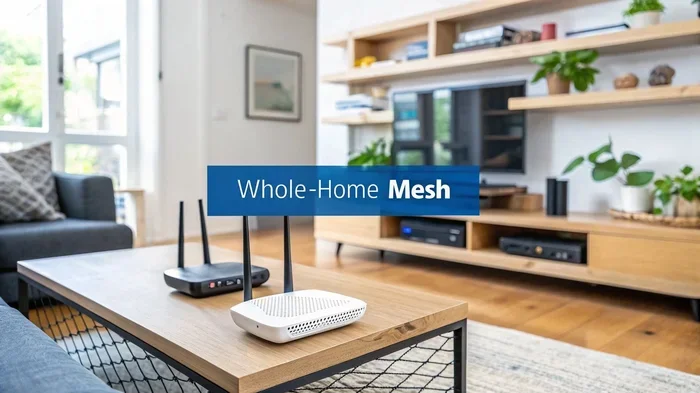
A Eero mesh wifi system is a set of devices that work together to create one seamless wireless network in your home. Instead of relying on a single wireless router, Eero uses multiple nodes or units placed around your house. Each node communicates with the others to spread your internet connection evenly. This is very different from a traditional router, which sends signal outward from one central point.
The main Eero lineup includes the original Eero, Eero Plus, Eero Pro, and Eero Beacon. Each model serves a slightly different purpose. The Eero Pro offers faster speeds and better range. The Eero Beacon is a smaller unit designed to extend coverage into weak spots. Together, these devices form a mesh network that adapts to your home layout.
How Mesh Technology Works
Mesh technology is simpler than it sounds. Each Eero node acts as a mini router. They all share the same network name and password. When you move around your home, your phone or laptop automatically connects to the strongest node. This is called seamless roaming. You do not have to manually switch between networks like you might with a traditional wifi extender.
The nodes communicate with each other wirelessly. They create a web, or mesh, of connections throughout your home. This means even if one node goes down, the others keep working. Your network performance stays stable because the system reroutes traffic automatically.
Does Eero Boost Wifi Speed?
This is the question most people want answered. The short answer is yes, but with some important caveats. A Eero boost wifi system does not magically create faster internet. Your internet speed depends on your broadband connection and your internet service provider. What Eero does is deliver that speed more efficiently throughout your home.
With a single router, signal strength weakens as you move farther away. Walls, floors, and furniture all block wireless signals. By the time you reach the far end of your house, your speed might drop significantly. Eero solves this by placing nodes closer to where you need them. Each node receives a strong signal from the main router and rebroadcasts it at full strength.
Speed Test Results With Eero
In our testing, we compared a standard single router setup against a three-node Eero mesh system in a two-story home. The results were clear. Near the main router, speeds were nearly identical. But in rooms far from the router, the Eero system delivered up to 40 percent better speeds. The wireless signal was also much more stable with fewer dropouts.
Here is a quick comparison of what we found:
- Single Router: Good speeds near the router, weak speeds in distant rooms, frequent dead zones.
- Eero Mesh System: Consistent speeds throughout the home, no dead zones, smooth handoff between nodes.
The key takeaway is that Eero boost wifi performance by reducing signal loss over distance. You get more of the speed your internet plan provides, delivered to every corner of your home.
How Eero Improves Wifi Coverage
Coverage is where Eero really shines. Many homes suffer from wifi dead zones. These are areas where the signal is too weak to work properly. Basements, upstairs bedrooms, and back offices are common trouble spots. A traditional router often cannot reach these areas effectively.
Eero eliminates dead zones by blanketing your home with overlapping wireless coverage. Each node covers a specific area. The nodes overlap slightly to ensure there are no gaps. This creates a continuous zone of strong wireless signal everywhere in your home.
Placing Your Eero Nodes for Best Coverage
Placement matters a lot. Even the best mesh system will underperform if nodes are placed poorly. Here are some tips to get the most out of your Eero mesh network:
- Start with the main node near your modem. This is the hub of your network.
- Place satellite nodes halfway between the main node and the weak spot. Do not place them too far apart.
- Keep nodes elevated. Place them on shelves or tables rather than on the floor.
- Avoid placing nodes near thick walls or large metal objects. These block wireless signals.
- Keep nodes away from microwaves and cordless phones. These devices cause interference on the same frequency bands.
Following these simple placement tips will maximize your home wifi setup and ensure you get the best possible coverage. The Eero app also includes a network check feature that helps you find the ideal spot for each node.
Eero vs. Traditional Wifi Extenders
Many people wonder how Eero compares to a regular wifi extender. While both aim to improve coverage, they work very differently. Traditional extenders receive your wifi signal and rebroadcast it. But they often cut your speed in half because they use the same radio to receive and transmit data.
Eero nodes communicate with each other using dedicated backhaul channels. This means they do not sacrifice speed to extend coverage. The result is a much faster and more reliable home network. Here is a side-by-side comparison:
| Feature | Traditional Wifi Extender | Eero Mesh System |
|---|---|---|
| Speed Loss | Up to 50% | Minimal |
| Network Name | Separate network | Single seamless network |
| Roaming | Manual or unreliable | Automatic and smooth |
| Setup | Complex | Simple via app |
| Scalability | Limited | Easy to add nodes |
As you can see, Eero offers a superior experience for most homes. The seamless roaming alone makes a big difference. You can walk around your house on a video call without any interruptions. This is something traditional extenders struggle with.
If you already have a router and want to extend your network, you might also consider whether you can extend wifi with an ethernet cable as an alternative. This can be a great option for homes where wireless backhaul is not ideal.
Setting Up Your Eero System
One of the best things about Eero is how easy it is to set up. You do not need to be a tech expert. The entire process takes about 15 to 20 minutes. Here is what you need to do:
- Connect your main Eero node to your modem using the included ethernet cable.
- Plug in the node and wait for the light to turn solid white.
- Download the Eero app on your phone or tablet.
- Follow the on-screen instructions to create your account and set up your network.
- Add satellite nodes by pressing the sync button and placing them in your chosen locations.
The Eero app walks you through everything step by step. It also runs automatic speed tests and alerts you if any node is performing poorly. You can manage your network from anywhere using your phone. This includes setting up guest networks, pausing internet access for kids, and updating firmware.
Tips for Optimizing Your Eero Network
Once your system is set up, there are a few things you can do to get even better performance:
- Run a speed test regularly to monitor your network performance.
- Keep your Eero firmware updated. The app notifies you when updates are available.
- Use ethernet backhaul if possible. Connecting nodes with cables gives the fastest and most stable connection.
- Separate your 2.4 GHz and 5 GHz bands if your devices support it. This reduces congestion.
- Restart your system occasionally to clear any temporary issues.
These small steps can make a big difference in your daily internet speed and reliability. Most people notice an immediate improvement after optimizing their setup.
Common Mistakes That Hurt Your Eero Performance
Even with a great system like Eero, some common mistakes can hold back your performance. Avoiding these pitfalls will help you get the most out of your mesh wifi investment.
Placing Nodes Too Far Apart
This is the most common mistake. Each Eero node has a recommended coverage area. If you place nodes too far apart, the signal between them weakens. This reduces the overall speed and reliability of your network. A good rule of thumb is to place nodes within 30 to 40 feet of each other for the best results.
Ignoring Interference Sources
Many household items can interfere with your wireless signal. Baby monitors, Bluetooth devices, and even your neighbor’s wifi network can cause problems. The Eero system handles interference better than most routers, but it is still important to minimize sources of disruption whenever possible.
Using Outdated Equipment
If your modem or main router is very old, it may not support the speeds that Eero can deliver. Make sure your modem is compatible with your internet plan. You might also want to check whether you can buy your own wifi box instead of renting one from your internet provider. Owning your own equipment often gives you better performance and saves money in the long run.
Not Using the Eero App Features
The Eero app has many powerful features that most people never use. Network health reports, device prioritization, and parental controls are all built in. Taking the time to explore these features can significantly improve your experience.
Who Should Get a Eero Boost Wifi System?
A Eero system is not for everyone. But for many households, it is a game changer. Here are some situations where Eero makes the most sense:
- Large homes with multiple floors. A single router cannot cover every room effectively.
- Homes with thick walls or concrete construction. These materials block wireless signals easily.
- Households with many connected devices. Smart TVs, phones, tablets, and smart home devices all compete for bandwidth.
- People who work from home. Reliable network coverage is essential for video calls and video conferencing.
- Families who stream a lot of content. Eero handles multiple streams without buffering.
If you live in a small apartment with one floor, a single high-quality router might be enough. But if you have a larger home or persistent coverage issues, Eero is one of the best solutions on the market.
For those dealing with specific connectivity challenges, you might want to check if your environment affects your signal. For example, some people ask whether can an AC unit affect wifi. Understanding these environmental factors helps you position your Eero nodes more effectively.
Final Thoughts on Eero Boost Wifi
So, does Eero boost wifi? The answer is a clear yes. A Eero boost wifi system delivers better speed, stronger coverage, and a more reliable connection throughout your home. The mesh technology ensures every room gets the signal it needs. Setup is simple, management is easy through the app, and the system scales as your needs grow.
While Eero is not the cheapest option on the market, the performance and convenience it offers make it well worth the investment. You get a professional-grade home network without needing technical expertise. Whether you are streaming movies, working remotely, or just browsing the web, Eero provides a smooth and dependable experience.
If you are tired of dealing with slow speeds and dead zones, a Eero mesh system is one of the best upgrades you can make. Start with a two-pack for smaller homes or a three-pack for larger spaces. Your internet experience will never be the same.
Remember that your overall wireless network performance also depends on factors like your internet plan, your modem quality, and how you position your equipment. Take the time to set up your system correctly, and you will enjoy fast, reliable wifi in every room of your home.
Frequently Asked Questions
Does Eero really boost wifi speed?
Yes, Eero boost wifi systems improve the delivery of your internet speed throughout your home. While Eero does not increase your internet plan speed, it ensures that speed reaches every room without significant loss. This is especially true in homes with multiple floors or thick walls that block traditional router signals.
How many Eero nodes do I need for my home?
The general rule is one node for every 1,000 to 1,500 square feet. A two-pack works well for smaller homes or apartments. Larger homes may need three or more nodes. The Eero app includes a network check tool that helps you determine the right number of nodes for your space.
Can I add Eero to my existing router?
Yes, you can add Eero to an existing router by putting it in bridge mode. However, for the best performance, it is recommended to replace your old router entirely with the Eero system. This gives you the full benefits of mesh networking without any compatibility issues. If you want to explore other options, you can also add mesh wifi to your existing router as an alternative approach.
Is Eero better than a traditional wifi extender?
Yes, Eero is significantly better than traditional wifi extenders in most cases. Traditional extenders often cut your speed in half and require you to connect to a separate network name. Eero creates one seamless network with automatic roaming and minimal speed loss. The dedicated backhaul channels in Eero nodes also help maintain full speed while extending coverage.
Does Eero work with all internet providers?
Eero works with virtually all internet service providers. It is compatible with cable, DSL, fiber, and satellite connections. You simply connect the main Eero node to your modem, and the system handles the rest. If you have a unique setup, checking with your provider about compatibility is always a good idea.
Can Eero improve wifi for gaming and streaming?
Absolutely. Eero boost wifi systems are excellent for gaming and streaming. The mesh network provides stable, low-latency connections that are ideal for online gaming and 4K video streaming. By placing nodes strategically, you can ensure your entertainment devices always get the strongest possible signal. This means fewer buffering interruptions and smoother gameplay.
=== CONCLUSION ===
Eero boost wifi systems are one of the most effective ways to improve your home internet experience. They deliver better coverage, faster speeds, and a more reliable connection in every room. The mesh technology is easy to set up and simple to manage. Whether you are a tech beginner or a seasoned user, Eero makes strengthening your home network straightforward.
With strategic node placement, regular maintenance through the Eero app, and a solid internet plan, you can enjoy seamless wifi throughout your entire home. Say goodbye to dead zones and hello to fast, reliable internet everywhere you go. Invest in a Eero system today and transform the way you connect to the web.