Does Closing A Door Affect Wi Fi Connection Strength
Yes, closing a door can weaken your Wi-Fi connection strength significantly. Doors — especially solid wood, metal, and thick composite ones — block and absorb wireless signals, creating dead zones in your home network. This guide explains exactly how doors affect your signal and what you can do to fix it.
Key Takeaways
- Doors reduce Wi-Fi signal strength: Solid doors can block up to 10-15 dB of your wireless signal, weakening connectivity in adjacent rooms.
- Door material matters a lot: Metal and solid wood doors block signals far more than hollow or glass doors.
- Router placement is key: Positioning your router in an open area minimizes the impact of closed doors on your network.
- Wi-Fi extenders and mesh systems help: These devices push signals past closed doors and eliminate dead zones.
- Simple fixes work: Adjusting router position, changing channels, and upgrading hardware can all improve signal through closed doors.
- Multiple closed doors compound the problem: Each additional door in the signal path weakens the connection further.
- Wireless signal strength varies by frequency: 5 GHz signals are more easily blocked by doors than 2.4 GHz signals.
📑 Table of Contents
- Does Closing A Door Affect Wi Fi Connection Strength?
- How Wi-Fi Signals Travel Through Your Home
- How Doors Block or Weaken Wi-Fi Signals
- Which Types of Doors Affect Wi-Fi the Most
- Practical Tips to Improve Wi-Fi Behind Closed Doors
- When to Consider Upgrading Your Hardware
- Common Mistakes That Make Door-Related Wi-Fi Problems Worse
- Expert Insights on Door-Related Wi-Fi Signal Loss
- Key Takeaways
Does Closing A Door Affect Wi Fi Connection Strength?
You have probably noticed your Wi-Fi gets slower or drops when you close a bedroom door. It is a frustrating experience. You are streaming a show, working from home, or playing a game, and suddenly everything buffers. The door you just shut might be the culprit.
The short answer is yes. Closing a door affects your Wi-Fi connection strength. But the full story is more interesting than you might think. The amount of signal loss depends on the door material, thickness, and how many doors sit between your device and the router. Let us break it all down so you understand exactly what is happening inside your home network.
Wi-Fi signals are radio waves. They travel through the air and pass through objects. Some materials let them through easily. Others block them almost completely. A closed door sits right in the path of those waves, and that creates a barrier. Understanding this helps you fix the problem instead of just dealing with slow internet every time you shut your bedroom door.
How Wi-Fi Signals Travel Through Your Home
Your router sends out wireless signals in all directions. Think of it like a light bulb. The light spreads outward from the bulb and gets dimmer the farther it travels. Wi-Fi works the same way. The signal loses strength as it moves away from the router. This is called signal attenuation.
But walls, doors, and furniture also absorb and reflect these signals. Every object in the path weakens the signal a little more. When you add a closed door into that path, the signal has to pass through wood, metal, or glass. Each material blocks the radio waves differently. This is why your wireless connection might be strong in one room and weak in the next.
The frequency band your router uses also plays a big role. Most modern routers use two bands: 2.4 GHz and 5 GHz. The 2.4 GHz band travels farther and passes through obstacles better. The 5 GHz band is faster but has a shorter range and is more easily blocked by doors and walls.
Why Radio Frequencies Matter
Radio frequency waves behave differently depending on their wavelength. The 2.4 GHz band has a longer wavelength, which means it bends around objects more easily. The 5 GHz band has a shorter wavelength, so it travels in a straighter line and gets blocked more easily. This is one reason why closing a door hurts your network performance more on 5 GHz than on 2.4 GHz.
If you have a dual-band router, try switching to the 2.4 GHz band when you are on the other side of a closed door. You will likely notice better connectivity even though the speed is slightly lower. This simple change can make a big difference in your daily use.
How Doors Block or Weaken Wi-Fi Signals
Doors are not just open space with a frame. They have mass, material, and structure. All of these factors determine how much Wi-Fi signal gets through when the door is closed. A solid wood door is a much bigger obstacle than a hollow interior door.
When a radio wave hits a door, three things can happen. The wave can pass through, bounce off, or get absorbed. The amount of each depends on the door material and the signal frequency. Let us look at how different door types affect your wireless signal strength.
Solid Wood Doors
Solid wood doors are among the worst offenders for blocking Wi-Fi. A typical solid wood door is about 1.75 inches thick and made of dense material. This blocks a significant portion of the wireless signal. Studies show that solid wood doors can reduce signal strength by 10 to 15 decibels. That is a noticeable drop.
If you have solid wood doors throughout your home, closing them can create Wi-Fi dead zones in rooms that are just a few feet away from the router. This is especially common in homes with central routers and multiple solid doors between the router and the farthest rooms.
Hollow Core Doors
Hollow core doors are much thinner and lighter. They contain a thin wood frame with cardboard or honeycomb filling inside. These doors block much less signal than solid wood doors. A hollow core door might only reduce your signal by 3 to 5 decibels.
This is why some rooms in your house might have great Wi-Fi even with the door closed, while others do not. The type of door makes a huge difference. If you are dealing with weak signal in a room with a hollow door, the problem is probably something else, like distance or interference.
Metal and Glass Doors
Metal doors are the worst for Wi-Fi signals. Metal reflects radio waves almost completely. A solid metal door can block nearly all of the signal from reaching the other side. If you have a metal door in your home, you will likely notice a dramatic drop in connectivity when that door is closed.
Glass doors are a different story. Thin glass lets more signal through than wood or metal. However, thick glass with metal frames or coatings can still block a good portion of the signal. Frosted or tempered glass is slightly better than standard glass for signal passage, but it is still not as transparent to radio waves as open air.
| Door Type | Approximate Signal Loss | Impact on Wi-Fi |
|---|---|---|
| Solid Wood | 10-15 dB | High – creates dead zones |
| Hollow Core | 3-5 dB | Low – minor signal reduction |
| Metal | 15-20 dB | Very High – near complete block |
| Glass (thin) | 2-4 dB | Low – mostly transparent |
| Glass (thick/coated) | 5-8 dB | Moderate – noticeable reduction |
Which Types of Doors Affect Wi-Fi the Most
Not all doors are created equal when it comes to blocking wireless signals. The material, thickness, and number of doors in the signal path all matter. Let us look at the worst offenders and why they cause so much trouble for your home network.
Interior Doors with Metal Frames
Many interior doors have metal frames or metal reinforcements. Even if the door itself is hollow, the metal frame can reflect and block signals. This is a sneaky cause of weak Wi-Fi because the door looks harmless but the frame does the damage. If you notice poor signal in a room with a seemingly normal door, check whether the frame is metal.
Fire Doors
Fire doors are designed to be thick, dense, and heat-resistant. They are often made of solid wood, metal, or composite materials with insulation. These doors are excellent at blocking fire, but they are terrible for Wi-Fi signals. A fire door can reduce your signal strength by 15 to 20 decibels or more. If your home has fire doors, they are likely a major contributor to weak connectivity in certain rooms.
French Doors and Sliding Glass Doors
French doors and sliding glass doors are generally better for Wi-Fi because they have large glass panels. However, the frames around them can still block signal. If the frames are metal or thick wood, they create partial barriers. The more glass in the door, the better the signal passes through. But even a glass door with a thick frame will reduce your signal strength more than an open doorway.
Exterior Doors
Exterior doors are usually the thickest and most solid doors in your home. They are built for security and insulation, which means they are built to block just about everything, including radio waves. A solid exterior door can be one of the biggest obstacles to your Wi-Fi signal. If your router is near an exterior wall and the door is closed, the signal has to fight through that dense material to reach other parts of the house.
Practical Tips to Improve Wi-Fi Behind Closed Doors
The good news is that you do not have to live with weak Wi-Fi every time you close a door. There are several practical steps you can take to improve your connection. Some are free, and some require a small investment. Let us walk through the most effective solutions.
1. Reposition Your Router
The single best thing you can do is move your router to a more central location in your home. If your router is in a back room with doors closed off, the signal has to pass through multiple obstacles to reach the rest of the house. Moving it to a central, open area helps the signal spread more evenly.
Place your router in a high location, like on a shelf or mounted on a wall. Signals travel downward better than upward. Keep it away from walls, metal objects, and large appliances. The more open space around the router, the better the signal will reach through closed doors in other rooms.
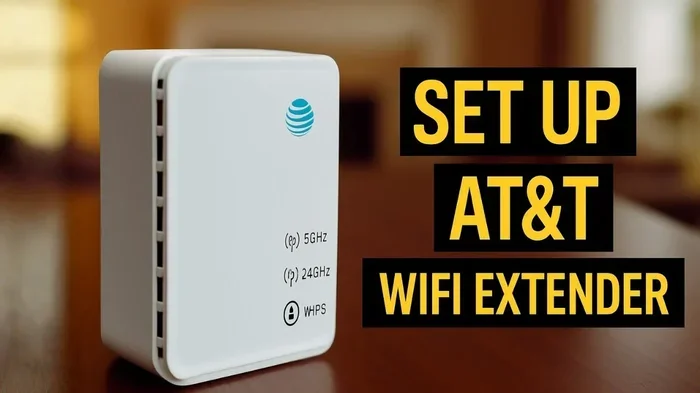
2. Use a Wi-Fi Extender or Repeater
A Wi-Fi extender picks up your existing signal and rebroadcasts it on the other side of the obstacle. If you have a room that always loses signal when the door is closed, an extender placed in the hallway can bridge the gap. The extender receives the signal from your router and sends it past the closed door into the room.
Extenders are affordable and easy to set up. They are not perfect, though. They can reduce your overall speed because they use the same radio to receive and transmit. For better performance, look for a dual-band extender that can handle both 2.4 GHz and 5 GHz signals.
If you want a more permanent and reliable solution, consider Can I Add Wi Fi To My Pc with a dedicated adapter and set up a wired access point. This gives you a strong, stable connection in rooms that are hard to reach with wireless alone.
3. Upgrade to a Mesh Wi-Fi System
A mesh Wi-Fi system replaces your single router with multiple nodes placed around your home. Each node communicates with the others and creates a seamless network. Because the nodes are spread out, they can reach rooms that are behind closed doors without the signal having to pass through as many obstacles.
Mesh systems are more expensive than traditional routers, but they offer much better coverage. They are especially useful in larger homes with multiple floors and several closed doors between the router and the farthest rooms. If you have been struggling with connectivity issues in certain parts of your home, a mesh system is worth the investment.
4. Switch to the 2.4 GHz Band
As mentioned earlier, the 2.4 GHz band passes through obstacles better than the 5 GHz band. If you are experiencing weak signal behind a closed door, switch your device to the 2.4 GHz network. You will lose some speed, but you will gain range and reliability.
Most modern routers support band steering, which automatically assigns devices to the best band. You can also log into your router settings and manually choose which band to use. For devices that are far from the router or behind multiple closed doors, 2.4 GHz is usually the better choice.
5. Keep Doors Open When Possible
This might seem obvious, but keeping doors open is one of the simplest ways to improve Wi-Fi coverage. An open door creates a much wider pathway for radio waves than a closed door. If you are not using a room, leave the door open. This small habit can noticeably improve signal strength in adjacent rooms.
You do not need to keep every door open all the time. Just be strategic about it. If you are working from home in a room with a closed door, try opening it for a few hours to see if your connection improves. You might be surprised at the difference.
6. Check for Wi-Fi Interference
Doors are not the only thing that blocks Wi-Fi. Other electronics can cause interference too. Microwaves, baby monitors, cordless phones, and Bluetooth devices all operate on similar frequencies. When your router is near these devices, even an open door might not help your signal.
Try moving your router away from other electronics. Change your Wi-Fi channel to one that is less congested. Most routers let you scan for the best channel in their settings. Reducing interference can improve your wireless connection just as much as dealing with door obstructions.
When to Consider Upgrading Your Hardware
Sometimes, no amount of repositioning or tweaking will fix the problem. If your router is old or underpowered, it might not be able to push signals through closed doors effectively. In that case, upgrading your hardware is the best solution.
Modern routers use Wi-Fi 6 or Wi-Fi 6E technology, which is much better at handling obstacles and interference than older standards. If you are still using an older router, upgrading to a newer model can significantly improve your signal strength throughout the home, even behind closed doors.
Also consider the age of your devices. Older laptops and phones may not support the latest Wi-Fi standards. If your device cannot connect to the newer bands, it will struggle to get a strong signal through any obstacle, including doors. You might want to check if you Can Any Wi Fi Adapter Work On Any Pc before assuming the router is the problem.
Some users find that their entire home setup needs rethinking. If you have been asking yourself, Can I Get Just Wi Fi At Home without dealing with dead zones, the answer is yes, but it might require a mesh system or a few access points strategically placed around the house.
For those working from a home office, the connection to your PC matters too. If you are relying on wireless and the signal drops when the office door closes, you might want to explore whether Can I Connect My Pc To Wi Fi Without Ethernet is possible with a USB Wi-Fi adapter that has better range than your laptop’s built-in card.
Common Mistakes That Make Door-Related Wi-Fi Problems Worse
Many people make simple mistakes that amplify the effect of closed doors on their Wi-Fi. Avoiding these mistakes can help you get better signal without any extra hardware.
Placing the router in a closet or cabinet. Closets are enclosed spaces with doors. Putting your router inside a closet means the signal has to pass through a closed door before it even reaches your home. This is one of the worst places for a router. Keep it out in the open.
Ignoring router firmware updates. Manufacturers regularly release updates that improve signal handling and performance. An outdated router might not be optimizing its signal the way it was designed to. Check for updates regularly.
Using the wrong channel. If you live in a dense neighborhood, many routers might be competing for the same channel. Switching to a less crowded channel can reduce interference and improve your signal through closed doors.
Not restarting the router. A simple restart can clear temporary issues and improve performance. If your Wi-Fi has been acting up, try unplugging the router for 30 seconds and plugging it back in.
Expert Insights on Door-Related Wi-Fi Signal Loss
Networking experts agree that doors are one of the most overlooked causes of weak Wi-Fi. Most people blame the router or their internet service provider when the real problem is right there in their own home. A single closed door might only reduce signal by a few percent, but multiple closed doors in sequence can cut your signal strength in half or more.
Experts recommend the “open door test.” Walk around your home with a Wi-Fi signal checker app on your phone. Check the signal in each room with doors open and then closed. You will likely see a clear difference. This simple test helps you identify which doors are causing the most signal loss and where to focus your improvement efforts.
Another expert tip is to think of your home like a building with rooms. Each room is a zone, and the doors are the connections between zones. The stronger your router, the easier it is to push signal through those connections. But even the best router will struggle if every door in the path is solid and closed. Balance is key.
Key Takeaways
- Closing a door reduces Wi-Fi signal strength: Depending on the material, a closed door can block 3 to 20 dB of signal, weakening your connection in the next room.
- Solid and metal doors are the worst: These materials absorb and reflect radio waves, creating noticeable dead zones behind them.
- Hollow and glass doors have less impact: They allow more signal to pass through, so the difference when closed is smaller.
- Router placement makes a big difference: A central, open location helps signals reach all rooms more easily, even with doors closed.
- Mesh systems and extenders solve door-related problems: These devices place signal sources closer to the rooms that need them, bypassing closed doors entirely.
- The 2.4 GHz band handles doors better: Its longer wavelength passes through obstacles more effectively than the 5 GHz band.
- Multiple closed doors compound the problem: Each additional door in the signal path weakens the connection further, so be mindful of the path between your router and your device.
Frequently Asked Questions
Does closing a door really affect Wi-Fi signal?
Yes, closing a door does affect your Wi-Fi signal. Solid doors, especially those made of wood or metal, block and absorb radio waves. This reduces the signal strength on the other side. The effect is more noticeable with multiple closed doors in a row.
How much signal does a closed door block?
A solid wood door can block 10 to 15 dB of signal. A metal door can block even more, up to 20 dB. Hollow core doors block much less, around 3 to 5 dB. The exact amount depends on the door material, thickness, and the Wi-Fi frequency being used.
What type of door blocks the most Wi-Fi signal?
Metal doors block the most Wi-Fi signal. They reflect radio waves almost completely. Solid wood doors are the next worst. Fire doors and exterior doors are also significant blockers because they are thick and dense. Hollow core and thin glass doors block the least.
Can a Wi-Fi extender help with signal loss from closed doors?
Yes, a Wi-Fi extender can help a lot. It picks up the signal from your router and rebroadcasts it past the closed door. Place the extender in a location that still has good signal from the router. It will then send a stronger signal into the room behind the closed door.
Is 2.4 GHz or 5 GHz better for getting through closed doors?
2.4 GHz is better for passing through closed doors. Its longer wavelength can bend around obstacles more easily. 5 GHz is faster but has a shorter range and is blocked more easily by doors and walls. Use 2.4 GHz for devices that are far from the router or behind closed doors.
Should I leave all my doors open for better Wi-Fi?
You do not need to leave all doors open all the time. But keeping doors open in key areas can improve signal flow. Try the open door test to see which doors cause the most signal loss. Focus on keeping those doors open when you need strong connectivity.
=== CONCLUSION ===
Closing a door absolutely affects your Wi-Fi connection strength. The impact depends on the door material, thickness, and how many doors sit between your device and the router. Solid wood and metal doors are the biggest culprits, while hollow and glass doors have a smaller effect. The good news is that there are many practical solutions. You can reposition your router, use an extender, upgrade to a mesh system, or simply keep key doors open. Understanding how doors affect your signal helps you make smarter decisions about your home network setup.
Next time your Wi-Fi slows down when you close a door, you will know exactly why. And more importantly, you will know what to do about it. Try a few of the tips in this article and see how much your connection improves. Your home network deserves better than weak signal behind every closed door.