Does Att Provide A Router Here Is Everything You Need
Yes, AT&T provides a router or gateway device to all internet customers. The equipment you receive depends on your plan type, whether it is AT&T Fiber or DSL. AT&T charges a monthly rental fee of $10 to $15 for the gateway, but you can use your own router to save money and get better performance.
So you just signed up for AT&T internet, and now you are wondering, does AT&T provide a router? This is one of the most common questions new customers ask. Whether you are switching from another provider or you are getting internet for the first time, knowing what equipment you will receive matters a lot.
The short answer is yes. AT&T does provide a router or gateway device to every internet customer. But the details matter. The type of router you get, the fees involved, and whether you can swap it out for your own device all depend on your specific plan. In this article, we will walk you through everything you need to know about AT&T router equipment, rental costs, setup, and more.
Let us break it all down so you have a clear picture of what to expect and how to get the best performance from your AT&T internet connection.
Key Takeaways
- AT&T provides a gateway device: Every AT&T internet plan includes a modem-router combo at no extra charge beyond the rental fee.
- Rental fees add up: Expect to pay $10-$15 per month, which can cost $120-$180 per year.
- You can use your own router: Put the AT&T gateway into bridge mode and connect a third-party router for better features and savings.
- AT&T Smart Home Manager is the main app: It lets you manage settings, run speed tests, and troubleshoot issues from your phone.
- Fiber customers get better equipment: AT&T Fiber plans come with faster gateways like the BGW320 or Smart Home Manager.
- Setup is simple: Plug in the gateway, download the app, and follow the on-screen prompts to get online.
📑 Table of Contents
- What Is AT&T and Why Does It Matter for Your Internet?
- Does AT&T Provide a Router? Here Is the Full Answer
- AT&T Router Fees and Rental Costs
- Can You Use Your Own Router with AT&T?
- Setting Up and Troubleshooting Your AT&T Router
- AT&T Fiber vs. AT&T Internet: Router Differences
- Final Thoughts on AT&T Router Equipment
What Is AT&T and Why Does It Matter for Your Internet?
AT&T is one of the largest internet service providers in the United States. They serve millions of customers across the country with several types of internet plans. Understanding what AT&T offers helps you know what router or gateway device you will receive and how to set it up properly.
AT&T internet plans vary by location and speed tier. Some customers get fiber-optic connections, while others receive DSL or fixed wireless. The equipment provided depends on the technology used in your area. Here is a quick look at the different types of AT&T internet services:
AT&T Fiber
AT&T Fiber is the premium option. It uses fiber-optic cables to deliver ultra-fast speeds. Fiber customers typically receive the AT&T Smart Home Manager or the BGW320 gateway. These devices support high speeds and offer solid Wi-Fi coverage for most homes.
AT&T DSL
DSL internet uses traditional phone lines to deliver connectivity. Speeds are slower than fiber, but DSL is still reliable for basic browsing and streaming. AT&T provides a gateway device for DSL customers as well, usually the BGW210 model.
AT&T Fixed Wireless
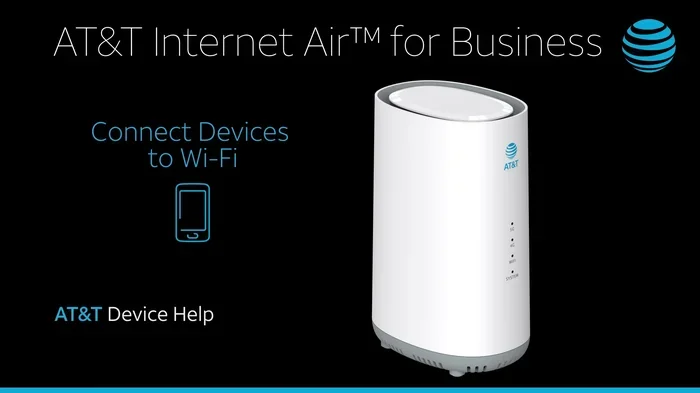
Fixed wireless uses cellular towers to deliver internet. It is often available in rural areas where fiber or DSL is not an option. The equipment for fixed wireless is different from fiber and DSL, but AT&T still provides the necessary gateway device to get you online.
Each connection type has its own setup process, and the router or gateway plays a key role in your internet speed and overall performance.
Does AT&T Provide a Router? Here Is the Full Answer
So, does AT&T provide a router? Yes, they absolutely do. When you sign up for any AT&T internet plan, the company provides you with the equipment needed to connect to the internet. This equipment is called a gateway device, and it combines both modem and router functions into one unit.
What Equipment Does AT&T Send You?
AT&T sends you a gateway device that handles two jobs at once. It connects to the internet through the wall outlet or phone jack, and it broadcasts a Wi-Fi signal throughout your home. One device does both tasks, which makes setup simple for most users.
The specific model you receive depends on your plan type and location. Here are the most common AT&T gateway devices:
- AT&T Smart Home Manager – This is the primary router AT&T provides for fiber and DSL customers. It supports dual-band Wi-Fi and covers most homes with solid signal strength.
- BGW210 Gateway – An older but reliable model used for DSL and some fiber connections. It offers basic Wi-Fi and multiple Ethernet ports.
- BGW320 Gateway – A newer model with improved Wi-Fi 6 support. It offers better speeds and wider coverage than older gateway models.
AT&T Smart Home Manager Features
The AT&T Smart Home Manager app is a handy tool that lets you manage your router from your phone. You can check your internet speed, run speed tests, and see which devices are connected to your network. The app also helps you troubleshoot common connectivity problems without calling customer service.
Does AT&T provide a router with mesh capabilities? Some AT&T gateways support basic mesh-like features, but they are not true mesh systems. If you need full-home coverage in a large house, you may want to add a separate mesh satellite or use your own mesh router.
AT&T Router Fees and Rental Costs
One of the first things customers want to know is how much it costs to rent an AT&T router. AT&T router fees can add up over time, so it is important to understand what you are paying for each month.
Monthly Rental Fee for AT&T Equipment
AT&T charges a monthly rental fee for the equipment they provide. This fee typically ranges from $10 to $15 per month. The exact amount depends on your plan and the type of gateway device you receive.
Here is a quick breakdown of common AT&T equipment rental fees:
- AT&T Smart Home Manager – $10 to $15 per month
- BGW210 Gateway – $10 per month
- BGW320 Gateway – $10 to $15 per month
Over a full year, these fees can add up to $120-$180. That is real money that could go toward other household expenses or savings.
Is the Rental Fee Worth It?
Does AT&T provide a router for free? No, there is always a rental fee unless you have a promotional offer. Some AT&T plans include free equipment for the first year, but after that, the fee kicks in automatically.
If you plan to stay with AT&T for many years and value the convenience, renting their equipment might make sense. But if you want to save money over the long run, using your own router is a smart financial move. You eliminate the monthly fee and often get better features and performance.
Can You Use Your Own Router with AT&T?
Many customers want to know if they can ditch the AT&T gateway and use their own equipment. The answer is yes, but there are a few steps you need to follow to make it work properly.
How to Use Your Own Router with AT&T
Using your own router with AT&T is possible, but you need to put the AT&T gateway into bridge mode first. Bridge mode turns off the router function on the AT&T device and lets your own router handle the Wi-Fi broadcasting. This prevents double routing and keeps your network running smoothly.
Here is how the process generally works:
- Log into your AT&T gateway admin panel using a web browser
- Navigate to the network settings or advanced settings
- Find the bridge mode option and enable it
- Connect your own router to one of the gateway Ethernet ports
- Configure your new router settings and Wi-Fi name
Can I buy a router and install myself? Absolutely! If you want better performance, more features, or long-term savings, purchasing your own router is a great option. Just make sure the router is compatible with AT&T’s network setup.
Benefits of Using Your Own Router
There are several real advantages to ditching the AT&T rental and using your own equipment:
- Better Wi-Fi coverage – Many third-party routers offer superior range and signal strength compared to AT&T’s basic gateways.
- More features – You get access to advanced settings like parental controls, quality of service, and VPN support.
- Cost savings – Eliminating the $10-$15 monthly rental fee saves you $120-$180 every single year.
- Faster speeds – Modern routers can handle gigabit speeds better than AT&T’s entry-level gateway devices.
- More control – You own the device and can customize it however you want without restrictions.
If you want to explore router options and learn more about self-installation, check out this helpful guide on buying and installing your own router.
Setting Up and Troubleshooting Your AT&T Router
Once you receive your AT&T router, you need to set it up properly. A good setup ensures the best Wi-Fi coverage and internet speed throughout your home. The good news is that AT&T makes the process pretty straightforward.
Step-by-Step AT&T Router Setup
Setting up your AT&T router is simple if you follow these steps in order:
- Plug the AT&T gateway into your wall outlet or phone jack
- Connect the power adapter and wait for the lights to stabilize
- Download the AT&T Smart Home Manager app on your phone
- Follow the on-screen instructions to complete the initial setup
- Connect your devices to the new Wi-Fi network using the default password
The default Wi-Fi name and password are printed on a sticker on the bottom of your AT&T gateway. Write these down and keep them in a safe place. You can change the Wi-Fi name and password later through the app or admin panel.
Common AT&T Router Problems and Fixes
Sometimes things do not work as expected right away. Here are some common issues and how to fix them quickly:
- Slow internet speed – Try restarting your gateway. Unplug it for 30 seconds, then plug it back in. This clears the cache and refreshes the connection.
- Weak Wi-Fi signal – Move the gateway to a central location in your home. Avoid placing it near walls, metal objects, or microwaves that can interfere with the signal.
- Cannot connect to Wi-Fi – Make sure you are using the correct password. You can reset or change it through the AT&T Smart Home Manager app.
- Gateway keeps restarting – This could indicate a hardware issue or overheating. Contact AT&T customer service for a replacement device.
Can You Connect Mesh to an Existing AT&T Router?
If your home is large and the AT&T gateway does not cover every room, you might consider adding a mesh system. Can I connect mesh to existing router? Yes, you can! You can connect a mesh satellite to your AT&T gateway to extend your Wi-Fi coverage. Just place the mesh node in a room where the signal is still strong and let it rebroadcast the connection to dead zones.
For more details on mesh setups and how to extend your network, check out this guide on connecting mesh to an existing router.
AT&T Fiber vs. AT&T Internet: Router Differences
Not all AT&T internet plans are the same, and the router you get can vary significantly between AT&T Fiber and AT&T Internet (DSL). Knowing the differences helps you set the right expectations for your internet experience.
AT&T Fiber Router Equipment
AT&T Fiber is the premium option, and the equipment reflects that. Fiber customers typically receive the AT&T Smart Home Manager or the BGW320 gateway. These devices support faster speeds and offer better Wi-Fi performance than DSL equipment.
AT&T Fiber speeds can reach up to 5 Gbps in some areas. To take full advantage of these speeds, you need a gateway that can handle the bandwidth. AT&T’s fiber gateways are built for this purpose and deliver reliable performance for streaming, gaming, and video calls.
AT&T DSL Router Equipment
AT&T DSL is the more basic option. DSL customers also receive a gateway device, but the speeds are lower. The BGW210 is a common model for DSL customers. It provides reliable internet but may not support the fastest Wi-Fi speeds available today.
If you are on a DSL plan, you might still want to upgrade your router for better performance. Using your own router can make a big difference in Wi-Fi coverage and overall speed, even on a slower DSL plan.
Which AT&T Plan Should You Choose?
Your choice of plan affects the router you get and the overall internet experience. Here is a quick comparison of the two main AT&T internet options:
- AT&T Fiber – Max speed up to 5 Gbps, gateway includes Smart Home Manager or BGW320, monthly fee $60-$180, router rental $10-$15/month, best for heavy users, streaming, and gaming.
- AT&T DSL – Max speed up to 100 Mbps, gateway includes BGW210, monthly fee $30-$50, router rental $10/month, best for basic browsing and email.
Choosing the right plan ensures you get the right equipment and the best possible internet experience for your household needs.
Final Thoughts on AT&T Router Equipment
So, does AT&T provide a router? Yes, without a doubt. AT&T provides a gateway device that combines modem and router functions for all internet customers. The specific model depends on your plan and location. Whether you get the Smart Home Manager, BGW210, or BGW320, AT&T ensures you have the equipment needed to go online right away.
That said, renting AT&T equipment comes with a monthly fee that can add up over time. If you want more control, better features, and long-term savings, using your own router is a great option. Just remember to enable bridge mode on the AT&T gateway first, and you will be all set.
No matter which route you choose, understanding your AT&T router setup helps you get the best performance from your internet service. Take the time to explore your options, test your speeds, and make adjustments as needed. A little effort goes a long way toward a faster, more reliable internet connection.
Finally, if you ever run into issues or have questions, AT&T customer service is always available to help. You can also use the Smart Home Manager app for quick troubleshooting. Stay informed, stay connected, and enjoy your AT&T internet experience to the fullest.
Frequently Asked Questions
Does AT&T charge a fee for the router?
Yes, AT&T charges a monthly rental fee for the gateway device they provide. The fee typically ranges from $10 to $15 per month. Some promotional plans may include the equipment for free for the first year, but the rental fee applies after that period ends.
Can I use my own router with AT&T internet?
Yes, you can use your own router with AT&T. You need to put the AT&T gateway into bridge mode first. This disables the built-in router function and allows your third-party router to handle Wi-Fi broadcasting. Make sure your router is compatible with AT&T’s network setup before purchasing.
How do I set up my AT&T router for the first time?
Plug the AT&T gateway into your wall outlet or phone jack, connect the power adapter, and wait for the lights to stabilize. Download the AT&T Smart Home Manager app and follow the on-screen prompts. The default Wi-Fi name and password are printed on a sticker on the bottom of the gateway device.
What is the AT&T Smart Home Manager app?
The AT&T Smart Home Manager app is a free tool that lets you manage your AT&T gateway from your phone. You can check internet speeds, run diagnostics, see connected devices, and troubleshoot common issues. It is available for both iOS and Android devices and makes router management simple.
Can I return AT&T router equipment if I cancel service?
Yes, you must return AT&T equipment when you cancel your service. AT&T will provide a return label and instructions. Failure to return the equipment may result in charges for the full retail value of the device. Contact AT&T customer service to start the return process.
Does AT&T provide a modem and router separately?
No, AT&T provides a single gateway device that combines both modem and router functions. This all-in-one unit handles the connection to the internet and broadcasts the Wi-Fi signal. If you want separate devices, you can use bridge mode and connect your own modem and router setup.