Does ATT Fiber Have WiFi 6 And What You Should Know
Does AT&T Fiber have WiFi 6? The answer is yes, but with important caveats. AT&T Fiber supports WiFi 6 on select gateways and plans, giving you faster wireless speeds and better performance for multiple devices. However, you may need to upgrade your equipment or check your specific plan to get the full WiFi 6 experience.
AT&T Fiber is one of the fastest internet options available today. It delivers blazing speeds through fiber optic cables directly to your home. But the real question many people ask is whether AT&T Fiber supports WiFi 6.
The short answer is yes. AT&T Fiber does support WiFi 6 on many of its plans and gateways. But the full story is a bit more detailed than that. In this article, we will walk you through everything you need to know about AT&T Fiber WiFi 6. We will cover what WiFi 6 actually is, which AT&T equipment supports it, and how you can get the best performance from your connection.
Whether you are a casual internet user or a heavy streamer, understanding WiFi 6 on AT&T Fiber can make a big difference. Let us dive right in.
Key Takeaways
- AT&T Fiber does support WiFi 6: Select AT&T gateways and plans include WiFi 6 technology for faster wireless speeds.
- Equipment matters: You need a WiFi 6-compatible gateway or router to access WiFi 6 speeds on your AT&T Fiber connection.
- Not all plans include WiFi 6: Some AT&T Fiber plans may require an upgrade or a separate router purchase to unlock WiFi 6 features.
- WiFi 6 offers real benefits: Faster speeds, lower latency, and better performance for smart home devices and streaming.
- You can use your own router: If the AT&T gateway doesn’t support WiFi 6, you can buy your own WiFi box and connect it to your AT&T Fiber setup.
- Mesh systems help extend coverage: Adding a mesh network can boost WiFi 6 performance throughout your home.
📑 Table of Contents
What Is WiFi 6 and Why Does It Matter?
WiFi 6 is the latest wireless networking standard. It is also known as 802.11ax. This new standard brings significant improvements over older WiFi versions like WiFi 5 and WiFi 4.
Here is what makes WiFi 6 special:
- Faster speeds: WiFi 6 can deliver speeds up to 9.6 Gbps in theory. Real-world speeds are lower but still much faster than older standards.
- Better performance with multiple devices: WiFi 6 uses a technology called OFDMA. This lets your router communicate with many devices at the same time instead of one at a time.
- Lower latency: Latency is the delay before data starts moving. WiFi 6 reduces this delay significantly. This is great for gaming and video calls.
- Improved battery life for devices: WiFi 6 has a feature called Target Wake Time. It helps smart home devices and phones save battery by managing when they wake up to send data.
- Better performance in crowded areas: If you live in an apartment building or a neighborhood with many networks, WiFi 6 handles the congestion much better.
Think of WiFi 6 like a highway with more lanes. More cars (devices) can travel at the same time without traffic jams. That is what WiFi 6 technology does for your home network.
WiFi 6 vs WiFi 5: What Is the Difference?
WiFi 5 (also called 802.11ac) was a big step forward. But WiFi 6 takes things much further. WiFi 5 maxes out at about 3.5 Gbps. WiFi 6 nearly triples that. More importantly, WiFi 6 handles multiple devices far better than WiFi 5 ever could.
If you have a smart home with many connected devices, WiFi 6 makes a noticeable difference. Your smart speakers, cameras, and thermostats all stay connected without slowing down your internet.
Does AT&T Fiber Support WiFi 6?
Now let us get to the core question: does AT&T Fiber have WiFi 6? The answer depends on a few factors, including your gateway device and your specific plan.
AT&T has been rolling out WiFi 6 support across its fiber offerings. Many newer AT&T Fiber plans come with gateways that support WiFi 6. However, older gateways or lower-tier plans may not include this feature.
Which AT&T Fiber Plans Support WiFi 6?
AT&T Fiber plans vary by location and availability. Generally, the higher-speed plans are more likely to include WiFi 6 support. Here is what you should know:
- AT&T Fiber 300: This plan often includes a WiFi 6 gateway, especially in newer installations.
- AT&T Fiber 500: WiFi 6 support is standard on most 500 Mbps plans.
- AT&T Fiber 1 GIG and 2 GIG: These plans almost always come with WiFi 6-capable equipment.
- AT&T Fiber 5 GIG: The top-tier plans include the latest WiFi 6 and even WiFi 6E technology in some cases.
It is important to note that AT&T sometimes ships older equipment to certain areas. If you are not sure whether your gateway supports WiFi 6, you can check the model number on the back of your device. You can also call AT&T support or check your account online for details about your specific plan and equipment.
Can You Use Your Own WiFi 6 Router With AT&T Fiber?
Yes, you can. If your AT&T gateway does not support WiFi 6, you have options. You can purchase your own WiFi 6 router and connect it to your AT&T Fiber gateway. This is a great way to get WiFi 6 speeds even if your ISP-provided equipment is older.
Just keep in mind that using your own router means you will need to put the AT&T gateway into bridge mode. This disables the WiFi on the AT&T device and lets your personal router handle all the wireless connections. If you are not sure how to do this, many online guides can walk you through the process step by step.
Some people also choose to buy their own WiFi box to avoid rental fees from AT&T. This can save you money over time, especially if you plan to keep your internet service for several years.
AT&T Fiber WiFi 6 Equipment and Setup
Getting the most out of AT&T Fiber WiFi 6 starts with the right equipment. Let us look at what you need and how to set it up properly.
AT&T WiFi Gateway Models That Support WiFi 6
AT&T has released several gateway models that include WiFi 6 support. Here are some of the most common ones:
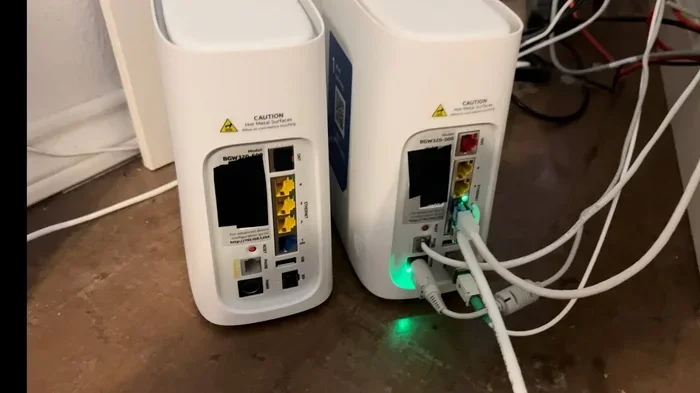
- BGW320-500: This is one of AT&T’s newer gateways. It supports WiFi 6 and offers speeds up to 5 Gbps.
- BGW210-700: Another popular model that includes WiFi 6 capabilities. It works well with AT&T Fiber plans up to 2 Gbps.
- Arris BGW210-700: This is a rebadged version of the same gateway. It offers solid WiFi 6 performance for most households.
If you are not sure which model you have, check the label on the back or bottom of your gateway. The model number is usually printed right there. You can also log into your AT&T account to view your equipment details.
Setting Up WiFi 6 on AT&T Fiber
Setting up WiFi 6 on your AT&T Fiber connection is straightforward. Here are the basic steps:
- Make sure your AT&T gateway supports WiFi 6. Check the model number online if you are unsure.
- Connect your gateway to the fiber outlet using the provided cable.
- Power on the gateway and wait for it to fully start up.
- Open a web browser and go to the AT&T gateway settings page (usually 192.168.1.254).
- Log in with your AT&T credentials.
- Navigate to the wireless settings section.
- Look for WiFi 6 or 802.11ax in the settings. Make sure it is enabled.
- Set a strong password and save your settings.
Once you complete these steps, your devices should connect to the WiFi 6 network automatically. Older devices will fall back to older WiFi standards, but newer phones, laptops, and tablets will take full advantage of WiFi 6 speeds.
Extending Your WiFi 6 Coverage
Even with WiFi 6, your wireless signal has limits. Thick walls, long distances, and interference from other electronics can weaken your signal. If you have a larger home, you may need to extend your coverage.
One effective way to do this is by using an Ethernet cable to connect additional access points or mesh nodes. If you are exploring options to extend your network, you can learn more about extending WiFi with Ethernet cable to boost your coverage throughout your home.
Another option is to set up a mesh network. AT&T offers mesh systems through its Smart Home manager. You can also purchase third-party mesh systems that support WiFi 6. These systems use multiple nodes placed around your home to create a seamless wireless network with no dead zones.
If you are considering a mesh setup, keep in mind that adding mesh WiFi to an existing router is a common and effective way to improve coverage without replacing your current equipment.
WiFi 6 Benefits on AT&T Fiber
So what do you actually gain by using WiFi 6 on AT&T Fiber? The benefits are real and noticeable. Let us break them down.
Faster Speeds for Streaming and Gaming
With AT&T Fiber speeds of 300 Mbps or higher, WiFi 6 ensures that wireless connections can keep up. Older WiFi standards sometimes bottleneck your speeds, especially when you are far from the router. WiFi 6 fixes this problem with better signal efficiency and higher throughput.
If you love streaming 4K content on Netflix or playing online games, WiFi 6 makes a real difference. You will experience fewer buffering moments and smoother gameplay.
Better Performance for Smart Homes
Modern homes have dozens of connected devices. Smart TVs, phones, tablets, smart speakers, security cameras, and smart thermostats all compete for bandwidth. WiFi 6 handles this traffic much better than older WiFi standards.
The OFDMA technology in WiFi 6 lets your router talk to multiple devices simultaneously. This means your smart home devices stay responsive even when everyone in the house is streaming or working online.
Lower Latency for Real-Time Applications
Latency is the time it takes for data to travel from your device to the internet and back. WiFi 6 reduces latency significantly compared to WiFi 5. This is especially important for:
- Online gaming
- Video conferencing
- Cloud computing
- Remote work applications
If you work from home and rely on video calls all day, lower latency means fewer frozen screens and clearer audio.
Future-Proofing Your Home Network
WiFi 6 is the current standard, and WiFi 6E and WiFi 7 are already on the horizon. By choosing AT&T Fiber with WiFi 6, you are investing in a network that will serve you well for years to come. Your devices will be ready for whatever comes next.
Common Mistakes and How to Avoid Them
Even with a great AT&T Fiber connection and WiFi 6, mistakes can hold you back. Here are some common pitfalls and how to avoid them.
Not Checking Your Gateway Model
Many people assume their AT&T equipment supports WiFi 6 without checking. This is a mistake. Older gateways may only support WiFi 5 or even WiFi 4. Always verify your model number and look up its specifications online.
Placing the Router in a Bad Location
WiFi signals struggle with thick walls, metal objects, and electronics. Placing your gateway in a closet or behind a TV can weaken your signal significantly. Put your gateway in a central, open location for the best coverage.
Ignoring Firmware Updates
AT&T regularly releases firmware updates for its gateways. These updates can improve WiFi performance and fix bugs. Make sure your gateway is running the latest firmware. You can usually check for updates in the AT&T Smart Home Manager app.
Using Too Many Devices on One Band
WiFi 6 gateways are dual-band or tri-band. If you put all your devices on the 2.4 GHz band, you will experience slower speeds. Spread your devices across both bands, or use the 5 GHz or 6 GHz bands for high-bandwidth activities like gaming and streaming.
Expert Insights on AT&T Fiber WiFi 6
Networking experts agree that WiFi 6 is a game-changer for fiber internet connections. According to industry analysts, the combination of AT&T Fiber’s high-speed backbone and WiFi 6 wireless technology creates one of the best home networking experiences available today.
“The pairing of fiber optic internet with WiFi 6 is the gold standard for home connectivity,” says one network engineer. “Fiber provides the raw speed, and WiFi 6 makes sure that speed reaches every device in your home efficiently.”
Experts also recommend that households with more than 10 connected devices strongly consider WiFi 6. The ability to handle multiple simultaneous connections without slowdowns is perhaps the single biggest advantage of WiFi 6 over older standards.
For those who want even more advanced features, WiFi 6E opens up the 6 GHz band, providing an additional lane for data traffic. Some newer AT&T gateways support WiFi 6E, which is worth looking into if you want the absolute best performance.
It is also worth noting that your actual WiFi speeds depend on several factors. Distance from the router, the number of walls between your device and the router, and the number of active devices all play a role. WiFi 6 helps minimize these issues, but it cannot completely eliminate them.
Final Thoughts on AT&T Fiber WiFi 6
So, does AT&T Fiber have WiFi 6? The answer is a resounding yes for most modern plans and equipment. AT&T has embraced WiFi 6 technology across its fiber offerings, giving customers access to faster speeds, better multi-device performance, and lower latency.
However, you need to make sure your specific plan and equipment support WiFi 6. Check your gateway model, review your plan details, and do not hesitate to upgrade if needed. If your AT&T-provided gateway does not support WiFi 6, you can always buy your own WiFi box and connect it to your AT&T Fiber setup for a seamless upgrade.
The benefits of WiFi 6 on AT&T Fiber are clear. Faster streaming, smoother gaming, better smart home performance, and a future-proof network are all within your reach. Take the time to set up your equipment properly, place your gateway in an optimal location, and keep your firmware updated. These small steps will pay off in a big way.
With AT&T Fiber and WiFi 6, you are getting one of the best internet experiences available today. Enjoy the speed, the reliability, and the peace of mind that comes with knowing your home network is ready for whatever the future brings.
Frequently Asked Questions
Does every AT&T Fiber plan include WiFi 6?
Not every plan includes WiFi 6 by default. Higher-tier plans like AT&T Fiber 500, 1 GIG, and 2 GIG are more likely to include WiFi 6 support. Check your specific plan details or contact AT&T to confirm whether your plan includes a WiFi 6 gateway.
Can I get WiFi 6 speeds with an older AT&T gateway?
Older gateways may not support WiFi 6. If your gateway is several years old, it likely uses WiFi 5 or an older standard. You can check your gateway model number online to confirm its WiFi capabilities. Upgrading to a newer gateway or using your own WiFi 6 router is the best way to get WiFi 6 speeds.
Do I need a special device to connect to WiFi 6 on AT&T Fiber?
Your gateway or router needs to support WiFi 6, and your device also needs a WiFi 6-compatible wireless adapter. Most modern smartphones, laptops, and tablets released after 2020 support WiFi 6. Older devices will connect but will use older WiFi standards and slower speeds.
Is AT&T Fiber WiFi 6 faster than regular WiFi?
Yes, WiFi 6 is significantly faster than older WiFi standards like WiFi 5 and WiFi 4. On AT&T Fiber, WiFi 6 allows your wireless devices to get closer to the full speed of your fiber plan. You will notice the biggest difference when multiple devices are connected at the same time.
What should I do if my AT&T Fiber WiFi 6 signal is weak?
If your WiFi 6 signal is weak, try moving your gateway to a central location in your home. Avoid placing it near thick walls or large electronics. You can also extend your coverage by adding a mesh system or using an Ethernet cable to connect additional access points. Learning more about extending WiFi with Ethernet cable can help you improve your signal in larger homes.
Can I use a mesh WiFi system with AT&T Fiber and WiFi 6?
Absolutely. Mesh WiFi systems work great with AT&T Fiber and WiFi 6. You can add a mesh system to extend your WiFi 6 coverage throughout your home. Just make sure the mesh system you choose supports WiFi 6 for the best performance. You can find more guidance on adding mesh WiFi to an existing router to get started.