Does Your AC Need WiFi To Work Or Can It Run Offline
Most air conditioners can run perfectly fine without WiFi. Your AC uses electricity and refrigerant to cool your home, and none of that requires an internet connection. However, smart AC units offer remote control, scheduling, and energy savings when connected. You can always use a WiFi thermostat or smart plug to add connectivity later if needed.
This is a comprehensive guide about Does Ac Need Wifi To Work.
Key Takeaways
- ACs work offline by default: Traditional units cool your home with no internet needed at all.
- Smart AC features depend on WiFi: Remote control, scheduling, and voice commands need a connection.
- WiFi interference from AC units is real: Your cooling system can sometimes weaken wireless signals.
- You can add WiFi to any AC: Smart plugs and WiFi thermostats let you upgrade older units.
- Power outages affect both wired and smart ACs: A WiFi connection does not keep your AC running during blackouts.
- Security matters: Connected ACs can be vulnerable if not properly secured.
[FEATURED_IMAGE_PLACEHOLDER]
Does Your AC Need WiFi To Work?
Here is the short answer. No, your air conditioner does not need WiFi to work. A standard AC unit cools your home using electricity, refrigerant, and a simple thermostat. None of these parts need an internet connection to do their job. You can unplug your WiFi router, and your AC will still blast cold air all summer long.
But the question goes deeper than that. Many modern AC units now come with WiFi built in. These smart ACs let you control the temperature from your phone. They also offer scheduling, energy tracking, and voice control through assistants like Alexa and Google Home. So while WiFi is not required, it adds a lot of convenience.
This article breaks down everything you need to know. We will cover how ACs work with and without WiFi. You will learn what features you gain and lose. We will also look at whether your AC can interfere with your wireless signal, and how to add WiFi to an older unit.
Whether you have a window unit, a split system, or a central AC, this guide has you covered. Let us dive in.
How a Traditional AC Works Without WiFi
Before we talk about WiFi, let us understand the basics. A traditional air conditioner is a self-contained cooling system. It does not need any digital connection to function. Here is how it works in simple terms.
Your AC pulls warm air from your room over cold coils filled with refrigerant. The refrigerant absorbs the heat and sends it outside. The cooled air blows back into your room. A basic thermostat controls this cycle. When the room reaches your set temperature, the AC shuts off. When it warms up again, the AC turns back on.
Every part of this process is mechanical or electrical. There is no software. No internet. No data transfer. Your AC has been doing this for decades, long before any home had wireless internet.
The Role of a Basic Thermostat
The thermostat is the brain of a traditional AC. It uses a simple temperature sensor and a switch. When the temperature rises above your setting, the switch closes and the AC starts. When it cools down, the switch opens and the AC stops.
These thermostats are reliable. They do not crash. They do not need updates. They do not depend on a WiFi router being online. This is why older AC units are so dependable. They work even during internet outages or power fluctuations that might disrupt your network.
What You Lose Without WiFi
Running your AC without WiFi means you miss out on smart features. You cannot change the temperature from the couch. You cannot set schedules from work. You cannot check if you left the AC running while on vacation. For many people, these conveniences are worth the connection. But your AC will still cool your home just fine without them.
What Smart ACs Can Do With WiFi
Smart AC units connect to your home network and unlock a range of features. These units use WiFi to communicate with an app on your phone. Some also connect to smart home ecosystems like Amazon Alexa, Google Home, or Apple HomeKit.
Here are the main benefits of a WiFi-enabled AC:
- Remote control: Turn your AC on or off from anywhere with cell service.
- Scheduling: Set cooling schedules that match your daily routine.
- Energy monitoring: Track how much power your AC uses in real time.
- Voice control: Change the temperature using voice commands.
- Geofencing: Your AC turns on automatically when you are near home.
- Diagnostics: Get alerts if something goes wrong with your unit.
WiFi Thermostats That Work With Any AC
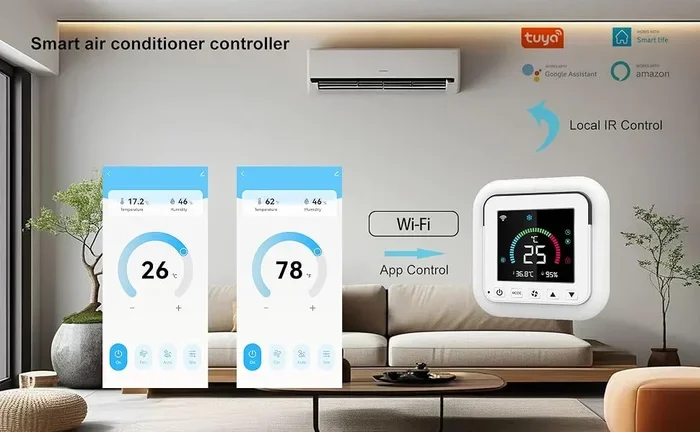
You do not need a smart AC to get these features. A WiFi thermostat can add smart controls to almost any existing unit. These devices replace your current thermostat and connect to your home network. You can then control your AC through an app or voice assistant.
Some WiFi thermostats work without needing an AC wire connection, which makes installation easier for many homes. This is a great option if you want the benefits of smart cooling without buying a whole new AC unit.
Do Smart ACs Work Without WiFi?
Most smart ACs can still cool your home without WiFi. They just revert to basic operation. You can use the physical remote or the unit’s built-in controls. But you lose all the smart features until the connection returns. Some units also store schedules locally, so they may still follow a set routine even offline.
If your internet goes down, do not panic. Your AC keeps running. You just cannot control it from your phone until the WiFi is back.
Can Your AC Affect Your WiFi Signal?
This is a question many people ask but few know the answer to. The short answer is yes, your AC can sometimes affect your wireless signal. But the impact is usually small.
Here is why it happens. AC units contain electrical components that can create electromagnetic interference. The compressor, fan motor, and power cables all generate small electrical fields. These fields can occasionally interfere with nearby WiFi signals.
When AC Interference Is Most Noticeable
You are more likely to notice WiFi problems when your AC kicks on. The compressor startup creates a brief electrical surge. This can cause momentary signal drops. If your WiFi router is placed near your AC unit, you might see more frequent disruptions.
Window units are the biggest culprits here. They sit right next to walls where routers often live. The metal casing of a window AC can also block WiFi signals from passing through. This is not just about interference. The physical barrier matters too.
How to Reduce AC-Related WiFi Issues
Keep your router away from your AC unit. A few feet of distance can make a big difference. If you use a window AC, try placing the router on the opposite side of the room. You can also use a WiFi extender to boost the signal through walls and obstructions.
For homes with central AC, the ductwork can sometimes act as a shield. This may create dead zones in your wireless coverage. Adding a mesh network can solve this problem effectively.
Adding WiFi to an Older AC Unit
Not everyone wants to buy a new smart AC. The good news is that you can add WiFi to almost any existing unit. There are several simple ways to do this without replacing your entire system.
Option 1: Smart Plugs
A smart plug is the easiest and cheapest solution. You plug your AC into the smart plug, and then plug the smart plug into the wall. The smart plug connects to your WiFi and lets you turn your AC on or off remotely through an app.
Smart plugs do not control temperature. They simply switch the power on and off. But this is enough to save energy and add basic remote control. You can turn your AC on before you get home so the house is cool when you arrive.
Option 2: WiFi Thermostats
A WiFi thermostat gives you much more control than a smart plug. It regulates temperature automatically and lets you set detailed schedules. Many models work with both window units and split systems.
Before buying one, check if your AC has a common wire (C-wire). Some older units do not have this wire, which can make thermostat installation tricky. However, many modern WiFi thermostats include a power extender kit that solves this problem.
You can also find WiFi thermostats that work without an AC wire, making them compatible with almost any setup. This is a great option for renters or anyone who wants a simple upgrade.
Option 3: Infrared Blasters
Some smart home hubs include infrared blasters. These devices learn the infrared signals from your AC remote. They then replay those signals when you give a command through your phone or voice assistant. This is a clever way to add smart control without any wiring.
Devices like the BroadLink RM4 Pro or SwitchBot Hub work well for this purpose. They are affordable and easy to set up. You point the hub at your AC, and it takes over from there.
AC WiFi Connectivity: What to Watch Out For
While connecting your AC to WiFi has many benefits, there are some things to keep in mind. Not every connection is perfect, and some issues can surprise you.
Security Concerns
Any device connected to the internet can be a target. Smart ACs are no exception. If your AC is on an unsecured network, someone could potentially access it. They might change your temperature or, in rare cases, gain access to your broader home network.
To stay safe, always use a strong password for your WiFi network. Keep your AC firmware updated. And consider putting smart devices on a separate guest network if your router supports it.
Internet Outages and Cloud Dependencies
Many smart AC features rely on cloud servers. If the manufacturer’s servers go down, you might lose access to remote control and scheduling. Your AC still cools, but the smart features go dark. This is rare but worth knowing about before you buy.
Data Privacy
Connected ACs collect data about your usage patterns. Some manufacturers use this data to improve their products. Others may share it with third parties. Read the privacy policy before purchasing a smart AC. Choose brands that are transparent about data collection.
Should You Get a WiFi-Enabled AC?
This depends on your needs and budget. Here is a quick comparison to help you decide.
- Traditional AC: Lower upfront cost, no internet needed, fully reliable, but no remote features.
- Smart AC with WiFi: Higher upfront cost, needs WiFi for full features, but offers convenience and energy savings.
- Retrofit option (smart plug or thermostat): Low cost, works with existing AC, adds basic smart features without a full replacement.
If you live in a home with reliable WiFi and enjoy controlling devices from your phone, a smart AC is a great choice. If you prefer simplicity and do not want to deal with apps and networks, a traditional AC works perfectly fine.
Keep in mind that a WiFi connection does not make your AC more powerful. It does not cool faster or use less energy on its own. The savings come from better scheduling and smarter usage habits that the app encourages.
Also, remember that your AC will still work during a WiFi outage. The cooling does not stop. You just go back to using the physical controls until your internet returns. This is an important point that many people overlook when deciding whether to go smart.
One more thing to consider is the AC unit’s effect on WiFi. If you notice your wireless signal dropping when the AC runs, you may want to reposition your router or use a mesh system. A strong WiFi connection ensures your smart AC stays responsive and reliable.
Bottom line. Your AC does not need WiFi to keep you cool. But WiFi can make your life easier and your home smarter. Choose what fits your lifestyle and budget best.
Conclusion
Your air conditioner works perfectly well without WiFi. The cooling process is entirely mechanical and electrical. No internet connection is required for your unit to blow cold air into your home. This has been true since the first AC units were invented.
WiFi adds a layer of convenience. It lets you control your AC from anywhere, set smart schedules, and monitor energy use. But it is not a necessity. If you prefer a simple setup, a traditional AC with a basic thermostat gets the job done.
If you want more control, you can always add WiFi later. Smart plugs, WiFi thermostats, and infrared blasters are all affordable options. They let you upgrade your existing unit without a full replacement.
Just remember to keep your WiFi secure and place your router away from your AC unit to avoid signal issues. And if your internet goes down, do not worry. Your AC will keep cooling your home just fine.
Ultimately, the choice is yours. WiFi makes your AC smarter. But it does not make it work. Your AC has been doing its job long before WiFi existed, and it will keep doing so for decades to come.
Frequently Asked Questions
Can I use my AC if my WiFi is down?
Yes, absolutely. Your AC does not need WiFi to cool your home. If the WiFi goes out, simply use the physical remote or the controls on the unit itself. All basic cooling functions work without any internet connection.
Will a smart AC still work without WiFi?
Yes, a smart AC will still cool your home without WiFi. It just loses the remote control, scheduling, and smart features. The unit reverts to basic operation using its built-in thermostat and controls until the WiFi connection returns.
Can I add WiFi to my old AC unit without buying a new one?
Yes, you can. Smart plugs, WiFi thermostats, and infrared blasters are all affordable ways to add smart features to an older AC. A smart plug is the cheapest option, while a WiFi thermostat gives you the most control over temperature and scheduling.
Does my AC unit interfere with my WiFi signal?
It can, especially window units placed near your router. The electrical components in your AC and the metal casing can cause interference or block signals. Moving your router away from the AC unit usually solves this problem quickly.
Is a WiFi-enabled AC more expensive to run?
Not necessarily. A smart AC uses the same amount of electricity to cool your home. However, the scheduling and energy monitoring features can help you use less energy overall, which may lower your electricity bill over time.
Are smart ACs secure from hackers?
Most reputable brands take security seriously and release regular firmware updates. To stay safe, use a strong WiFi password, keep your AC firmware updated, and consider placing smart devices on a separate guest network. Avoid using default passwords on any smart device.