Do All Pixma Printers Use The Same Ink Cartridges
Not all Pixma printers use the same ink cartridges. Canon designs different Pixma models with specific ink systems, meaning cartridge compatibility varies widely. Understanding your printer model and ink type saves money, prevents damage, and ensures the best print quality every time.
Do all Pixma printers use the same ink cartridges? This is one of the most common questions Canon printer users ask. The short answer is no. Canon builds its Pixma lineup with different ink systems depending on the model, purpose, and price point. Some printers use a single black cartridge and a tricolor combo, while others use individual color tanks. Understanding how Canon Pixma ink cartridges work helps you make smarter buying decisions.
Whether you own a budget Pixma for home use or a high-end model for photo printing, knowing your ink setup matters. Using the wrong cartridge wastes money and can even harm your printer. In this guide, we break down everything you need to know about printer ink compatibility across the Canon Pixma range. Let us get into it.
Key Takeaways
- Different Pixma models use different ink cartridges: Not every Canon Pixma printer shares the same ink system.
- Ink cartridge numbers matter: Each cartridge has a unique identifier tied to specific printer models.
- OEM and compatible options exist: You can choose between genuine Canon ink and third-party alternatives.
- High yield vs. standard cartridges: Some Pixma printers support both, giving you flexibility and cost savings.
- Always check your model number: This is the fastest way to confirm which ink cartridges your printer needs.
- Using the wrong ink can cause problems: Poor print quality, leaks, and even permanent printer damage are real risks.
📑 Table of Contents
- Why Pixma Printers Do Not Share a Universal Ink System
- Canon Pixma Ink Cartridge Types Explained
- How to Find the Right Ink for Your Pixma Printer
- OEM vs Compatible Ink Cartridges for Pixma Printers
- Common Mistakes People Make With Pixma Ink Cartridges
- How to Save Money on Pixma Ink Cartridges
- Final Thoughts on Pixma Ink Compatibility
Why Pixma Printers Do Not Share a Universal Ink System
Canon designs different Pixma printers for different needs. A basic home printer has different requirements than a photo printer or an office machine. Because of this, Canon uses several distinct ink systems across its Pixma lineup. Each system matches a specific set of cartridge numbers and printer models.
Canon’s Ink System Philosophy
Canon believes that different printing tasks need different ink solutions. A document printer does not need the same ink setup as a photo printer. This is why Canon created multiple ink platforms within the Pixma family. Each platform uses a unique set of cartridges designed for specific print quality, volume, and color range.
For example, some Pixma models use the PGI and CLI ink system. These are pigment-based black ink and dye-based color inks. Other models use the CLI-only system where every color, including black, comes in a single dye-based cartridge. The differences go beyond just the cartridge shape. The ink chemistry, print head design, and fluid composition all vary.
How Ink Compatibility Works Across Models
Ink compatibility depends on the printer’s internal architecture. The print head, cartridge slots, and firmware all work together to recognize specific cartridges. When you insert a cartridge, the printer reads its chip to verify it is the correct one. If the chip does not match, the printer will not use it. This is why printer ink compatibility is not just about physical size. It is also about electronic communication between the cartridge and the printer.
Some older Pixma models share the same cartridges. For instance, several entry-level models from the same era might all use the PGI-225 and CLI-226 cartridges. But newer models often introduce new cartridge numbers. This means a cartridge that works in one Pixma model may not work in another, even if they look similar on the outside.
Canon Pixma Ink Cartridge Types Explained
Canon Pixma printers use several different ink cartridge types. Each type serves a specific purpose and fits a specific range of models. Let us break them down so you know exactly what to look for.
Standard Yield Cartridges
Standard yield cartridges contain a moderate amount of ink. They are perfect for light printing tasks like documents, school assignments, and occasional photos. These cartridges are more affordable upfront but need to be replaced more often if you print frequently.
Common standard yield cartridge numbers include:
- PGI-225 Black
- CLI-226 Color (combines cyan, magenta, and yellow)
- PGI-250 Black
- CLI-251 Color
High Yield Cartridges
High yield cartridges hold more ink and cost more per cartridge. However, they deliver a lower cost per page. If you print often or run a small office, high yield cartridges make more sense. They reduce how often you need to swap cartridges and save money over time.
Common high yield cartridge numbers include:
- PGI-225XL Black
- CLI-226XL Color
- PGI-250XL Black
- CLI-251XL Color
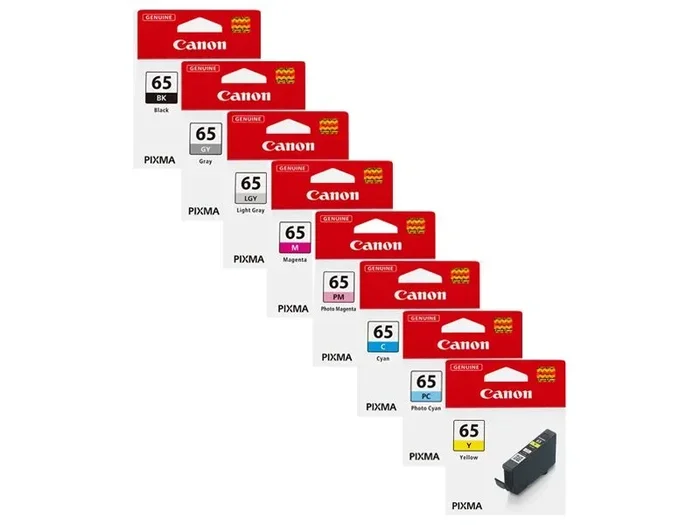
Individual Color Cartridges
Some Pixma printers use individual cartridges for each color. This means you have a separate cartridge for cyan, magenta, yellow, and black. The advantage is that you only replace the color you run out of. If you run out of yellow but still have plenty of cyan and magenta, you just buy one yellow cartridge instead of a whole tricolor combo.
Models like the Canon PIXMA TS series often use individual cartridges. This setup is great for users who want to save on ink costs in the long run.
Photo Ink Cartridges
Photo-focused Pixma printers use a dedicated photo ink system. These printers typically include a gray cartridge or a photo blue cartridge in addition to the standard colors. The extra inks help produce smoother gradients, richer blacks, and more vibrant photo colors. If you print lots of photographs, a photo ink setup is worth the investment.
How to Find the Right Ink for Your Pixma Printer
Finding the right ink for your Pixma printer is easier than you think. You just need to know your model number and where to look. Here is a step-by-step guide to help you get the correct cartridges every time.
Step 1: Check Your Printer Model Number
Every Canon Pixma printer has a model number printed on the front or top of the unit. It looks something like PIXMA TS3420 or PIXMA TR8620. Write this number down or take a photo of it with your phone. This is your key to finding the right ink.
Step 2: Visit the Canon Website
Go to the Canon support website and enter your model number in the search bar. The support page will list all compatible cartridges for your specific printer. Canon also provides a user manual PDF that includes ink compatibility details.
Step 3: Check the Cartridge Packaging
When you buy cartridges, the packaging lists compatible printer models. Always double-check that your model number appears on the list before you purchase. This simple habit prevents costly mistakes and wasted cartridges.
Quick Tips for Buying the Right Ink
- Always verify your printer model before ordering cartridges.
- Buy cartridges from reputable sellers to avoid counterfeits.
- Keep a spare cartridge on hand so you are never caught off guard.
- Consider buying high yield cartridges if you print more than 50 pages per week.
- Check if your printer supports XL cartridges for better value.
OEM vs Compatible Ink Cartridges for Pixma Printers
When shopping for Pixma ink, you will encounter two main options: OEM cartridges and compatible cartridges. Both have pros and cons, and understanding the difference helps you make the best choice for your needs and budget.
What Are OEM Cartridges?
OEM stands for Original Equipment Manufacturer. These are the cartridges made by Canon itself. OEM cartridges are designed specifically for Canon printers and come with a warranty of print quality. They tend to cost more than third-party options, but they offer consistent results and reliable performance. If you print important documents or professional photos, OEM cartridges are the safer choice.
What Are Compatible Cartridges?
Compatible cartridges are made by third-party manufacturers. They are designed to work with specific Canon Pixma models but are not made by Canon itself. Compatible cartridges cost significantly less than OEM options. Many compatible cartridges offer excellent print quality that is nearly indistinguishable from genuine Canon ink.
However, not all compatible cartridges are created equal. Some cheap options use lower-quality ink that can clog print heads or fade quickly. Always buy compatible cartridges from trusted sellers with good customer reviews.
Which Should You Choose?
Your choice depends on your printing needs and budget. Here is a quick comparison:
| Feature | OEM Cartridges | Compatible Cartridges |
|---|---|---|
| Price | Higher | Lower |
| Print Quality | Excellent and consistent | Very good from reputable brands |
| Warranty | Backed by Canon | Varies by seller |
| Availability | Widely available | Widely available online |
| Risk of Damage | Very low | Low from trusted sellers |
Many users find that a mix of both works best. Use OEM cartridges for important documents and photos, and use compatible cartridges for everyday printing tasks like homework, drafts, and internal documents.
Common Mistakes People Make With Pixma Ink Cartridges
Even experienced printer users make mistakes when it comes to ink cartridges. Avoid these common errors to keep your Pixma printer running smoothly and your prints looking great.
Assuming All Pixma Models Use the Same Ink
This is the biggest mistake people make. Just because two Pixma printers look similar does not mean they use the same ink. Always check the cartridge numbers for your specific model. A quick search on the Canon website or the printer manual will confirm compatibility.
Ignoring Low Ink Warnings
Some users wait until the printer stops printing before replacing a cartridge. This can cause the print head to dry out and clog. Replace cartridges when the printer alerts you. This keeps your print head healthy and your prints consistent.
Using Refilled Cartridges Without Cleaning the Print Head
If you use refilled or remanufactured cartridges, always run a print head cleaning cycle afterward. Refilled cartridges can introduce air bubbles or debris into the print head. A cleaning cycle flushes these out and keeps your prints sharp.
Storing Ink Cartridges Improperly
Ink cartridges should be stored in a cool, dry place away from direct sunlight. Heat and humidity can damage the ink and the cartridge seal. Never leave cartridges in a hot car or near a heater. Proper storage extends the shelf life of your ink and prevents leaks.
Overlooking Wireless and Connectivity Features
Many modern Pixma printers connect to your home network wirelessly. This means you can print from your phone, tablet, or laptop without plugging in a cable. Some users do not realize that connectivity features can also affect ink usage. For instance, printing a test page over WiFi uses ink just like a wired print job. If you want to learn more about how wireless printing works across different devices, you might find this guide on how connectivity works across devices helpful for understanding the broader picture.
How to Save Money on Pixma Ink Cartridges
Ink cartridges can be one of the biggest ongoing costs of owning a printer. Here are some practical tips to help you reduce ink expenses without sacrificing print quality.
Buy High Yield Cartridges
High yield cartridges cost more upfront but deliver far more pages per dollar. If you print regularly, switching to XL cartridges can cut your ink costs by 30 to 50 percent over time.
Use Draft Mode for Everyday Prints
Draft mode uses less ink per page. For documents that do not need to look perfect, draft mode is a smart choice. Reserve high-quality settings for important documents and photos.
Print in Grayscale When Possible
If you are printing text documents, switch to grayscale mode. This uses only the black cartridge and saves your color cartridges for when you truly need them.
Take Advantage of Bulk Buying
Buying cartridges in multipacks often saves money compared to purchasing them individually. Look for bundle deals on trusted retail sites or directly from Canon.
Consider a Continuous Ink System
Some Pixma models support continuous ink systems, also known as CISS. These systems use large external ink tanks that connect to the printer. The cost per page is dramatically lower than traditional cartridges. However, CISS setups are not available for all Pixma models, so check compatibility before purchasing.
Final Thoughts on Pixma Ink Compatibility
So, do all Pixma printers use the same ink cartridges? The answer is clearly no. Canon designs its Pixma lineup with different ink systems to match different printing needs, budgets, and quality expectations. From standard yield to high yield, from combined cartridges to individual color tanks, the variety is intentional and practical.
Knowing which cartridges your printer needs protects your investment and keeps your prints looking their best. Always check your model number, verify cartridge compatibility, and choose the ink type that fits your printing habits. Whether you go with OEM or compatible cartridges, the right choice is the one that meets your needs and budget.
Take a few minutes today to check your Pixma printer model and confirm your ink setup. A little knowledge goes a long way in saving you time, money, and frustration. Happy printing.
Frequently Asked Questions
Can I use any Canon ink cartridge in any Pixma printer?
No, you cannot use any Canon ink cartridge in any Pixma printer. Each Pixma model uses specific cartridge numbers that match its print head and ink system. Always verify compatibility by checking your printer model number and the cartridge packaging before purchasing.
What happens if I use the wrong ink cartridge in my Pixma printer?
Using the wrong ink cartridge can cause poor print quality, ink leaks, or error messages. In some cases, the printer will simply refuse to print until the correct cartridge is installed. Repeated use of incorrect cartridges can damage the print head and void your warranty.
Are high yield cartridges worth the extra cost?
Yes, high yield cartridges are worth it if you print frequently. They contain more ink and cost less per page than standard cartridges. For users who print more than 50 pages per week, switching to XL cartridges can save a significant amount of money over time.
How long do Pixma ink cartridges last before they expire?
Unopened Pixma ink cartridges typically last for one to two years from the manufacture date. Once installed and used, the cartridge should last for the number of pages its yield rating indicates. Storing cartridges in a cool, dry place helps extend their shelf life.
Can I refill my Pixma ink cartridges instead of buying new ones?
Yes, you can refill some Pixma cartridges using a refill kit. However, refilling can be messy and may not always produce the same quality as a new cartridge. Refilled cartridges can also clog the print head if the ink is not properly prepared. Always follow refill instructions carefully and run a print head cleaning cycle afterward.
Do all Canon PIXMA models use the same ink system?
No, Canon PIXMA models use different ink systems depending on the series and release year. Entry-level models often use combined cartridges, while higher-end models use individual color cartridges or photo-specific ink systems. Always check your specific model’s ink requirements before buying replacement cartridges.