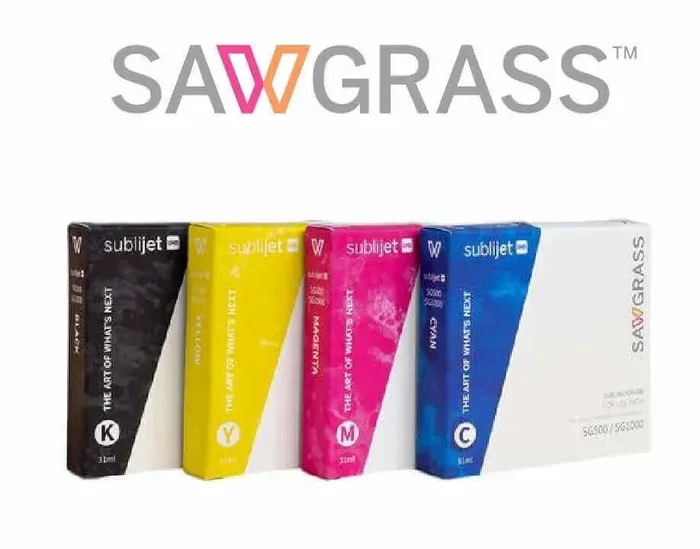
Can You Use Any Sublimation Ink In A Sawgrass Printer
You cannot use just any sublimation ink in a Sawgrass printer. Sawgrass printers require specific eco-sub inks designed for their unique print heads and workflow. Using the wrong ink can damage your machine, ruin prints, and void your warranty.
Many people wonder whether they can use any sublimation ink in a Sawgrass printer. The short answer is no. But the full story is more nuanced than you might think.
If you own a Sawgrass printer, you already know it is a popular choice for sublimation printing. These machines deliver reliable results for mugs, shirts, ornaments, and more. But the ink you put into them matters a lot. Not every dye-sub ink works the same way. And choosing the wrong one can cost you time, money, and frustration.
In this guide, we will walk through everything you need to know. We will cover ink compatibility, the risks of using generic ink, and how to get the best results from your setup. By the end, you will feel confident about your ink choices.
Key Takeaways
- Sawgrass printers need specific eco-sub inks: Generic sublimation ink may cause compatibility issues and poor print quality.
- Using wrong ink risks permanent damage: Incompatible ink can clog print heads and harm internal components.
- Third-party inks vary widely in quality: Some third-party options work, but others fall short on color accuracy and reliability.
- Always check your printer model: Different Sawgrass models support different ink types and cartridge systems.
- Warranty matters: Using non-approved ink may void your Sawgrass printer warranty.
- Quality ink = quality prints: The right ink ensures vibrant colors, sharp details, and long-lasting results on sublimation blanks.
📑 Table of Contents
- What Makes Sawgrass Printers Special
- Can You Use Any Sublimation Ink In A Sawgrass Printer
- How to Choose the Right Ink for Your Sawgrass Printer
- Common Mistakes People Make with Sublimation Ink
- Quick Tips for the Best Sublimation Printing Results
- Expert Insights on Sublimation Ink Compatibility
- Final Thoughts
What Makes Sawgrass Printers Special
Sawgrass printers are built for one main purpose: sublimation printing. They are not regular inkjet printers. They use a special system designed to work with eco-sub inks. This is what sets them apart from standard home or office printers.
How Sawgrass Printers Work
These printers use a thermal print head that heats ink to turn it into a gas. The gas then bonds with special coated materials, like sublimation paper and blanks. This process creates vibrant, durable prints that will not peel or fade easily.
The print head and ink system are closely matched. Sawgrass designs their ink cartridge system to work perfectly with their printers. This means the color management and print quality are optimized right out of the box.
Why Ink Compatibility Matters
Every printer has specific requirements. A Sawgrass SG500 or SG1000 needs ink that flows at the right viscosity. It also needs ink that reacts properly with the heat press process. Using the wrong ink can throw off this balance.
Think of it like fuel in a car. You cannot put diesel in a gasoline engine and expect it to work well. The same idea applies here. The sublimation workflow depends on the right ink from start to finish.
Can You Use Any Sublimation Ink In A Sawgrass Printer
This is the big question. And the answer is not a simple yes or no. Let us break it down.
OEM Ink: The Safe Choice
OEM ink stands for Original Equipment Manufacturer ink. This means ink made by Sawgrass themselves. It is the safest option. It is designed specifically for your printer model. It will give you the best color accuracy and print quality.
Using OEM ink also keeps your printer warranty intact. If something goes wrong, Sawgrass will not blame third-party products. This alone is a big reason to stick with the real thing.
Third-Party Sublimation Ink
Many people look for cheaper alternatives. Third-party sublimation ink exists and some of it works well. But not all of it is created equal. Here are the key things to consider:
- Quality varies a lot: Some third-party inks match OEM performance closely. Others produce dull or faded prints.
- Print head risk: Poor-quality ink can clog or damage the print head. Repairs can be expensive.
- Color shifts: Third-party ink may not match colors the same way. This matters a lot for custom products.
- Warranty issues: Using non-OEM ink may void your warranty. Always check the terms before switching.
Some users report success with certain third-party brands. But results are not guaranteed. You have to test and compare carefully.
What Happens When You Use the Wrong Ink
Using incompatible ink can cause a range of problems. Some are immediate. Others show up over time. Here are the most common issues:
- Clogged print heads: Wrong ink can dry and block the tiny nozzles. This leads to streaks or missing colors.
- Poor color reproduction: Prints may look washed out or have wrong shades. This ruins the final product.
- Wasted paper and blanks: Bad ink means bad prints. You end up wasting materials and money.
- Printer damage: In extreme cases, the wrong ink can harm internal parts. This leads to costly repairs or a dead printer.
- Voided warranty: Sawgrass may refuse service if they detect non-approved ink in the system.
These risks are real. They are not just scare tactics. Many printers have been damaged by using the wrong dye-sub ink. It is not worth the gamble.
How to Choose the Right Ink for Your Sawgrass Printer
Choosing the right ink does not have to be confusing. Follow these steps to make the best decision.
Step 1: Check Your Printer Model
Different Sawgrass models use different ink systems. The SG500 uses a specific set of cartridges. The SG1000 may have different requirements. Always check the manual or the Sawgrass website for your exact model.
Step 2: Look for Eco-Sub Certified Inks
Sawgrass has their own eco-sub ink line. These inks are tested and approved for their printers. They deliver consistent results and protect your investment. If you want peace of mind, start here.
Step 3: Test Third-Party Options Carefully
If you want to try a third-party brand, do it carefully. Buy a small amount first. Run test prints. Check for color accuracy and print head health. Do not switch all your cartridges at once. Replace them one at a time and monitor results.
Step 4: Consider Your Print Goals
What are you printing? If you sell products, quality matters a lot. Customers expect sharp, vibrant designs. For personal projects, you might be more flexible. But either way, using the right sublimation ink improves your results.
Common Mistakes People Make with Sublimation Ink
Even experienced users make mistakes. Here are some of the most common ones to avoid.
Buying Based on Price Alone
Cheap ink sounds great. But it often comes with hidden costs. Low-quality ink leads to bad prints, wasted materials, and potential printer damage. Sometimes spending a little more saves you a lot in the long run.
Mixing Ink Brands
Do not mix OEM ink with third-party ink in the same printer. This can cause chemical reactions inside the system. It can also lead to inconsistent color output and print head problems.
Ignoring Storage Conditions
Sublimation ink needs proper storage. Keep it in a cool, dry place. Avoid direct sunlight. Heat and humidity can degrade the ink quality before you even use it.
Skipping Printer Maintenance
Regular maintenance keeps your printer running smoothly. Clean the print heads as recommended. Run nozzle checks often. This applies whether you use OEM or third-party ink.
Quick Tips for the Best Sublimation Printing Results
Want to get the most out of your Sawgrass printer? Follow these quick tips:
- Always use recommended ink: Stick with Sawgrass eco-sub inks for the best results.
- Use quality sublimation paper: The paper plays a big role in how your prints turn out.
- Calibrate your printer regularly: This ensures accurate colors every time.
- Keep spare ink on hand: Running out mid-project is frustrating. Stay prepared.
- Clean your heat press regularly: Residue buildup affects print transfer quality.
- Store ink properly: Seal cartridges tightly and keep them in a cool place.
These simple habits make a big difference. They help you avoid common problems and keep your prints looking professional.
Expert Insights on Sublimation Ink Compatibility
Industry experts agree on one thing: stick with the right ink for your printer. Sawgrass designs their systems as a complete package. The printer, ink, paper, and heat press all work together. When you change one part of the equation, you risk the whole process.
Some experts suggest that certain third-party inks have improved a lot in recent years. And they may work well for some users. But the consensus is clear: for guaranteed results, use ink that is tested and approved for your specific Sawgrass model.
It is also worth noting that the sublimation ink market is always evolving. New formulations and brands appear regularly. Stay informed by checking reviews and forums. But always prioritize compatibility over savings.
Final Thoughts
So, can you use any sublimation ink in a Sawgrass printer? The answer is no, not just any ink. Your Sawgrass printer needs eco-sub inks that are compatible with its system. While some third-party options may work, the risks are real. Damage to the print head, poor print quality, and voided warranties are all potential consequences.
The safest path is to use OEM Sawgrass ink. It is designed for your printer. It delivers consistent, vibrant results. And it keeps your warranty protected. If you want to explore other options, do your research first. Test small batches. Monitor your results closely.
Investing in the right ink pays off. Your prints will look better. Your printer will last longer. And you will avoid costly mistakes. Make the smart choice for your sublimation printing setup today.
Frequently Asked Questions
Can I use generic sublimation ink in my Sawgrass printer?
You can, but it comes with risks. Generic ink may not be compatible with the print head system. It can cause clogs, poor color accuracy, and even void your warranty. Always test a small amount first before committing.
What happens if I use the wrong ink in a Sawgrass printer?
Using the wrong ink can clog the print heads, damage internal parts, and produce poor-quality prints. In some cases, it may permanently harm the printer. It can also void your warranty, leaving you responsible for repair costs.
Are Sawgrass eco-sub inks worth the price?
Yes, for most users they are. These inks are specifically formulated for Sawgrass printers. They deliver reliable color accuracy, consistent print quality, and protect your machine. The cost is justified by the results and the warranty coverage.
Can I mix OEM ink with third-party sublimation ink?
It is not recommended. Mixing different ink brands can cause chemical reactions inside the printer. This leads to inconsistent prints and potential print head damage. Stick to one ink brand at a time.
How do I know which ink my Sawgrass model needs?
Check your printer manual or visit the Sawgrass website. Each model has specific ink requirements. The model number, such as the SG500 or SG1000, determines the compatible ink type and cartridge system.
Does using third-party ink void the Sawgrass warranty?
It can. Sawgrass may refuse service if they detect non-approved ink in the system. Always review the warranty terms before switching to third-party products. Protecting your warranty is one of the best reasons to use OEM ink.
=== INTERNAL LINKS ===
For more tech tips, check out our guide on troubleshooting common software issues and learn about the advantages and disadvantages of a computer mouse to understand how peripheral devices impact your workflow. Also explore our article on fixing Excel line deletion problems for more helpful troubleshooting advice.