Can You Send Hdmi Over Cat6 Here Is What You Should Know
Yes, you can send HDMI over Cat6 cable using an HDMI extender or balun setup. This method lets you run high-definition video and audio signals up to 165 feet or more over standard Ethernet cabling. It is a popular and cost-effective alternative to long HDMI cables. Below, you will learn how HDMI over Cat6 works, what equipment you need, and what to watch out for.
Have you ever tried running a long HDMI cable and run into signal problems? Maybe the picture flickered, or the sound dropped out entirely. It is a frustrating experience that many people face when setting up home theaters, office displays, or digital signage. If you have been searching for a better way to send HDMI signals over longer distances, you have probably come across the idea of using Cat6 cable. The question is simple but important: can you send HDMI over Cat6?
The short answer is yes. You absolutely can send HDMI over Cat6 cable, and it is a proven method used in homes, schools, and businesses around the world. But there is more to it than just plugging things in. You need to know which equipment to use, how far you can push the signal, and what pitfalls to avoid. This guide covers everything you need to know about HDMI over Cat6 in clear, practical terms.
Whether you are trying to connect a projector in a conference room or set up a TV in another room, understanding how HDMI over Ethernet works can save you time, money, and headaches. Let us dive in and break it all down.
Key Takeaways
- HDMI over Cat6 works reliably: You can extend HDMI signals using a balun or extender kit over standard Cat6 Ethernet cable.
- Distance is a major advantage: Cat6 can carry HDMI signals much farther than a standard HDMI cable, often up to 165 feet or more.
- You need the right equipment: An HDMI balun transmitter and receiver pair is essential for sending HDMI over Cat6.
- Cat6a offers better performance: The enhanced Cat6a cable supports higher bandwidth and longer distances than standard Cat6.
- Setup is straightforward: Most HDMI over Cat6 kits are plug-and-play and do not require advanced technical skills.
- Watch for signal loss: Long runs, poor cable quality, or interference can degrade your HDMI signal over Cat6.
- It is a budget-friendly solution: HDMI over Cat6 is often cheaper than running dedicated fiber HDMI extensions.
📑 Table of Contents
- What Does It Mean to Send HDMI Over Cat6?
- How Far Can You Send HDMI Over Cat6?
- What Equipment Do You Need for HDMI Over Cat6?
- Step-by-Step Setup Guide for HDMI Over Cat6
- Common Mistakes to Avoid When Using HDMI Over Cat6
- Benefits of Sending HDMI Over Cat6
- Is HDMI Over Cat6 Right for You?
- Final Thoughts on HDMI Over Cat6
What Does It Mean to Send HDMI Over Cat6?
When we talk about sending HDMI over Cat6, we mean using a Cat6 Ethernet cable to carry HDMI audio and video signals from one device to another. A standard HDMI cable is designed for short runs, usually up to 50 feet. Beyond that, the signal starts to weaken. This is where Cat6 cable and an HDMI extender come into play.
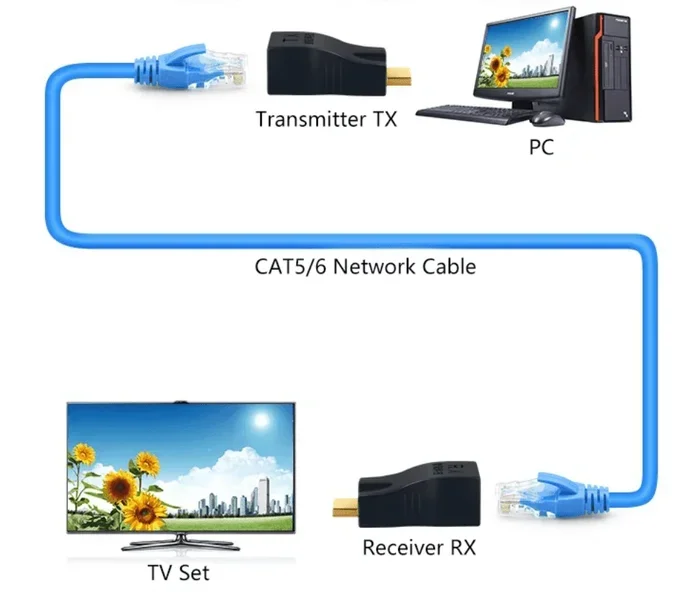
The process works with a small device called an HDMI balun. A balun converts the HDMI signal into a format that can travel over twisted-pair Ethernet cable. One balun unit connects to your source device, like a Blu-ray player or laptop. The other balun unit connects to your display, like a TV or projector. The Cat6 cable runs between them, carrying the signal cleanly over a much longer distance.
This method is also known as HDMI over network cable or HDMI extension over Cat6. It is widely used because Cat6 cable is cheap, easy to install, and available almost everywhere. You can find it in any office or home with existing Ethernet wiring.
How HDMI Baluns Work
An HDMI balun extender is the core of any HDMI over Cat6 setup. The word balun stands for balanced-to-unbalanced. It takes the unbalanced HDMI signal and converts it to a balanced signal that travels well over twisted-pair cable. On the other end, another balun converts it back to HDMI.
Most balun kits are plug-and-play. You do not need to install drivers or software. You just plug the HDMI cable from your source into the transmitter balun, run a Cat6 cable to the receiver balun, and connect the receiver to your display. The signal travels through the Cat6 cable, and you get a clean HDMI output on the other side.
Some advanced balun kits also support HDMI over Cat6a, which is the enhanced version of Cat6. Cat6a offers thicker shielding and better performance, making it ideal for longer runs and higher resolutions.
How Far Can You Send HDMI Over Cat6?
Distance is one of the biggest reasons people choose to send HDMI over Cat6 cable. A standard HDMI cable struggles beyond 50 feet. The signal degrades, and you get a poor picture or no picture at all. With a Cat6 extender, you can push the signal much farther.
Most HDMI extenders for Cat6 can transmit signals up to 165 feet over a single Cat6 cable. Some high-quality kits claim distances of up to 230 feet or more. The actual distance depends on several factors, including the cable quality, the resolution you are sending, and the quality of the balun itself.
If you need even longer runs, you can daisy-chain multiple extenders or use a network switch. This lets you send HDMI signals hundreds of feet over standard Ethernet cabling. It is a game-changer for large venues, classrooms, and retail displays.
Factors That Affect Distance and Signal Quality
Several things influence how well and how far your HDMI signal over Cat6 will travel:
- Cat6 cable quality: Not all Cat6 cables are the same. A shielded Cat6 cable performs better than an unshielded one, especially in environments with electrical interference.
- Cable length: Longer runs mean more signal loss. Keep your Cat6 runs as short as possible for the best results.
- Resolution and refresh rate: Sending 4K at 60Hz uses more bandwidth than 1080p at 30Hz. Higher resolutions reduce the maximum reliable distance.
- Balun quality: Cheap balun kits may not perform well over long distances. Investing in a reputable brand makes a big difference.
- Environmental interference: Running Cat6 cable near power lines or fluorescent lights can introduce interference and degrade the signal.
What Equipment Do You Need for HDMI Over Cat6?
Setting up HDMI over Cat6 is simple. You need a few pieces of equipment, and the total cost is usually quite low compared to running a long HDMI cable or fiber solution. Here is what you will need:
- HDMI balun extender kit: This includes a transmitter and a receiver. The transmitter connects to your source device, and the receiver connects to your display.
- Cat6 Ethernet cable: You need a decent quality Cat6 cable long enough to reach from your source to your display.
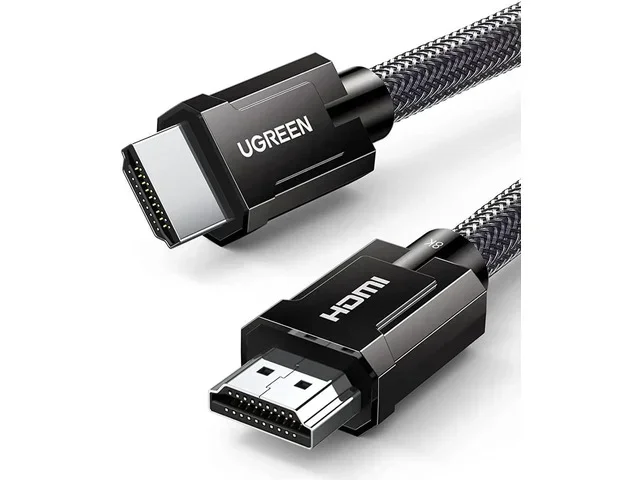
- Standard HDMI cables: One short HDMI cable to connect your source to the transmitter, and another to connect the receiver to your display.
- Power adapters: Most balun kits need power. They usually come with USB power adapters or can be powered via the Ethernet cable itself in some cases.
Cat6 vs Cat6a for HDMI Extension
When choosing a cable for HDMI over Ethernet, you may wonder whether to use Cat6 or Cat6a. Here is a quick comparison:
| Feature | Cat6 | Cat6a |
|---|---|---|
| Max Bandwidth | 250 MHz | 500 MHz |
| Max Distance (HDMI) | Up to 165 feet | Up to 230+ feet |
| Shielding | Basic or none | Enhanced shielding |
| Price | Lower cost | Slightly higher cost |
| Best For | Short to medium runs | Longer runs and 4K |
For most home setups, standard Cat6 works great. If you need longer distances or want to send 4K signals reliably, Cat6a HDMI over Cat6a is the better choice. The extra shielding reduces crosstalk and interference, which helps maintain a clean signal.
Step-by-Step Setup Guide for HDMI Over Cat6
Setting up HDMI over Cat6 cable is easier than most people think. Here is a simple step-by-step guide you can follow.
Step 1: Choose Your Equipment
Pick an HDMI balun extender kit that supports your desired resolution. If you plan to send 4K content, make sure the kit supports 4K at 60Hz. Check the maximum distance rating and make sure it meets your needs.
Step 2: Connect the Transmitter
Plug one end of a short HDMI cable into your source device, such as a laptop, cable box, or gaming console. Plug the other end into the HDMI input on the transmitter balun. Then connect the transmitter to a power source using the included USB adapter or power cable.
Step 3: Run the Cat6 Cable
Run your Cat6 cable from the transmitter to the receiver. Try to keep the cable away from power cords and other sources of electrical interference. If you are running the cable through walls or ceilings, use a cable rated for in-wall use.
Step 4: Connect the Receiver
Plug the receiver balun into a power source. Then connect a short HDMI cable from the receiver output to your TV, projector, or monitor. Make sure both baluns are powered on.
Step 5: Test the Signal
Turn on your source device and your display. You should see the HDMI signal on your screen. If you do not, check your connections and make sure both baluns are receiving power. Try a different Cat6 cable if the signal does not appear.
Quick Tips for a Smooth Setup
- Use shielded Cat6 cable if you are running it near power lines.
- Label both ends of your Cat6 cable so you know which source and display they connect.
- Keep your balun units in well-ventilated areas to prevent overheating.
- Test your setup at full resolution before mounting your display on the wall.
Common Mistakes to Avoid When Using HDMI Over Cat6
Even though setting up HDMI over Cat6 is straightforward, there are some common mistakes that can cause problems. Avoiding these will save you time and frustration.
Using Low-Quality Cat6 Cable
Not all Cat6 cables are created equal. A cheap, thin cable may not perform well over longer distances. It can introduce signal loss and cause flickering or dropouts. Always buy Cat6 cable from a reputable brand and look for cables with proper shielding.
Ignoring Distance Limits
Every balun kit has a maximum distance rating. Pushing beyond that limit will result in a degraded signal or no signal at all. If you need to cover a longer distance, consider using a higher-quality kit or adding a network switch to boost the signal.
Forgetting to Power the Baluns
Many people assume the balun gets power through the Cat6 cable. Some kits do, but many require separate power. Always check if your transmitter and receiver need power adapters and plug them in.
Mixing Cable Categories
Do not use Cat5e or Cat5 cable with an HDMI balun kit designed for Cat6. The lower category cable has less bandwidth and shielding, which can hurt performance. Stick with Cat6 or Cat6a for the best results.
Not Checking Resolution Compatibility
Before buying a balun kit, make sure it supports the resolution you need. If you want to send 4K content, a kit that only supports 1080p will not work. Always check the specifications carefully.
Benefits of Sending HDMI Over Cat6
There are many reasons why people choose HDMI over Cat6 instead of other methods. Here are the key benefits:
- Longer distances: Cat6 can carry HDMI signals much farther than a direct HDMI cable. This makes it perfect for large rooms, auditoriums, and multi-room setups.
- Lower cost: Cat6 cable is inexpensive and widely available. An HDMI balun kit costs much less than a fiber HDMI extension system.
- Easy installation: Most kits are plug-and-play. You do not need special tools or technical knowledge to set them up.
- Leverage existing wiring: Many buildings already have Cat6 cables running through the walls. You can use this existing infrastructure to send HDMI signals without running new cables.
- Scalability: You can connect multiple displays to a single source using a network switch, making it easy to expand your setup.
- Clean and organized: Using a single Cat6 cable keeps your setup neat. You avoid the bulk and stiffness of long HDMI cables.
Is HDMI Over Cat6 Right for You?
Now that you know how HDMI over Cat6 works, you might be wondering if it is the right choice for your situation. The answer depends on your specific needs.
If you need to send an HDMI signal more than 50 feet, Cat6 with a balun extender is an excellent solution. It is affordable, reliable, and easy to set up. If you are in a professional setting like a classroom or boardroom, it is one of the most practical options available.
However, if you need to send HDMI over very long distances, like 300 feet or more, you may want to consider a fiber HDMI extender instead. Fiber offers much greater distances and higher bandwidth, but it comes at a higher cost.
For most home and office use cases, sending HDMI over Cat6 hits the sweet spot between performance, cost, and ease of use. It is a smart choice for anyone who wants a clean, reliable HDMI extension without breaking the bank.
Final Thoughts on HDMI Over Cat6
The ability to send HDMI over Cat6 cable is a practical and affordable solution for extending high-definition audio and video signals. Whether you are setting up a home theater, a conference room, or a digital signage display, an HDMI balun extender over Cat6 can solve your distance problems with ease.
Remember to choose a quality balun kit, use good Cat6 cable, and stay within the recommended distance limits. Avoid the common mistakes outlined in this guide, and your setup should work flawlessly. With the right equipment and a little planning, you can enjoy crystal-clear HDMI signals over long distances using simple, inexpensive Cat6 cable.
Take what you have learned here and apply it to your next AV project. You will be surprised at how simple and effective HDMI over Cat6 can be. It is one of those solutions that just works, and once you set it up, you will wonder how you ever managed without it.
Frequently Asked Questions
Can You Run HDMI Over Cat6 Without a Balun?
No, you cannot send HDMI over Cat6 without a balun or extender. The HDMI signal uses a different connector and protocol than Ethernet cable. A balun converts the signal so it can travel through Cat6 cabling properly.
What Is the Maximum Distance for HDMI Over Cat6?
Most HDMI balun kits can transmit signals up to 165 feet over standard Cat6 cable. Higher-quality kits and Cat6a cables can push that distance to 230 feet or more, depending on the resolution being sent.
Does HDMI Over Cat6 Support 4K Resolution?
Yes, many HDMI balun kits support 4K resolution. However, you need to check the specifications of your specific kit. Some kits only support 4K at 30Hz, while others support 4K at 60Hz for smoother motion.
Is HDMI Over Cat6 Better Than a Long HDMI Cable?
For runs longer than 50 feet, yes. A standard HDMI cable loses signal quality over long distances. Using Cat6 with a balun extender gives you a cleaner, more reliable signal over much greater lengths.
Can I Use Cat5e Cable Instead of Cat6 for HDMI Extension?
You can, but the results may not be as reliable. Cat5e has lower bandwidth and less shielding than Cat6. For best results, especially at higher resolutions, use Cat6 or Cat6a cable.
Does HDMI Over Cat6 Have Any Lag or Latency?
Most modern HDMI balun kits have very low latency and are suitable for real-time applications like gaming and live presentations. However, extremely cheap or older kits may introduce slight delays. Choose a reputable brand for the best experience.
=== CONCLUSION ===
Sending HDMI over Cat6 is a practical, affordable, and reliable way to extend your HDMI signals over long distances. With an HDMI balun extender and a quality Cat6 cable, you can easily push HD and even 4K signals well beyond the limits of a standard HDMI cable. The setup is simple, the equipment is affordable, and the results are impressive. Whether you are a home user or a professional, HDMI over Cat6 is a solution worth considering for your next AV project.