Can You Refill Canon Pixma Ink Cartridges at Home Safely
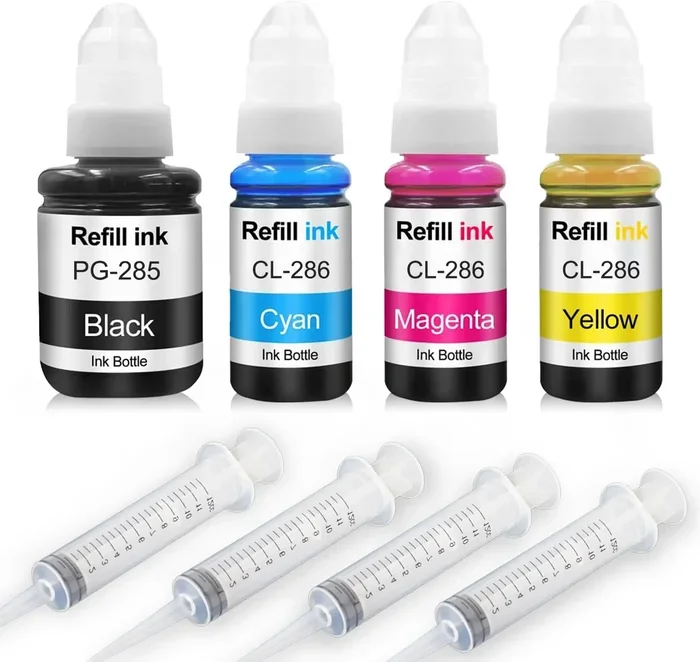
Yes, you can refill Canon Pixma Ink Cartridges at home safely with the right kit and careful steps. This guide walks you through the entire ink refill process, from choosing a refill kit to avoiding common mistakes. You will learn how to save money on ink while keeping your printer running smoothly.
Key Takeaways
- Refilling is safe: Follow the instructions and use quality ink to avoid damage.
- Use a proper refill kit: A syringe, ink bottles, and a reset tool make the job easier.
- Clean the printhead: Run a cleaning cycle after refilling to prevent clogged nozzles.
- Reset the chip: A chip resetter or refillable cartridge helps the printer recognize the ink level.
- Avoid overfilling: Too much ink causes leaks and messes inside the printer.
- Save up to 70%: DIY refilling costs a fraction of buying new OEM cartridges.
- Know when to replace: Old or damaged cartridges should be swapped out instead of refilled.
📑 Table of Contents
- Can You Refill Canon Pixma Ink Cartridges at Home Safely?
- Why Refill Your Canon Pixma Ink Cartridges?
- What You Need for a Safe Refill
- Step-by-Step Refill Guide for Canon Pixma Cartridges
- Common Mistakes to Avoid When Refilling
- Quick Tips for a Successful Refill
- Refill vs. Replace: Which Is Better for Your Canon Pixma?
- Expert Insights on Canon Pixma Ink Refill Safety
Can You Refill Canon Pixma Ink Cartridges at Home Safely?
Yes, you can refill Canon Pixma Ink Cartridges at home safely. Many printer owners worry about damaging their devices. But with the right tools and a little patience, you can do it yourself. This guide shows you exactly how. You will learn the steps, the supplies you need, and the mistakes to avoid.
Refilling your ink cartridges saves money. It also reduces plastic waste. Canon Pixma printers use small ink tanks that run out fast. Buying new cartridges every time adds up quickly. A refill kit costs much less. You can refill a cartridge several times. That means big savings over time.
In this article, we cover everything you need to know. We explain the safe refill process in simple steps. We also share tips to keep your printer healthy. You will understand how ink levels work. And you will see when it is better to replace the cartridge instead of refilling it.
Why Refill Your Canon Pixma Ink Cartridges?
The Cost Savings Are Real
Canon Pixma ink costs a lot. A single original cartridge can cost as much as the printer itself. Refilling cuts that cost by up to 70 percent. A quality refill kit with multiple ink bottles costs under $20. One kit can refill a cartridge 10 to 15 times. That is a huge difference compared to buying new ones each time.
Think about how often you print. If you print homework, photos, or work documents every week, you go through ink fast. Refilling lets you keep printing without the high price tag. You control how much ink you use. You do not have to worry about running out mid-project.
Environmental Benefits of Refilling
Every empty ink cartridge ends up in a landfill. Plastic takes hundreds of years to break down. By refilling, you keep those cartridges out of the trash. You use the same plastic shell again and again. That is a simple way to reduce waste.
Refilling also means less packaging. New cartridges come in boxes, plastic wrap, and shipping materials. All of that waste disappears when you refill at home. It is a small change that adds up to a big environmental win.
What You Need for a Safe Refill
Choosing the Right Refill Kit
Not all refill kits are the same. You need a kit made for Canon Pixma cartridges. Look for a kit that includes a syringe, ink bottles, and a chip resetter. The syringe should have a thin, blunt tip. This helps you inject ink without spilling. The ink bottles should match your cartridge model. Common Canon Pixma ink codes include PGI-2500 and CLI-251.
Cheap kits with low-quality ink can clog your printhead. Spend a little more on a reputable brand. A good kit ensures your Canon Pixma ink refill goes smoothly. It protects your printer from damage.
Compatible Ink and Supplies
Use ink that is compatible with your cartridge. OEM ink is best, but high-quality third-party ink works well too. Avoid mystery inks from unknown sellers. They can contain particles that harm your printer. Always check the ink color matches the cartridge color. Black ink goes in the black cartridge. Color ink goes in the tri-color cartridge.
You will also need a few household items. Have some paper towels ready. A small tray or plate helps catch drips. Wear disposable gloves to keep your hands clean. A toothpick or pin can help clear clogged nozzles.
Preparing Your Workspace
Set up a clean, flat surface. Cover the table with old newspapers or a plastic sheet. Ink spills are messy and hard to clean. Work in a well-lit area. Make sure you can see the ink fill hole clearly. Keep a cup of water nearby for rinsing the syringe. Have your cartridge ready and remove any protective tape before you start.
Step-by-Step Refill Guide for Canon Pixma Cartridges
Step 1: Gather Your Materials
Lay out your refill kit. You need the ink bottle, syringe, chip resetter, and your empty cartridge. Read the instructions that came with your kit. Every kit is slightly different. Knowing the steps beforehand prevents accidents. Keep your cartridge at room temperature. Cold ink flows poorly.
Step 2: Locate the Ink Fill Hole
Look at the top of the cartridge. You will see a small hole or a label. The label is a false top. Peel it off carefully with a toothpick. Underneath, you will find the rubber fill hole. Do not remove the label if your cartridge has a built-in fill port. Just puncture it with the syringe tip.
Each color cartridge has its own fill hole. The black cartridge has one hole. The color cartridge has three holes (cyan, magenta, yellow). They are often labeled. If you are not sure, check your cartridge model online. Refilling the wrong color will ruin the print quality.
Step 3: Inject the New Ink Carefully
Draw ink into the syringe slowly. Do not force it. Insert the blunt tip into the fill hole. Push the plunger gently. Add ink until the cartridge is about 80 to 90 percent full. Overfilling causes leaks. You should see the ink level rise through the clear plastic shell. Stop as soon as you reach the fill line.
If you are refilling a tri-color cartridge, use a separate syringe for each color. Never mix the inks. Clean the syringe between colors with a damp paper towel. This prevents cross-contamination. Cross-contamination can create muddy, dull prints.
Step 4: Clean and Reset the Cartridge
Wipe the top of the cartridge with a dry paper towel. This removes any ink on the surface. Place the cartridge chip-side down on a paper towel. If your kit includes a chip resetter, place the cartridge on it and press the button. The resetter tells the printer that the cartridge is full again.
If you do not have a chip resetter, you can use refillable cartridges. These cartridges come with pre-installed reset chips. You simply refill them the same way. The printer will recognize them as full. This is a great long-term solution.
Step 5: Run a Printhead Check
Slide the refilled cartridge back into the printer. Close the lid. The printer may show a low-ink warning at first. That is normal. Go to your printer software on the computer. Run a printhead cleaning cycle. This moves ink through the nozzles. It clears any air bubbles left from the refill.
Print a test page. Check for missing lines or faded colors. If the print looks streaky, run one more cleaning cycle. Most cartridges work perfectly after one cleaning. If the problem continues, the cartridge may need a few more drops of ink or a longer soak in warm water.
Common Mistakes to Avoid When Refilling
Overfilling the Cartridge
Overfilling is the number one mistake. Too much ink creates pressure inside the cartridge. It leaks out around the nozzles. Ink can drip into the printer interior. That causes smudges on every page. It can also damage the printhead carriage. Always leave a small air gap at the top. Never push the ink past the fill line.
Using Low-Quality Ink
Cheap ink often has large pigment particles. These particles clog the tiny nozzles on the printhead. Clogged nozzles lead to white streaks and blank spots. You may need to run multiple cleaning cycles. In some cases, the cartridge becomes unusable. Stick with reputable ink brands. The extra cost is worth protecting your printer.
Skipping Printhead Cleaning
Some people refill the cartridge and put it straight into the printer. That skips the cleaning step. Air bubbles trapped in the nozzles block ink flow. The first few prints may look patchy. Running a cleaning cycle pushes the air out. It also primes the nozzle for a smooth first print. Do not skip this step.
Quick Tips for a Successful Refill
- Work slowly: Rushing leads to spills and overfilling.
- Use a flashlight: Shine a light through the cartridge to see the ink level clearly.
- Label your syringes: Mark each syringe with its color to avoid mix-ups.
- Store ink bottles upright: This prevents leaks and keeps the ink flowing smoothly.
- Keep a log: Write down how many times you refilled each cartridge. Replace it after 5 to 6 refills.
- Warm the cartridge: If the ink is thick, place the cartridge in warm water for 5 minutes before refilling.
Refill vs. Replace: Which Is Better for Your Canon Pixma?
Deciding between refilling and buying a new cartridge depends on a few factors. Consider the age of the cartridge, the print quality you need, and your budget. Here is a simple comparison.
| Factor | Refill Kit | New OEM Cartridge | Compatible Replacement |
|---|---|---|---|
| Cost per cartridge | $2 to $5 | $15 to $30 | $8 to $15 |
| Number of refills | 5 to 15 times | 1 use only | 1 use only |
| Print quality | Same as OEM if using good ink | Factory-standard quality | Good, but varies by brand |
| Environmental impact | Low (reuses cartridge) | High (new plastic each time) | Medium (new cartridge, no refill) |
| Risk of printer damage | Low if done correctly | None | Low to moderate |
| Best for | Frequent printers, budget users | High-quality photo printing | Quick replacement without mess |
Refilling wins for cost savings and eco-friendliness. New OEM cartridges win for peace of mind and top-tier photo quality. Compatible replacements offer a middle ground. They cost less than OEM and require no messy refill process. Choose based on your needs.
Expert Insights on Canon Pixma Ink Refill Safety
Printer repair technicians see many refilled cartridges every week. Their top advice is simple: use clean tools and the right ink. A dirty syringe introduces bacteria into the ink. That can grow inside the cartridge and clog the nozzle. Always rinse the syringe with warm water after each use. Let it dry completely before the next refill.
Experts also warn about ink expiration dates. Ink bottles have a shelf life. Old ink thickens and does not flow well. It can leave residue in the printhead. Buy ink in quantities you will use within six months. Store the bottles in a cool, dark place. Heat and sunlight break down the ink formula.
One more tip from the pros: never shake the cartridge after refilling. Shaking creates air bubbles. Those bubbles block the ink flow. Instead, gently tap the cartridge on the table to settle the ink. Then run a cleaning cycle. This keeps the ink flowing smoothly through the nozzles.
Refilling your Canon Pixma Ink Cartridges is a skill anyone can learn. It takes about 15 minutes per cartridge once you do it a few times. The confidence grows with each refill. You will save money, reduce waste, and keep your printer running at full capacity. Just remember to follow the steps carefully and use quality supplies.
Start with a small refill kit. Practice on an old cartridge if you have one. Once you see the results, you will wonder why you ever paid full price for new ink. The process is safe, simple, and rewarding. Give it a try and enjoy the savings.
Frequently Asked Questions
Is it safe to refill Canon Pixma ink cartridges at home?
Yes, it is safe as long as you use the right ink and follow the steps carefully. Avoid overfilling and always clean the printhead after refilling. Use a reputable refill kit to protect your printer.
How many times can you refill a Canon Pixma cartridge?
You can refill a cartridge 5 to 15 times before the printhead wears out. The exact number depends on the ink quality and how well you clean the syringe between refills. Replace the cartridge if you notice faded prints or streaks.
Will refilling void my Canon printer warranty?
Refilling does not automatically void the warranty. However, if a refilled cartridge damages the printer, Canon may deny the claim. Use quality ink and follow the instructions to avoid problems. Keep your original cartridges if you want to stay fully covered.
What happens if you overfill a Canon Pixma ink cartridge?
Overfilling causes ink to leak from the nozzles. The excess ink can drip onto the printhead carriage and create smudges. It may also cause the printer to error out. Always leave a small air gap and stop at the fill line.
Can you use any ink to refill a Canon Pixma cartridge?
No, you must use ink specifically formulated for your cartridge model. Canon Pixma cartridges use dye-based or pigment-based ink depending on the model. Check your cartridge code and buy the matching refill ink. Using the wrong ink can damage the printhead.
How do you reset the ink level after refilling?
Use a chip resetter that comes with your refill kit. Place the cartridge on the resetter and press the button. If you do not have a resetter, you can use refillable cartridges with built-in reset chips. The printer will then recognize the new ink level.