Can You Play Original Xbox On Hdmi Without Any Hassle
Yes, you can play your original Xbox on HDMI, but you need the right adapter or custom cable. The original Xbox does not have a built-in HDMI port, so you must use a component-to-HDMI converter, a VGA-to-HDMI adapter, or a dmod chip to get digital output. This guide walks you through every option, setup steps, and troubleshooting tips so you can enjoy your classic Xbox in crisp HD quality without any hassle.
If you still have an original Xbox sitting in your closet and want to plug it into a modern TV, you might be wondering whether playing original Xbox on HDMI is even possible. The short answer is yes, but the journey to get there requires a little know-how. The original Xbox launched in 2001 with only composite and component video outputs. HDMI did not become standard on consoles until years later. So you need a bridge between the old hardware and your new display.
Here is the good news. Connecting your original Xbox to an HDMI-ready TV is easier than most people think. Whether you want to play Halo in higher quality or just relive your favorite retro games, this guide covers everything you need. We will walk through every method, compare your options, and help you avoid common mistakes. By the end, you will know exactly how to get original Xbox HDMI output working in your setup.
Key Takeaways
- The original Xbox lacks native HDMI support, so you need an external adapter or internal modification to get HDMI output.
- Three main methods exist: component-to-HDMI converters, VGA-to-HDMI adapters, and dmod chip installations for the best quality.
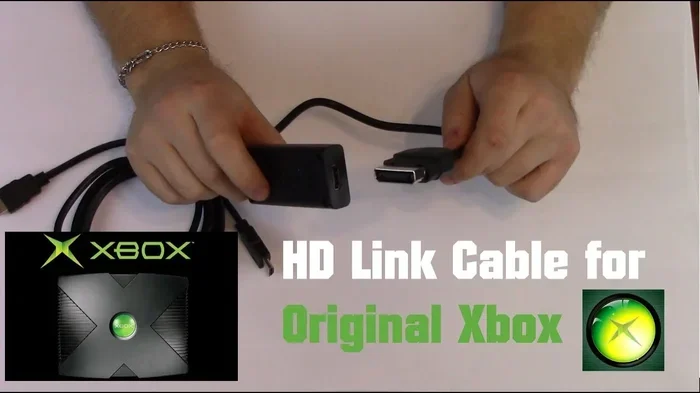
- You do not need to buy an expensive original Xbox HDMI cable because no such official cable exists.
- Budget-friendly options work well for most setups, but internal mods offer the highest picture quality.
- Common issues like no signal or flickering are usually easy to fix with the right cable or settings adjustment.
- Your TV or monitor must support the input type you choose, so check compatibility before buying any adapter.
📑 Table of Contents
- Why HDMI Makes a Big Difference for Original Xbox Gaming
- What You Need to Connect Original Xbox to HDMI
- Step-by-Step Guide to Connecting Your Xbox to HDMI
- Common Problems and How to Fix Them
- Comparing Your Xbox Connection Options
- Expert Tips for the Best HDMI Experience
- Is It Worth It to Mod Your Original Xbox for HDMI?
- Final Thoughts
Why HDMI Makes a Big Difference for Original Xbox Gaming
When the original Xbox came out, composite cables were the norm. These cables carry analog signals, which means they degrade over distance and look fuzzy on larger screens. If you plug a composite cable into a 40-inch or bigger TV, you will notice blurry text and washed-out colors. HDMI delivers a clean digital signal that keeps your picture sharp and vibrant.
The Problem with Old Cables
The original Xbox came with either composite AV cables or component cables in the box. Composite cables use three RCA plugs: yellow for video and red and white for audio. Component cables split the video signal into three parts for better quality. Both of these are analog connections. Analog signals are more prone to interference and signal loss. On a modern HDTV, they just do not look their best.
Component cables are the better of the two options for the original Xbox. They offer 480p resolution, which is a noticeable upgrade from composite. But even component cables have limits. They cannot carry audio and video on a single cable, and they do not support higher resolutions. HDMI solves all of these problems by carrying both audio and video in one digital cable.
What HDMI Brings to the Table
Switching to HDMI gives you several real benefits. The digital signal means no interference or ghosting. You get cleaner text, sharper edges, and more accurate colors. HDMI also supports audio pass-through, so you only need one cable for both sound and picture. This simplifies your gaming setup and reduces cable clutter behind your TV.
Another advantage is compatibility. Most modern TVs and monitors only have HDMI inputs. So if you want to use your original Xbox on a newer display, HDMI is the only practical option. You cannot plug an old composite cable directly into a modern flat screen and expect great results.
What You Need to Connect Original Xbox to HDMI
Before you start, you need to understand your options. There is no official original Xbox HDMI cable made by Microsoft. The console simply does not have an HDMI port. So you need a third-party solution. Let us look at the three main methods you can use.
Method 1: Component-to-HDMI Converter
This is the easiest and most popular method. You take the component cables that came with your Xbox and plug them into a component-to-HDMI converter box. The converter box then outputs a clean HDMI signal to your TV. These converter boxes are affordable and widely available online.
You will need three things for this method. First, your original Xbox component cables. Second, a component-to-HDMI converter. Third, a standard HDMI cable to connect the converter to your TV. Total cost is usually under $30, which makes this a budget-friendly retro gaming upgrade.
Method 2: VGA-to-HDMI Adapter
The original Xbox has a built-in VGA output port. This is the same port used for PC monitors. If you have a VGA cable, you can use a VGA-to-HDMI adapter to convert the signal for your TV. This method gives you a solid digital picture without needing a separate converter box.
One thing to keep in mind. The VGA output on the original Xbox is only available on models that were updated with the latest dashboard software. If your Xbox has not been updated, you may need to update it first. Also, you will still need a separate audio connection since VGA does not carry sound.
Method 3: Internal Dmod Chip Installation
This is the most advanced option. A dmod chip is a small circuit board that you install inside your original Xbox. It replaces the video output circuitry and gives you native HDMI output directly from the console. The picture quality is the best of any method because the signal is converted inside the console itself.
Installing a dmod chip requires opening your Xbox and soldering. This is not for beginners. If you are comfortable with basic electronics and console modding, this is the way to go for the best possible picture quality. The cost is higher, usually around $50 to $100 for the chip and installation materials.
Step-by-Step Guide to Connecting Your Xbox to HDMI
Let us walk through the setup process for the most common method: using a component-to-HDMI converter. This is the simplest approach and works for almost everyone.
- Gather your cables. You need your original Xbox component cables, a component-to-HDMI converter box, and an HDMI cable.
- Connect the component cables to your Xbox. Plug the red, green, and blue cables into the matching ports on the back of your console. Connect the red and white audio cables as well.
- Plug the other end of the component cables into the converter box. Match the colors. Red to red, green to green, blue to blue. Connect the audio cables to the converter box audio input.
- Connect the HDMI cable from the converter to your TV. Plug one end into the converter box and the other into an available HDMI port on your television.
- Power on your Xbox and switch your TV input. Turn on the console and use your TV remote to select the correct HDMI input channel.
- Adjust the display settings on your Xbox. Go to the system settings and configure the display output. Your Xbox should now show a clean HDMI picture on your screen.
Once you complete these steps, you should see your Xbox dashboard in full digital quality. The difference from composite cables is immediately noticeable. Text is sharper, colors are richer, and the overall image is much cleaner. If you want even better results, you can also check your home WiFi setup to make sure your network is strong enough for any online features or streaming you plan to use alongside your retro gaming. You can learn more about understanding your WiFi standard to ensure your network supports smooth online play.
Common Problems and How to Fix Them
Even with the right setup, you might run into issues. Here are the most common problems people face when connecting their original Xbox to HDMI, along with simple fixes.
No Signal on Your TV
If your TV shows no signal, the first thing to check is your cable connections. Make sure all the component cables are firmly plugged in. Check that the HDMI cable is secure at both ends. Try a different HDMI port on your TV. Sometimes the converter box needs a few seconds to initialize. Unplug it, wait 10 seconds, and plug it back in.
Flickering or Intermittent Picture
Flickering usually means a loose connection or a low-quality cable. Try a different HDMI cable first. If that does not work, check the component cables for bent or corroded pins. Clean the connectors with a dry cloth. Also, make sure your converter box is getting enough power. Some converter boxes need a USB power cable in addition to the component input.
No Audio Through HDMI
HDMI carries both audio and video, but sometimes the audio does not come through automatically. Check your TV audio settings and make sure HDMI audio output is selected. On the Xbox, go to system settings and verify that the audio output is set to HDMI. If you are using a VGA-to-HDMI adapter, remember that VGA does not carry audio, so you need a separate 3.5mm to RCA cable for sound.
Black and White Picture
A black and white image usually means the component cables are not seated correctly. Make sure the red and blue audio cables are not confused with the video cables. The red and white cables are for audio only. The green cable carries the brightness signal. If you mix these up, you will get a monochrome picture.
Comparing Your Xbox Connection Options
Not all methods are created equal. Here is a quick comparison of the three main ways to get original Xbox HDMI output.
| Method | Picture Quality | Ease of Setup | Cost | Audio Support |
|---|---|---|---|---|
| Component-to-HDMI Converter | Good | Very Easy | $15-$30 | Yes, through converter |
| VGA-to-HDMI Adapter | Very Good | Easy | $10-$25 | No, needs separate cable |
| Dmod Chip Installation | Excellent | Advanced | $50-$100 | Yes, native HDMI |
For most people, the component-to-HDMI converter is the best choice. It is affordable, easy to set up, and delivers a noticeable improvement over the original cables. The VGA-to-HDMI adapter is a good alternative if you already have a VGA cable. The dmod chip is the top choice for enthusiasts who want the absolute best picture and are willing to open their console.
No matter which method you choose, you are making a smart move. Connecting your original Xbox to HDMI breathes new life into a classic console. Your games will look better, sound better, and work better with modern displays. If you use your phone to look up parts or settings, keep in mind that searching on your iPhone might require adding prefixes to numbers for certain search results to display correctly.
Expert Tips for the Best HDMI Experience
Here are some practical tips that will help you get the most out of your original Xbox on HDMI. These are small changes that make a big difference.
- Use a short HDMI cable. Longer cables can cause signal loss. Keep your HDMI cable under 6 feet for the best picture quality.
- Clean your Xbox ports. Over time, dust builds up inside the AV and VGA ports. Use compressed air to blow out any debris before connecting cables.
- Update your Xbox dashboard. If you plan to use the VGA method, make sure your Xbox has the latest software update. This unlocks the VGA output option in the display settings.
- Match your TV refresh rate. Set your Xbox display settings to match your TV’s native refresh rate. Most modern TVs run at 60Hz, which works perfectly with the original Xbox.
- Use a powered USB hub for your converter. Some converter boxes draw too much power from the Xbox itself. A powered USB hub ensures stable operation and prevents flickering.
- Store your original cables safely. Even after switching to HDMI, keep your original composite and component cables. They are useful for other retro consoles or as backup cables.
These tips come from years of experience helping people set up retro consoles. The biggest mistake most people make is buying a cheap, unverified converter box. Stick with reputable brands and read reviews before purchasing. A $20 converter from a trusted brand will outperform a $10 no-name product every time.
Is It Worth It to Mod Your Original Xbox for HDMI?
This is a question many retro gaming fans ask. The answer depends on how much you value picture quality and how comfortable you are with console modifications. If you just want to play your favorite games on a better screen, a component-to-HDMI converter is all you need. It is simple, reversible, and affordable.
If you are a dedicated collector or modder, installing a dmod chip takes your setup to the next level. Native HDMI output means no signal conversion loss. The picture is as clean as it can be. Plus, a properly modded original Xbox opens up a world of other possibilities. You can play backup games, install custom dashboards, and even add Wi-Fi functionality to your console. This is especially useful if you want to play online or use modern networking features with your classic Xbox.
Before you decide, think about what you want from your original Xbox. If you just want better picture quality, go with a converter. If you want a full retro gaming experience with modern features, a dmod chip is the way to go. Either way, you are making a great investment in preserving your classic gaming library.
Final Thoughts
Playing your original Xbox on HDMI is absolutely possible and much easier than most people assume. You do not need expensive equipment or advanced technical skills. A simple converter box can transform your retro gaming experience in minutes. Your classic games will look sharper, sound better, and feel more immersive on a modern display.
Whether you choose a component-to-HDMI converter, a VGA-to-HDMI adapter, or a full dmod chip installation, the result is the same. Your original Xbox finally gets the digital output it deserves. Retro gaming has never looked better, and your classic console can hold its own next to modern systems. So grab your Xbox, pick your method, and enjoy your favorite games in all their digital glory. The nostalgia is worth it, and the picture quality makes it even better.
Frequently Asked Questions
Can I plug my original Xbox directly into an HDMI TV?
No, the original Xbox does not have an HDMI port. You need a converter box, an adapter, or a dmod chip to convert the signal to HDMI. There is no direct plug-and-play HDMI connection for the original Xbox.
What is the cheapest way to get HDMI output from my original Xbox?
The cheapest method is a component-to-HDMI converter box. These cost between $15 and $30 and require only the component cables that came with your Xbox and a standard HDMI cable. It is the most budget-friendly way to upgrade your display quality.
Do I need to modify my original Xbox to use HDMI?
No, not if you use an external converter or adapter. Only a dmod chip installation requires opening and modifying your console. External methods are completely reversible and do not void your warranty in any way.
Will HDMI improve the sound quality of my original Xbox?
Yes, HDMI carries both audio and video digitally. This means you get cleaner sound compared to the analog red and white RCA audio cables. The improvement is subtle but noticeable, especially with stereo music and sound effects in games.
Can I use a component-to-HDMI converter with other retro consoles?
Yes, most component-to-HDMI converters work with any device that outputs component video. This includes the PlayStation 2, GameCube, and other retro consoles that use component cables. It is a versatile tool for any retro gaming setup.
Why does my Xbox show a black screen after connecting to HDMI?
A black screen usually means the TV input is not set correctly or the cables are not fully seated. Try switching to the correct HDMI input on your TV, check all cable connections, and make sure your Xbox is powered on. If the problem persists, try a different HDMI cable or port.
=== CONCLUSION ===
Connecting your original Xbox to HDMI is one of the best upgrades you can make for retro gaming. The process is straightforward, the cost is low, and the results are impressive. You get a clean digital picture, better audio, and full compatibility with modern TVs and monitors. Playing original Xbox on HDMI brings your classic console into the present and makes every game look better than ever before. Pick the method that fits your budget and skill level, follow the steps in this guide, and enjoy your favorite Xbox games in stunning digital quality. Your retro gaming setup deserves this upgrade, and once you make the switch, you will never go back to old composite cables again.