Can You Get A Pocket Wifi And Stay Connected Anywhere
Yes, you can get a pocket wifi device and stay connected almost anywhere in the world. A pocket wifi is a small, portable gadget that creates a personal hotspot using cellular networks, giving you wireless internet on the go. Whether you are traveling, commuting, or working remotely, a pocket wifi keeps you online without relying on public wifi. In this guide, we walk you through everything you need to know about getting a pocket wifi, choosing the right device, and staying connected wherever life takes you.
Have you ever found yourself in a new city with no internet access? Maybe you are on a road trip, staying at a hotel with terrible wifi, or working from a coffee shop that keeps you on a short leash. The frustration of losing your connection is real. The good news is that there is a simple solution. You can get a pocket wifi device and stay connected anywhere, anytime.
A pocket wifi is a tiny, portable device that acts as your own personal wireless router. It connects to cellular networks and creates a private wifi hotspot that you can carry in your pocket. This means you are not stuck waiting for public wifi or relying on your phone’s data alone. With a pocket wifi, you get a reliable internet connection wherever there is cell signal.
In this article, we will cover everything you need to know about getting a pocket wifi. We will explain how these devices work, where to buy them, and how to pick the right one for your needs. By the end, you will have a clear picture of whether a pocket wifi is the right choice for your connectivity needs.
Key Takeaways
- Easy to Get: You can buy or rent a pocket wifi device from carriers, online retailers, or specialty shops.
- Works Almost Everywhere: Pocket wifi uses cellular networks, so you get internet in most populated areas.
- Multiple Devices Supported: Most pocket wifi units can connect 5 to 10 devices at once.
- Flexible Plans Available: You can choose from daily, weekly, or monthly data plans based on your needs.
- Great for Travel: Pocket wifi is a game changer for international trips, eliminating expensive roaming charges.
- Simple to Use: Most devices work right out of the box with just a SIM card and power source.
📑 Table of Contents
- What Is a Pocket Wifi Device?
- How Does a Pocket Wifi Work?
- Where Can You Get a Pocket Wifi?
- Benefits of Using a Pocket Wifi
- How to Choose the Right Pocket Wifi Device
- Tips for Getting the Most From Your Pocket Wifi
- Common Mistakes People Make With Pocket Wifi
- Expert Insights on Pocket Wifi
- Key Takeaways
- Conclusion
What Is a Pocket Wifi Device?
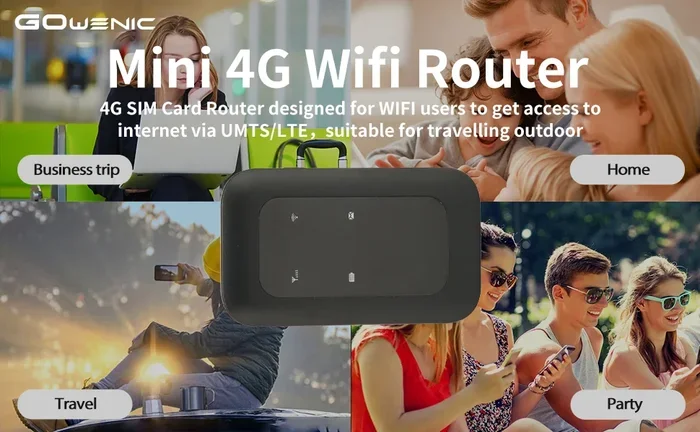
A pocket wifi device is a small, battery-powered gadget that connects to cellular networks and broadcasts a wifi signal. Think of it as a mini router that fits in your hand. You slip in a SIM card, turn it on, and it creates a private internet connection. Any wifi-enabled device nearby can then connect to it.
These devices are also known as mobile hotspots, portable wifi routers, or travel routers. They come in different shapes and sizes, but most are about the size of a credit card or a small matchbox. You can easily slip one into your pocket, purse, or travel bag.
How Is It Different From Your Phone’s Hotspot?
You might wonder why you need a separate device when your phone already has a hotspot feature. While a phone hotspot works, it has limitations. Your phone battery drains fast when it acts as a hotspot. Also, connecting multiple devices can slow things down and eat up your phone’s data quickly.
A dedicated pocket wifi device solves these problems. It has its own battery, its own data plan, and its own connection. This means your phone stays charged and free to do other things. Plus, a pocket wifi often has a better antenna, which means a stronger signal and faster speeds.
Who Uses Pocket Wifi Devices?
All kinds of people use pocket wifi. Travelers rely on them for internet in foreign countries without paying steep roaming fees. Digital nomads use them as their primary internet source while working from cafes, co-working spaces, or hotels. Families use them on road trips so everyone can stream, browse, and stay entertained. Even businesses use pocket wifi for conferences, trade shows, and remote meetings.
How Does a Pocket Wifi Work?
Understanding how a pocket wifi works is simple. The device contains a SIM card slot, just like your phone. When you insert a SIM card with a data plan, the pocket wifi connects to the nearest cellular tower. It then converts that cellular signal into a wifi network that your devices can connect to.
The process is similar to how your home wifi router works, except your pocket wifi uses mobile networks instead of a fixed broadband line. This is what makes it so flexible and portable.
The Role of the SIM Card
The SIM card is the heart of your pocket wifi setup. It determines which cellular network your device connects to and how much data you have available. You can use a regular SIM card from your carrier, or you can get a specialized travel SIM card designed for international use.
Some pocket wifi providers offer their own SIM cards with preloaded data plans. These are especially convenient for travelers who do not want to deal with finding a local SIM card in every country they visit.
Connecting Your Devices
Once your pocket wifi is turned on, it broadcasts a wifi network name and password. You find this network on your phone, tablet, or laptop just like you would connect to home wifi. The device can usually handle between five and ten connected devices at the same time, depending on the model.
This is perfect for families or small teams who all need internet access at once. Everyone can browse, stream, and video call without fighting over a single phone connection.
Where Can You Get a Pocket Wifi?
One of the best things about a pocket wifi is that you have many options for getting one. You are not limited to one store or one method. Let us look at the main ways to get your hands on a portable wifi device.
Buying a Pocket Wifi Device
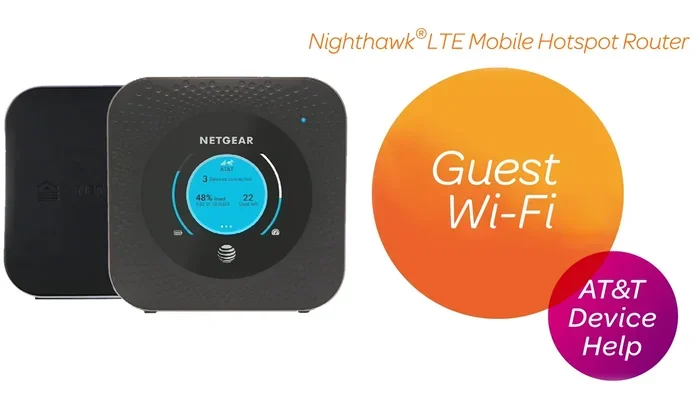
You can buy a pocket wifi device from many retailers. Electronics stores, online marketplaces, and carrier shops all carry them. Popular brands include Huawei, TP-Link, Netgear, and ZTE. Prices typically range from $50 to $200, depending on the features and capabilities.
When you buy a device outright, you own it. You can use it with any compatible SIM card and switch data plans whenever you want. This gives you the most flexibility and long-term value.
Renting a Pocket Wifi
If you only need a pocket wifi for a short trip, renting might be the better option. Many companies specialize in renting portable wifi devices for travel. You can book online, have the device shipped to your home, use it on your trip, and then mail it back.
Rental services often come with preloaded international data plans. This makes them super convenient for travelers who do not want to research local SIM cards in every destination. Popular rental services include TravelWifi, Skyroam, and GigSky.
Getting a Pocket Wifi From Your Carrier
Many mobile carriers offer pocket wifi devices as part of their product lineup. You can visit a carrier store or order online. The carrier will often set up the device for you and add a data plan to your existing account. This is a great option if you already have a good relationship with your carrier and want a seamless experience.
Benefits of Using a Pocket Wifi
There are many reasons why people choose a pocket wifi over other internet options. Let us explore the key benefits that make these devices so popular.
Stay Connected Anywhere
The biggest advantage of a pocket wifi is the freedom it gives you. As long as there is cellular coverage, you have internet. This means you can work from a beach, a mountain cabin, or a remote village. You are not tied to a specific location or a specific wifi network.
Save Money on Roaming
International roaming charges can be brutal. Your phone bill can skyrocket when you use data abroad. A pocket wifi lets you avoid these fees by using local data plans or international travel SIM cards. You can get affordable data in most countries for just a few dollars a day.
Protect Your Privacy
Public wifi networks are convenient, but they are not safe. Hackers can easily intercept your data on open wifi networks. A pocket wifi creates your own private, encrypted connection. This keeps your personal information safe while you browse, bank, or shop online.
Connect Multiple Devices
A single pocket wifi device can connect your phone, tablet, laptop, and even smartwatch all at once. You do not need to share your phone’s hotspot or switch between devices. Everyone stays connected at the same time.
Long Battery Life
Most pocket wifi devices have batteries that last between 8 and 16 hours on a single charge. Some models even last longer. This is much better than using your phone as a hotspot, which drains the battery in just a few hours.
How to Choose the Right Pocket Wifi Device
Not all pocket wifi devices are created equal. There are many options on the market, and picking the right one can feel overwhelming. Here are the key factors to consider when shopping for a pocket wifi.
Check the Network Compatibility
Before you buy, make sure the device works with the networks you plan to use. Different pocket wifi models support different cellular bands and frequencies. If you travel internationally, look for a device that supports multiple bands and works in the countries you will visit.
Consider the Data Speed
Most modern pocket wifi devices support 4G LTE speeds. Some newer models even support 5G. If you need fast internet for video calls or streaming, look for a device that offers at least 4G speeds. Check the advertised download and upload speeds before you buy.
Think About Battery Life
Battery life matters a lot, especially if you are on the go all day. Look for a pocket wifi with at least 8 hours of battery life. Some devices also support pass-through charging, which means you can charge the device while using it at the same time.
Look at the Number of Connected Devices
Consider how many devices you need to connect at once. Most pocket wifi units support between five and ten devices. If you are traveling with a family or a small team, go for a model that supports more connections.
Size and Portability
The whole point of a pocket wifi is portability. Choose a device that is small and lightweight. You want something that slips easily into your pocket or bag without adding bulk. Some devices are even smaller than a standard credit card.
Price and Data Plans
Set a budget before you shop. Pocket wifi devices range from budget-friendly to premium. Also, factor in the cost of data plans. Some providers offer affordable daily or weekly plans, while others charge more for unlimited data. Compare options to find the best value for your needs.
Tips for Getting the Most From Your Pocket Wifi
Once you have your pocket wifi device, a few simple tips can help you get the best experience. Here is how to make the most of your portable wifi.
Place the Device Near a Window
For the strongest signal, place your pocket wifi near a window or in an open area. Walls and obstacles can weaken the cellular signal. A clear line of sight to the nearest cell tower gives you the best speeds and most reliable connection.
Turn It Off When Not in Use
Turning off your pocket wifi when you do not need it saves battery life. It also helps conserve your data plan. Many devices have a power button or a quick toggle in the settings menu.
Monitor Your Data Usage
Keep an eye on how much data you are using. Most pocket wifi devices have a dashboard or app where you can check your data usage. This helps you avoid running out of data before the end of your plan period.
Update the Firmware
Manufacturers release firmware updates to improve performance and fix bugs. Check for updates regularly and install them when available. This keeps your device running smoothly and securely.
Use a Protective Case
Since pocket wifi devices are small and portable, they can get lost or damaged easily. A protective case or pouch keeps your device safe during travel. It also makes it easier to find in your bag.
Common Mistakes People Make With Pocket Wifi
Even though pocket wifi devices are simple to use, some common mistakes can cause frustration. Here are a few pitfalls to avoid.
Forgetting to Activate the SIM Card
One of the most common mistakes is forgetting to activate the SIM card before your trip. Make sure your SIM card is active and has a data plan loaded before you leave. Nothing is worse than arriving at your destination and finding out your device has no internet.
Choosing the Wrong Data Plan
Not all data plans are the same. Some have slow speeds after a certain amount of data. Others have fair use policies that limit your speeds during peak hours. Read the fine print and choose a plan that matches your usage needs.
Assuming Coverage Everywhere
While pocket wifi works in most places, it is not magic. Remote areas, mountains, and underground locations may have weak or no signal. Always check the cellular coverage map for your destination before you rely on a pocket wifi for connectivity.
Expert Insights on Pocket Wifi
We spoke with tech experts and frequent travelers to get their take on pocket wifi devices. Here is what they had to say.
Sarah Mitchell, a digital nomad with 5 years of remote work experience, says, “A pocket wifi has been a lifesaver for me. I travel to different countries every month, and having my own portable internet keeps me productive no matter where I am. I do not have to worry about finding wifi at cafes or hotels.”
James Lee, a tech reviewer at Network Insider, adds, “The technology behind pocket wifi has improved dramatically in recent years. Modern devices are faster, smaller, and more reliable than ever. If you travel often or need a backup internet source, a pocket wifi is one of the best investments you can make.”
Dr. Priya Sharma, a telecommunications professor, explains, “Pocket wifi devices use the same cellular networks that your phone does, but they are optimized for creating a stable wifi connection. They are especially useful in situations where multiple devices need internet access simultaneously.”
Key Takeaways
- You Can Get a Pocket Wifi Easily: Buy, rent, or order from your carrier. Many options are available online and in stores.
- It Works Almost Anywhere: As long as there is cellular coverage, your pocket wifi provides internet access.
- Multiple Devices Connect at Once: Most devices support 5 to 10 connected devices simultaneously.
- Save Money on Roaming: Use local or international data plans to avoid expensive roaming charges.
- Private and Secure: Your own pocket wifi creates a private connection, unlike public wifi networks.
- Simple Setup: Insert a SIM card, power on, and connect your devices in minutes.
- Great for Travel and Remote Work: A pocket wifi is an essential tool for anyone who needs reliable internet on the go.
Conclusion
The short answer to the question “Can you get a pocket wifi” is a resounding yes. A pocket wifi is one of the most practical and convenient ways to stay connected in today’s world. Whether you are a frequent traveler, a remote worker, or someone who just wants reliable internet on the go, a pocket wifi delivers.
These devices are affordable, easy to use, and incredibly versatile. You can buy one, rent one, or get one through your mobile carrier. The setup process is simple, and the benefits are significant. You get your own private internet connection, you save money on roaming fees, and you stay connected in places where public wifi is unavailable or unreliable.
With so many options available today, there has never been a better time to invest in a pocket wifi device. Do your research, pick the right device and data plan, and enjoy the freedom of staying connected anywhere. The world is your office, your living room, and your playground when you have a pocket wifi in your pocket.
Take the first step today. Explore your options, compare devices and plans, and get ready to experience the internet on your own terms. Staying connected has never been easier or more convenient.
Frequently Asked Questions
Is a pocket wifi the same as a mobile hotspot?
A pocket wifi and a mobile hotspot serve the same basic purpose, but they are not exactly the same. A mobile hotspot usually refers to the hotspot feature on your phone. A pocket wifi is a dedicated device built specifically to create a wifi network. It has its own battery, its own data plan, and better performance than a phone hotspot.
Can I use a pocket wifi at home?
Yes, you can use a pocket wifi at home. It works just like any other wifi router. However, it may not be as fast or reliable as a fixed broadband connection. A pocket wifi is best used as a backup or for situations where you need portable internet access.
How much does a pocket wifi cost per month?
The cost varies depending on the provider and data plan. Daily plans can cost as little as $5 to $10. Weekly plans typically range from $20 to $50. Monthly plans can be $30 to $100 or more, depending on the amount of data included. Travel-specific plans are often very affordable.
Can I use a pocket wifi in multiple countries?
Many pocket wifi devices work internationally. You can either use a global SIM card or purchase local data plans for each country you visit. Some rental services include international coverage in their plans, making it very easy to use your device abroad.
Does a pocket wifi work without wifi?
A pocket wifi does not need an existing wifi connection to work. It uses cellular networks to create its own wifi signal. All it needs is a SIM card with a data plan and access to a cellular tower. This is why it works in so many different locations.
Can I make phone calls using a pocket wifi?
A pocket wifi provides internet access, not cellular voice service. However, you can use apps like WhatsApp, Skype, or Zoom to make voice and video calls over the internet connection your pocket wifi provides. You cannot make traditional phone calls through the device itself.