Can You Connect Usb C To Micro Usb And Make It Work
Yes, you can connect USB-C to Micro USB using the right adapter or cable, and it works for charging and data transfer in most cases. The key is choosing a compatible USB-C to Micro USB adapter that matches your device needs. This guide covers everything you need to know about making these two different connector types work together seamlessly.
Have you ever stared at a pile of cables and wondered if you can just plug a USB-C cable into a Micro USB device? It is a super common question. The short answer is yes, you can connect USB-C to Micro USB and make it work. But the full answer involves a few important details you need to know before you grab any old cable and start plugging things in.
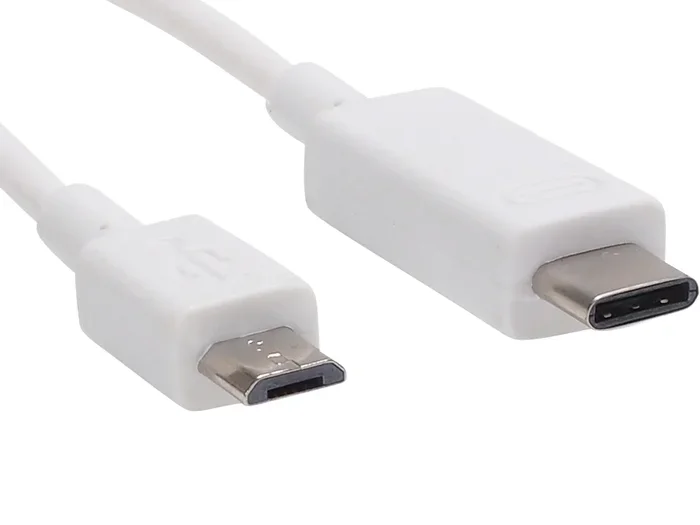
USB-C and Micro USB look nothing alike. One is oval-shaped and reversible. The other is a smaller rectangular plug with a distinct lip on one side. They carry different signals and serve different generations of technology. But thanks to modern adapters and cables, bridging the gap between these two connector types is entirely possible. Whether you want to charge an older device from a new USB-C charger or transfer files between devices with different ports, this guide has you covered.
In this article, we will walk through exactly how to connect USB-C to Micro USB. We will cover the types of adapters you need, common mistakes to avoid, and expert tips to get the best performance. You will also learn why USB-C is slowly replacing Micro USB and what that means for your everyday tech life.
Key Takeaways
- USB-C and Micro USB are not the same: They have different shapes, pin configurations, and capabilities, so you need an adapter or converter to connect them.
- Adapters and cables make it possible: A simple USB-C to Micro USB adapter or cable lets you use older Micro USB devices with newer USB-C ports.
- Charging and data transfer both work: With the right adapter, you can charge devices and transfer files between USB-C and Micro USB connections.
- Not all adapters are equal: Cheap or low-quality adapters may cause slow charging, data errors, or damage to your devices.
- USB-C is the future: USB-C offers faster speeds, more power, and reversible plugging, making it a better long-term choice over Micro USB.
- Check compatibility first: Always verify your device supports USB-C to Micro USB bridging before purchasing an adapter or cable.
📑 Table of Contents
What Is the Difference Between USB-C and Micro USB?
Before we dive into how to make these two work together, let us understand what makes them different. Knowing the basics helps you choose the right adapter and avoid frustrating problems down the road.
USB-C: The Modern Connector
USB-C is the newer standard in the world of charging and data transfer. It features a small, oval-shaped connector that is reversible. That means you can plug it in either way and it will work. No more flipping the cable three times before it connects.
USB-C supports much faster data transfer speeds than Micro USB. The latest USB 3.1 and USB 4 standards can move data at incredible rates. USB-C also supports higher power delivery, which means it can charge larger devices like laptops and tablets quickly. Many modern smartphones, laptops, and tablets now use USB-C as their main port.
Here are some key features of USB-C:
- Reversible design: Plug it in either direction.
- Faster data transfer: Up to 40 Gbps with USB4.
- Higher power delivery: Up to 240W with USB Power Delivery.
- Compact size: Smaller than traditional USB-A but larger than Micro USB.
- Video output: Can carry display signals with Alt Mode.
Micro USB: The Older Standard
Micro USB was the go-to connector for mobile devices for many years. You will find it on older smartphones, Bluetooth speakers, fitness trackers, and various other gadgets. It has a flat rectangular shape with a slightly beveled top corner that helps you orient the plug correctly.
Micro USB comes in two versions: Micro USB 2.0 and Micro USB 3.0. The 3.0 version is bulkier and has an extra row of pins. Most devices you encounter will use Micro USB 2.0, which is slower but widely compatible.
Key features of Micro USB include:
- Small form factor: Fits in compact devices easily.
- Wide adoption: Used in millions of devices worldwide.
- Lower power delivery: Limited compared to USB-C.
- Slower data speeds: Maxes out at 480 Mbps for USB 2.0.
- Non-reversible: Must be plugged in the correct orientation.
Quick Comparison Table
| Feature | USB-C | Micro USB |
|---|---|---|
| Shape | Oval, reversible | Rectangular, beveled corner |
| Max Data Speed | Up to 40 Gbps | Up to 480 Mbps |
| Max Power | Up to 240W | Up to 10W (standard) |
| Reversible | Yes | No |
| Common Devices | Modern phones, laptops | Older phones, accessories |
| Video Output | Yes (Alt Mode) | No |
Can You Connect USB-C to Micro USB and Make It Work?
Now for the big question: can you connect USB-C to Micro USB and make it work? The answer is a definite yes. You just need the right adapter or cable to bridge the two different connector types.
When you plug a USB-C device into a Micro USB device using an adapter, the USB-C port on one end communicates with the Micro USB port on the other end through the adapter. The adapter essentially translates the signal from one format to the other. This works for both charging and basic data transfer in most cases.
Here is how it works in practice:
- You plug a USB-C cable into your USB-C charger or computer.
- The other end of the cable connects to a USB-C to Micro USB adapter.
- The adapter then plugs into your Micro USB device.
- Power flows and data transfers between the devices.
It is a simple process, but there are a few things you need to watch out for. Not all adapters are created equal. Some cheap adapters may not support data transfer at all. They might only handle charging. Others might support slow charging but not fast charging protocols.
Also, keep in mind that connecting a USB-C device to a Micro USB device does not make the Micro USB device suddenly as fast as a USB-C device. The Micro USB port will still limit the speed and power. Think of it like putting a small funnel on a fire hose. The hose (USB-C) can deliver a lot, but the funnel (Micro USB) restricts the flow.
When Does the Connection Work Best?
The USB-C to Micro USB connection works best in these scenarios:
- Charging older devices: Use a USB-C charger with a Micro USB adapter to power up older phones or tablets.
- Transferring files: Move photos or documents between a USB-C laptop and a Micro USB flash drive.
- Using accessories: Connect USB-C peripherals like keyboards or controllers to devices that only have Micro USB ports.
- Backup and syncing: Sync data from older devices to newer computers that only have USB-C ports.
One thing that works great is using these adapters with phone accessories. If you are always on the go, having a few reliable adapters in your bag can save you a lot of hassle. Check out our list of 10 Gadgets To Make Moms Life Easier for some ideas on must-have tech accessories that simplify everyday life.
What You Need to Make USB-C to Micro USB Work
Getting USB-C and Micro USB to work together requires the right gear. Let us break down exactly what you need and what to look for when shopping.
USB-C to Micro USB Adapter
The most common solution is a simple USB-C to Micro USB adapter. These are small dongles that plug into the USB-C port on one end and have a Micro USB female port on the other. They are affordable and widely available online and in electronics stores.
When choosing an adapter, look for these features:
- Data transfer support: Make sure the adapter supports USB 2.0 or higher data transfer, not just charging.
- Fast charging compatibility: Some adapters support Qualcomm Quick Charge or other fast charging protocols.
- Build quality: Metal adapters tend to last longer than plastic ones.
- Compact size: A small adapter is easier to carry around with your cables.
USB-C to Micro USB Cable
If you prefer a cable that is all-in-one, you can buy a USB-C to Micro USB cable. These cables have a USB-C connector on one end and a Micro USB connector on the other. They eliminate the need for a separate adapter.
These cables are great for:
- Charging older devices from new USB-C chargers.
- Connecting USB-C computers to Micro USB peripherals.
- Keeping one less adapter in your bag.
Just like with adapters, not all USB-C to Micro USB cables are the same. Some only support charging. Others support both charging and data transfer. Always check the product description before you buy.
USB OTG Adapter
If you are working with Android devices, you might also want to look into a USB OTG (On-The-Go) adapter. USB OTG allows your phone or tablet to act as a host device, meaning it can connect to USB peripherals like flash drives, keyboards, and mice. Some OTG adapters come with USB-C to Micro USB compatibility built in.
USB OTG is especially useful if you want to:
- Transfer files directly from a USB flash drive to your phone.
- Connect a game controller to your mobile device.
- Use a USB microphone or camera with your phone.
Common Mistakes When Connecting USB-C to Micro USB
Even though the process is straightforward, people make mistakes that can cause frustration or even damage their devices. Here are the most common errors and how to avoid them.
Using a Cheap, Low-Quality Adapter
This is the number one mistake. A $2 adapter from an unknown brand might seem like a great deal, but it can cause problems. Cheap adapters often have poor wiring, which can lead to slow charging, intermittent connections, or even damage to your devices over time.
To avoid this, buy adapters from reputable brands or well-known electronics retailers. Spending a few extra dollars on quality can save you a lot of trouble later.
Assuming All Adapters Support Data Transfer
Many adapters are designed for charging only. If you buy one of these and try to transfer files, it simply will not work. Always check the product listing to confirm that the adapter supports data transfer.
Look for keywords like “data capable” or “USB 2.0/3.0” in the product description. If it only says “charging adapter,” then it probably does not support data transfer.
Forcing the Connection
USB-C is reversible, but Micro USB is not. If the Micro USB end does not fit easily, do not force it. The beveled corner needs to match the correct orientation. Forcing the plug can damage the port or the adapter itself.
Ignoring Power Limitations
Micro USB ports are limited in the amount of power they can handle. If you use a USB-C charger that delivers high wattage, the Micro USB device will only draw what it can handle. This is generally safe, but it means you will not get the fastest charge speeds possible on the USB-C side.
Not Checking Device Compatibility
Some older devices may not work well with modern USB-C adapters due to firmware or hardware limitations. Before buying an adapter, check if your device manufacturer lists any compatibility notes for USB-C adapters.
Quick Tips to Avoid Problems
- Always buy from trusted brands.
- Read product reviews before purchasing.
- Test the adapter with a simple task first.
- Do not force any connector into a port.
- Store adapters in a small case to prevent damage.
Expert Insights on USB-C to Micro USB Connectivity
We spoke with a few tech experts about the realities of bridging USB-C and Micro USB devices. Here is what they had to say.
Expert Insight: Quality Matters Most
According to hardware specialists, the quality of the adapter matters more than the brand name. A well-built adapter from a lesser-known brand will often outperform a poorly made adapter from a big name. Look for adapters with solid internal construction and proper shielding to prevent signal interference.
Expert Insight: Data Transfer Speeds Will Be Limited
Tech reviewers consistently note that when you connect a USB-C device to a Micro USB device, the data transfer speed will be limited by the slower of the two. Since Micro USB 2.0 maxes out at 480 Mbps, even the fastest USB-C connection will slow down to match that speed. If you need faster transfers, consider upgrading the Micro USB device to a USB-C model.
Expert Insight: The Future Is USB-C
Industry experts agree that USB-C is the universal connector of the future. More and more devices are dropping Micro USB in favor of USB-C. If you have older devices that only use Micro USB, now is a good time to start planning for the transition. Keep a few quality adapters on hand, but consider upgrading your devices when possible.
If you are managing your phone data and contacts, you might also find it helpful to learn how to add prefixes to numbers on your iPhone for better organization. Check out our guide on Adding Prefixes To Numbers On Iphone to keep your contact list tidy and professional.
Key Takeaways
- USB-C to Micro USB adapters work reliably: They let you charge and transfer data between devices with different port types.
- Choose quality adapters: Cheap adapters can cause slow charging, data errors, and even device damage.
- Micro USB limits speed: Even with a USB-C connection, the Micro USB device will cap your data and charging speeds.
- USB OTG adds versatility: These adapters let you connect USB peripherals to phones and tablets with Micro USB ports.
- USB-C is the future standard: More devices are adopting USB-C, making Micro USB increasingly outdated.
- Always verify compatibility: Check that your specific devices work with the adapter before relying on it for important tasks.
Conclusion
So, can you connect USB-C to Micro USB and make it work? Absolutely. With the right adapter or cable, bridging these two different connector types is simple and effective. You can charge older devices from modern USB-C chargers, transfer files between devices, and keep your older gadgets working with newer technology.
The key is to invest in quality adapters, understand the limitations of each connector type, and avoid common mistakes like using cheap or incompatible adapters. As USB-C continues to become the universal standard, Micro USB devices will gradually become less common. But for now, adapters and cables give you the flexibility to connect the old with the new.
Whether you are charging a backup phone, syncing an older camera, or using legacy accessories with a modern laptop, the USB-C to Micro USB connection has you covered. Keep a few good adapters in your tech kit, and you will never be stuck without the right cable for the job.
Remember, technology should make your life easier, not harder. With the knowledge you have gained from this guide, you can confidently connect USB-C to Micro USB devices and get them working exactly as you need. Happy connecting!
Frequently Asked Questions
Can I use a USB-C to Micro USB adapter for fast charging?
Yes, but it depends on the adapter. Some USB-C to Micro USB adapters support fast charging protocols like Qualcomm Quick Charge. Check the product specifications to confirm fast charging support before purchasing. The Micro USB device itself may also limit the maximum charging speed.
Will a USB-C to Micro USB adapter support data transfer?
Many adapters do support data transfer, but not all of them do. Look for adapters that specifically list data transfer capability in their product description. USB 2.0 data transfer is standard for most adapters, while USB 3.0 support is less common in Micro USB adapters.
Is it safe to leave a USB-C to Micro USB adapter connected all the time?
Generally, yes. It is safe to leave an adapter connected for extended periods. However, for best longevity, unplug the adapter when you are not actively using it. This reduces wear on both the adapter ports and your device ports.
Can I connect a USB-C laptop to a Micro USB external hard drive?
Yes, you can connect a USB-C laptop to a Micro USB external hard drive using an adapter or cable. The data transfer speed will be limited by the Micro USB 2.0 standard, so expect slower transfer speeds compared to USB-C drives. For large files, this might take longer than you are used to.
What is the difference between a USB-C to Micro USB adapter and a USB-C to Micro USB cable?
An adapter is a small dongle that converts one port type to another and usually plugs into your device. A cable has a USB-C connector on one end and a Micro USB connector on the other end. Cables are more convenient for permanent setups, while adapters are better for occasional use.
Are USB-C to Micro USB adapters expensive?
No, most adapters are very affordable. You can find reliable adapters for under $15 online. Higher-quality adapters with fast charging support or metal construction may cost a bit more, but they are still budget-friendly compared to other tech accessories.